Windows 7 Forums Search
Welcome to Windows 7 Forums. Our forum is dedicated to helping you find solutions with any problems, errors or issues you are experiencing with Windows 7. The Windows 7 forum also covers news and updates and has an extensive Windows 7 tutorial section that covers a wide range of tips and tricks.


Windows 7 - Reliability Monitor Shortcut


Reliability Monitor Shortcut

How to Create a Windows 7 Reliablity Monitor Shortcut
Published by Brink
08-15-2009
Default Reliability Monitor Shortcut

How to Create a Windows 7 Reliablity Monitor Shortcut

information   Information
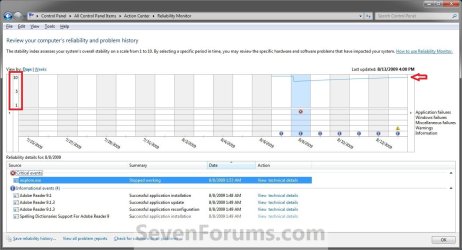
This will allow you to download a Reliability Monitor shortcut that will open Windows 7 Reliability Monitor directly instead of having to go through the Action Center.
Tip   Tip
If you would like to pin the Reliability Monitor shortcut to the taskbar, then you can use the same method to pin the Recycle Bin to the taskbar and just substitute the Recycle Bin for the Reliability Monitor shortcut instead.
EXAMPLE: Reliability Monitor
Reliability Monitor Shortcut-reliability_monitor.jpg

Here's How:
1. Click on the download button below to download the file below.
Reliability_Monitor.zip
download
2. Click on Save, and save the .zip file to the desktop.

3. Open the .zip file and extract the Reliability Monitor shortcut to the desktop.

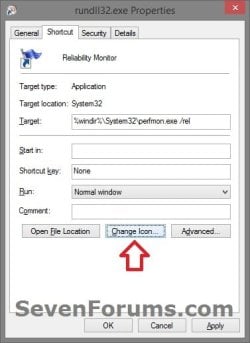
4. Right click on the Reliability Monitor shortcut, and click on Properties, General tab, and on the Unblock button. (See screenshot below)
NOTE: If you do not have a Unblock button under the General tab, then the shortcut is already unblocked and you can continue on to step 5.
Reliability Monitor Shortcut-unblock.jpg
5. Move the Reliability Monitor shortcut to where you like for easy use.
NOTE: See the yellow TIP box at the top of the tutorial for about how to pin it to the taskbar if you like.

6. When done, you can delete the downloaded .zip file on the desktop if you like, or save it to use again.
That's it,
Shawn


Published by
Administrator

Join Date: Oct 2008
Location: Texas
Posts: 34,826
Brink has a reputation beyond reputeBrink has a reputation beyond reputeBrink has a reputation beyond repute
Brink has a reputation beyond reputeBrink has a reputation beyond reputeBrink has a reputation beyond reputeBrink has a reputation beyond reputeBrink has a reputation beyond reputeBrink has a reputation beyond reputeBrink has a reputation beyond reputeBrink has a reputation beyond reputeBrink has a reputation beyond reputeBrink has a reputation beyond reputeBrink has a reputation beyond reputeBrink has a reputation beyond reputeBrink has a reputation beyond reputeBrink has a reputation beyond repute

Tutorial Tools
08-24-2009   #1
luckman212


Windows 7 x64


Brink- how did you make that shortcut - the one that takes you directly to the reliability center? I am so curious!

My System SpecsSystem Spec
08-24-2009   #2
Brink


Windows 7 Ultimate x64 SP1


Hello Luckman, and welcome to Seven Forums.

It mas made using alien technology of course.
My System SpecsSystem Spec
08-25-2009   #3
luckman212


Windows 7 x64


My System SpecsSystem Spec
.


10-24-2009   #4
RandyD123


Win7 x64


Why can't I download the link? I am a registered member!
My System SpecsSystem Spec
10-24-2009   #5
Brink


Windows 7 Ultimate x64 SP1


Hello Randy, and welcome to Seven Forums.

Everyone can download it whether they are a member or not.

Are clicking on the blue Download button and clicking on Save, then saving it to your desktop?

If you are, then you might check to see if you have a security program installed that may be blocking the download.

Hope this helps,
Shawn
My System SpecsSystem Spec
10-24-2009   #6
RandyD123


Win7 x64


Shawn,

I thought I always was a memeber, maybe it was the Vista forum? Anyway I was able to download just now.

I knew that I did not have to be a member to download but glad I joined anyway!!!

Thanks again
My System SpecsSystem Spec
10-24-2009   #7
Brink


Windows 7 Ultimate x64 SP1


You're welcome Randy. I'm happy to hear that you got it downloaded.
My System SpecsSystem Spec
03-05-2010   #8
Antonimo


Windows 7 Professional


Quote   Quote: Originally Posted by luckman212 View Post
Brink- how did you make that shortcut - the one that takes you directly to the reliability center? I am so curious!
I am also very curious - my own attempts have failed. Please share!
My System SpecsSystem Spec
03-05-2010   #9
Brink


Windows 7 Ultimate x64 SP1


Hello Antonimo, and welcome to Seven Forums.

Sorry, but this one is a proprietary secret. I just can't reveal that.
My System SpecsSystem Spec
Comment

Reliability Monitor Shortcut problems?


Tutorial Tools


Similar Threads for: Reliability Monitor Shortcut
Windows 7 Tutorial Category
Reliability Monitor Performance & Maintenance
Reliability Monitor on the fritz Performance & Maintenance
Solved Reliability monitor file name? Performance & Maintenance
Reliability Monitor Stopped Performance & Maintenance


All times are GMT -5. The time now is 11:18 PM.


Windows 7 Forums is an independent web site and has not been authorized,
sponsored, or otherwise approved by Microsoft Corporation.
"Windows 7" and related materials are trademarks of Microsoft Corp.
© Designer Media Ltd
  

1 2 3 4 5 6 7 8 9 10 11 12 13 14 15 16 17 18 19 20 21 22 23 24 25 26 27 28 29 30