Windows 7 Forums Search
Welcome to Windows 7 Forums. Our forum is dedicated to helping you find solutions with any problems, errors or issues you are experiencing with Windows 7. The Windows 7 forum also covers news and updates and has an extensive Windows 7 tutorial section that covers a wide range of tips and tricks.


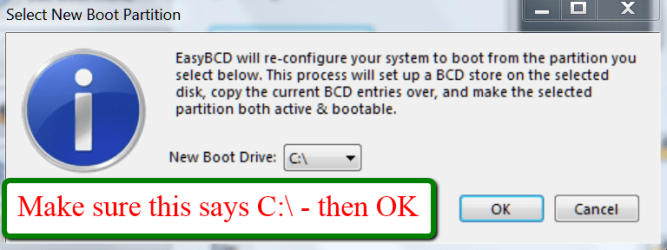
Windows 7 - Bootmgr - Move to C:\ with EasyBCD

 
01-22-2012   #9
whs


Vista and Windows7, sometimes Ubuntu and Fedora


Bootmgr - Move to C:\ with EasyBCD

...


Last edited by whs; 02-09-2012 at 04:38 PM..
My System SpecsSystem Spec
01-30-2012   #10
whs


Vista and Windows7, sometimes Ubuntu and Fedora


Quote   Quote: Originally Posted by LittleJay View Post
Thanks for the great tutorial whs. It worked like a charm for me.
I am glad you could make good use of it. And it is so simple, isn't it.

My System SpecsSystem Spec
01-31-2012   #11
LittleJay


Windows 7 Home Premium 64bit


Quote   Quote: Originally Posted by whs View Post
I am glad you could make good use of it. And it is so simple, isn't it.
Simplicity is a "beautiful thing" IMHO! Especially for a "technologically challenged" person like myself.
My System SpecsSystem Spec
02-10-2012   #12
stinman


windows 7 ultimate 64bit, Win 7 Ul x86, XP


well did not work for me.I did follow the steps out lined. I have Gateway 32bit vista, dual booted with win 7. I haven't booted up vista since 7 came out.(can't even remember how long ). I believe the mbr is located on the recovery partition 11GBs(hidden), org vista is on D, and 7 is on C.Actually thinking of getting rid of both and put 7 x64.Wanted to at least git rid of 100Gb useless vista and 11GB recovery. I shall have to dig a bit deeper. In theory couldn't I just copy and paste the master boot record exe from recovery and to c: on 7?

OK it says the Win 7 drive I'm on is a logical drive, must first change to a primary 1st. hmm.
My System SpecsSystem Spec
02-10-2012   #13
whs


Vista and Windows7, sometimes Ubuntu and Fedora


Yeah, I think you can only move it to a primary partition because only primary partitions can be made active.

And Btw., the MBR is not on a partition but on the first 512 bytes of a physical disk. But the bootmgr can be on the recovery partition. You find that on Dell OEM systems. In fact, the bootmgr can be on any partition - even on a partition that is on a different physical disk.
My System SpecsSystem Spec
.


02-10-2012   #14
stinman


windows 7 ultimate 64bit, Win 7 Ul x86, XP


found that out! I kind of just worded it wrong on here. According to EasyBCD it is on the Vista D partition. Not just in the Gateway recovery. Now the 100mb thing I didn't see it that way. I have EaseUS partition manager server edition installed on all PC's. I actually need to convert the logical/boot C: "win 7" to a primary drive. This Gateway GM5664 htpc x86 came with Vista. it came with a GGC-H20N bluray multi-drive. I built a new PC and put that drive in it.The Gateway has no DVD dr now, gonna have to set it to boot from "removable" for 1st boot so I can work from usb drive.I just don't see the need for Vista dual boot anymore. I wanted to just delete the Vista partition and the 11GB Gateway recovery partition. I don't see any hidden partitions other than the 11GB one.So I would say there is no other?, right in your opinion?

I'm looking in to how to change the logical to primary, not finding much yet! you have any links or ideals?

BTW thank you for responding so quick!!

Last edited by stinman; 02-10-2012 at 02:09 PM.. Reason: thanking the poster
My System SpecsSystem Spec
02-10-2012   #15
whs


Vista and Windows7, sometimes Ubuntu and Fedora


1. I suggest that you delete the Vista partitioon first before you make C a primary (but not the 100MB partition if it contains the bootmgr). I don't want you to run into dynamic partitions because you may already have 4 primaries on the disk.

2. Before you remove the Vista partitions, get the Vista BCD out of the bootmgr: Deleting Menu Entries - EasyBCD - NeoSmart Technologies Wiki

3. Then make the Windows 7 partition active. Use the bootable CD of Partition Wizard (you find it on the left side of the webpage).

The controls are in the Partition tab > Modify. But you have to first highlight the C partition. And do not forget 'Apply" which is on the bottom left.
Note: You cannot do this operation from an active Windows 7. You have to boot from the CD.

4. Now move the Windows 7 BCD to C:\ as per my tutorial.

5. Delete the little 100MB partition with Disk Management.

Last edited by whs; 02-10-2012 at 03:21 PM.. Reason: red addition
My System SpecsSystem Spec
02-10-2012   #16
stinman


windows 7 ultimate 64bit, Win 7 Ul x86, XP


this is what is on EasyBCD when you first start it up.

There are a total of 2 entries listed in the bootloader.

Default: Windows 7
Timeout: 30 seconds
EasyBCD Boot Device: D:\

Entry #1
Name: Windows 7
BCD ID: {current}
Drive: C:\
Bootloader Path: \Windows\system32\winload.exe

Entry #2
Name: Microsoft Windows Vista
BCD ID: {6dfc5cb0-f9ab-11da-ae34-df1fe3e76dcf}
Drive: D:\
Bootloader Path: \Windows\system32\winload.exe

Now I'm actually in Win 7 Ultimate SP 1 x86 C: drive
says default Win 7 Boot Device D:
so that tells me it's using "Vista" D partition as the boot device, right?

At same time does it look to you like the boot device is also in:
Windows 7 (current) - Drive C: - then path?

don't see a 100mb partition, if I delete Vista now, it won't reboot, I don't think

I think a long time ago I had to do a repair install, have ran a few different sfc/ scan now to fix
some things from patched theme files (don't remember what else) I'm wondering if it maybe copied it then to C: drive on 7? Silly I know! but I don't have a CD-rom or DVD drive in it, I never replaced it after taking the Bluray drive out. I can get it to boot from usb drive as first boot order though. I have usb stick with pendrivelinux on it (has ubuntu on it), I can put iso on it for repair or maybe just clean install of Win 7 Ultimate x64 if needed I guess. Maybe re-format is best choice, just hate to loose all programs and certain settings.

Last edited by stinman; 02-10-2012 at 03:37 PM..
My System SpecsSystem Spec
02-10-2012   #17
whs


Vista and Windows7, sometimes Ubuntu and Fedora


Right, remove the Vista BCD.

Addition to my previous post - see red under #3.
My System SpecsSystem Spec
02-10-2012   #18
stinman


windows 7 ultimate 64bit, Win 7 Ul x86, XP


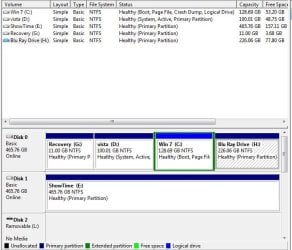
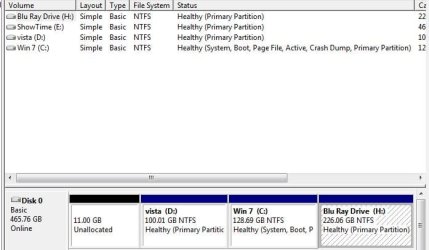
oh I see, leave the 11Gb gateway recovery partition,yes? I do have 4 partitions on 500GB disk they are in this order Disk 0: G:Recoveryrimary 11Gb - D:Vista : system,active,primary, 100Gb - C: Win 7: boot,pagefile,crash dump,logical drive, 128.69Gb - H:Bluray Driverimary 226.06 Gb

My C: win 7 is on 3rd spot of disk 0

got ya! Thanks. I got the new usb drive partition wizard and shall see what I can do.
My System SpecsSystem Spec
02-10-2012   #19
whs


Vista and Windows7, sometimes Ubuntu and Fedora


Before we proceed, you may want to post a picture of your Disk Management - just to make sure we do not make a mistake here.
My System SpecsSystem Spec
Comment

 Bootmgr - Move to C:\ with EasyBCD problems?


Tutorial Tools


Similar Threads for: Bootmgr - Move to C:\ with EasyBCD
Windows 7 Tutorial Category
i have a problem with the easyBCD Installation & Setup
EasyBCD 2.0.1 Released! Software
New EasyBCD 2.0, Build 77 out.. Software
EasyBCD Software


All times are GMT -5. The time now is 02:20 AM.


Windows 7 Forums is an independent web site and has not been authorized,
sponsored, or otherwise approved by Microsoft Corporation.
"Windows 7" and related materials are trademarks of Microsoft Corp.
© Designer Media Ltd
  

1 2 3 4 5 6 7 8 9 10 11 12 13 14 15 16 17 18 19 20 21 22 23 24 25 26 27 28 29 30