
"Do you want to create a system repair disc?" Message - Hide or Show
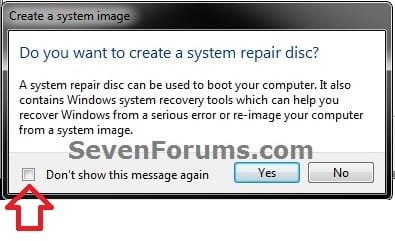
EXAMPLE: "Do you want to create a system repair disc?" message

1. When the system image backup has completed successfully, check the Don't show this message again box, and click on No. (see screenshot below)
1. To Hide "Do you want to create a system repair disc?" Message
A) Click on the Download button below to download the file below.
Do-Not_Show_Create_System_Repair_Disc_Message.reg
Download
B) Go to step 3.
2. To Show "Do you want to create a system repair disc?" Message
NOTE: This is the default setting.
A) Click on the Download button below to download the file below.
Show_Create_System_Repair_Disc_Message.reg
Download
3. Save the .reg file to the desktop.
4. Right click on the downloaded .reg file and click on Merge.
5. If prompted, click on Run, Yes, Yes, and OK.
6. When done, you can delete the downloaded .reg file if you like.
That's it,
Shawn
How to Hide or Show "Do you want to create a system repair disc?" Message
Information
This will show you how to always hide or show the Do you want to create a system repair disc? message from displaying at the end when a system image backup completed successfully in Windows 7.
EXAMPLE: "Do you want to create a system repair disc?" message
OPTION ONE
Set to Not Show from within Message
1. When the system image backup has completed successfully, check the Don't show this message again box, and click on No. (see screenshot below)
OPTION TWO
Set to Hide or Show Message Using a REG File Download
1. To Hide "Do you want to create a system repair disc?" Message
A) Click on the Download button below to download the file below.
Do-Not_Show_Create_System_Repair_Disc_Message.reg
Download
B) Go to step 3.
2. To Show "Do you want to create a system repair disc?" Message
NOTE: This is the default setting.
A) Click on the Download button below to download the file below.
Show_Create_System_Repair_Disc_Message.reg
Download
3. Save the .reg file to the desktop.
4. Right click on the downloaded .reg file and click on Merge.
5. If prompted, click on Run, Yes, Yes, and OK.
6. When done, you can delete the downloaded .reg file if you like.
That's it,
Shawn


