
“Test Mode Windows 7 Build 7601" Watermark - Remove from Desktop
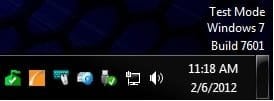
EXAMPLE: "Test Mode Windows 7 Build 7601" Watermark
Here's How:
1. Open an elevated command prompt.
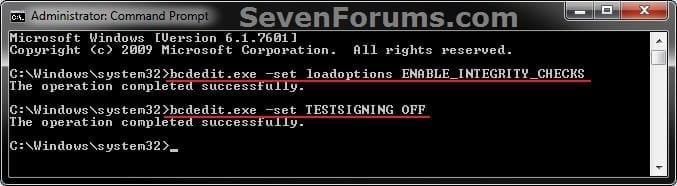
2. In the elevated command prompt, copy and paste the command below and press Enter. (see screenshot below step 3)
bcdedit.exe -set loadoptions ENABLE_INTEGRITY_CHECKS
3. In the elevated command prompt, copy and paste the command you want to use below, and press Enter. (see screenshot below)
(Turn Off test mode and remove watermark)
bcdedit.exe -set TESTSIGNING OFF
OR
(Turn On test mode and add watermark)
bcdedit.exe -set TESTSIGNING ON
4. Close the elevated command prompt.
5. Restart the computer to apply.
That's it,
Shawn
How to Remove “Test Mode Windows 7 Build 7601" Watermark from Desktop
Information
This tutorial will show you how to remove the Test Mode Windows 7 Build 7601 (with SP1 installed) or Test Mode Windows 7 Build 7600 (without SP1 installed) watermark from the lower right corner of the Windows 7 desktop by turning off test mode.
You must be logged in as an administrator to be able to do the steps in this tutorial.
You must be logged in as an administrator to be able to do the steps in this tutorial.
Note
According to Microsoft, the test mode watermark can appear if the test signing mode is started on the computer. This test mode may occur if an application whose drivers are not digitally signed by Microsoft is installed and still in the test phase. Microsoft added test mode to Windows so that users can test programs without having to provide an authentication certificate.
The TESTSIGNING boot configuration option determines whether Windows Vista and later versions of Windows will load any type of test-signed kernel-mode code. This option is not set by default, which means test-signed kernel-mode drivers will not load by default on 64-bit versions of Windows Vista and later versions of Windows.
For 64-bit versions of Windows Vista and later versions of Windows, the kernel-mode code signing policy requires that all kernel-mode code have a digital signature. However, in most cases, an unsigned driver can be installed and loaded on 32-bit versions of Windows Vista and later versions of Windows.
The TESTSIGNING boot configuration option determines whether Windows Vista and later versions of Windows will load any type of test-signed kernel-mode code. This option is not set by default, which means test-signed kernel-mode drivers will not load by default on 64-bit versions of Windows Vista and later versions of Windows.
For 64-bit versions of Windows Vista and later versions of Windows, the kernel-mode code signing policy requires that all kernel-mode code have a digital signature. However, in most cases, an unsigned driver can be installed and loaded on 32-bit versions of Windows Vista and later versions of Windows.
EXAMPLE: "Test Mode Windows 7 Build 7601" Watermark
Here's How:
1. Open an elevated command prompt.
2. In the elevated command prompt, copy and paste the command below and press Enter. (see screenshot below step 3)
bcdedit.exe -set loadoptions ENABLE_INTEGRITY_CHECKS
3. In the elevated command prompt, copy and paste the command you want to use below, and press Enter. (see screenshot below)
(Turn Off test mode and remove watermark)
bcdedit.exe -set TESTSIGNING OFF
OR
(Turn On test mode and add watermark)
bcdedit.exe -set TESTSIGNING ON
4. Close the elevated command prompt.
5. Restart the computer to apply.
That's it,
Shawn
Last edited:


