| | Welcome to Windows 7 Forums. Our forum is dedicated to helping you find solutions with any problems, errors or issues you are experiencing with Windows 7. The Windows 7 forum also covers news and updates and has an extensive Windows 7 tutorial section that covers a wide range of tips and tricks. | Windows 7 - Bubbles Screen Saver - Change Settings
|
01-15-2009
|
#9 | | Windows 7 Ultimate x64 SP1 |
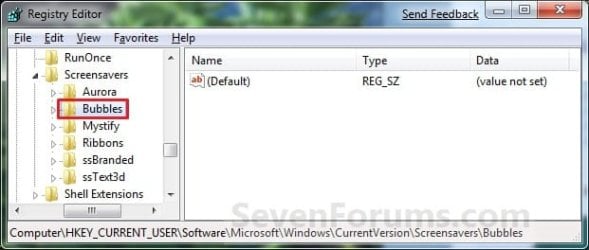
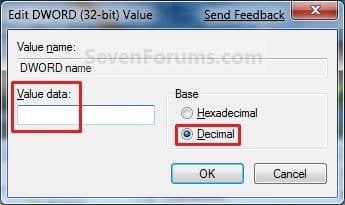
Bubbles Screen Saver - Change Settings How to Change the Bubbles Screen Saver Settings in Windows 7
Last edited by Brink; 11-14-2011 at 12:32 AM..
| My System Specs | | System Manufacturer/Model Number Self built custom OS Windows 7 Ultimate x64 SP1 CPU Intel i7-980X 3.3 Ghz (3.48 Ghz OC'd) Motherboard ASUS P6X58D Premium Memory 12 GB (2GBx6) DDR3 PC3-16000 2000 MHz Kingston HyperX Graphics Card Sapphire HD5870 Eyefinity 6 2GB Sound Card Realtek HD Audio ALC889 Integrated Chip Monitor(s) Displays 3x 27" Asus VE278Q Screen Resolution 1920x1080 Keyboard Logitech Cordless Desktop MX 5500 Revolution Mouse Logitech Cordless Desktop MX 5500 Revolution PSU OCZ Series Gold OCZZ1000M 1000W Case Corsair Obsidian 800D Cooling Thermalright Ultra 120 Extreme Copper CPU heat sink w/120 MM Hard Drives 160GB OCZ RevoDrive X2
** 2 x 1TB Samsung HDD HD154UI SATA Internet Speed 50 Mb/s Download and 2 Mb/s Upload Other Info Microsoft LifeCam Cinema
** Lite-On iHBS212 12x BD Writer
** Samsung CLX-3175FW Printer
** Netgear WNDR3800 Router
** Motorola SBG6580 Cable Modem
** 2x APC Back-UPS XS 1500 |
02-16-2010
|
#10 | | Windows 7 Home Premium 32bit |
Thanks for the tutorial. My bubbles are just the way I like them now. | My System Specs | | System Manufacturer/Model Number Visionman Slim Intel Desktop Computer OS Windows 7 Home Premium 32bit CPU Intel Pentium Dual Core E2180 Motherboard Biostar P4M900-M7 SE Memory 2GB DDR2-667 Graphics Card NVIDIA 8400GS 256MB Sound Card Realtek Monitor(s) Displays Viewsonic VX1940w LCD Display Screen Resolution 1280 x 800 Keyboard Kensington Comfort Type (ergonomic) Mouse I have mice.....a collection. Hard Drives WD 250GB SATA-2 HDD |
02-16-2010
|
#11 | | Windows 7 Ultimate x64 SP1 |
You're most welcome Kitti. Just don't pop to many now. | My System Specs | | System Manufacturer/Model Number Self built custom OS Windows 7 Ultimate x64 SP1 CPU Intel i7-980X 3.3 Ghz (3.48 Ghz OC'd) Motherboard ASUS P6X58D Premium Memory 12 GB (2GBx6) DDR3 PC3-16000 2000 MHz Kingston HyperX Graphics Card Sapphire HD5870 Eyefinity 6 2GB Sound Card Realtek HD Audio ALC889 Integrated Chip Monitor(s) Displays 3x 27" Asus VE278Q Screen Resolution 1920x1080 Keyboard Logitech Cordless Desktop MX 5500 Revolution Mouse Logitech Cordless Desktop MX 5500 Revolution PSU OCZ Series Gold OCZZ1000M 1000W Case Corsair Obsidian 800D Cooling Thermalright Ultra 120 Extreme Copper CPU heat sink w/120 MM Hard Drives 160GB OCZ RevoDrive X2
** 2 x 1TB Samsung HDD HD154UI SATA Internet Speed 50 Mb/s Download and 2 Mb/s Upload Other Info Microsoft LifeCam Cinema
** Lite-On iHBS212 12x BD Writer
** Samsung CLX-3175FW Printer
** Netgear WNDR3800 Router
** Motorola SBG6580 Cable Modem
** 2x APC Back-UPS XS 1500 |
02-16-2010
|
#12 | | Xp Pro SP3 x64, Win7 x86 (Ult 7600), Win7 x64 Ult 7600, TechNet RTM on AMD x64 (2.8Ghz) |
Is there a list of add on screen savers here at SevenForums? | My System Specs | | System Manufacturer/Model Number Built them myself, Science Experiments ! OS Xp Pro SP3 x64, Win7 x86 (Ult 7600), Win7 x64 Ult 7600, TechNet RTM on AMD x64 (2.8Ghz) CPU AMD-64 3000mhz, AMD-32 2400mhz, AMD-64 3200mhz, AMDx64 2.8G Motherboard SIS 755, ECS-K8M890M-M (Ult 7600), & others Memory 2gb, 4gb on the Ult 7600, 4gb on Technet RTM Graphics Card Draw my own Graphics, several nVidia cards Sound Card on motherboard Monitor(s) Displays 19" flat scr, 19" Acer widescr, 22" Emprex Widescr, 23" Acer Screen Resolution 1280 x 1024, 1440 x 900, 1920 x 1080 Keyboard Compaq & Dell recycled from GoodWill Mouse Made in China Optical Wired Mouse PSU 430w, 550w, 600w, etc Case All Generic Full Towers Cooling Open Air & a few fans Hard Drives 6 pata Ide HD's & 2 Sata HD's
added 80gb external on Ult 7600 computer,
several extra 1tb & 2TB SATA HD's Internet Speed Fast Cable InterNet Other Info Linksys Routers, switches, & Hubs
Too Many USB Flash Drives to count, Biggest is 64GB !
Eight computers in my home network.
Twelve computers at my business network.
Linked via TeamViewer !
Lots of old used spare computer parts everywhere! |
02-16-2010
|
#13 | | Windows 7 Ultimate x64 SP1 |
Hi Doc,
I'm not sure of what you mean? There's a list of ones you can modify in the related tutorials list in the tutorial if that's what you mean.
If not, then you can add free screen savers to install in Windows 7 from these links: WinCustomize: Screen Savers Gallery or 3Planesoft - Premium 3D Screensavers | My System Specs | | System Manufacturer/Model Number Self built custom OS Windows 7 Ultimate x64 SP1 CPU Intel i7-980X 3.3 Ghz (3.48 Ghz OC'd) Motherboard ASUS P6X58D Premium Memory 12 GB (2GBx6) DDR3 PC3-16000 2000 MHz Kingston HyperX Graphics Card Sapphire HD5870 Eyefinity 6 2GB Sound Card Realtek HD Audio ALC889 Integrated Chip Monitor(s) Displays 3x 27" Asus VE278Q Screen Resolution 1920x1080 Keyboard Logitech Cordless Desktop MX 5500 Revolution Mouse Logitech Cordless Desktop MX 5500 Revolution PSU OCZ Series Gold OCZZ1000M 1000W Case Corsair Obsidian 800D Cooling Thermalright Ultra 120 Extreme Copper CPU heat sink w/120 MM Hard Drives 160GB OCZ RevoDrive X2
** 2 x 1TB Samsung HDD HD154UI SATA Internet Speed 50 Mb/s Download and 2 Mb/s Upload Other Info Microsoft LifeCam Cinema
** Lite-On iHBS212 12x BD Writer
** Samsung CLX-3175FW Printer
** Netgear WNDR3800 Router
** Motorola SBG6580 Cable Modem
** 2x APC Back-UPS XS 1500 |
01-07-2011
|
#14 | | Windows 7 Ultimate 32 bit |
Hello,
Nice Tut. I have one problem trying these effect. I don't have the bubbles folder in my registry. Sorry for the large photo I'm not very good at inserting images. | My System Specs | | OS Windows 7 Ultimate 32 bit CPU AMD Phenom 8450 Triple Core 2.1GHz Motherboard MSI MS-7388 Memory Corsair 4GB Graphics Card ATI Radeon HD3650 1GB Sound Card Onboard 7.1 Monitor(s) Displays Samsung 24" LCD - Philips 42" LCD Screen Resolution 1600 x 900 32bit @60Hz PSU 650w Hard Drives Maxtor 120GB IDE - Hitachi 1TB SATA |
01-07-2011
|
#15 | | Windows 7 Ultimate x64 SP1 |
Hello Tyenot,
Doing OPTION ONE in the tutorial will restore the "Bubbles" key for you. Afterwards, you should be able to change the settings in OPTION TWO.
Hope this helps,
Shawn | My System Specs | | System Manufacturer/Model Number Self built custom OS Windows 7 Ultimate x64 SP1 CPU Intel i7-980X 3.3 Ghz (3.48 Ghz OC'd) Motherboard ASUS P6X58D Premium Memory 12 GB (2GBx6) DDR3 PC3-16000 2000 MHz Kingston HyperX Graphics Card Sapphire HD5870 Eyefinity 6 2GB Sound Card Realtek HD Audio ALC889 Integrated Chip Monitor(s) Displays 3x 27" Asus VE278Q Screen Resolution 1920x1080 Keyboard Logitech Cordless Desktop MX 5500 Revolution Mouse Logitech Cordless Desktop MX 5500 Revolution PSU OCZ Series Gold OCZZ1000M 1000W Case Corsair Obsidian 800D Cooling Thermalright Ultra 120 Extreme Copper CPU heat sink w/120 MM Hard Drives 160GB OCZ RevoDrive X2
** 2 x 1TB Samsung HDD HD154UI SATA Internet Speed 50 Mb/s Download and 2 Mb/s Upload Other Info Microsoft LifeCam Cinema
** Lite-On iHBS212 12x BD Writer
** Samsung CLX-3175FW Printer
** Netgear WNDR3800 Router
** Motorola SBG6580 Cable Modem
** 2x APC Back-UPS XS 1500 |
01-10-2011
|
#16 | | Windows 7 Ultimate 32 bit |
Thanks Brink.
Worked like a charm. | My System Specs | | OS Windows 7 Ultimate 32 bit CPU AMD Phenom 8450 Triple Core 2.1GHz Motherboard MSI MS-7388 Memory Corsair 4GB Graphics Card ATI Radeon HD3650 1GB Sound Card Onboard 7.1 Monitor(s) Displays Samsung 24" LCD - Philips 42" LCD Screen Resolution 1600 x 900 32bit @60Hz PSU 650w Hard Drives Maxtor 120GB IDE - Hitachi 1TB SATA |
01-10-2011
|
#17 | | Windows 7 Ultimate x64 SP1 |
You're most welcome Tyenot. I'm happy to hear that you got it sorted. | My System Specs | | System Manufacturer/Model Number Self built custom OS Windows 7 Ultimate x64 SP1 CPU Intel i7-980X 3.3 Ghz (3.48 Ghz OC'd) Motherboard ASUS P6X58D Premium Memory 12 GB (2GBx6) DDR3 PC3-16000 2000 MHz Kingston HyperX Graphics Card Sapphire HD5870 Eyefinity 6 2GB Sound Card Realtek HD Audio ALC889 Integrated Chip Monitor(s) Displays 3x 27" Asus VE278Q Screen Resolution 1920x1080 Keyboard Logitech Cordless Desktop MX 5500 Revolution Mouse Logitech Cordless Desktop MX 5500 Revolution PSU OCZ Series Gold OCZZ1000M 1000W Case Corsair Obsidian 800D Cooling Thermalright Ultra 120 Extreme Copper CPU heat sink w/120 MM Hard Drives 160GB OCZ RevoDrive X2
** 2 x 1TB Samsung HDD HD154UI SATA Internet Speed 50 Mb/s Download and 2 Mb/s Upload Other Info Microsoft LifeCam Cinema
** Lite-On iHBS212 12x BD Writer
** Samsung CLX-3175FW Printer
** Netgear WNDR3800 Router
** Motorola SBG6580 Cable Modem
** 2x APC Back-UPS XS 1500 |
01-23-2011
|
#18 | | Windows 7 Home Premium 64 bit |
This is great information! When I initially installed Win 7 I had the bubbles flaoting over our desktop, and we loved it. Mysteriously, after reinstalling most of our applications, the bubbles went back to the black background. I have tried the registery edits, and an HTML based GUI program, I even ran the zip found here to return to the defaults. I can change all parameters except the background, very frustrating as that is the only parameter I wanted to change in the first place.
Any suggestions? One thing I noted. In my regiistry under Bubbles there are Screen 1 and Screen 2. I have a dual screen card card, but am running only one monitor right now. | My System Specs | | System Manufacturer/Model Number HP OS Windows 7 Home Premium 64 bit CPU AMD |
01-23-2011
|
#19 | | Windows 7 Ultimate x64 SP1 |
Hello NoTopo, and welcome to Seven Forums.
Usually the background should be whatever it was when the screensaver is turned on with the bubbles floating over it as you descibed.
You might see if uninstalling anything that you installed since it was working properly to see if one of them may be the cause if the screen saver works properly after the progam was uninstalled.
You could also do a system restore using a restore point date when the screen saver worked properly, then start installing the programs one by one and test after each one to see if it still works or not.
Hope this may help,
Shawn | My System Specs | | System Manufacturer/Model Number Self built custom OS Windows 7 Ultimate x64 SP1 CPU Intel i7-980X 3.3 Ghz (3.48 Ghz OC'd) Motherboard ASUS P6X58D Premium Memory 12 GB (2GBx6) DDR3 PC3-16000 2000 MHz Kingston HyperX Graphics Card Sapphire HD5870 Eyefinity 6 2GB Sound Card Realtek HD Audio ALC889 Integrated Chip Monitor(s) Displays 3x 27" Asus VE278Q Screen Resolution 1920x1080 Keyboard Logitech Cordless Desktop MX 5500 Revolution Mouse Logitech Cordless Desktop MX 5500 Revolution PSU OCZ Series Gold OCZZ1000M 1000W Case Corsair Obsidian 800D Cooling Thermalright Ultra 120 Extreme Copper CPU heat sink w/120 MM Hard Drives 160GB OCZ RevoDrive X2
** 2 x 1TB Samsung HDD HD154UI SATA Internet Speed 50 Mb/s Download and 2 Mb/s Upload Other Info Microsoft LifeCam Cinema
** Lite-On iHBS212 12x BD Writer
** Samsung CLX-3175FW Printer
** Netgear WNDR3800 Router
** Motorola SBG6580 Cable Modem
** 2x APC Back-UPS XS 1500 Bubbles Screen Saver - Change Settings problems? All times are GMT -5. The time now is 04:35 AM. |  |