
| Windows 7: Local Group Policy - Reset to Default Local Group Policy - Reset to Default How to Reset Local Group Policy to Default in Vista, Windows 7, and Windows 8
Published 16 Feb 2012
|  Published by | | |
 Featured Tutorial | | | How to Reset Local Group Policy to Default in Vista, Windows 7, and Windows 8  Information This will show you how to reset all policy objects in the Local Group Policy Editor (gpedit.msc), including any custom GPOs for specific users/groups or all users except administrators, back to default in Vista, Windows 7, and Windows 8.
This will also only reset registry entries for policies that had been changed in the Local Group Policy Editor (gpedit.msc) itself to default, and not those changed using a REG file, manually in Registry Editor, or any other means.
This will not reset local security policies (secpol.msc)  Note This could be handy if you lost track of what changes you made in the Local Group Policy Editor, and just wanted to reset it back to default.  Warning The Local Group Policy Editor is only available in: - Vista Business, Ultimate, and Enterprise editions.
- Windows 7 Professional, Ultimate, and Enterprise editions.
- Windows 8 Pro and Enterprise editions.
 OPTION ONE 
To Reset "Local Group Policy" to Default using a VBS File
NOTE: You must be logged in as an administrator in Windows to be able to do this option.1. Click/tap on the Download button below to download the VBScript file below, then run it.Reset_Local_Group_Policy.vbs  2. If prompted, click/tap on Open. NOTE: If you like, you can stop getting the Run prompt by unblocking the downloaded .vbs file. 3. If prompted by UAC, then click/tap on Yes (Windows 7/8) or Continue (Vista). 4. The Local Group Policy Editor has now been reset back to default.
 OPTION TWO 
To Reset "Local Group Policy" to Default using a BAT File
NOTE: You must be logged in as an administrator in Windows to be able to do this option.1. Click/tap on the Download button below to download the batch file below.Reset_Local_Group_Policy.bat  2. Right click on the downloaded .bat file, and click/tap on Run as administrator. 3. If prompted, click/tap on Run. NOTE: If you like, you can stop getting the Run prompt by unblocking the downloaded .bat file. 4. If prompted by UAC, then click/tap on Yes (Windows 7/8) or Continue (Vista). 5. The Local Group Policy Editor has now been reset back to default.
 OPTION THREE 
To Reset "Local Group Policy" to Default in a Command Prompt at Boot
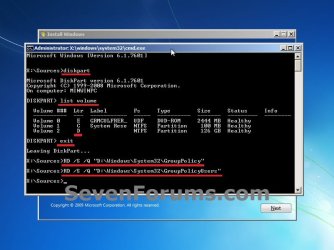
1. Open a command prompt at boot in Vista or Windows 7 or Windows 8. NOTE: See OPTION ONE at this link for how if needed. 2. In the command prompt, type diskpart, and press Enter. (see screenshot below step 7) 3. In the command prompt, type list volume, and press Enter. (see screenshot below step 7) 4. Make note of what your Windows OS drive letter is. It is not always C: at boot. (see screenshot below step 7) NOTE: Mine just happens to be D: at boot. 5. In the command prompt, type exit, and press Enter. (see screenshot below step 7) 6. In the command prompt, type the command below, and press Enter. (see screenshot below step 7) NOTE: Substitute D in the command below with your drive letter from step 4 instead.RD /S /Q "D:\Windows\System32\GroupPolicy" 7. In the command prompt, type the command below, and press Enter. (see screenshot below) NOTE: Substitute D in the command below with your drive letter from step 4 instead.RD /S /Q "D:\Windows\System32\GroupPolicyUsers"  8. Restart the computer back into Windows. 9. The Local Group Policy Editor has now been reset back to default. That's it,
Shawn | | | Need more help? Try searching our extensive help and support site.
Loading | |
16 Feb 2012
|
| | |
Hi Shawn, great tutorial. Would it also delete all restrictions and preferences set using the administrator account?
For ex, if i have set some restrictions for local users using my administrator account, will it delete all of them? | My System Specs |
| System Manufacturer/Model Number Samsung NP530U4B-S02IN OS Windows® 8 Pro (64-bit) CPU Intel® Core™ i5 Processor 2467M (1.60GHz, 3MB L3 Cache) Motherboard Samsung Electronics Memory 6GB DDR3 System Memory at 1,333MHz (on BD 4GB + 2GB x 1) Graphics Card AMD Radeon™ HD7550M 1GB DDR3 (Ext. Graphic) Sound Card Realtek High Definition Audio Monitor(s) Displays 35.56cm (14.0) SuperBright 300nit HD LED Display Screen Resolution 1366x768 Hard Drives 1TB S-ATA II Hard Drive (5400RPM) with ExpressCache 16GB SSD Internet Speed sucks Antivirus Microsoft Security Essentials Browser Google Chrome (Sync enabled) |
16 Feb 2012
|
| | |
Hello Dinesh,
It will only reset everything that was set from inside any Local Group Policy Editor itself back to default. This includes from within the normal gpedit.msc and any custom group policy mmc.exe for specific users and/or groups. | My System Specs | | Computer type PC/Desktop System Manufacturer/Model Number Self built custom OS 64-bit Windows 7 Ultimate SP1 & Windows 8 Enterprise CPU Intel i7-3930K 3.2 Ghz (O/C 4 Ghz) Motherboard ASRock X79 Extreme11 Memory 32 GB (8GBx4) G.SKILL DDR3 Quad PC3-19200 2400MHz Graphics Card Sapphire HD5870 Eyefinity 6 2GB Sound Card SB Recon 3Di Integrated Chip Monitor(s) Displays 3x 27" Asus VE278Q Screen Resolution 1920x1080 Keyboard Logitech Cordless Desktop MX 5500 Revolution Mouse Logitech Cordless Desktop MX 5500 Revolution PSU OCZ Series Gold OCZZ1000M 1000W Case Thermaltake Level 10 GT Snow Edition Cooling Corsair Hydro H100 Hard Drives 256GB OCZ Vector
160GB OCZ RevoDrive X2
2 x 1TB Samsung HDD HD154UI SATA Internet Speed 50 Mb/s Download and 2 Mb/s Upload Other Info Microsoft LifeCam Cinema
Lite-On iHBS212 12x BD Writer
Samsung CLX-3175FW Printer
Netgear WNDR3800 Router
Motorola SBG6580 Cable Modem
2x APC Back-UPS XS 1500 |
28 Feb 2012
|
| | |
hi brink,i read ur tutorial about gp reset with cmd commands,in fact we delete two folders that located in "windows\system32\Group policy & Group policy users" by these commands.but now i have a question, i use win 7 ultimate 32bit,i change the policy for log on message by editing computer config\windows setting\security setting\local policies\security options\interactive logon: message text ... but now i wanna to reset my gp to the default,i use the cmd commands and even i delete above folders but it resets other policies to default except this one...can u help me?!!! 10x | My System Specs | | OS Windows 7 Ultimate 32bit |
28 Feb 2012
|
| | |
Hello Sali,
This will only reset the local group policies (gpedit.msc), and not the local security policies (secpol.msc).
For security policies, you might see if this may help. How do I restore security settings to a known working state?
Last edited by Brink; 28 Feb 2012 at 11:25 AM..
Reason: updated
| My System Specs | | Computer type PC/Desktop System Manufacturer/Model Number Self built custom OS 64-bit Windows 7 Ultimate SP1 & Windows 8 Enterprise CPU Intel i7-3930K 3.2 Ghz (O/C 4 Ghz) Motherboard ASRock X79 Extreme11 Memory 32 GB (8GBx4) G.SKILL DDR3 Quad PC3-19200 2400MHz Graphics Card Sapphire HD5870 Eyefinity 6 2GB Sound Card SB Recon 3Di Integrated Chip Monitor(s) Displays 3x 27" Asus VE278Q Screen Resolution 1920x1080 Keyboard Logitech Cordless Desktop MX 5500 Revolution Mouse Logitech Cordless Desktop MX 5500 Revolution PSU OCZ Series Gold OCZZ1000M 1000W Case Thermaltake Level 10 GT Snow Edition Cooling Corsair Hydro H100 Hard Drives 256GB OCZ Vector
160GB OCZ RevoDrive X2
2 x 1TB Samsung HDD HD154UI SATA Internet Speed 50 Mb/s Download and 2 Mb/s Upload Other Info Microsoft LifeCam Cinema
Lite-On iHBS212 12x BD Writer
Samsung CLX-3175FW Printer
Netgear WNDR3800 Router
Motorola SBG6580 Cable Modem
2x APC Back-UPS XS 1500 |
28 Feb 2012
|
| | |
u r right...it wont effect sec policies.
special thanks brink for this gr8 tip | My System Specs | | OS Windows 7 Ultimate 32bit |
28 Feb 2012
|
| | |
You're welcome. I hope the other link may help. | My System Specs | | Computer type PC/Desktop System Manufacturer/Model Number Self built custom OS 64-bit Windows 7 Ultimate SP1 & Windows 8 Enterprise CPU Intel i7-3930K 3.2 Ghz (O/C 4 Ghz) Motherboard ASRock X79 Extreme11 Memory 32 GB (8GBx4) G.SKILL DDR3 Quad PC3-19200 2400MHz Graphics Card Sapphire HD5870 Eyefinity 6 2GB Sound Card SB Recon 3Di Integrated Chip Monitor(s) Displays 3x 27" Asus VE278Q Screen Resolution 1920x1080 Keyboard Logitech Cordless Desktop MX 5500 Revolution Mouse Logitech Cordless Desktop MX 5500 Revolution PSU OCZ Series Gold OCZZ1000M 1000W Case Thermaltake Level 10 GT Snow Edition Cooling Corsair Hydro H100 Hard Drives 256GB OCZ Vector
160GB OCZ RevoDrive X2
2 x 1TB Samsung HDD HD154UI SATA Internet Speed 50 Mb/s Download and 2 Mb/s Upload Other Info Microsoft LifeCam Cinema
Lite-On iHBS212 12x BD Writer
Samsung CLX-3175FW Printer
Netgear WNDR3800 Router
Motorola SBG6580 Cable Modem
2x APC Back-UPS XS 1500 |
03 Mar 2012
|
| | |
Will the batch files work on computer not running windows 7 Professional or Ultimate | My System Specs | | |
03 Mar 2012
|
| | |
Hello Tom,
Unfortunately, no. The BAT files only resets what has been changed through the Local Group Policy Editor itself, and not by any other means (ex: registry). | My System Specs | | Computer type PC/Desktop System Manufacturer/Model Number Self built custom OS 64-bit Windows 7 Ultimate SP1 & Windows 8 Enterprise CPU Intel i7-3930K 3.2 Ghz (O/C 4 Ghz) Motherboard ASRock X79 Extreme11 Memory 32 GB (8GBx4) G.SKILL DDR3 Quad PC3-19200 2400MHz Graphics Card Sapphire HD5870 Eyefinity 6 2GB Sound Card SB Recon 3Di Integrated Chip Monitor(s) Displays 3x 27" Asus VE278Q Screen Resolution 1920x1080 Keyboard Logitech Cordless Desktop MX 5500 Revolution Mouse Logitech Cordless Desktop MX 5500 Revolution PSU OCZ Series Gold OCZZ1000M 1000W Case Thermaltake Level 10 GT Snow Edition Cooling Corsair Hydro H100 Hard Drives 256GB OCZ Vector
160GB OCZ RevoDrive X2
2 x 1TB Samsung HDD HD154UI SATA Internet Speed 50 Mb/s Download and 2 Mb/s Upload Other Info Microsoft LifeCam Cinema
Lite-On iHBS212 12x BD Writer
Samsung CLX-3175FW Printer
Netgear WNDR3800 Router
Motorola SBG6580 Cable Modem
2x APC Back-UPS XS 1500 Local Group Policy - Reset to Default problems? All times are GMT -5. The time now is 06:42 PM. | |