| | Welcome to Windows 7 Forums. Our forum is dedicated to helping you find solutions with any problems, errors or issues you are experiencing with Windows 7. The Windows 7 forum also covers news and updates and has an extensive Windows 7 tutorial section that covers a wide range of tips and tricks. | Windows 7 - Command Prompt - Copy to Clipboard
Command Prompt - Copy to Clipboard How to Enable Copy to Clipboard from the Windows 7 Command Prompt
Published by Brink
08-22-2009
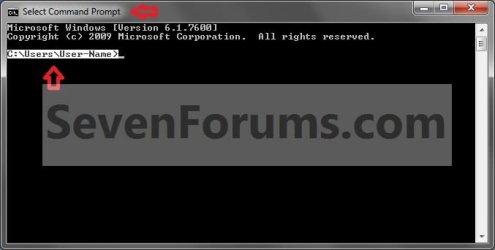
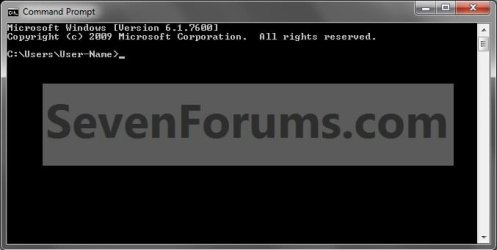
| Command Prompt - Copy to Clipboard How to Enable Copy to Clipboard from the Windows 7 Command Prompt  Information This will show you how to enable or disable Quick Edit mode in the command prompt to highlight text within the command prompt to copy to the clipboard in Windows 7.  Note EXAMPLE: Command Prompt NOTE: This is the command prompt window when you have text highlighted.   Here's How:1. Open a command prompt, then right click on the title bar of the command prompt and click on Properties. (See screenshot below)
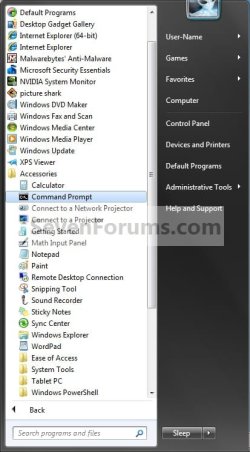
A) Go to step 4 or 5. 2. Open the Start Menu and click on All Programs and Accessories, then right click on Command Prompt shortcut and click on Properties. (See screenshot below) NOTE: This option can only be done using a Command Prompt shortcut. If you do not have one, then you can do step 3 to create a shortcut to use instead.
A) Go to step 4 or 5. OR 3. If you do not have a shortcut to use in step 2 -A) In Windows Explorer, navigate to C:\Windows\system32\cmd.exe, then right click on the cmd.exe file and click on Send To and Desktop (create shortcut). Now right click on the shortcut and click on Properties. (See screenshot below)
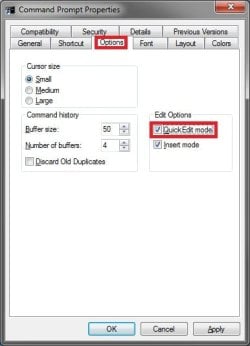
4. To Enable Copy to Clipboard A) Click on the Options tab, then check the Quick Edit mode box and click on OK. (See screenshot below) B) Go to step 6. 5. To Disable Copy to Clipboard A) Click on the Options tab, then uncheck the Quick Edit mode box and click on OK. (See screenshot above)
B) You're done. 6. Now you can highlight text (left click and hold, drag over text) in the command prompt that you want to copy to the Windows 7 clipboard and press enter or right click. (See screenshot below) NOTE: Notice how the command prompt title changes to Select Command Prompt when you are in Quick Edit mode to highlight the text. The title will return to Command Prompt when you press enter or right click to indicate that it has been copied to the clipboard. 7. You can now right click where you want to copy the text to from the clipboard, then click on Paste. That's it,
Shawn |  Published by | | Administrator Join Date: Oct 2008 Location: Texas Posts: 34,824 | |
 Tutorial Tools | | | | | | | | | |
08-22-2009
|
#1 | | Windows 7 Ultimate 64bit, MS XP Mode, VBox, VMLite Workstation, VM Player 4.0 |
"got ya..."! Right off the command prompt! | My System Specs | | OS Windows 7 Ultimate 64bit, MS XP Mode, VBox, VMLite Workstation, VM Player 4.0 CPU AMD Phenom II X4 Deneb 3.4 Motherboard Gigabyte 790XTA-UD4 Memory Mushkin Enhanced DDR3 1600 8gb 1.5v-1.7v Graphics Card MSI Radeon 5750 1gb Sound Card Creative Labs X-Fi XtremeGamer Monitor(s) Displays 2 x Acer P191W 19" widesscreen Screen Resolution 1440x900 native Keyboard Microsoft Recusa Razor Mouse MS Trackball Explorer PSU Corsair 750TX Case Antec 900-2 - SSD compatible Cooling Zalman CNPS9900A Hard Drives WD Black Edition 1tb Sata 6.0 = 2
WD Black Edition 1tb Sata 3.0 = 2
WD 1tb Green Power sata = 2 1 external
usb flash drives = 8 Internet Speed 12mbps boost |
08-22-2009
|
#2 | | |
i wish this was possible in vista... | My System Specs | | System Manufacturer/Model Number Compaq Presario CQ60-215DX OS Windows 7 Home Premium CPU 2 AMD Athlon 64 X2 Graphics Card NVIDIA GeForce 8200M G graphics |
08-22-2009
|
#3 | | Windows 7 Ultimate x64 SP1 |
Hello Wii Master,
It's the same in Vista as well. | My System Specs | | System Manufacturer/Model Number Self built custom OS Windows 7 Ultimate x64 SP1 CPU Intel i7-980X 3.3 Ghz (3.48 Ghz OC'd) Motherboard ASUS P6X58D Premium Memory 12 GB (2GBx6) DDR3 PC3-16000 2000 MHz Kingston HyperX Graphics Card Sapphire HD5870 Eyefinity 6 2GB Sound Card Realtek HD Audio ALC889 Integrated Chip Monitor(s) Displays 3x 27" Asus VE278Q Screen Resolution 1920x1080 Keyboard Logitech Cordless Desktop MX 5500 Revolution Mouse Logitech Cordless Desktop MX 5500 Revolution PSU OCZ Series Gold OCZZ1000M 1000W Case Corsair Obsidian 800D Cooling Thermalright Ultra 120 Extreme Copper CPU heat sink w/120 MM Hard Drives 160GB OCZ RevoDrive X2
** 2 x 1TB Samsung HDD HD154UI SATA Internet Speed 50 Mb/s Download and 2 Mb/s Upload Other Info Microsoft LifeCam Cinema
** Lite-On iHBS212 12x BD Writer
** Samsung CLX-3175FW Printer
** Netgear WNDR3800 Router
** Motorola SBG6580 Cable Modem
** 2x APC Back-UPS XS 1500 |
08-22-2009
|
#4 | | Windows 7 Ultimate 64bit, MS XP Mode, VBox, VMLite Workstation, VM Player 4.0 |
"Once Vista is back on here I'll have it a try there too!" posting from the command prompt again! | My System Specs | | OS Windows 7 Ultimate 64bit, MS XP Mode, VBox, VMLite Workstation, VM Player 4.0 CPU AMD Phenom II X4 Deneb 3.4 Motherboard Gigabyte 790XTA-UD4 Memory Mushkin Enhanced DDR3 1600 8gb 1.5v-1.7v Graphics Card MSI Radeon 5750 1gb Sound Card Creative Labs X-Fi XtremeGamer Monitor(s) Displays 2 x Acer P191W 19" widesscreen Screen Resolution 1440x900 native Keyboard Microsoft Recusa Razor Mouse MS Trackball Explorer PSU Corsair 750TX Case Antec 900-2 - SSD compatible Cooling Zalman CNPS9900A Hard Drives WD Black Edition 1tb Sata 6.0 = 2
WD Black Edition 1tb Sata 3.0 = 2
WD 1tb Green Power sata = 2 1 external
usb flash drives = 8 Internet Speed 12mbps boost |
08-22-2009
|
#5 | | |
That is an amazing trick. Always thought of having it. Nice catch Shawn. | My System Specs | | System Manufacturer/Model Number Compaq OS Windows 7 Ultimate x64 CPU Intel core 2 duo T 5550 @ 1.83 GHz Motherboard Intel 965 express mobile chipset Memory 3 GB DR 2 @ 667 MHz Graphics Card Onboard with approx 512 MB RAM Sound Card Onboard Monitor(s) Displays 15"4 inch widescreen Hard Drives 160 GB SATA WD. Internet Speed sucks |
08-22-2009
|
#6 | | Windows 7 Ultimate 64bit, MS XP Mode, VBox, VMLite Workstation, VM Player 4.0 |
Shawn always manages to make the best finds for some reason! | My System Specs | | OS Windows 7 Ultimate 64bit, MS XP Mode, VBox, VMLite Workstation, VM Player 4.0 CPU AMD Phenom II X4 Deneb 3.4 Motherboard Gigabyte 790XTA-UD4 Memory Mushkin Enhanced DDR3 1600 8gb 1.5v-1.7v Graphics Card MSI Radeon 5750 1gb Sound Card Creative Labs X-Fi XtremeGamer Monitor(s) Displays 2 x Acer P191W 19" widesscreen Screen Resolution 1440x900 native Keyboard Microsoft Recusa Razor Mouse MS Trackball Explorer PSU Corsair 750TX Case Antec 900-2 - SSD compatible Cooling Zalman CNPS9900A Hard Drives WD Black Edition 1tb Sata 6.0 = 2
WD Black Edition 1tb Sata 3.0 = 2
WD 1tb Green Power sata = 2 1 external
usb flash drives = 8 Internet Speed 12mbps boost |
08-23-2009
|
#7 | | Windows 7 Ultimate x64 SP1 |

Quote: Originally Posted by Night Hawk Shawn always manages to make the best finds for some reason!  It's just those alien advantages. | My System Specs | | System Manufacturer/Model Number Self built custom OS Windows 7 Ultimate x64 SP1 CPU Intel i7-980X 3.3 Ghz (3.48 Ghz OC'd) Motherboard ASUS P6X58D Premium Memory 12 GB (2GBx6) DDR3 PC3-16000 2000 MHz Kingston HyperX Graphics Card Sapphire HD5870 Eyefinity 6 2GB Sound Card Realtek HD Audio ALC889 Integrated Chip Monitor(s) Displays 3x 27" Asus VE278Q Screen Resolution 1920x1080 Keyboard Logitech Cordless Desktop MX 5500 Revolution Mouse Logitech Cordless Desktop MX 5500 Revolution PSU OCZ Series Gold OCZZ1000M 1000W Case Corsair Obsidian 800D Cooling Thermalright Ultra 120 Extreme Copper CPU heat sink w/120 MM Hard Drives 160GB OCZ RevoDrive X2
** 2 x 1TB Samsung HDD HD154UI SATA Internet Speed 50 Mb/s Download and 2 Mb/s Upload Other Info Microsoft LifeCam Cinema
** Lite-On iHBS212 12x BD Writer
** Samsung CLX-3175FW Printer
** Netgear WNDR3800 Router
** Motorola SBG6580 Cable Modem
** 2x APC Back-UPS XS 1500 |
08-23-2009
|
#8 | | Windows 7 Ultimate 64bit, MS XP Mode, VBox, VMLite Workstation, VM Player 4.0 |

Quote: Originally Posted by Brink It's just those alien advantages.  That's getting "out there" for sure!
At times I could have sworn I had something highlighted in a command prompt and pasted into Note Pad. But this certainly is a great reminder just the same! | My System Specs | | OS Windows 7 Ultimate 64bit, MS XP Mode, VBox, VMLite Workstation, VM Player 4.0 CPU AMD Phenom II X4 Deneb 3.4 Motherboard Gigabyte 790XTA-UD4 Memory Mushkin Enhanced DDR3 1600 8gb 1.5v-1.7v Graphics Card MSI Radeon 5750 1gb Sound Card Creative Labs X-Fi XtremeGamer Monitor(s) Displays 2 x Acer P191W 19" widesscreen Screen Resolution 1440x900 native Keyboard Microsoft Recusa Razor Mouse MS Trackball Explorer PSU Corsair 750TX Case Antec 900-2 - SSD compatible Cooling Zalman CNPS9900A Hard Drives WD Black Edition 1tb Sata 6.0 = 2
WD Black Edition 1tb Sata 3.0 = 2
WD 1tb Green Power sata = 2 1 external
usb flash drives = 8 Internet Speed 12mbps boost |
08-23-2009
|
#9 | | |

Quote: Originally Posted by Brink Hello Wii Master,
It's the same in Vista as well.  well, i went to the file that you specified in explorer, but when i right clicked it and hit properties, all that came up was 4 tabs that said general, security, and i forgot what the other 2 said. do i need to take ownership or something? | My System Specs | | System Manufacturer/Model Number Compaq Presario CQ60-215DX OS Windows 7 Home Premium CPU 2 AMD Athlon 64 X2 Graphics Card NVIDIA GeForce 8200M G graphics Command Prompt - Copy to Clipboard problems? All times are GMT -5. The time now is 09:51 PM. |  |