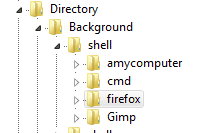
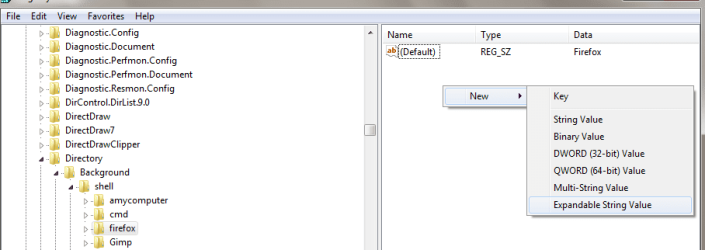
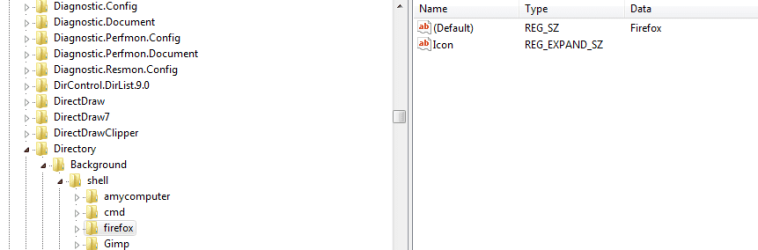
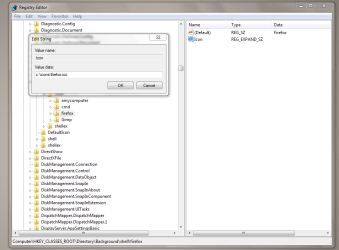
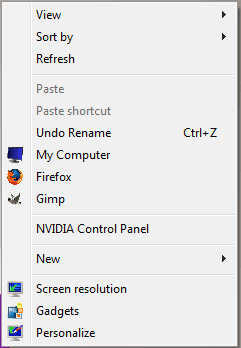
It is not necessary to add a separate icon (.ico) file.
Instead, We can extract icons from the existing ones that are:
1) inside the executable file of the program (.exe) eg: firefox.exe
or
2) from the built-in system icons that are inside the .dll(s). eg: shell32.dll
As the
kintomaniac guides, in the Windows Registry editor, make an
ValueName Icon,
DataType REG_SZ (it is not need to be REG_EXPAND_SZ datatype), and
as a
DataValue we could use either:
eg.1: Program's full path address: eg.:
C:\Program Files\Mozilla Firefox\firefox.exe,0
eg.2: A system built-in icon from .dll file. eg.:
C:\Windows\System32\shell32.dll,3
(The nubmer after the comma is the icon number. This number is depended on number of icons exist in exe or dll .)
Firefox built-in icons example:
R.Click on Firefox shortcut or .exe > Properies > Change icon...

Almost all (Windows 7) system built-in icons below: (actually, .dll(s) with icons)
All the following .dll(s) are in [C ]C:\Windows\System32\[/C] .
[1] compstui.dll -- (Common Property Sheet User Interface)
[2] comres.dll -- (COM+ Resources)
[3] ddores.dll -- (Device Category Information and Resources)
[4] dmdskres.dll -- (Disk Management Support Snap-In)
[5] dsuiext.dll -- (Directory Service Common UI)
[6] ieframe.dll -- (Internet Explorer)
[7] imageres.dll -- (Windows Image Resource)
[8] imagesp1.dll -- (Windows SP1 Image Resource) [Drives]
[9] inetcpl.cpl -- (Internet Control Panel)
[A] main.cpl -- (Mouse and Keyboard Control Panel Applets)
mmcndmgr.dll -- (Microsoft Management Console Node Manager)
[C ] mmres.dll -- (General Audio Resources)
[D] moricons.dll -- (Windows NT Setup Icon Resources Library)
[E] mstask.dll -- (Task Scheduler interface DL)
[F] mstsc.exe -- (Remote Desktop Connection Client)
[G] mstscax.dll -- (Remote Desktop Services ActiveX Client)
[H] netshell.dll -- (Network Connections Shell)
pifmgr.dll -- (Windows NT PIF Manager Icon Resource Library)
[J] pnidui.dll -- (Network System Icons)
[K] setupapi.dll -- (Windows Setup API) ***
[L] shdocvw.dll -- (Shell Doc Object and Control Library)
[M] shell32.dll -- (Windows Shell Common)
[N] urlmon.dll -- (OLE32 Extension for Win32)
[O] wiashext.dll -- (Imaging Devices Shell Folder UI)
[P] wmploc.dll -- (Windows Media Player Resources)
[Q] wpdshext.dll -- (Portable Devices Shell Extension)
[R] powrprof.dll -- (Power: Hibernate, Sleep, Suspend)
[S ] User32.dll -- (User)
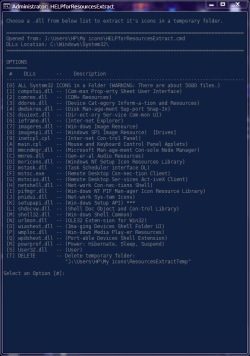
[S ]I made the following little batch "HELPforResourcesExtract.cmd"
to help for "ResourcesExtract.exe" to extract windows icons from system32 folder.
You just need to place both "HELPforResourcesExtract.cmd" and the program's extracted folder "resourcesextract-x64" in the same directory.
Download the Nirsoft's "ResourcesExtract v1.18" here: ResourcesExtract - Extract files (bitmaps, icons, html files, and more) from dll files [ZIP Archive (36.7 KB)]
HELPforResourcesExtract.cmd
Code:
:: This .bat/.cmd is just a help for "ResourcesExtract.exe" to extract windows icons from system32 folder. (adonios77)

@[URL="https://www.sevenforums.com/members/echo.html"]echo[/URL] off
title HELPforResourcesExtract
mode con cols=83 lines=58&&color 17
setlocal EnableExtensions
%WinDir%\System32\chcp.com 65001 >nul
:Start
cls
echo.&&echo. Choose a .dll from below list to extract it^'s icons in a temporary folder.        ^'
echo.
echo. =================================================================================
echo. Opened from: %~dpnx0
echo. DLLs Location: %WinDir%\System32\
echo. =================================================================================
echo.&&echo. OPTIONS
echo. =======
echo.  #    DLLs       --    Description
echo. ---------------------------------------------------------------------------------
echo. [0] ALL System32 ICONS in a Folder (WARNING: There are about 5080 files.)
echo. [1] compstui.dll -- (Com*mon Prop*erty Sheet User Interface)
echo. [2] comres.dll   -- (COM^+ Resources)
echo. [3] ddores.dll   -- (Device Cat*egory Inform*a*tion and Resources)
echo. [4] dmdskres.dll -- (Disk Man*age*ment Sup*port Snap-In)
echo. [5] dsuiext.dll  -- (Dir*ect*ory Ser*vice Com*mon UI)
echo. [6] ieframe.dll  -- (Inter*net Explorer)
echo. [7] imageres.dll -- (Win*dows Image Resource)
echo. [8] imagesp1.dll -- (Windows SP1 Image Resource)  [Drives]
echo. [9] inetcpl.cpl  -- (Inter*net Con*trol Panel)
echo. [A] main.cpl     -- (Mouse and Keyboard Control Panel Applets)
echo. [B] mmcndmgr.dll -- (Microsoft Man*age*ment Con*sole Node Manager)
echo. [C ] mmres.dll    -- (Gen*er*al Audio Resources)
echo. [D] moricons.dll -- (Windows NT Setup Icon Resources Library)
echo. [E] mstask.dll   -- (Task Scheduler interface DL)
echo. [F] mstsc.exe    -- (Remote Desktop Con*nec*tion Client)
echo. [G] mstscax.dll  -- (Remote Desktop Ser*vices Act*iveX Client)
echo. [H] netshell.dll -- (Net*work Con*nec*tions Shell)
echo. [I] pifmgr.dll   -- (Win*dows NT PIF Man*ager Icon Resource Library)
echo. [J] pnidui.dll   -- (Net*work Sys*tem Icons)
echo. [K] setupapi.dll -- (Win*dows Setup API) ***
echo. [L] shdocvw.dll  -- (Shell Doc Object and Con*trol Library)
echo. [M] shell32.dll  -- (Win*dows Shell Common)
echo. [N] urlmon.dll   -- (OLE32 Exten*sion for Win32)
echo. [O] wiashext.dll -- (Ima*ging Devices Shell Folder UI)
echo. [P] wmploc.dll   -- (Win*dows Media Play*er Resources)
echo. [Q] wpdshext.dll -- (Port*able Devices Shell Extension)
echo. [R] powrprof.dll -- (Power: Hibernate, Sleep, Suspend)
echo. [S ] User32.dll   -- (User)
echo. [T] DELETE       -- Delete temporary folder:
echo.                     "%~dp0ResourcesExtractTemp"
echo.
:SETINGS/OPTIONS
:: Put in the next line, where the portable program "ResourcesExtract.exe" starts from.
cd "%~dp0resourcesextract-x64"
set _RE=ResourcesExtract.exe
set _S=c:\windows\system32
set _D="%~dp0ResourcesExtractTemp"
set _T=2
set _SW=/ExtractIcons 1 /ExtractCursors 0 /ExtractBitmaps 0 /ExtractHTML 0 /ExtractManifests 0 /ScanSubFolders 0 /ExtractAnimatedIcons 0 /ExtractAnimatedCursors 0 /ExtractAVI 0 /ExtractTypeLib 0 /ExtractBinary 0 /ExtractStrings 0 /OpenDestFolder 1 /SaveBitmapAsPNG 0 /SubFolderDepth 1 /FileExistMode 2 /MultiFilesMode 1
::echo.Program:         [%_RE%]
::echo.Source:          [%_S%]
::echo.Destination:     [%_D%]
::echo.Options/Switches:[%_SW%]
choice /c 0123456789abcdefghijklmnopqrst /n /m "Select an Option [#]:"
set "_EL=%errorlevel%"
if %_EL%==255 goto :ERROR
if %_EL%==30 goto :DELETE
if %_EL%==29 (%_RE% /Source %_S%\User32.dll /DestFolder %_D% %_SW%)&timeout /t %_T% >nul &&start "" /d /i /max %_D%
if %_EL%==28 (%_RE% /Source %_S%\powrprof.dll /DestFolder %_D% %_SW%)&timeout /t %_T% >nul &&start "" /d /i /max %_D%
if %_EL%==27 (%_RE% /Source %_S%\wpdshext.dll /DestFolder %_D% %_SW%)&timeout /t %_T% >nul &&start "" /d /i /max %_D%
if %_EL%==26 (%_RE% /Source %_S%\wmploc.dll /DestFolder %_D% %_SW%)&timeout /t %_T% >nul &&start "" /d /i /max %_D%
if %_EL%==25 (%_RE% /Source %_S%\wiashext.dll /DestFolder %_D% %_SW%)&timeout /t %_T% >nul &&start "" /d /i /max %_D%
if %_EL%==24 (%_RE% /Source %_S%\urlmon.dll /DestFolder %_D% %_SW%)&timeout /t %_T% >nul &&start "" /d /i /max %_D%
if %_EL%==23 (%_RE% /Source %_S%\shell32.dll /DestFolder %_D% %_SW%)&timeout /t %_T% >nul &&start "" /d /i /max %_D%
if %_EL%==22 (%_RE% /Source %_S%\shdocvw.dll /DestFolder %_D% %_SW%)&timeout /t %_T% >nul &&start "" /d /i /max %_D%
if %_EL%==21 (%_RE% /Source %_S%\setupapi.dll /DestFolder %_D% %_SW%)&timeout /t %_T% >nul &&start "" /d /i /max %_D%
if %_EL%==20 (%_RE% /Source %_S%\pnidui.dll /DestFolder %_D% %_SW%)&timeout /t %_T% >nul &&start "" /d /i /max %_D%
if %_EL%==19 (%_RE% /Source %_S%\pifmgr.dll /DestFolder %_D% %_SW%)&timeout /t %_T% >nul &&start "" /d /i /max %_D%
if %_EL%==18 (%_RE% /Source %_S%\netshell.dll /DestFolder %_D% %_SW%)&timeout /t %_T% >nul &&start "" /d /i /max %_D%
if %_EL%==17 (%_RE% /Source %_S%\mstscax.dll /DestFolder %_D% %_SW%)&timeout /t %_T% >nul &&start "" /d /i /max %_D%
if %_EL%==16 (%_RE% /Source %_S%\mstsc.exe /DestFolder %_D% %_SW%)&timeout /t %_T% >nul &&start "" /d /i /max %_D%
if %_EL%==15 (%_RE% /Source %_S%\mstask.dll /DestFolder %_D% %_SW%)&timeout /t %_T% >nul &&start "" /d /i /max %_D%
if %_EL%==14 (%_RE% /Source %_S%\moricons.dll /DestFolder %_D% %_SW%)&timeout /t %_T% >nul &&start "" /d /i /max %_D%
if %_EL%==13 (%_RE% /Source %_S%\mmres.dll /DestFolder %_D% %_SW%)&timeout /t %_T% >nul &&start "" /d /i /max %_D%
if %_EL%==12 (%_RE% /Source %_S%\mmcndmgr.dll /DestFolder %_D% %_SW%)&timeout /t %_T% >nul &&start "" /d /i /max %_D%
if %_EL%==11 (%_RE% /Source %_S%\main.cpl /DestFolder %_D% %_SW%)&timeout /t %_T% >nul &&start "" /d /i /max %_D%
if %_EL%==10 (%_RE% /Source %_S%\inetcpl.cpl /DestFolder %_D% %_SW%)&timeout /t %_T% >nul &&start "" /d /i /max %_D%
if %_EL%==9 (%_RE% /Source %_S%\imagesp1.dll /DestFolder %_D% %_SW%)&timeout /t %_T% >nul &&start "" /d /i /max %_D%
if %_EL%==8 (%_RE% /Source %_S%\imageres.dll /DestFolder %_D% %_SW%)&timeout /t %_T% >nul &&start "" /d /i /max %_D%
if %_EL%==7 (%_RE% /Source %_S%\ieframe.dll /DestFolder %_D% %_SW%)&timeout /t %_T% >nul &&start "" /d /i /max %_D%
if %_EL%==6 (%_RE% /Source %_S%\dsuiext.dll /DestFolder %_D% %_SW%)&timeout /t %_T% >nul &&start "" /d /i /max %_D%
if %_EL%==5 (%_RE% /Source %_S%\dmdskres.dll /DestFolder %_D% %_SW%)&timeout /t %_T% >nul &&start "" /d /i /max %_D%
if %_EL%==4 (%_RE% /Source %_S%\ddores.dll /DestFolder %_D% %_SW%)&timeout /t %_T% >nul &&start "" /d /i /max %_D%
if %_EL%==3 (%_RE% /Source %_S%\comres.dll /DestFolder %_D% %_SW%)&timeout /t %_T% >nul &&start "" /d /i /max %_D%
if %_EL%==2 (%_RE% /Source %_S%\compstui.dll /DestFolder %_D% %_SW%)&timeout /t %_T% >nul &&start "" /d /i /max %_D%
if %_EL%==1 (%_RE% /Source %_S%\* /DestFolder %_D% %_SW%)&timeout /t %_T% >nul &&start "" /d /i /max %_D%
:DELETE
echo.
echo.Firstly manually close "ResourcesExtractTemp" window and
echo.Press any key to Delete the Temporary folder . . .
pause >nul
cd %~dp0 && DEL /f /s /q ResourcesExtractTemp
RMdir /s /q ResourcesExtractTemp
echo.&&echo.The Temporary folder has been deleted.
timeout /t 2 >nul && goto :Start
:ERROR
echo.&&echo. SORRY, SOMETHING WENT WRONG.
timeout /t 4 >nul && goto :Start
exit

:: https://superuser.com/questions/142731/how-can-i-see-which-dlls-included-in-windows-contain-icons
:: https://stackoverflow.com/questions/8435/how-do-you-get-the-icons-out-of-shell32-dll
 [/S]
[/S]