| Windows 7: Virtual XP Machine - Copy |
22 Aug 2009
|
#9 | | Windows 7 x64 Ultimate A Finnish immigrant in Leipzig, Germany |
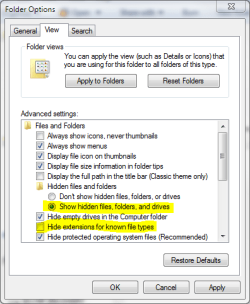
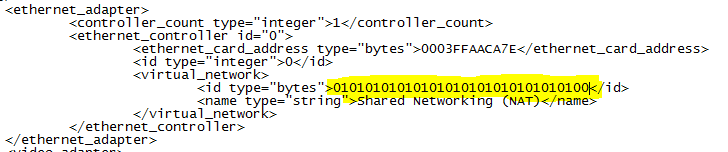
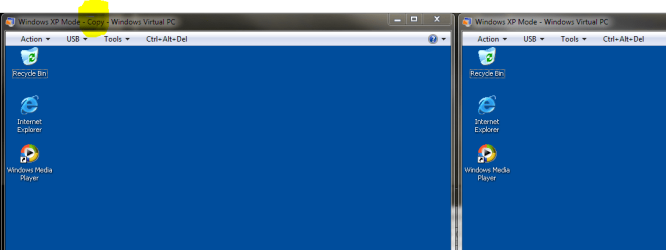
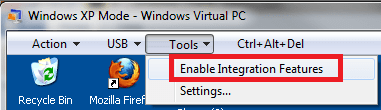
Virtual XP Machine - Copy How to Copy a Virtual XP Machine in Windows 7  Not...
Last edited by Brink; 07 Jul 2012 at 06:30 AM..
| My System Specs |
| Computer type Laptop System Manufacturer/Model Number HP ENVY 17-1150eg OS Windows 7 x64 Ultimate CPU 1.6 GHz Intel Core i7-720QM Processor Memory 6 GB Graphics Card ATI Mobility Radeon HD 5850 Graphics Sound Card Beats sound system with integrated subwoofer Monitor(s) Displays 17" laptop display, 22" LCD and 32" Full HD TV through HDMI Screen Resolution 1600*900, 1680*1050 and 1920*1080 Keyboard Logitech diNovo Media Desktop Laser (bluetooth) Mouse Logitech MX1000 Laser (Bluetooth) Hard Drives Internal: 2 x 500 GB SATA Hard Disk Drive 7200 rpm
External: 2TB for backups, 3TB USB3 network drive for media Internet Speed 50/10 Mbps VDSL Antivirus MSE, Windows Defender Browser Maxthon 3.5.2. Other Info Windows 7 Ultimate Retail Full in English, additional Guest-user accounts in Finnish, German and Swedish (Working languages English & Swedish, Family language German, my own language, mother tongue, Finnish. I really need Ultimate to get to use Language Packs!) |
15 Jan 2010
|
#10 | | Windows 7 Ultimate x64, XP Mode, W8 RP VM, Linux Mint Debian 2nd OS HD- 7 Pro x64 second case New England |
When Vista was on one vhd I copied the vhd itself over to the next drive and ran it there. The same worked for the 32bit 7 RC upgrade over that but all this was seen on the VPC and XP Mode RCs not final.
When going to start up the XP Mode RC with a new vhd already sitting blank waiting for an OS instead of seeing the XP Mode come right up the installer for Windows disk in the drive would load!
The images here are part of a guide I made up for installing Vista on a VM last summer. The finished XP Mode however will still see the "press any key to boot from dvd" message and then proceed onto the XP Mode's desktop. | My System Specs |
| OS Windows 7 Ultimate x64, XP Mode, W8 RP VM, Linux Mint Debian 2nd OS HD- 7 Pro x64 second case CPU AMD Phenom II X4 975 Deneb 3.6ghz - 965 on new mini tower Motherboard Gigabyte GA-790XTA-UD4 Memory Kingston Hyper X DDR3 1600 1.5v 16gb - Mushkin on 2nd build Graphics Card MSI HD Radeon 5750 1gb - MSI HD Radeon 6450 on mini tower Sound Card Creative Labs X-Fi XtremeGamer - Realtek onooard 2nd case Monitor(s) Displays 2 x Acer P191W 19" widesscreen - HP 20" widescreen mini towe Screen Resolution 1440x900 native - 1600x1024 on 7 Pro x64 build Keyboard Microsoft Recusa Razor - MS Comfort 3000 on second build Mouse MS Trackball Explorer - A4TECH dual scroll wheel trackball PSU Corsair 750TX - primary / Corsair CX600 - second Case Antec 900-2 - SSD compatible / NZXT Vulcan mini tower Cooling Zalman CNPS9900A Hard Drives Primary Ultimate x64 build-
WD Black Edition 1tb Sata 6.0 = 2
WD Black Edition 1tb Sata 3.0 = 2 (OS drives)
WD 1tb Green Power sata = 2 1 external
usb flash drives = 18
Second 7 Pro x64 mini tower-
WD Caviar SE 500gb sata II single drive presen Internet Speed 30mbps upgrade - primary hard wired - mini tower usb WiFi |
17 Jan 2010
|
#11 | | |
Works for some 
Quote: Originally Posted by Kari I really do not know why some of you guys are experiencing problems. To re-test the validity of this tutorial, I checked everything once more this morning.
I followed tutorial literally and it works. Hi Kari -
I have no doubt this works perfectly for you, and I am grateful for your efforts to post these instructions. But clearly it doesn't work for everyone. Now we just need to figure out what's different between our setups. I'm on the release version of Windows 7 Professional v6.1 build 7600. The VM I was trying to copy is not the original Windows XP Mode vm, but rather a new VM I created from scratch. Maybe that's the difference? My vm disk is of type "dynamic", not "differencing" like the pre-configured XP Mode vm. As such, it has no parent disk specified. I have undo disks enabled, which may have an effect as well (although I made sure to discard all the changes before copying the VM). The other difference I can see is that my networking is not "Shared" like it is with the pre-configured XP Mode VM, but I doubt that matters.
-Roy | My System Specs | | |
17 Jan 2010
|
#12 | | Windows 7 x64 Ultimate A Finnish immigrant in Leipzig, Germany |
Ok, rfeague. I'll try to install new virtual machine using my old XP Pro disk. I'll be back to tell how it went.
Kari | My System Specs | | Computer type Laptop System Manufacturer/Model Number HP ENVY 17-1150eg OS Windows 7 x64 Ultimate CPU 1.6 GHz Intel Core i7-720QM Processor Memory 6 GB Graphics Card ATI Mobility Radeon HD 5850 Graphics Sound Card Beats sound system with integrated subwoofer Monitor(s) Displays 17" laptop display, 22" LCD and 32" Full HD TV through HDMI Screen Resolution 1600*900, 1680*1050 and 1920*1080 Keyboard Logitech diNovo Media Desktop Laser (bluetooth) Mouse Logitech MX1000 Laser (Bluetooth) Hard Drives Internal: 2 x 500 GB SATA Hard Disk Drive 7200 rpm
External: 2TB for backups, 3TB USB3 network drive for media Internet Speed 50/10 Mbps VDSL Antivirus MSE, Windows Defender Browser Maxthon 3.5.2. Other Info Windows 7 Ultimate Retail Full in English, additional Guest-user accounts in Finnish, German and Swedish (Working languages English & Swedish, Family language German, my own language, mother tongue, Finnish. I really need Ultimate to get to use Language Packs!) |
17 Jan 2010
|
#13 | | Windows 7 x64 Ultimate A Finnish immigrant in Leipzig, Germany |
Did not find my XP install CD, so I tested now with Vista Ultimate.
I installed first Vista to a Virtual PC virtual machine. When it was installed, I turned it of and followed this tutorial step by step to make an independent copy.
I then booted both, changed desktop on one and installed Firefox to the other, only to check that they really are two fully separate machines. Everything works, as you can see in the attached screenshot.
I do not know what else to say. If the computer can run Virtual PC, making a copy of any virtual machine is just so easy as told in this tutorial.
Kari | My System Specs | | Computer type Laptop System Manufacturer/Model Number HP ENVY 17-1150eg OS Windows 7 x64 Ultimate CPU 1.6 GHz Intel Core i7-720QM Processor Memory 6 GB Graphics Card ATI Mobility Radeon HD 5850 Graphics Sound Card Beats sound system with integrated subwoofer Monitor(s) Displays 17" laptop display, 22" LCD and 32" Full HD TV through HDMI Screen Resolution 1600*900, 1680*1050 and 1920*1080 Keyboard Logitech diNovo Media Desktop Laser (bluetooth) Mouse Logitech MX1000 Laser (Bluetooth) Hard Drives Internal: 2 x 500 GB SATA Hard Disk Drive 7200 rpm
External: 2TB for backups, 3TB USB3 network drive for media Internet Speed 50/10 Mbps VDSL Antivirus MSE, Windows Defender Browser Maxthon 3.5.2. Other Info Windows 7 Ultimate Retail Full in English, additional Guest-user accounts in Finnish, German and Swedish (Working languages English & Swedish, Family language German, my own language, mother tongue, Finnish. I really need Ultimate to get to use Language Packs!) |
17 Jan 2010
|
#14 | | Windows 7 Ultimate x64, XP Mode, W8 RP VM, Linux Mint Debian 2nd OS HD- 7 Pro x64 second case New England |
The reason the XP Pro disk wasn't seen is that XP is not supported on the VPC. Vista is required. The Vista install later to 32bit RC worked when copied over to a second RC by simply creating a new shortcut to the vmc file itself. Virtual Box or another VM ware.
You still have to install the Windows Virtual PC before you can do anything else however. The setup for the XP Mode mainly preconfigures the vhd as it detects the hardwares on your system as it creates the new files on the drive in the designated folders there.
Even 7 was installed to the VPC as you can see here but has one unresolved problem connecting. The device manager there shows everything properly including the virtual ethernet adapter while the XP Mode and previous Vista and 32bit RC vhds never ran into this. Blocked by Windows Firewall until on the excepted programs list! | My System Specs | | OS Windows 7 Ultimate x64, XP Mode, W8 RP VM, Linux Mint Debian 2nd OS HD- 7 Pro x64 second case CPU AMD Phenom II X4 975 Deneb 3.6ghz - 965 on new mini tower Motherboard Gigabyte GA-790XTA-UD4 Memory Kingston Hyper X DDR3 1600 1.5v 16gb - Mushkin on 2nd build Graphics Card MSI HD Radeon 5750 1gb - MSI HD Radeon 6450 on mini tower Sound Card Creative Labs X-Fi XtremeGamer - Realtek onooard 2nd case Monitor(s) Displays 2 x Acer P191W 19" widesscreen - HP 20" widescreen mini towe Screen Resolution 1440x900 native - 1600x1024 on 7 Pro x64 build Keyboard Microsoft Recusa Razor - MS Comfort 3000 on second build Mouse MS Trackball Explorer - A4TECH dual scroll wheel trackball PSU Corsair 750TX - primary / Corsair CX600 - second Case Antec 900-2 - SSD compatible / NZXT Vulcan mini tower Cooling Zalman CNPS9900A Hard Drives Primary Ultimate x64 build-
WD Black Edition 1tb Sata 6.0 = 2
WD Black Edition 1tb Sata 3.0 = 2 (OS drives)
WD 1tb Green Power sata = 2 1 external
usb flash drives = 18
Second 7 Pro x64 mini tower-
WD Caviar SE 500gb sata II single drive presen Internet Speed 30mbps upgrade - primary hard wired - mini tower usb WiFi |
18 Jan 2010
|
#15 | | |

Quote: Originally Posted by Kari I do not know what else to say. If the computer can run Virtual PC, making a copy of any virtual machine is just so easy as told in this tutorial.
Kari Hi Kari -
I appreciate your dedication! What kind of disk did you use in the new VM you made? As noted previously, mine is type "dynamic"; I wonder if that matters?
My computer can run Virtual PC just fine. Both the Windows XP Mode default VM and my new made-from-scratch VM work fine. But making a copy of my new VM from these instructions does not work for me. Don't take it as an offense or an indication that there's something wrong with your instructions. I'm sure there is just a difference between our setups.
-Roy | My System Specs | | |
18 Jan 2010
|
#16 | | Windows 7 x64 Ultimate A Finnish immigrant in Leipzig, Germany |
I'm always using dynamic disks with virtual machines. Anyway, disk type should have nothing to do with this.
Could you attach the vmc and vmcx files of your new VM here for us to see? Just copy them to a new folder and change the filename extension to .txt, or zip them, and then attach to a new post.
Kari | My System Specs | | Computer type Laptop System Manufacturer/Model Number HP ENVY 17-1150eg OS Windows 7 x64 Ultimate CPU 1.6 GHz Intel Core i7-720QM Processor Memory 6 GB Graphics Card ATI Mobility Radeon HD 5850 Graphics Sound Card Beats sound system with integrated subwoofer Monitor(s) Displays 17" laptop display, 22" LCD and 32" Full HD TV through HDMI Screen Resolution 1600*900, 1680*1050 and 1920*1080 Keyboard Logitech diNovo Media Desktop Laser (bluetooth) Mouse Logitech MX1000 Laser (Bluetooth) Hard Drives Internal: 2 x 500 GB SATA Hard Disk Drive 7200 rpm
External: 2TB for backups, 3TB USB3 network drive for media Internet Speed 50/10 Mbps VDSL Antivirus MSE, Windows Defender Browser Maxthon 3.5.2. Other Info Windows 7 Ultimate Retail Full in English, additional Guest-user accounts in Finnish, German and Swedish (Working languages English & Swedish, Family language German, my own language, mother tongue, Finnish. I really need Ultimate to get to use Language Packs!) |
06 Feb 2010
|
#17 | | |
Thanks, this really helped. | My System Specs | | System Manufacturer/Model Number microsoft OS windows7 pro 64 bit CPU ADM Phenom II X4 965 3.4GHZ Motherboard MSI 790GX-G65 Memory 8 ram Monitor(s) Displays accer p244w lcd PSU Thermaltake W0117RU ToughPower 750W Black PFC Power Supply w Case Antec Three Hundred Gaming Case Hard Drives Western Digital Caviar Black 1 TB Bulk/OEM Hard Drive 3.5 Inch, 32 MB Cache, 7200 RPM SATA II WD1001FALS |
20 Feb 2010
|
#18 | | |
Really excellent article. Very helpful. However, step 14 has a small mistake. The vmc_path should be set to Windows XP Mode - Copy.vmc not Windows XP Mode - Copy.vhd | My System Specs | | |
20 Feb 2010
|
#19 | | Windows 7 x64 Ultimate A Finnish immigrant in Leipzig, Germany |
Hello Alochi, welcome to the Seven Forums.
That was a really bad typo! Thank you for pointing that out to me. Typo is now fixed.
Kari | My System Specs | | Computer type Laptop System Manufacturer/Model Number HP ENVY 17-1150eg OS Windows 7 x64 Ultimate CPU 1.6 GHz Intel Core i7-720QM Processor Memory 6 GB Graphics Card ATI Mobility Radeon HD 5850 Graphics Sound Card Beats sound system with integrated subwoofer Monitor(s) Displays 17" laptop display, 22" LCD and 32" Full HD TV through HDMI Screen Resolution 1600*900, 1680*1050 and 1920*1080 Keyboard Logitech diNovo Media Desktop Laser (bluetooth) Mouse Logitech MX1000 Laser (Bluetooth) Hard Drives Internal: 2 x 500 GB SATA Hard Disk Drive 7200 rpm
External: 2TB for backups, 3TB USB3 network drive for media Internet Speed 50/10 Mbps VDSL Antivirus MSE, Windows Defender Browser Maxthon 3.5.2. Other Info Windows 7 Ultimate Retail Full in English, additional Guest-user accounts in Finnish, German and Swedish (Working languages English & Swedish, Family language German, my own language, mother tongue, Finnish. I really need Ultimate to get to use Language Packs!) Virtual XP Machine - Copy problems? All times are GMT -5. The time now is 10:16 AM. | |