
How to Copy a Virtual XP Machine in Windows 7
Note
Notice please:
This tutorial was written when we were still using first beta versions of Virtual PC and XP mode. This method to copy a VPC virtual machine was the most practical at that time. It still is a fully working and secure way to copy a virtual machine.
Today, with the current version of VPC and XP Mode, copying a virtual machine is much easier. Basically, all you have to do is to copy a vhd-file to another location on same computer and create a new virtual machine using an existing vhd as told here.
Kari
November 2010
This tutorial was written when we were still using first beta versions of Virtual PC and XP mode. This method to copy a VPC virtual machine was the most practical at that time. It still is a fully working and secure way to copy a virtual machine.
Today, with the current version of VPC and XP Mode, copying a virtual machine is much easier. Basically, all you have to do is to copy a vhd-file to another location on same computer and create a new virtual machine using an existing vhd as told here.
Kari
November 2010
Information
This tutorial will show how to make a working copy of a Virtual XP Machine. Same priciple can also be used to make a copy of any Virtual PC virtual hard disk.
By default, XP Mode virtual machine consists of five files when installed and run first time, plus two additional files if XP Mode is hibernated or the Undo Disk feature is enabled. The file names, extensions and default locations are:
By default, XP Mode virtual machine consists of five files when installed and run first time, plus two additional files if XP Mode is hibernated or the Undo Disk feature is enabled. The file names, extensions and default locations are:
- Windows XP Mode base.vhd
- XP Mode base disk, contains the core elements of operating system (XP), no user data is saved on this virtual disk
- default location C:\Program Files\Windows XP Mode
- Windows XP Mode.vhd
- Virtual Machine virtual hard drive image, all user data and content is saved on this virtual disk
- default location C:\Users\Your_Username\AppData\Local\Microsoft\Windows Virtual PC\Virtual Machines
- Windows XP Mode.vmcx
- Virtual Machine description and registration settings
- default location C:\Users\Your_Username\Virtual Machines
- Windows XP Mode.vmc
- Virtual Machine settings file
- default location C:\Users\Your_Username\AppData\Local\Microsoft\Windows Virtual PC\Virtual Machines
- Windows XP Mode.vmc.vpcbackup
- Virtual Machine settings backup
- default location C:\Users\Your_Username\AppData\Local\Microsoft\Windows Virtual PC\Virtual Machines
- Windows XP Mode.vsv
- Virtual Machine saved state file (hibernation data)
- default location C:\Users\Your_Username\AppData\Local\Microsoft\Windows Virtual PC\Virtual Machines
- This file exists only when XP Mode is hibernated or is running. It is deleted automatically every time XP Mode is shut down
- VirtualPCUndo_Windows XP Mode_X_Y_ZZZZZZZZZZZZZZ.vud
- Virtual machine Undo-disk (X, Y & Z in the file name are replaced with digits)
- default location C:\Users\Your_Username\AppData\Local\Microsoft\Windows Virtual PC\Virtual Machines
- This file exists only if so called Undo Disk is enabled in XP Mode settings
Copying Virtual XP or any other virtual hard disk created with Virtual PC is very easy and fast. Here's what you have to do:
- Turn off your Virtual XP, do not hibernate it
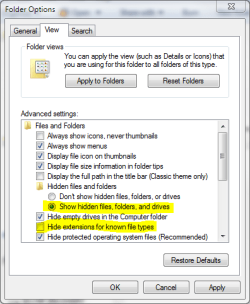
- Open Folder Options, choose Show hidden files, folders and drives. Uncheck Hide extensions for known file types
- Goto C:\Users\Your_Username\AppData\Local\Microsoft\Windows Virtual PC\Virtual Machines
- Copy Windows XP Mode.vhd and Windows XP Mode.vmc files
- Paste files to the same folder. Windows adds word Copy to both filenames, so now you have two new files: Windows XP Mode - Copy.vhd and Windows XP Mode - Copy.vmc
- Open Windows XP Mode - Copy.vmc with Notepad. It is a xml-file, so you can edit it normally with Notepad
- Find the following string containing virtual drives name: <drive_type type="integer">1</drive_type>

- Under the <drive_type...> change the vhd-file name to Windows XP Mode - Copy.vhd both in <absolute type="string"> and <relative type="string">
- Find the following place under <virtual_network> containing MAC-adress for Virtual XP's ethernet adapter: <id type="bytes">
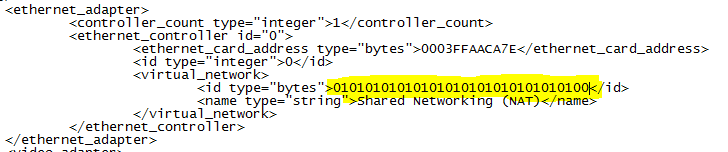
- To allow two copies of Virtual XP to connect to network simultaneously , we have to change the MAC-adress of the ethernet adapter to avoid MAC-adress conflict. Adress is given in hex, 0-9 and A-E. It is enough to change one bit. In this example we have changed the last bit from 1 to 0
- Save and close the file
- Go to C:\Users\Your_Username\Virtual Machines , copy Windows XP Mode.vmcx and paste it to same folder
- Open the file Windows XP Mode - Copy.vmcx with Notepad
- Change the file names to Windows XP Mode - Copy.vhd in <primary_disk1 type="string"> and to Windows XP Mode - Copy.vmc in <vmc_path type="string">

- Save and close the file
- Open Folder Options and choose Don't show hidden files, folders or drives. Check Hide extensions for known file types and click OK.
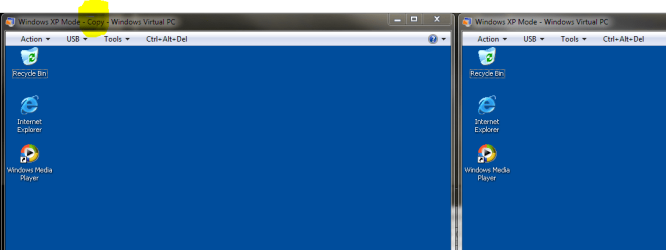
Have fun,
Kari
EDIT: Thanks to Brink for visual appearance.
Related Tutorials
- How to Install and Setup Virtual Windows XP Mode in Windows 7
- How to Enable the Built-in Administrator Account in Windows XP Mode
- How to Create a Virtual Machine in Windows Virtual PC
- How to Create Differencing Disks in Windows Virtual PC
- How to Delete a Virtual Machine Created with Windows Virtual PC
- How to Change Virtual Machine Settings in Windows Virtual PC
- How to Add Limited User Accounts to Windows Virtual PC XP Mode
- How to Boot from a CD or DVD in a Windows Virtual PC
- How to Install, Enable, and Disable Windows Virtual PC Integration Features
- How to Select Host Devices to Share with Virtual Machines in Windows Virtual PC
Last edited:



 , but it's still a mystery to me why it acts differently for me than it does for you.


