Windows 7 Forums Search
Welcome to Windows 7 Forums. Our forum is dedicated to helping you find solutions with any problems, errors or issues you are experiencing with Windows 7. The Windows 7 forum also covers news and updates and has an extensive Windows 7 tutorial section that covers a wide range of tips and tricks.


Windows 7 - NEW Context Menu - Edit for Desktop


08-23-2009   #9
kintomaniac


windows 7 Ultimate 32bit


NEW Context Menu - Edit for Desktop

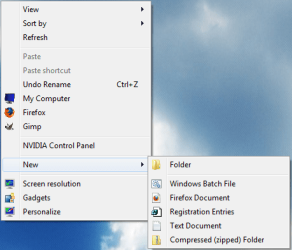
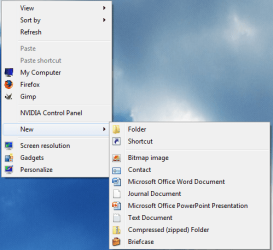
How to Edit the Windows 7 Desktop "NEW" Context Menu

This tutorial shows you how to do this

BEFORE Click here to read the entire tutorial


Last edited by Brink; 05-26-2011 at 01:31 PM..
My System SpecsSystem Spec
10-11-2009   #10
Brink


Windows 7 Ultimate x64 SP1


In Libraries, that is the only option you have. Right click on the desktop instead to see all of them.

In your root folders (ex: C: ), you will also only have New - Folder available.

My System SpecsSystem Spec
10-12-2009   #11
Barefoot


Windows 7 Professional 64-bit


Learned something new. I thought anywhere in explorer brought up the same menu. Much appreciated.
My System SpecsSystem Spec
10-12-2009   #12
Brink


Windows 7 Ultimate x64 SP1


You're welcome Barefoot.
My System SpecsSystem Spec
10-23-2009   #13
green98ls


Windows 7 Pro 64-bit


not sure if this is the right place to post, but I was reading on Tech Spot, and they linked to a program that will let you customize the context menu.

Here's the link to the article

Context Menu Editor
My System SpecsSystem Spec
.


11-26-2009   #14
nabilalk


Win 7 Professional 32-bit


Custom remove items from context menu

I tried to remove Microsoft Access, Publisher, Excel, as well as Adobe Acrobat PDF, and LiveCycle using the follow commands, but had no luck.

Code:
Windows Registry Editor Version 5.00

[-HKEY_CLASSES_ROOT\.accdb\Access.Database.12\ShellNew]

[-HKEY_CLASSES_ROOT\.pub\Publisher.Document.12\ShellNew]

[-HKEY_CLASSES_ROOT\.xlsx\Excel.Worksheet.12\ShellNew]

[-HKEY_CLASSES_ROOT\.xdp\LiveCyle.Document.12\ShellNew]

[-HKEY_CLASSES_ROOT\.pdf\Acrobat.Document.12\ShellNew]
Do I have the wrong name after the extension for some of these entries? Thanks for the help!
Attached Thumbnails
NEW Context Menu - Edit for Desktop-desktop-context-items-delete.jpg  
My System SpecsSystem Spec
11-27-2009   #15
sergiogarcia9


Have been looking for this for a while Thanks
My System SpecsSystem Spec
05-18-2010   #16
CWBillow


Windows 7 b7000


I tried the reg entry 3-4 times to add an item to the "New" sub-menu. It accepts the entry, but the item doesn't show up. I even tried it manually, but the same result.

I copied and pasted the entry here, changing only the exctension (frompng to dbx).

What the heck is goign wrong here? I tried it with all my add-ons disabled. Nada.

What the heck?

Regards,
Chuck Billow
My System SpecsSystem Spec
06-18-2010   #17
Beatnik


Windows 7 Home Premium X64


Is their any way to do this without registry files. So i can choose what i want to remove as some of the new shortcuts i have currently they are only from WinRaR and Open Office and i would like to not remove all the entry's from Open Office but some.

I am wondering if their is an app for this? I dont know how it works with windows 7 in Windows XP it was simple the new menu just linked to a folder with shortcuts that could be added or removed. Right now i dont believe it is similar since the registry is involved.

So any help is appreciated I read about how you can use ShellEX View to do this although i dont know how. that is if it even does what i thought it could do? What is this APP specifically made for?

Sorry for bringing up an old post but i thought it would be better than making a new one although if i get no replys i may have too, I just dont want to clutter up the forum.
Thanks in advance!
My System SpecsSystem Spec
06-19-2010   #18
kintomaniac


windows 7 Ultimate 32bit


i hav an exam on monday. after that i'll make an app for that
My System SpecsSystem Spec
09-22-2010   #19
laffen86


Windows 7 Ultimate 64 bit


.java filetype wont work

Hi.

I am new to registry editing, and having some trouble getting this to work with some filetypes. I have been at it for a couple of hours now, and I am about to give up.This is what I would like to do:

As I recently have started java programming I would like to have the option to right click, and choose new java document.

I have sucsessfully added other filetypes such as HTML, XML and REG files to the "new" context menu. The ".JAVA" file type however, will not show up.

I have used this registry entry:
Windows Registry Editor Version 5.00

[HKEY_CLASSES_ROOT\.java\ShellNew]
"NullFile"=""

It shows up correctly when I look for it in Regedit, and also when I look in this program: ShellNewHandler (ShellNewHandler | Download ShellNewHandler software for free at SourceForge.net). I also noticed in this program(see jpg attachment) that .BMP and .TRC filetypes should be visible in the new context menu - but they are not. There is also no description to any of the three file types (.JAVA,.BMP and .TRC) - could this be the problem? If so, how can I add a file type description?

I also read on some forum that it may be because the file type has no associated class(?) but there was no solution, and I do not remember where I read it. I also have tried setting Notepad to be the default editor, but it does not seem to help...

Does anyone have any idea that can help? I am getting pretty frustrated not getting this to work..


I would appreciate any help
Attached Thumbnails
NEW Context Menu - Edit for Desktop-2010-09-22.png   NEW Context Menu - Edit for Desktop-2010-09-22_2.png  
My System SpecsSystem Spec
Comment

NEW Context Menu - Edit for Desktop problems?


Tutorial Tools


Similar Threads for: NEW Context Menu - Edit for Desktop
Windows 7 Tutorial Category
Can I edit the Context Menu? Customization
Edit folder context menu? Customization
Can't fully edit context menu Customization
How to edit context menu items order? Customization
Easy tool to edit context menu? Customization


All times are GMT -5. The time now is 12:23 AM.


Windows 7 Forums is an independent web site and has not been authorized,
sponsored, or otherwise approved by Microsoft Corporation.
"Windows 7" and related materials are trademarks of Microsoft Corp.
© Designer Media Ltd
  

1 2 3 4 5 6 7 8 9 10 11 12 13 14 15 16 17 18 19 20 21 22 23 24 25 26 27 28 29 30