
Windows 7 Forums


Windows 7: Hibernate - Change Size of hiberfil.sys File


Hibernate - Change Size of hiberfil.sys File

How to Change the Size of the hiberfil.sys File in Windows
Published 18 Mar 2012
Published by

Featured Tutorial

User Profile - Customize During Installation

How to Customize Default User Profile in Audit Mode

Clean Reinstall - Factory OEM Windows 7

How to Clean Reinstall a Factory OEM Windows 7

Peppermint3 - Create Live CD/DVD/USB To Use For Emergency Backup

How to Perform an Emergency Data Backup When Windows 7 Will Not Boot

Clean Up Factory Bloatware


User Profiles - Create and Move During Windows 7 Installation

How to Create User Accounts on another Partition or Disk During Windows 7 Installation

Search - Find More with Filters and Operators

How to Use Windows Search Filters and Operators to get better Search Results in Windows 7
How to Change the Size of the hiberfil.sys File in Windows

information   Information
By default, the size of the hiberfil.sys file is 75% of the total amount of installed RAM (memory) when hibernate is enabled in Vista, Windows 7, and Windows 8.

This tutorial will show you how to change the size of the hiberfil.sys file to what percentage you want it to be.

You must be logged in as an administrator to be able to do the steps in this tutoria.

Note   Note
You can look at the hidden protected OS C:\hiberfil.sys file to see how large it currently is.

1 GB = 1024 MB or 1,048,576 KB or 10,73,741,824 Bytes

1 MB = 1024 KB

1 KB - 1024 Bytes

Hibernate - Change Size of hiberfil.sys File-cmd-1.jpg

warning   Warning
While this can be used to reduce the size of the hiberfil.sys file to save HDD space when you have hibernate enabled, I would only recommend to increase the size to be 100% instead of the default 75% to help make sure that everything in memory is saved when you hibernate.


Here's How:

1. Open a elevated command prompt.

2. In the elevated command prompt type the command below with the percentage (50-100%) you want to resize the hiberfil.sys file to be, and press Enter. (see screenshot below)
NOTE: Substitute percentage in the command with 50% to 100%.
powercfg -h -size percentage


For example: If I wanted to resize hiberfil.sys to be 100%, I would type either of the commands below exactly.
powercfg -h -size 100%

OR

powercfg -h -size 100
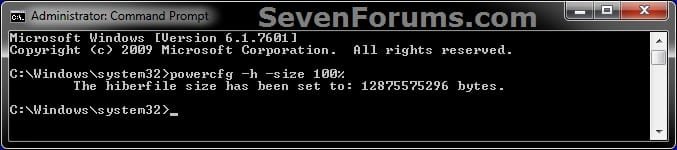
Hibernate - Change Size of hiberfil.sys File-cmd-2.jpg
3. When finished, close the elevated command prompt.


That's it,
Shawn


Need more help? Try searching our extensive help and support site.
Loading
Comment

 Hibernate - Change Size of hiberfil.sys File problems?


Tutorial Tools


Similar help and support threads for: Hibernate - Change Size of hiberfil.sys File
Windows 7 Tutorial Category
Solved Hibernate (hyberfil.sys) file size Performance & Maintenance
Change File Size Calculations General Discussion
how do i change max file size? Music, Pictures & Video
Hiberfil.sys size Performance & Maintenance
How to change file dialog box size? Customization


All times are GMT -5. The time now is 10:07 AM.


Seven Forums Android App Seven Forums IOS App Follow us on Facebook

Windows 7 Forums is an independent web site and has not been authorized,
sponsored, or otherwise approved by Microsoft Corporation.
"Windows 7" and related materials are trademarks of Microsoft Corp.
© Designer Media Ltd
  

1 2 3 4 5 6 7 8 9 10 11 12 13 14 15 16 17 18 19 20 21 22 23 24 25 26 27 28 29 30 31 32