|
Welcome to Windows 7 Forums. Our forum is dedicated to helping you find solutions with any problems, errors or issues you are experiencing with Windows 7. The Windows 7 forum also covers news and updates and has an extensive Windows 7 tutorial section that covers a wide range of tips and tricks.
Windows 7 - Default Operating System - Change Default Boot OS Default Operating System - Change Default Boot OS How to Change the Default Operating System to Start in Windows 7 and Vista
Published by Brink
01-17-2009
| Default Operating System - Change Default Boot OS How to Change the Default Operating System to Start in Windows 7 and Vista  Information If you dual boot with one or more operating systems installed other than Windows 7 or Vista, then this will show you how to change the default operating system to start in the Windows Boot Manager.
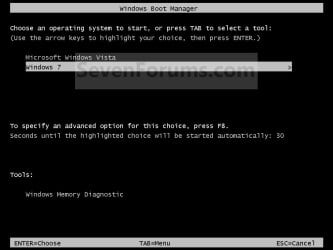
You must be logged in as an administrator to be able to do the steps in this tutorial. EXAMPLE: Windows Boot Manager NOTE: This is the boot screen where you select what operating system that you would like to start. By default, you have 30 seconds to choose another operating system before the default operating system will start automatically. OPTION ONE
Through Startup and Recovery
1. Open the Start Menu.A) Right click on the Computer button on the dark right side and click on Properties.
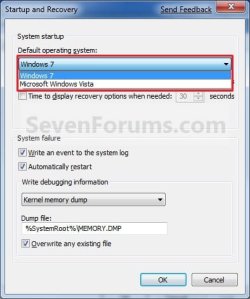
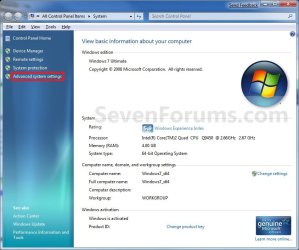
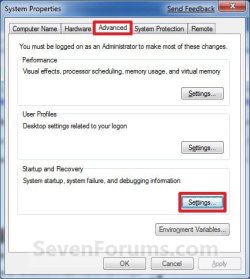
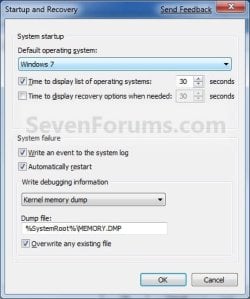
B) Go to step 3. OR 2. Open the Control Panel (icons view) and click on the System icon. 3. In the left blue pane, click on the Advanced system settings link. (See screenshot below) 4. Close the System window. (See screenshot above) 5. Under the Advanced tab, click on the Settings button under Startup and Recovery. (See screenshot below) 6. Under System Startup, select a operating system from the drop down menu to be the new default operating system, then click on OK. (See screenshots below) 7. Click on OK. (See screenshot below step 5) OPTION TWO
Through System Configuration
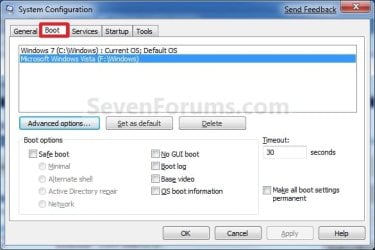
1. Open the Start Menu, type msconfig in the search line, and press Enter. 2. Click on the Boot tab. (see screenshot below) 3. Select a listed operating system that is not already set as the Default OS, and click on the Set as default button to make the selected OS the new default instead. (see screenshot above) 4. Click on OK. (see screenshot below step 2) 5. Click on the Restart button. (see screenshot below) WARNING: This will restart the computer immediately. Make sure you save and close anything open that you do not want to lose first.
OPTION THREE
Using the bcdedit Command
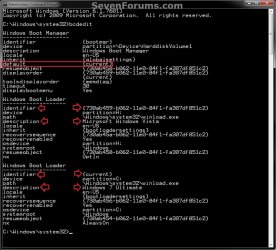
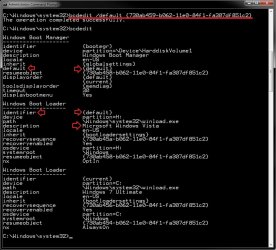
1. Open a elevated command prompt or a command prompt at boot. NOTE: If you have a RAID setup or a PCI-E SSD as your boot drive and want to open a command prompt at boot, then you may need to use the Load Drivers option in the System Recovery Options screen to load it's drivers first before Windows will see the boot drive to be able to use the bcdedit command on it. 2. In the elevated command prompt, type bcdedit and press enter. (see screenshot below) NOTE: This will let you see what OS is the default to start under the Windows Boot Manager section, and to see the description (name) and identifier of the operating system(s) listed in Windows Boot Manager under the Windows Boot Loader section(s). For example, Microsoft Windows Vista (description) as {730ab458-b062-11e0-84f1-fa307df851c2} (identifier). 3. In the elevated command prompt, type the command below for a listed OS that you want to be the default OS to start, and press Enter. (see screenshot below)bcdedit /default {identifier} For example: If I wanted to change the default OS to start from Windows 7 Ultimate (description) as {current} (identifier) to Microsoft Windows Vista (description) as {730ab458-b062-11e0-84f1-fa307df851c2} (identifier), I would type this below and press Enter. bcdedit /default {730ab459-b062-11e0-84f1-fa307df851c2}  4. In the elevated command prompt, type bcdedit and press enter. (see screenshot below step 3) NOTE: This will let you see and verify the new default OS identifier to start under the Windows Boot Manager section. For example, {default} identifier for Microsoft Windows Vista (description) now. 5. When finished, close the elevated command prompt. OPTION FOUR
Using the "EasyBCD" Program
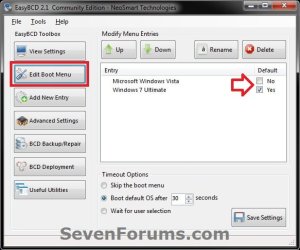
1. If you have not already, download and install a free version of the EasyBCD program, then run it. NOTE: The free version download is at the bottom under "Download free for limited, non-commercial use". Registration is not required to download. 2. Click on the Edit Boot Menu button, then check the box for the OS that you want to be the default OS to start in the Windows Boot Manager. (see screenshot below) 3. When finished, close EasyBCD. That's it,
Shawn |  Published by | | Administrator Join Date: Oct 2008 Location: Texas Posts: 37,303 | |
 Tutorial Tools | | | | | | | | | |
06-12-2009
|
#1 | | |
Is there a way for when ya dual Booting the same OS to change the name of one so ya can tell em apart,like for instance mine come's up with
Windows 7
Windows 7
one is 32 and the other is 64 is there a way i can add say (32)and(64)to the appropriate ones?
| My System Specs | | System Manufacturer/Model Number Handy manny OS Windows 7 (x64) CPU i7 870 Motherboard Evga P55 FTW Memory G.Skill Trident (F3-17066CL9D-4GBTDS 2x2GB) - 2133MHz Graphics Card Evga GTX 460 EE 1GB Sound Card On Board Monitor(s) Displays Samsung P2350 Screen Resolution 1920x1080 Keyboard Logitech MX5500 Revolution Mouse Logitech MX5500 Revolution PSU Corsair 620w Case Corsair 800D Cooling Corsair H50 Hard Drives 1 x 64GB G-Skill Falcon SSD
1 x 60GB Corsair Force Series SSD
1 x 1TB WD Caviar Black
2 x 640GB WD Caviar Black
1 x 1TB Samsung Spinpoint F3 Internet Speed http://www.speedtest.net/result/939062765.png Other Info http://www.sevenforums.com/overclocking-case-mods/104136-show-us-your-rig-2-a-4.html#post937213 |
06-12-2009
|
#2 | | Windows 7 Ultimate x64 SP1 |
| My System Specs | | System Manufacturer/Model Number Self built custom OS Windows 7 Ultimate x64 SP1 CPU Intel i7-980X 3.3 Ghz (3.48 Ghz OC'd) Motherboard ASUS P6X58D Premium Memory 12 GB (2GBx6) DDR3 PC3-16000 2000 MHz Kingston HyperX Graphics Card Sapphire HD5870 Eyefinity 6 2GB Sound Card Realtek HD Audio ALC889 Integrated Chip Monitor(s) Displays 3x 27" Asus VE278Q Screen Resolution 1920x1080 Keyboard Logitech Cordless Desktop MX 5500 Revolution Mouse Logitech Cordless Desktop MX 5500 Revolution PSU OCZ Series Gold OCZZ1000M 1000W Case Corsair Obsidian 800D Cooling Thermalright Ultra 120 Extreme Copper CPU heat sink w/120 MM Hard Drives 160GB OCZ RevoDrive X2
** 2 x 1TB Samsung HDD HD154UI SATA Internet Speed 50 Mb/s Download and 2 Mb/s Upload Other Info Microsoft LifeCam Cinema
** Lite-On iHBS212 12x BD Writer
** Samsung CLX-3175FW Printer
** Netgear WNDR3800 Router
** Motorola SBG6580 Cable Modem
** 2x APC Back-UPS XS 1500 |
06-12-2009
|
#3 | | |

Quote: Originally Posted by Brink Thanks again mate | My System Specs | | System Manufacturer/Model Number Handy manny OS Windows 7 (x64) CPU i7 870 Motherboard Evga P55 FTW Memory G.Skill Trident (F3-17066CL9D-4GBTDS 2x2GB) - 2133MHz Graphics Card Evga GTX 460 EE 1GB Sound Card On Board Monitor(s) Displays Samsung P2350 Screen Resolution 1920x1080 Keyboard Logitech MX5500 Revolution Mouse Logitech MX5500 Revolution PSU Corsair 620w Case Corsair 800D Cooling Corsair H50 Hard Drives 1 x 64GB G-Skill Falcon SSD
1 x 60GB Corsair Force Series SSD
1 x 1TB WD Caviar Black
2 x 640GB WD Caviar Black
1 x 1TB Samsung Spinpoint F3 Internet Speed http://www.speedtest.net/result/939062765.png Other Info http://www.sevenforums.com/overclocking-case-mods/104136-show-us-your-rig-2-a-4.html#post937213 |
06-12-2009
|
#4 | | Windows 7 Ultimate x64 SP1 |
You're welcome. | My System Specs | | System Manufacturer/Model Number Self built custom OS Windows 7 Ultimate x64 SP1 CPU Intel i7-980X 3.3 Ghz (3.48 Ghz OC'd) Motherboard ASUS P6X58D Premium Memory 12 GB (2GBx6) DDR3 PC3-16000 2000 MHz Kingston HyperX Graphics Card Sapphire HD5870 Eyefinity 6 2GB Sound Card Realtek HD Audio ALC889 Integrated Chip Monitor(s) Displays 3x 27" Asus VE278Q Screen Resolution 1920x1080 Keyboard Logitech Cordless Desktop MX 5500 Revolution Mouse Logitech Cordless Desktop MX 5500 Revolution PSU OCZ Series Gold OCZZ1000M 1000W Case Corsair Obsidian 800D Cooling Thermalright Ultra 120 Extreme Copper CPU heat sink w/120 MM Hard Drives 160GB OCZ RevoDrive X2
** 2 x 1TB Samsung HDD HD154UI SATA Internet Speed 50 Mb/s Download and 2 Mb/s Upload Other Info Microsoft LifeCam Cinema
** Lite-On iHBS212 12x BD Writer
** Samsung CLX-3175FW Printer
** Netgear WNDR3800 Router
** Motorola SBG6580 Cable Modem
** 2x APC Back-UPS XS 1500 |
11-02-2009
|
#5 | | Windows 7 Home Premium [x64] |
Saved my life! Great tutorial! Thanks a lot!!! | My System Specs | | System Manufacturer/Model Number Multirama PC Expert [Bulgaria] OS Windows 7 Home Premium [x64] CPU Intel Core 2 Quad CPU Q8200 @ 2.33 GHz Motherboard GIGABYTE GA-G31M-S2C Memory 4094 MB Graphics Card GIGABYTE Radeon HD 6970 (2 GB VRAM) Sound Card Realtek ALC883 @ Intel 82801GB ICH7 - High Definition Audio Monitor(s) Displays Samsung SyncMaster BX2235 [21.5" LCD with LED Backlight] Screen Resolution 1920x1080 Keyboard A4 Tech X7 G800 (Gaming Keyboard) Mouse Razer Lachesis (4000 DPI, Blue Version) PSU Cooler Master GX750 - 750W Case Multirama (black) Cooling Two Aditional Cooler Master Fans Hard Drives Hitachi HDT721075SLA360 - 750 GB Internet Speed Spectrum Net "Start" [15 Mbps] Other Info Wacom Bamboo Pen & Touch S (Graphics Design Tablet) |
11-02-2009
|
#6 | | Windows 7 Ultimate x64 SP1 |
You're most welcome Stefan. | My System Specs | | System Manufacturer/Model Number Self built custom OS Windows 7 Ultimate x64 SP1 CPU Intel i7-980X 3.3 Ghz (3.48 Ghz OC'd) Motherboard ASUS P6X58D Premium Memory 12 GB (2GBx6) DDR3 PC3-16000 2000 MHz Kingston HyperX Graphics Card Sapphire HD5870 Eyefinity 6 2GB Sound Card Realtek HD Audio ALC889 Integrated Chip Monitor(s) Displays 3x 27" Asus VE278Q Screen Resolution 1920x1080 Keyboard Logitech Cordless Desktop MX 5500 Revolution Mouse Logitech Cordless Desktop MX 5500 Revolution PSU OCZ Series Gold OCZZ1000M 1000W Case Corsair Obsidian 800D Cooling Thermalright Ultra 120 Extreme Copper CPU heat sink w/120 MM Hard Drives 160GB OCZ RevoDrive X2
** 2 x 1TB Samsung HDD HD154UI SATA Internet Speed 50 Mb/s Download and 2 Mb/s Upload Other Info Microsoft LifeCam Cinema
** Lite-On iHBS212 12x BD Writer
** Samsung CLX-3175FW Printer
** Netgear WNDR3800 Router
** Motorola SBG6580 Cable Modem
** 2x APC Back-UPS XS 1500 |
12-18-2009
|
#7 | | |
Lost Bootmanager I installed Windows 7 on a SATA drive within an XP system, it made a nice boot choice menu. I had some issues with an XP install on C:, and reformatted... lost that nice boot menu, now I don't have access to that independent G: drive or anything windows 7 other than to see the files. It's not considered a bootable drive in Bios as it needs the sata drivers to be loaded first and short of re-installing is there any help? A simple boot loader program pointing to the drive doesn't seem to work.. but perhaps I'm not pointing correctly? A Win 7 repair tells me boot manager is missing bu there is no repair. Would EasyBCD for XP do the trick? | My System Specs | | System Manufacturer/Model Number no name OS Win7 CPU Barton Motherboard Asus A7N8X Deluxe Memory 1.5 giggles Graphics Card Sahphire 3650 AGP 512K Sound Card Nvidia on the MB Monitor(s) Displays Sam24 & LG 37 PSU Enermax Case LiLin Cooling air conditioning Hard Drives 8 or so at last count, some SATA |
12-18-2009
|
#8 | | Windows 7 Ultimate x64 SP1 |
Helllo Ah802,
Yes, you should be able to use EasyBCD to repair the boot file by adding Windows 7 to it. | My System Specs | | System Manufacturer/Model Number Self built custom OS Windows 7 Ultimate x64 SP1 CPU Intel i7-980X 3.3 Ghz (3.48 Ghz OC'd) Motherboard ASUS P6X58D Premium Memory 12 GB (2GBx6) DDR3 PC3-16000 2000 MHz Kingston HyperX Graphics Card Sapphire HD5870 Eyefinity 6 2GB Sound Card Realtek HD Audio ALC889 Integrated Chip Monitor(s) Displays 3x 27" Asus VE278Q Screen Resolution 1920x1080 Keyboard Logitech Cordless Desktop MX 5500 Revolution Mouse Logitech Cordless Desktop MX 5500 Revolution PSU OCZ Series Gold OCZZ1000M 1000W Case Corsair Obsidian 800D Cooling Thermalright Ultra 120 Extreme Copper CPU heat sink w/120 MM Hard Drives 160GB OCZ RevoDrive X2
** 2 x 1TB Samsung HDD HD154UI SATA Internet Speed 50 Mb/s Download and 2 Mb/s Upload Other Info Microsoft LifeCam Cinema
** Lite-On iHBS212 12x BD Writer
** Samsung CLX-3175FW Printer
** Netgear WNDR3800 Router
** Motorola SBG6580 Cable Modem
** 2x APC Back-UPS XS 1500 |
12-18-2009
|
#9 | | |
Looks like Vista is what it wants.
There are a total of 2 entries listed in the Vista Bootloader.
Bootloader Timeout: 5 seconds.
Default OS: Windows XP
Entry #1
Name: Windows XP
BCD ID: {default}
Drive: C:\
Bootloader Path: \NTLDR
Entry #2
Name: Windows 7
BCD ID: {b62341f0-ec0d-11de-933a-0026540b8e54}
Drive: F:\
Bootloader Path: \Windows\system32\winload.exe
Windows Directory: \Windows but in the root of c: I find
[boot loader]
timeout=30
default=multi(0)disk(0)rdisk(0)partition(1)\WINDOWS
[operating systems]
multi(0)disk(0)rdisk(0)partition(1)\WINDOWS="Microsoft Windows XP Professional" /noexecute=optin /fastdetect and no boot loader on boot., so can I simply add this with notepad?
multi(0)disk(2)rdisk(2)partition(1)\WINDOWS="Windows 7" /noexecute=optin /fastdetect | My System Specs | | System Manufacturer/Model Number no name OS Win7 CPU Barton Motherboard Asus A7N8X Deluxe Memory 1.5 giggles Graphics Card Sahphire 3650 AGP 512K Sound Card Nvidia on the MB Monitor(s) Displays Sam24 & LG 37 PSU Enermax Case LiLin Cooling air conditioning Hard Drives 8 or so at last count, some SATA Default Operating System - Change Default Boot OS problems? All times are GMT -5. The time now is 02:23 AM. |  |