Windows Boot Manager - Delete a Listed Operating System

How to Delete an Operating System Listed in Windows Boot Manager


   Information
This will show you how to delete a non-default operating system in Vista, Windows 7, or Windows 8 from the list in Windows Boot Manager or Startup Options (Windows 8) that allows you to select a OS to run at startup.

You must be logged in as an administrator to be able to do the steps in this tutorial.


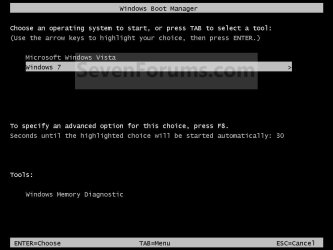
EXAMPLE: Windows Boot Manager or "Startup Options" (Windows 8)
NOTE: This is the boot screen where you select what operating system that you would like to start. By default, you have 30 seconds to choose another operating system before the default operating system will start automatically.
Boot_Manager.jpg Startup_Options.jpg


OPTION ONE

Through System Configuration


1. Press the Windows + R keys to open the Run dialog, type msconfig, and press Enter.

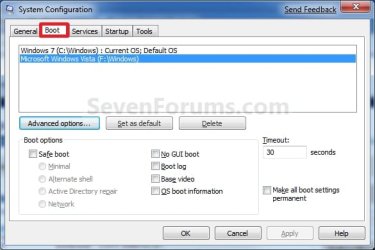
2. Click/tap on the Boot tab. (see screenshot below)
Boot.jpg
3. Select the operating system you want to delete that is not set as the Default OS, and click/tap on Delete. (see screenshot above)
NOTE: If the OS you want to delete from the list is the Default OS, then you will need to change the default operating system to another listed OS first.

4. Check the Make all boot settings permanent box, and click/tap on OK. (see screenshot below step 2)

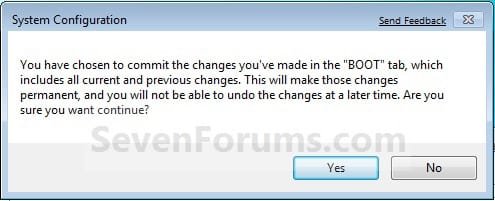
5. Click/tap on Yes to confirm. (see screenshot below)
Confirm.jpg
6. Click/tap on the Restart button. (see screenshot below)
WARNING: This will restart the computer immediately. Make sure you save and close anything open that you do not want to lose first.
Restart.jpg


OPTION TWO

Using the bcdedit Command


1. Open an elevated command prompt or a command prompt at boot.
NOTE: If you have a RAID setup or a PCI-E SSD as your boot drive and want to open a command prompt at boot, then you may need to use the Load Drivers option in the System Recovery Options screen to load it's drivers first before Windows will see the boot drive to be able to use the bcdedit command on it.

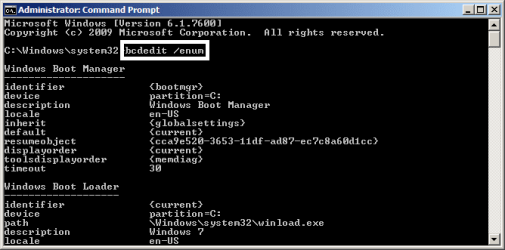
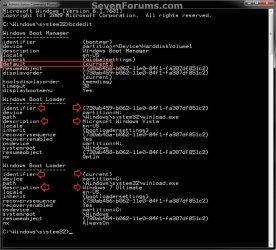
2. In the elevated command prompt, type bcdedit and press enter. (see screenshot below)
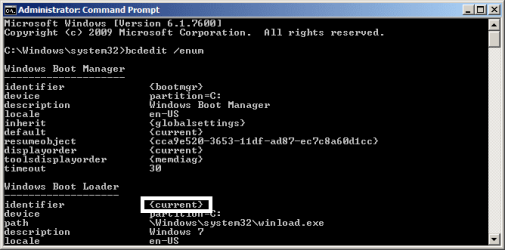
NOTE: This will let you see what OS is the default to start under the Windows Boot Manager section, and to see the description (name) and identifier of the operating system(s) listed in Windows Boot Manager are under the Windows Boot Loader section(s). For example, Microsoft Windows Vista (description) as {730ab458-b062-11e0-84f1-fa307df851c2} (identifier).
CMD-1.jpg
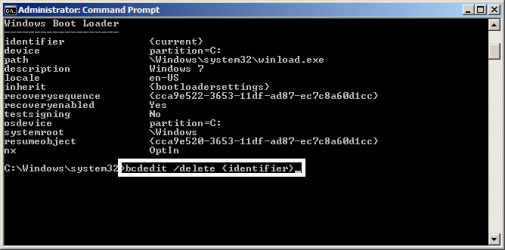
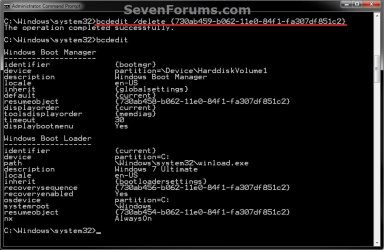
3. In the elevated command prompt, type the command below for a listed OS that you want to delete, and press Enter. (see screenshot below)
NOTE: If the OS you want to delete from the list is the Default OS, then you will need to change the default operating system to another listed OS first.
bcdedit /delete {identifier}

For example: If I wanted to delete Microsoft Windows Vista (description) as {730ab458-b062-11e0-84f1-fa307df851c2} (identifier), I would type this below and press Enter.

bcdedit /delete {730ab459-b062-11e0-84f1-fa307df851c2}
CMD-2.jpg
4. In the elevated command prompt, type bcdedit and press enter. (see screenshot below step 3)
NOTE: This will let you see and verify that the OS has been deleted.

5. When finished, close the elevated command prompt.


OPTION THREE

Using the "EasyBCD" Program


   Note
Note provided by Ray.

If you use EasyBCD in Windows 8, EasyBCD will use the Windows 7 Boot Loader.

If you would like to use the Windows 8 Boot Loader, refresh Windows 8.

After doing a refresh, you will be using the Windows 8 Boot Loader. Refresh will also delete the EasyBCD program.


1. Download and install a free version of the EasyBCD program, then run it.
NOTE: You can click on the "Download" button at the bottom to download the free version. Registration is not required to download.

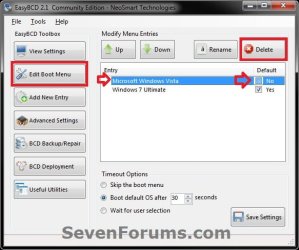
2. Click on the Edit Boot Menu button, select the OS (ex: Microsoft Windows Vista) that you want to delete, and click on the Delete button. (see screenshot below)
NOTE: If the OS you want to delete from the list is the Default OS, then you will need to change the default operating system to another listed OS first.
EasyBCD-1.jpg
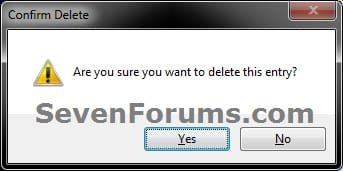
3. Click/tap on Yes to confirm deletion. (see screenshot below)
EasyBCD-2.jpg
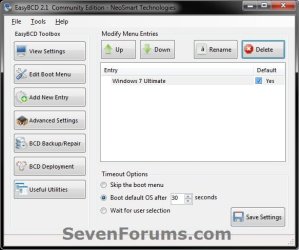
4. The OS (ex: Microsoft Windows Vista) is now deleted. (see screenshot below)
EasyBCD-3.jpg
5. When finished, close EasyBCD.


That's it,
Shawn


Last edited:
I'm really confused. I dual boot XP and 7 (installed 7 first, using your guide) and was following your directions on deleting it. Unfortunately, for some reason, only Windows 7 is listed where there should be two OSs. Any ideas?

EDIT: lol, i just realized 2 people above just had the same issue. Never mind. XD But I still have one question: Afterwards, how do I delete everything on the hard drive? Do I just click "Format..." I just want to clear it off now.

EDIT 2: Never mind, lol, I got it all down, just disregard this post. Thanks for your help. XD
 
Last edited:

My Computer

OS
Windows 7 Home Premium Edition, 64-bit
CPU
Intel Core i5-2500k, 2nd generation
Motherboard
GIGABYTE GA-Z68-UD3H-B3
Memory
8 GB Corsair
Graphics Card(s)
EVGA NVIDIA GeForce GTX 570
Monitor(s) Displays
LG Flatron Wide
Screen Resolution
1440x900
Hard Drives
1.5 TB Samsung HDD, 5200 RPM
PSU
Antec 620w
Case
BitFēnix Survivor
Cooling
BitFēnix Spectre (2)
Keyboard
Logitech K-270
Mouse
Microsoft Optical Wheel Mouse USB
Internet Speed
20 MB/s download, 5 MB/s upload
Hello Rct2guy,

I'm happy to hear that you got it sorted. :)
 

My Computer

Computer type
PC/Desktop
Computer Manufacturer/Model Number
Self built custom
OS
64-bit Windows 11 Pro for Workstations
CPU
Intel i7-8700K OC'd to 5 GHz
Motherboard
ASUS ROG Maximus XI Formula Z390
Memory
64 GB (4x16GB) G.SKILL TridentZ RGB DDR4 3600 MHz
Graphics Card(s)
ASUS ROG-STRIX-GTX1080TI-O11G-GAMING
Sound Card
Integrated
Monitor(s) Displays
2 x Samsung Odyssey G7 27"
Screen Resolution
2560x1440
Hard Drives
1TB Samsung 990 PRO M.2,
4TB Samsung 990 PRO PRO M.2,
TerraMaster F8 SSD Plus NAS
PSU
Seasonic Prime Titanium 850W
Case
Thermaltake Core P3
Cooling
Corsair Hydro H115i
Keyboard
Logitech wireless K800
Mouse
Logitech MX Master 4
Internet Speed
2 Gb/s Download and 100 Mb/s Upload
Antivirus
Malwarebyte Anti-Malware Premium
Browser
Google Chrome
Other Info
Logitech Z625 speaker system,
Logitech BRIO 4K Pro webcam,
HP Color LaserJet Pro MFP M477fdn,
APC SMART-UPS RT 1000 XL - SURT1000XLI,
Galaxy S23 Plus phone
Hey, ive followed the guide and i have a problem. When i boot up my computer i can choose between Windows 7 and XP (As i want to.) But when i press ENTER on Windows XP i can suddenly choose from 3 Windows XP professional edition. I've checked msconfig and EasyBCD and none of them recognize those other 2 windows XP. So how do i remove them? // Thanks ~Niklas
 

My Computer

OS
Windows 7 / XP Dual-Boot
Hello Borgen, and welcome to Seven Forums.

You might need to check while started in both Windows 7 and XP to see which one these are listed in, then delete them.
 

My Computer

Computer type
PC/Desktop
Computer Manufacturer/Model Number
Self built custom
OS
64-bit Windows 11 Pro for Workstations
CPU
Intel i7-8700K OC'd to 5 GHz
Motherboard
ASUS ROG Maximus XI Formula Z390
Memory
64 GB (4x16GB) G.SKILL TridentZ RGB DDR4 3600 MHz
Graphics Card(s)
ASUS ROG-STRIX-GTX1080TI-O11G-GAMING
Sound Card
Integrated
Monitor(s) Displays
2 x Samsung Odyssey G7 27"
Screen Resolution
2560x1440
Hard Drives
1TB Samsung 990 PRO M.2,
4TB Samsung 990 PRO PRO M.2,
TerraMaster F8 SSD Plus NAS
PSU
Seasonic Prime Titanium 850W
Case
Thermaltake Core P3
Cooling
Corsair Hydro H115i
Keyboard
Logitech wireless K800
Mouse
Logitech MX Master 4
Internet Speed
2 Gb/s Download and 100 Mb/s Upload
Antivirus
Malwarebyte Anti-Malware Premium
Browser
Google Chrome
Other Info
Logitech Z625 speaker system,
Logitech BRIO 4K Pro webcam,
HP Color LaserJet Pro MFP M477fdn,
APC SMART-UPS RT 1000 XL - SURT1000XLI,
Galaxy S23 Plus phone
Just realised something. When im in Windows XP i can see them in MSCONFIG. But i dont know how to delete them, can't seem to find the delete button. And they're not showing in EasyBCD. Anyways thanks alot for helping out mate.
 
Last edited:

My Computer

OS
Windows 7 / XP Dual-Boot
Yes, either one should be able to allow you to view and remove them. I would try msconfig first though.
 

My Computer

Computer type
PC/Desktop
Computer Manufacturer/Model Number
Self built custom
OS
64-bit Windows 11 Pro for Workstations
CPU
Intel i7-8700K OC'd to 5 GHz
Motherboard
ASUS ROG Maximus XI Formula Z390
Memory
64 GB (4x16GB) G.SKILL TridentZ RGB DDR4 3600 MHz
Graphics Card(s)
ASUS ROG-STRIX-GTX1080TI-O11G-GAMING
Sound Card
Integrated
Monitor(s) Displays
2 x Samsung Odyssey G7 27"
Screen Resolution
2560x1440
Hard Drives
1TB Samsung 990 PRO M.2,
4TB Samsung 990 PRO PRO M.2,
TerraMaster F8 SSD Plus NAS
PSU
Seasonic Prime Titanium 850W
Case
Thermaltake Core P3
Cooling
Corsair Hydro H115i
Keyboard
Logitech wireless K800
Mouse
Logitech MX Master 4
Internet Speed
2 Gb/s Download and 100 Mb/s Upload
Antivirus
Malwarebyte Anti-Malware Premium
Browser
Google Chrome
Other Info
Logitech Z625 speaker system,
Logitech BRIO 4K Pro webcam,
HP Color LaserJet Pro MFP M477fdn,
APC SMART-UPS RT 1000 XL - SURT1000XLI,
Galaxy S23 Plus phone
I have W7 and xp installed in a dual boot system. Separate partitions, same physical drive. Works as it should.

I now want to uninstall xp.

When I try the procedure given here, xp does not appear in the list of OS in the boot tab, only 7. Perhaps this only works for 7 and vista.

What's the method for xp?
 

My Computer

Computer Manufacturer/Model Number
Built from components
OS
Windows 7 Home Premium X64 SP1
CPU
AMD phenom II X6 1090T @3750mhz
Motherboard
Asus M4A87D EVO nb and ht @2600mhz
Memory
2 x 4GB Corsair CMX8GX3M2A1600C9 1600mhz
Graphics Card(s)
Nvidia Quadro FX 1800
Sound Card
on board VIA Technologies
Monitor(s) Displays
primary Viewsonic VP2365wb IPS, secondary LG L1933TR
Screen Resolution
p 1920x1080 s 1280x1024 or 1920x1080 depending on sys
Hard Drives
5 drives totaling 6TB
PSU
Corsair 750
Case
Ultra Aluminus (modified)
Cooling
Coolmaster V6, several 120mm case fans
Keyboard
Microsoft Wireless Keyboard 3000 V2
Mouse
Microsoft Wireless Mouse 5000
Internet Speed
2 to 3 Mbps. wireless.
Hello Gregglee,

You could use the BCDEDIT command to delete the XP entry.

Hope this helps,
Shawn
 

My Computer

Computer type
PC/Desktop
Computer Manufacturer/Model Number
Self built custom
OS
64-bit Windows 11 Pro for Workstations
CPU
Intel i7-8700K OC'd to 5 GHz
Motherboard
ASUS ROG Maximus XI Formula Z390
Memory
64 GB (4x16GB) G.SKILL TridentZ RGB DDR4 3600 MHz
Graphics Card(s)
ASUS ROG-STRIX-GTX1080TI-O11G-GAMING
Sound Card
Integrated
Monitor(s) Displays
2 x Samsung Odyssey G7 27"
Screen Resolution
2560x1440
Hard Drives
1TB Samsung 990 PRO M.2,
4TB Samsung 990 PRO PRO M.2,
TerraMaster F8 SSD Plus NAS
PSU
Seasonic Prime Titanium 850W
Case
Thermaltake Core P3
Cooling
Corsair Hydro H115i
Keyboard
Logitech wireless K800
Mouse
Logitech MX Master 4
Internet Speed
2 Gb/s Download and 100 Mb/s Upload
Antivirus
Malwarebyte Anti-Malware Premium
Browser
Google Chrome
Other Info
Logitech Z625 speaker system,
Logitech BRIO 4K Pro webcam,
HP Color LaserJet Pro MFP M477fdn,
APC SMART-UPS RT 1000 XL - SURT1000XLI,
Galaxy S23 Plus phone
Problems

I have the problem of having to choose which operating system to boot at startup.

Windows 7
Windows 7 Loader XE

When I go to the boot tab in msconfig only Windows 7 is there. In this case how do I remove the second one from the boot menu?
 

My Computer

OS
windows 7
Hello Nate,

Yes, as long as the default is to the left in Disk Management (first OS installed), then you can delete and extend into the second OS partition.

Hope this helps,
Shawn
 

My Computer

Computer type
PC/Desktop
Computer Manufacturer/Model Number
Self built custom
OS
64-bit Windows 11 Pro for Workstations
CPU
Intel i7-8700K OC'd to 5 GHz
Motherboard
ASUS ROG Maximus XI Formula Z390
Memory
64 GB (4x16GB) G.SKILL TridentZ RGB DDR4 3600 MHz
Graphics Card(s)
ASUS ROG-STRIX-GTX1080TI-O11G-GAMING
Sound Card
Integrated
Monitor(s) Displays
2 x Samsung Odyssey G7 27"
Screen Resolution
2560x1440
Hard Drives
1TB Samsung 990 PRO M.2,
4TB Samsung 990 PRO PRO M.2,
TerraMaster F8 SSD Plus NAS
PSU
Seasonic Prime Titanium 850W
Case
Thermaltake Core P3
Cooling
Corsair Hydro H115i
Keyboard
Logitech wireless K800
Mouse
Logitech MX Master 4
Internet Speed
2 Gb/s Download and 100 Mb/s Upload
Antivirus
Malwarebyte Anti-Malware Premium
Browser
Google Chrome
Other Info
Logitech Z625 speaker system,
Logitech BRIO 4K Pro webcam,
HP Color LaserJet Pro MFP M477fdn,
APC SMART-UPS RT 1000 XL - SURT1000XLI,
Galaxy S23 Plus phone
thanks!

So should I do this before or after deleting the old partition?
 

My Computer

Computer Manufacturer/Model Number
Seanix Desktop PC
OS
Windows 7 Ultimate 32 bit
CPU
Intel Core 2 Duo CPU E4500 2.20 GHz
Memory
1.99 GB
Graphics Card(s)
Intel G33/G31 Express Chipset Family (256 MB)
Sound Card
Realtek ALC888/1200
Monitor(s) Displays
DELL
Screen Resolution
1280 X 1024
Hard Drives
320GB Internal
200GB External
Case
Seanix
Keyboard
Seanix USB Keyboard
Mouse
Seanix USB Keyboard
Internet Speed
Broadband
Other Info
Getting close to 3 years old.
Hello Lanthus,

It doesn't matter. You can do it before or after. :)
 

My Computer

Computer type
PC/Desktop
Computer Manufacturer/Model Number
Self built custom
OS
64-bit Windows 11 Pro for Workstations
CPU
Intel i7-8700K OC'd to 5 GHz
Motherboard
ASUS ROG Maximus XI Formula Z390
Memory
64 GB (4x16GB) G.SKILL TridentZ RGB DDR4 3600 MHz
Graphics Card(s)
ASUS ROG-STRIX-GTX1080TI-O11G-GAMING
Sound Card
Integrated
Monitor(s) Displays
2 x Samsung Odyssey G7 27"
Screen Resolution
2560x1440
Hard Drives
1TB Samsung 990 PRO M.2,
4TB Samsung 990 PRO PRO M.2,
TerraMaster F8 SSD Plus NAS
PSU
Seasonic Prime Titanium 850W
Case
Thermaltake Core P3
Cooling
Corsair Hydro H115i
Keyboard
Logitech wireless K800
Mouse
Logitech MX Master 4
Internet Speed
2 Gb/s Download and 100 Mb/s Upload
Antivirus
Malwarebyte Anti-Malware Premium
Browser
Google Chrome
Other Info
Logitech Z625 speaker system,
Logitech BRIO 4K Pro webcam,
HP Color LaserJet Pro MFP M477fdn,
APC SMART-UPS RT 1000 XL - SURT1000XLI,
Galaxy S23 Plus phone
Boot Options - Remove Manually

How to Remove a Boot Choice via Command Prompt

   Information
This tutorial will show you how to remove a boot choice when you cannot use a program such as EasyBCD. It's quite simply, but when changing major system settings a backup is always recommend.


   Warning
Please note that deleting the wrong boot menu can cause your computer to become unbootable. The only way to rectify this is via the original Windows DVD or recovery disk.


1. - Start an elevated command prompt:
Start > Search for "cmd" > Right click CMD.exe > Run as Administrator
bootmenu1.png


2. - Run this command:
bcdedit /enum
bootmenu2.png


3. - In the results from the last command, find the identifier for the boot option you wish to delete.
bootmenu3.png


4. - Replace {identifier} with that identifier in the following command:
bcdedit /delete {identifier}
bootmenu4.png

   Tip
If you wish to explore bcdedit more use this command:
bcdedit /?
 

My Computer

Computer Manufacturer/Model Number
Apple Macbook Pro (April 2009)
OS
W7 Ult. x64 | OS X
CPU
Intel Mobile Core 2 Duo 2.93Ghz [T9800 Penryn]
Motherboard
NVIDIA nForce 730i Rev. B1 [Mac-F2268EC8 (U2E1)]
Memory
4096MB Samsung DDR3 Dual Channel [PC3-8500F 1066Mhz]
Graphics Card(s)
NVIDIA GeForce 9600M GT 512MB [G96M Rev. C1]
Sound Card
SB X-Fi Surround 5.1 USB | Onboard Realtek (Disabled)
Monitor(s) Displays
Acer x223wbd 22" | Apple Anti-Glare 17" (Disabled)
Screen Resolution
{Current} 1440x900 {Acer} 1680x1050 {Apple} 1920x1200
Hard Drives
{Internal}
Seagate Momentus 320GB 2.5" 7200RPM [ST9320421AS]

{Externals}
LaCie 320GB USB 2.0 HDD [301284UR]
LaCie 750GB USB 2.0 FW400 eSATA HDD [301314U]
LaCie 1TB USB 2.0 HDD [301304UR]
PSU
Magsafe
Case
Aluminum/Unibody (MBP52)
Cooling
2 x 6000 RPM Fans
Keyboard
Logitech G-15v2 [PN 920-000379]
Mouse
Logitech G-9 [PN 910-000338]
Internet Speed
12Mbps/2.5Mbps w/ 24Mbps Speed Boost [Comcast]
Other Info
Logitech X-540 Speakers [PN 970223-0122]
Sennheiser PC-151 Headset
Thought my dumb actions I wound up with two windows 7 o/s on my machine. I did the best to delete the one I don't want, and machine will no longer boot to that one, however, how do I remove the option to select the os under windows boot manager. I tried the above, but the one I want to remove does not allow me to select delete. Both are listed as Windows 7, one (the one I want to use) is listed as default, and the one I'm trying to get rid of is listed as operating, although its not actually....Any suggestions on what to do to get the one I want to delete from the menu to offer me the delete option??? Any other way to get rid of it short of reformatting my system. There are years worth of information on my various hard drives, and I don't want to lose them, or the myriad of programs I have loaded....
 

My Computer

Computer Manufacturer/Model Number
HP Medial Center
OS
Windows 7
Memory
4gb
Graphics Card(s)
ATI Radeon
Monitor(s) Displays
HP
Hard Drives
3
Hello Parsec, and welcome to Seven Forums.

Yep, it sounds like you deleted the wrong one. Try running a startup repair to see if it will add the correct boot entry for the one you still have installed back for you. You may need to run it a couple of times though.

Hope this helps,
Shawn
 

My Computer

Computer type
PC/Desktop
Computer Manufacturer/Model Number
Self built custom
OS
64-bit Windows 11 Pro for Workstations
CPU
Intel i7-8700K OC'd to 5 GHz
Motherboard
ASUS ROG Maximus XI Formula Z390
Memory
64 GB (4x16GB) G.SKILL TridentZ RGB DDR4 3600 MHz
Graphics Card(s)
ASUS ROG-STRIX-GTX1080TI-O11G-GAMING
Sound Card
Integrated
Monitor(s) Displays
2 x Samsung Odyssey G7 27"
Screen Resolution
2560x1440
Hard Drives
1TB Samsung 990 PRO M.2,
4TB Samsung 990 PRO PRO M.2,
TerraMaster F8 SSD Plus NAS
PSU
Seasonic Prime Titanium 850W
Case
Thermaltake Core P3
Cooling
Corsair Hydro H115i
Keyboard
Logitech wireless K800
Mouse
Logitech MX Master 4
Internet Speed
2 Gb/s Download and 100 Mb/s Upload
Antivirus
Malwarebyte Anti-Malware Premium
Browser
Google Chrome
Other Info
Logitech Z625 speaker system,
Logitech BRIO 4K Pro webcam,
HP Color LaserJet Pro MFP M477fdn,
APC SMART-UPS RT 1000 XL - SURT1000XLI,
Galaxy S23 Plus phone
What about removing the OS

Very good Shawn. But how do you locate and remove the OS you deleted the pointer to and recover all that space. Thanx in advance!!
 

My Computer

Computer Manufacturer/Model Number
Dell Vostro 430
OS
Win 7 Pro 32-bit
CPU
Intel Core I5-650 with VT
Motherboard
Dell
Memory
4 GB
Graphics Card(s)
1GB NVIDIA GeForce GT220
Sound Card
None (Integrated 5.1)
Monitor(s) Displays
Dell E1901H
Hard Drives
2 320GB Serial ATA 7200RPM
Case
Mini Tower
Hello Thesosman, and welcome to Seven Forums.

It depends on if the OS you removed from the Windows Boot Manager screen is the one you installed first or not, and if it's the boot partition.

If not, then you could usually just delete the partition that OS is on to be unallocated space and extend the other partition into it.

If it is, then please post back a screenshot of your Disk Management (diskmgmt.msc) showing all of your drives layout, and what OS was removed from the list.

Hope this helps,
Shawn
 

My Computer

Computer type
PC/Desktop
Computer Manufacturer/Model Number
Self built custom
OS
64-bit Windows 11 Pro for Workstations
CPU
Intel i7-8700K OC'd to 5 GHz
Motherboard
ASUS ROG Maximus XI Formula Z390
Memory
64 GB (4x16GB) G.SKILL TridentZ RGB DDR4 3600 MHz
Graphics Card(s)
ASUS ROG-STRIX-GTX1080TI-O11G-GAMING
Sound Card
Integrated
Monitor(s) Displays
2 x Samsung Odyssey G7 27"
Screen Resolution
2560x1440
Hard Drives
1TB Samsung 990 PRO M.2,
4TB Samsung 990 PRO PRO M.2,
TerraMaster F8 SSD Plus NAS
PSU
Seasonic Prime Titanium 850W
Case
Thermaltake Core P3
Cooling
Corsair Hydro H115i
Keyboard
Logitech wireless K800
Mouse
Logitech MX Master 4
Internet Speed
2 Gb/s Download and 100 Mb/s Upload
Antivirus
Malwarebyte Anti-Malware Premium
Browser
Google Chrome
Other Info
Logitech Z625 speaker system,
Logitech BRIO 4K Pro webcam,
HP Color LaserJet Pro MFP M477fdn,
APC SMART-UPS RT 1000 XL - SURT1000XLI,
Galaxy S23 Plus phone
Delete OS on List at Boot

Thanks mate, really useful information you've got there:thumbsup:
 

My Computer

OS
Windows 7 ultimate x86
You're most welcome WildChaos, and welcome to Seven Forums. :)
 

My Computer

Computer type
PC/Desktop
Computer Manufacturer/Model Number
Self built custom
OS
64-bit Windows 11 Pro for Workstations
CPU
Intel i7-8700K OC'd to 5 GHz
Motherboard
ASUS ROG Maximus XI Formula Z390
Memory
64 GB (4x16GB) G.SKILL TridentZ RGB DDR4 3600 MHz
Graphics Card(s)
ASUS ROG-STRIX-GTX1080TI-O11G-GAMING
Sound Card
Integrated
Monitor(s) Displays
2 x Samsung Odyssey G7 27"
Screen Resolution
2560x1440
Hard Drives
1TB Samsung 990 PRO M.2,
4TB Samsung 990 PRO PRO M.2,
TerraMaster F8 SSD Plus NAS
PSU
Seasonic Prime Titanium 850W
Case
Thermaltake Core P3
Cooling
Corsair Hydro H115i
Keyboard
Logitech wireless K800
Mouse
Logitech MX Master 4
Internet Speed
2 Gb/s Download and 100 Mb/s Upload
Antivirus
Malwarebyte Anti-Malware Premium
Browser
Google Chrome
Other Info
Logitech Z625 speaker system,
Logitech BRIO 4K Pro webcam,
HP Color LaserJet Pro MFP M477fdn,
APC SMART-UPS RT 1000 XL - SURT1000XLI,
Galaxy S23 Plus phone
Back
Top