Host a Website - IIS7.5

Host your own website using IIS7.5

   Information
Windows 7 comes with a very handy application/tool set called Internet Information Services 7.5 which allows you to use any PC (Home or on a Network) as a server for your newly created website

   Note
You will need to register a DNS Host from here for free, purchasing a Domain is Optional

Update:
You can host a website without the need to register a Dynamic DNS host name. If you visit YouGetSignal it will give an External Address which can be used instead of the host name. For example, typing "http://x.xxx.xx.xxx" into your browser address bar will gain you access to the site you're hosting.
   Note
You can only host 1 website by using this method unless you add "/[new folder]/" to the end of the address


You will also need your IPv4 address, run command prompt (type cmd into the Start Menu) and type ipconfig, scroll up slightly & take note of your IPv4 address. This will be used to configure your router.

Special thanks goes to z3r010 for the majority of this information


Here's How:

Part 1: Acquiring the DNS Host

Go to www.no-ip.com and register for free. Click the 'Add Host' button and you will be give the option to name your host.

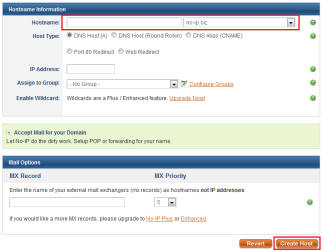
Add Host.PNGEnter Details.PNG


Just enter the name of your website and choose a prefix then click 'Create Host' (highlighted in image)
   Note
That is all the info you need to enter to create your DNS Host. It is also recommended that you download their NO-IP software too, as this will manage/sync your host.
Part 2: Installing & Using IIS7.5

1, Access 'Control Panel, and click 'Programs' followed by 'Turn Windows features on or off'.


Control Panel.PNG


2, Click the checkbox for each of the Internet Information Service toolsets then click 'OK'

Note: A system restart may be required
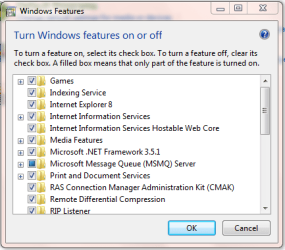
Windows Features.PNG


3, Run the IIS Manager - in the Start Menu type "IIS"
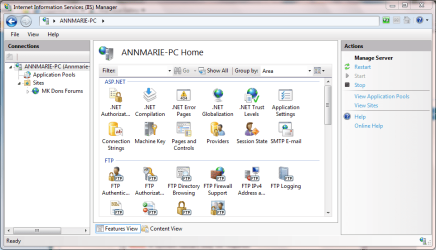
IIS Opened.PNG


4, Right-Click on 'Sites' and click 'Add Web Site'

Note: You may need to 'Expand' the explorer branch to allow you to see 'Sites'
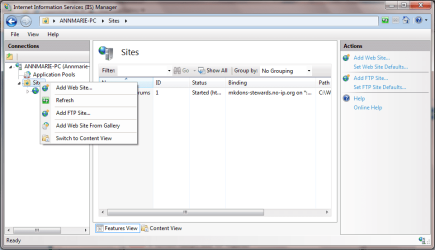
IIS New Site 1.PNG


5, Enter a 'Site Name', this can be anything (E.g. My New Site), 'Phisical Path' (E.g. C:\MY_SITE) and 'HOST Address', this is the address of the HOST you created in step 1 (e.g. my-new-site.no-ip.org) and click OK
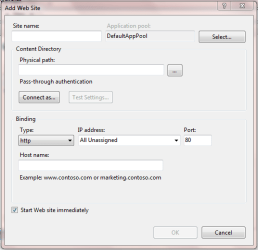
IIS New Site 2.PNG


Step 3: Router/Windows Firewall exception

1, In the Start Menu, type "firewall" and click 'Windows Firewall with Advanced Settings'
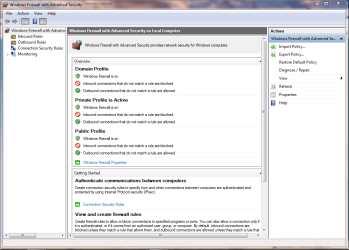

windows firewall.PNG


2, Click 'Inbound Rules' then 'New Rule' to start the 'New Rule Wizard. Click 'Port' then 'Next'
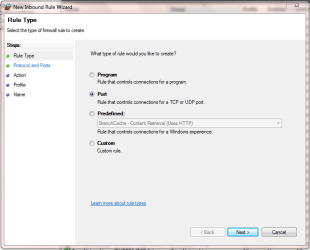
Inbound Rule 1.PNG


Click 'TCP' and enter port '80' then click 'Next'
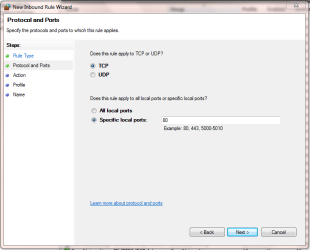
Inbound Rule 2.PNG


Click 'Allow the connection' then click 'Next'
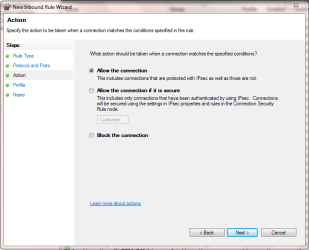
inbound rule 3.PNG


Click the rules that apply, then 'Next'
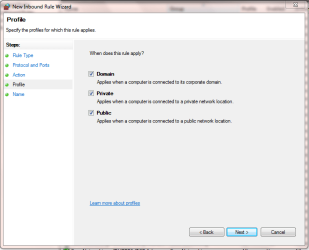
inbound rule 4.PNG


Lastly, name the new fule & click 'Finish'
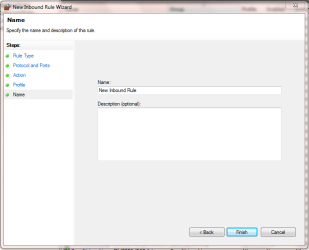
inbound rule 5.PNG


You will see that the new rule has now been created and you can close Windows firewall

see new rule.PNG


   Note
You will need to consult your router documentation for details on how to allow firewall exceptions


The 2 exceptions you will need to configure are
  • 'Outbound service' - Always allow HTTP(TCP:80)
  • 'Inbound Service' - Always allow HTTP(TCP:80) and 'Send to lan server' within that (enter your IPv4 address)
Now when you type the HOST address, e.g. no-ip.org, you, and others, will be able to access your site.
 
Last edited:
NIce tutorial, thanks guys............

I think now it is time for me to send Apache web server to Recycle bin..
 

My Computer

Computer Manufacturer/Model Number
Custom made
OS
Window 7 build 7600, Xp pro(VM)
CPU
Amd Athlon 2000 xp+
Motherboard
Asus x series
Memory
kingstone(1gb+256MB)
Graphics Card(s)
Nvdia 6200(256 mb+255mb(shared))
Sound Card
soundmax
Monitor(s) Displays
Lg Flatron w1943
Screen Resolution
1360x768
Hard Drives
segate 80GB
Case
i-ball
Keyboard
i-ball
Mouse
i-ball
Internet Speed
256kbps up and 256 kbps down
Apache is ok except its not native to Windows. Once you finally find your way around and get it going its fine ... once you get it going ... Im not sayin, Im just sayin!!

Nice Tutorial!!
 

My Computer

Computer type
PC/Desktop
Computer Manufacturer/Model Number
LENOVO K450 @3.0GHZ
OS
64-bit Windows 8.1 Pro
CPU
Core(TM) i5 CPU 4330 Haswell @ 3.20GHz
Motherboard
LENOVO
Memory
12.00 GB
Graphics Card(s)
Intel(R) HD Graphics
Sound Card
Intel HD integtrated
Monitor(s) Displays
HP 25' ISP Monitor
Screen Resolution
1900/1020
Hard Drives
(1) ST1000DM003-1CH162 (2) Generic STORAGE DEVICE USB Device (3) Generic STORAGE DEVICE USB Device
Internet Speed
100mb down/10mb up

My Computer

Computer Manufacturer/Model Number
Custom made
OS
Window 7 build 7600, Xp pro(VM)
CPU
Amd Athlon 2000 xp+
Motherboard
Asus x series
Memory
kingstone(1gb+256MB)
Graphics Card(s)
Nvdia 6200(256 mb+255mb(shared))
Sound Card
soundmax
Monitor(s) Displays
Lg Flatron w1943
Screen Resolution
1360x768
Hard Drives
segate 80GB
Case
i-ball
Keyboard
i-ball
Mouse
i-ball
Internet Speed
256kbps up and 256 kbps down
Nice work Jeff. :)
 

My Computer

Computer Manufacturer/Model Number
Samsung NP530U4B-S02IN
OS
Windows® 8 Pro (64-bit)
CPU
Intel® Core™ i5 Processor 2467M (1.60GHz, 3MB L3 Cache)
Motherboard
Samsung Electronics
Memory
6GB DDR3 System Memory at 1,333MHz (on BD 4GB + 2GB x 1)
Graphics Card(s)
AMD Radeon™ HD7550M 1GB DDR3 (Ext. Graphic)
Sound Card
Realtek High Definition Audio
Monitor(s) Displays
35.56cm (14.0) SuperBright 300nit HD LED Display
Screen Resolution
1366x768
Hard Drives
1TB S-ATA II Hard Drive (5400RPM) with ExpressCache 16GB SSD
Internet Speed
sucks
Antivirus
Microsoft Security Essentials
Browser
Google Chrome (Sync enabled)
The 2 exceptions you will need to configure are
  • 'Outbound service' - Always allow HTTP(TCP:80)
  • 'Inbound Service' - Always allow HTTP(TCP:80) and 'Send to lan server' within that (enter your IPv4 address)
Could you please tell me how do you do that? I m almost done, except this.
 

My Computer

Computer Manufacturer/Model Number
Samsung NP530U4B-S02IN
OS
Windows® 8 Pro (64-bit)
CPU
Intel® Core™ i5 Processor 2467M (1.60GHz, 3MB L3 Cache)
Motherboard
Samsung Electronics
Memory
6GB DDR3 System Memory at 1,333MHz (on BD 4GB + 2GB x 1)
Graphics Card(s)
AMD Radeon™ HD7550M 1GB DDR3 (Ext. Graphic)
Sound Card
Realtek High Definition Audio
Monitor(s) Displays
35.56cm (14.0) SuperBright 300nit HD LED Display
Screen Resolution
1366x768
Hard Drives
1TB S-ATA II Hard Drive (5400RPM) with ExpressCache 16GB SSD
Internet Speed
sucks
Antivirus
Microsoft Security Essentials
Browser
Google Chrome (Sync enabled)
You will need to access your router setup, just type in the IP address of the router homepage into your browser.

You then need to access the 'Securty' features, then 'Firewall' and add an exception to both 'Incoming' and 'outgoing

What router do you have, I may be able to help in more detail
 

My Computer

Computer Manufacturer/Model Number
Compaq Desktop
OS
Windows 7 Ultimate x64
CPU
AMD Sempron Dual Core
Memory
3GB
Graphics Card(s)
NVIDIA GeForce 6150SE nForce 430
Screen Resolution
1024x768
Hard Drives
150GB Sata
I dont have a router. Its direct.
 

My Computer

Computer Manufacturer/Model Number
Samsung NP530U4B-S02IN
OS
Windows® 8 Pro (64-bit)
CPU
Intel® Core™ i5 Processor 2467M (1.60GHz, 3MB L3 Cache)
Motherboard
Samsung Electronics
Memory
6GB DDR3 System Memory at 1,333MHz (on BD 4GB + 2GB x 1)
Graphics Card(s)
AMD Radeon™ HD7550M 1GB DDR3 (Ext. Graphic)
Sound Card
Realtek High Definition Audio
Monitor(s) Displays
35.56cm (14.0) SuperBright 300nit HD LED Display
Screen Resolution
1366x768
Hard Drives
1TB S-ATA II Hard Drive (5400RPM) with ExpressCache 16GB SSD
Internet Speed
sucks
Antivirus
Microsoft Security Essentials
Browser
Google Chrome (Sync enabled)
Ah, in that case i'm not sure :( sorry

Hopefully someone may be able to help you :p
 

My Computer

Computer Manufacturer/Model Number
Compaq Desktop
OS
Windows 7 Ultimate x64
CPU
AMD Sempron Dual Core
Memory
3GB
Graphics Card(s)
NVIDIA GeForce 6150SE nForce 430
Screen Resolution
1024x768
Hard Drives
150GB Sata
can i just bypass this step thinking that the firewall part is ok?
 

My Computer

Computer Manufacturer/Model Number
Samsung NP530U4B-S02IN
OS
Windows® 8 Pro (64-bit)
CPU
Intel® Core™ i5 Processor 2467M (1.60GHz, 3MB L3 Cache)
Motherboard
Samsung Electronics
Memory
6GB DDR3 System Memory at 1,333MHz (on BD 4GB + 2GB x 1)
Graphics Card(s)
AMD Radeon™ HD7550M 1GB DDR3 (Ext. Graphic)
Sound Card
Realtek High Definition Audio
Monitor(s) Displays
35.56cm (14.0) SuperBright 300nit HD LED Display
Screen Resolution
1366x768
Hard Drives
1TB S-ATA II Hard Drive (5400RPM) with ExpressCache 16GB SSD
Internet Speed
sucks
Antivirus
Microsoft Security Essentials
Browser
Google Chrome (Sync enabled)
You can give it a go mate :)

It won't cause any issues, you will just need an outside source to try accessing the site
 

My Computer

Computer Manufacturer/Model Number
Compaq Desktop
OS
Windows 7 Ultimate x64
CPU
AMD Sempron Dual Core
Memory
3GB
Graphics Card(s)
NVIDIA GeForce 6150SE nForce 430
Screen Resolution
1024x768
Hard Drives
150GB Sata
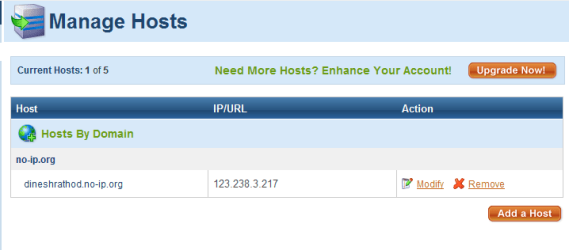
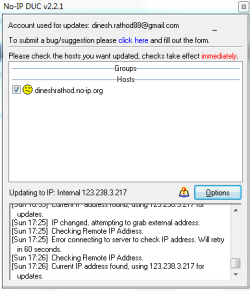
Ok now it looks like i have successfully added the host.
1.PNG
2.PNG
Also, Open Port Check Tool says that my port 80 is not blocked. however, i cant access my site: dineshrathod.no-ip.org
Do i need to do something else do access it?
 

My Computer

Computer Manufacturer/Model Number
Samsung NP530U4B-S02IN
OS
Windows® 8 Pro (64-bit)
CPU
Intel® Core™ i5 Processor 2467M (1.60GHz, 3MB L3 Cache)
Motherboard
Samsung Electronics
Memory
6GB DDR3 System Memory at 1,333MHz (on BD 4GB + 2GB x 1)
Graphics Card(s)
AMD Radeon™ HD7550M 1GB DDR3 (Ext. Graphic)
Sound Card
Realtek High Definition Audio
Monitor(s) Displays
35.56cm (14.0) SuperBright 300nit HD LED Display
Screen Resolution
1366x768
Hard Drives
1TB S-ATA II Hard Drive (5400RPM) with ExpressCache 16GB SSD
Internet Speed
sucks
Antivirus
Microsoft Security Essentials
Browser
Google Chrome (Sync enabled)
Hi Dinesh, sorry for the late reply :o

What error message are you recieving when you try to access your site?
 

My Computer

Computer Manufacturer/Model Number
Compaq Desktop
OS
Windows 7 Ultimate x64
CPU
AMD Sempron Dual Core
Memory
3GB
Graphics Card(s)
NVIDIA GeForce 6150SE nForce 430
Screen Resolution
1024x768
Hard Drives
150GB Sata
leave it jeff, my isp wont provide the features to configure the router. Its is blocked by them. :(
 

My Computer

Computer Manufacturer/Model Number
Samsung NP530U4B-S02IN
OS
Windows® 8 Pro (64-bit)
CPU
Intel® Core™ i5 Processor 2467M (1.60GHz, 3MB L3 Cache)
Motherboard
Samsung Electronics
Memory
6GB DDR3 System Memory at 1,333MHz (on BD 4GB + 2GB x 1)
Graphics Card(s)
AMD Radeon™ HD7550M 1GB DDR3 (Ext. Graphic)
Sound Card
Realtek High Definition Audio
Monitor(s) Displays
35.56cm (14.0) SuperBright 300nit HD LED Display
Screen Resolution
1366x768
Hard Drives
1TB S-ATA II Hard Drive (5400RPM) with ExpressCache 16GB SSD
Internet Speed
sucks
Antivirus
Microsoft Security Essentials
Browser
Google Chrome (Sync enabled)
Sorry to hear that mate :(
 

My Computer

Computer Manufacturer/Model Number
Compaq Desktop
OS
Windows 7 Ultimate x64
CPU
AMD Sempron Dual Core
Memory
3GB
Graphics Card(s)
NVIDIA GeForce 6150SE nForce 430
Screen Resolution
1024x768
Hard Drives
150GB Sata
Dinish, is your ISP Digicable.in? If so, there could be a way to get the infromation. They probably just ran the CAT5 and Cable Wire to your house (guessing). But that shouldn't be the problem. In India most ISP run their connections to a Operator. If you can get a hold of the operator they can help you. Slim chance.
 

My Computer

Computer Manufacturer/Model Number
Custom Made
OS
Windows 7 Ultimate x64
CPU
AMD Phenom II X4 920
Motherboard
ASUS M3A78
Memory
4 GB
Graphics Card(s)
nVidia Geforce 8600 GT
Hard Drives
500 GB Sata HDD
Issues with accessing site.

Hello there guys. I have developed a simple html web-page which i intend to use as a sort of 'online CV'. I thought id use this tutorial as a means of side-stepping the complicated hosting rental options.

I have followed this tutorial exactly. However, when i try and visit my site (http://finchspace.sytes.net) it redirects my to my router admin page and asks for a username and password....that's a bit strange is it not ?

I have created a folder in C:\inetpub\www.root\TestSite which contains only one file; index.html

With reference to the IIS section of the tutorial, I used "finchpersonalsite" as the site name. The physical path was then defined as "C:\inetpub\wwwroot\TestSite" and the host name was "www.finchspace.sytes.net" originally but i have tried "http://finchspace.sytes.net" and "finchspace.sytes.net" and all of them still result in the user being redirected to my router admin page and not the index.html file that i created.

Any ideas on how to sort this ?
 

My Computer

OS
Windows 7 x64
As you are inside your home network you will always get the router config page unless you edit your windows hosts file to point your website url to the localhost (example below).

127.0.0.1 finchspace.sytes.net
 

My Computer

Computer type
PC/Desktop
OS
Windows 11 Workstation
I have the same problem: I get the router config page...

But if I try to access my website from another computer I'll get the router page or the website?
 

My Computer

OS
Windows Seven
CPU
Intel Pentiun Dual-Core 1.8 Ghz
Memory
2GB
Graphics Card(s)
Nvidia 9400 GT
Monitor(s) Displays
LG L192WS
Back
Top