
Windows 7 Forums Search
Welcome to Windows 7 Forums. Our forum is dedicated to helping you find solutions with any problems, errors or issues you are experiencing with Windows 7. The Windows 7 forum also covers news and updates and has an extensive Windows 7 tutorial section that covers a wide range of tips and tricks.


Windows 7 - ClickLock - Turn On or Off


ClickLock - Turn On or Off

How to Turn ClickLock On or Off in Windows 7
Published by dw96
09-08-2009
Default ClickLock - Turn On or Off

How to Turn ClickLock On or Off in Windows 7

information   Information
In this tutorial you will learn about the usage of ClickLock to easily select multiple objects.
Note   Note
ClickLock enables you to highlight or drag without holding down the mouse button.
Tip   Tip
This feature is very useful for selecting items with a laptop touchpad.


Let's Begin:
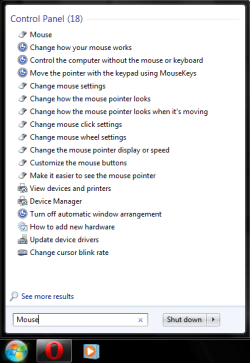
[1] Open the Start menu. Type in "Mouse" (without the quotation marks) and hit Enter.
ClickLock - Turn On or Off-start-mouse.png
[2] To Turn On ClickLock
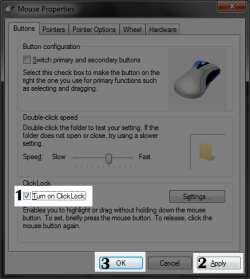
A) At the bottom of the dialog box, check the "Turn on ClickLock" box. Then, hit the "Apply" button, and then the "OK" button.
ClickLock - Turn On or Off-clicklock-enable.png
B) Go to step 4.
[3] To Turn Off ClickLock
A) At the bottom of the dialog box, uncheck the "Turn on ClickLock" box. Then, hit the "Apply" button, and then the "OK" button. (See screenshot above)

B) You're done.
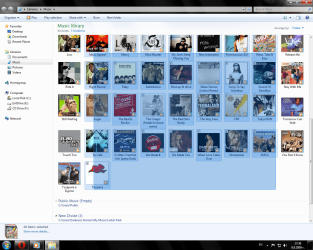
[4] Let's go to a folder with some items. Press and hold the left mouse button and slowly begin to make a selection. After 3 seconds of the left mouse button being held, release it. You will notice that the process of selecting is still ongoing. This also works for selecting text and other content.
ClickLock - Turn On or Off-clicklock-function.png
Tip   Tip
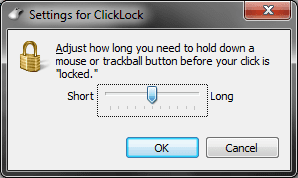
You can adjust how long you have to hold the mouse button before ClickLock activates by going to the Mouse options again and clicking the "Settings" button to the right of the "ClickLock" checkbox. Drag the slider to adjust this setting.
Name:  Settings for ClickLock.png
Views: 3400
Size:  18.4 KB

THAT'S IT!!!
-~- D.W.96 -~-


Published by
dw96's Avatar
Darkness Warrior ['96]
Join Date: May 2009
Location: Bulgaria/EU
Posts: 394

Tutorial Tools
01-21-2012   #1
ICit2lol


DEsk1 7 Home pre / Desk2 7 Home pre / Laptop 7 Pro


Hum I couldn't find how to turn of the touchpad with this tut bu in Control Panel under Mouse Properties I had Touch pad settings and just ticked Disable internal pointing device and bingo on and off it goes!

My System SpecsSystem Spec
Comment

 ClickLock - Turn On or Off problems?


Tutorial Tools


Similar Threads for: ClickLock - Turn On or Off
Windows 7 Tutorial Category
ClickLock - Change Time before Click is Locked Tutorials
Clicklock unexpectedly turned on General Discussion
Monitor turn on by itself after "Turn off the display" starts General Discussion
Icons turn white, then turn back one by one General Discussion
Bing Maps turn-by-turn navigation released for Windows News


All times are GMT -5. The time now is 02:24 AM.


Windows 7 Forums is an independent web site and has not been authorized,
sponsored, or otherwise approved by Microsoft Corporation.
"Windows 7" and related materials are trademarks of Microsoft Corp.
© Designer Media Ltd
  

1 2 3 4 5 6 7 8 9 10 11 12 13 14 15 16 17 18 19 20 21 22 23 24 25 26 27 28 29 30