
How to Add or Remove "Enable forced button/lid shutdown" in Power Options
Information
The Enable forced button/lid shutdown setting is to have a forced shudown (set to On) or normal shutdown (set to Off) of the computer when the system "power button" is pressed or "lid closed" if their action is set to Shut down.
This tutorial will show you how to add or remove the Enable forced button/lid shutdown setting under Power buttons and lid in the advanced power settings of all power plans for all users in Vista, Windows 7, and Windows 8.
You must be logged in as an administrator to be able to do this tutorial.
This tutorial will show you how to add or remove the Enable forced button/lid shutdown setting under Power buttons and lid in the advanced power settings of all power plans for all users in Vista, Windows 7, and Windows 8.
You must be logged in as an administrator to be able to do this tutorial.
Warning
If the Enable forced button/lid shutdown setting is enabled and a user presses the power button to shut down the system, any open documents might not be saved and data loss could occur.
To prevent this, be sure to save and close any open programs first.
To prevent this, be sure to save and close any open programs first.
EXAMPLE: "Enable forced button/lid shutdown" added to Advanced Power Settings
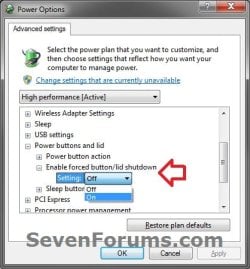
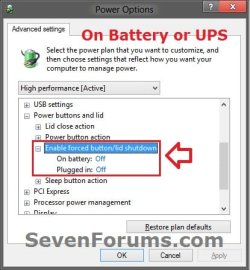
Here's How:
1. Do step 2 or 3 below for what you would like to do.
2. Add "Enable forced button/lid shutdown" to Advanced Power Settings
A) Click/tap on the Download button below to download the file below.
Add_Enable_forced_button-lid_shutdown.reg
Download
B) Go to step 4.
3. Remove "Enable forced button/lid shutdown" from Advanced Power Settings
NOTE: This is the default setting.
A) Click/tap on the Download button below to download the file below.
Remove_Enable_forced_button-lid_shutdown.reg
Download
4. Save the .reg file to the desktop.
5. Double click/tap on the downloaded .reg file to Merge it.
6. When prompted, click/tap on Run, Yes (UAC Windows 7/8) or Continue (UAC Vista), Yes, and OK.
7. You can now delete the downloaded .reg file if you like.
That's it,
Shawn
Related Tutorials
- How to Change the Power Plan Settings in Windows 7
- How to Change Power Plan Settings in Windows 8 and 8.1
- How to Create a "Advanced Power Options" Shortcut in Windows 7
- How to Enable HIPM and DIPM for your SSD and HDD in Windows 7
- How to Add or Remove the Shut Down, Restart, Sleep, and Hibernate Commands in Windows 7
- How to Create a Force "Shut Down" Computer Shortcut in Windows
- How to Add or Remove "Allow Away Mode Policy" in Power Options in Windows
- How to Add or Remove "Allow sleep with Remote Opens" in Power Options in Windows 7 and 8
- How to Add or Remove "Allow wake timers" in Power Options in Windows
- How to Add or Remove Desktop Background "Slide Show" in Power Options in Windows
- How to Add or Remove "Dim display after" in Power Options in Windows
- How to Add or Remove "Hard disk burst ignore time" in Power Options
- How to Add or Remove "Hibernate after" in Power Options in Windows
- How to Add or Remove PCIe "Link State Power Management" in Power Options in Windows
- How to Add or Remove "Minimum processor state" and "Maximum processor state" in Power Options in Windows
- How to Add or Remove "System cooling policy" in Power Options in Windows
- How to Add or Remove "System unattended sleep timeout" in Power Options
- How to Add or Remove "Turn off hard disk after" in Power Options in Windows
- How to Add or Remove "USB 3 Link Power Mangement" in Power Options in Windows 8
- How to Add or Remove "USB selective suspend setting" in Power Options in Windows
- How to Add or Remove "When sharing media" in Power Options in Windows
- How to Add or Remove Wireless Adapter Settings "Power Saving Mode" in Windows
Attachments
Last edited:
 Win7 Ult.
 But I work at a rental place, and the batteries in the laptops always get run into the ground by others leaving the laptops on. I was hoping to find something to force a shutdown, even when programs are left open/unsaved data. Lid closed=force shutdown.


