
How to Customize How Windows Media Center Will Start Up
Information
This will show you how to use a list of commands that allow you to change how Windows Media Center starts up including, no start up animations, force widescreen, start in screensaver, and more!
Windows Media Center is not available in the Windows 7 Starter and Windows 7 Home Basic editions.
Windows Media Center is not available in the Windows 7 Starter and Windows 7 Home Basic editions.
Note
This also works with the Media Browser shortcuts that are avaliable through the internet! Shortcut avaliable for download Here!
The N and KN editions of Windows 7 have all the features that normally come with each individual Windows 7 edition, except for Windows Media Player 12 and related programs, such as Windows Media Center or Windows DVD Maker.
The N editions of Windows 7 allow you to choose your own media player and software required to manage and play CDs, DVDs, and other digital media files. If you choose to use Windows Media Player 12, downloading it, along with related software, is free. Download Media Feature Pack for Windows 7 N with Service Pack 1 and Windows 7 KN with Service Pack 1 (KB968211) from Official Microsoft Download Center
The N and KN editions of Windows 7 have all the features that normally come with each individual Windows 7 edition, except for Windows Media Player 12 and related programs, such as Windows Media Center or Windows DVD Maker.
The N editions of Windows 7 allow you to choose your own media player and software required to manage and play CDs, DVDs, and other digital media files. If you choose to use Windows Media Player 12, downloading it, along with related software, is free. Download Media Feature Pack for Windows 7 N with Service Pack 1 and Windows 7 KN with Service Pack 1 (KB968211) from Official Microsoft Download Center
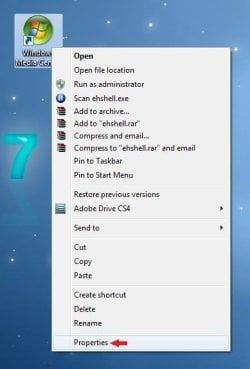
Here's How : 1. Ok so first your going to navigate to your Windows Media Center shortcut you'd like to modify.

2. Right click on your shortcut and click on Properties.
3. Find the "Target" box.
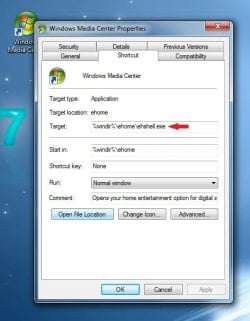
4. In the Target box at the end of the text put a space, then copy one of the following commands in bold below. Exactly like this.... (See screenshot below command list)
- /homepage:VideoFullscreen.xml /PushStartPage:True - Live TV
- /homepage:VideoGuide.xml /PushStartPage:True - TV Guide
- /homepage:RecordedTV.BrowsePage.xml /PushStartPage:True - Recorded TV
- /homepage:VideoToBeRecorded.xml/PushStartPage:True - Scheduled Recordings
- /homepage:Radio.BrowsePage.xml /PushStartPage:True - Radio
- /homepage:Radio.xml - FM Radio
- /homepage:MusicBrowsePage.xml /PushStartPage:True - Music Library
- /homepage:VideosBrowsePage.xml /PushStartPage:True - Video Library
- /homepage
 hotosBrowsePage.xml /PushStartPage:True - Picture Library
 - /homepage:Options.Home.xml /PushStartPage:True - Settings Menu
- /nostartupanimation – disables the startup animation
- /noshutdownui – removes the shutdown item from Tasks
- /mediamode – start in “media only mode” with no minimize/close buttons
- /widescreen – force widescreen mode
- /nochrome – launch windowed mode without the containing window
- /playallmusic – Play all music at startup
- /playfavmusic – Play favorite music at startup
- /playfavslideshow – Play favorite slideshow at startup
- /playfavslideshowwithmusic – Same as above with music
- /playslideshow – Play all slideshows
- /playslideshowwithmusic – Same as above with music
- /screensaver – Start media center in screensaver mode
- /configuress – Start media center at configuring screen saver menu
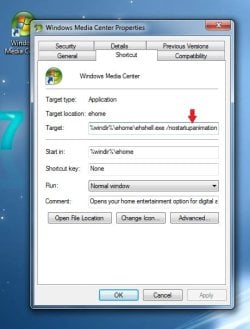
5. Click on Apply and Ok, then you should be good to go!
Related Tutorials
- How to Create a Shortcut that Opens Directly to the "Settings Menu" in Windows Media Center
- How to Create a Shortcut that Opens Directly to "Recorded TV" in Windows Media Center
- How to Create a Shortcut that Opens Directly to the "Picture Library" in Windows Media Center
- How to Create a Shortcut that Opens Directly to the "Video Library" in Windows Media Center
- How to Create a Shortcut that Opens Directly to the "Music Library" in Windows Media Center
- How to Create a Shortcut that Opens Directly to " FM Radio" in Windows Media Center
- How to Create a Shortcut that Opens Directly to "Radio" in Windows Media Center
- How to Create a Shortcut that Opens Directly to "TV Guide" in Windows Media Center
- How to Create a Shortcut that Opens Directly to "Scheduled Recordings" in Windows Media Center
- How to Create a Shortcut that Opens Directly to "Live TV" in Windows Media Center
- How to Create a Shortcut that Opens Directly to "Disc Playback" in Windows Media Center
- How to Create Shortcut that Opens Directly to "Favorite Pictures Slide Show Settings" in Media Center
- How to Create a Shortcut to Play All Music in Window Media Center
- How to Create a Shortcut to Start the Windows Media Center Screen Saver
- How to Create a Shortcut to Open Windows Media Center with No Startup Animation
- How to Create a Shortcut to Play the Windows Media Center Slide Show
- How to Add a "Windows Media Center" Cascading Desktop Context Menu in Windows 7
Last edited by a moderator:


 here's my dilemma:


