How to Fix Custom Recycle Bin Icons Not Automatically Refreshing
Information
The Recycle Bin provides a safety net when deleting files or folders. When you delete any of these items from your hard disk, Windows places it in the Recycle Bin and the Recycle Bin icon changes from empty to full.
Sometimes, when using different custom icons for both the Full and Empty Recycle Bin, the icons will not change to the proper icon when filled or emptied, unless you manually refresh the Desktop.
This will show you how to fix the refreshing problem when you use custom icons for the Recycle Bin in Vista and Windows 7.
Sometimes, when using different custom icons for both the Full and Empty Recycle Bin, the icons will not change to the proper icon when filled or emptied, unless you manually refresh the Desktop.
This will show you how to fix the refreshing problem when you use custom icons for the Recycle Bin in Vista and Windows 7.
Tip
To use custom icons for the Recycle Bin, see this tutorial here - Desktop Icons - Add or Remove
Note
- If you change one or both icons to different ones after you have applied the changes in Regedit, you will need to apply the registry changes again for the new ones
- Removable drives do not use or have a Recycyle Bin. Files deleted from removable drives are permanently deleted instead.
Here's How:
1. Open the Registry Editor by going to the Start Menu and typing in Regedit. Click yes for UAC prompt.
2. Navigate to-
Code:
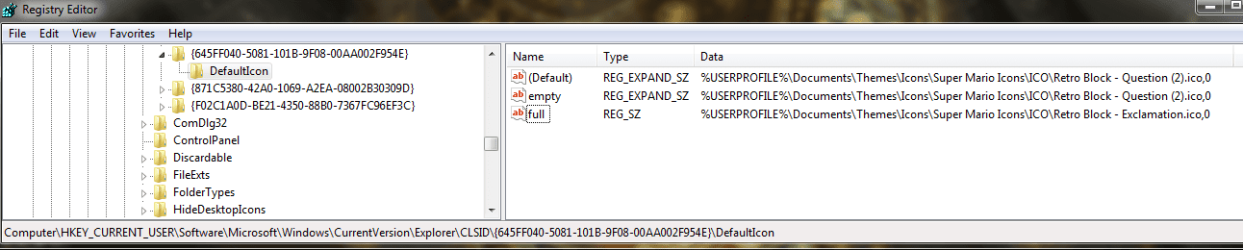
HKEY_CURRENT_USER/Software/Microsoft/Windows/CurrentVersion/Explorer/CLSID/{645FF040-5081-101B-9F08-00AA002F954E}/Default IconNOTE: Instead of blackhole.ico, you will have your custom icon file name instead.
4. Click OK.
5. Repeat Step 3 for the empty and full string entries as well. When done, it should look like this -

6. Close Regedit and the changes should apply without having to log off and on or restart. You can try it out by deleting something when it's Empty, and see if it changes to the Full custom icon.
That's it.
Airbot
Last edited by a moderator:


 dude thank you so much for your hard work doing this
  I really apologize, I had the "0" in the registryat one time but was changed after a restore