How to Correctly Setup a Dual Boot with Windows 7 and LinuxMint13
Information
Historically, dual booting Windows and a Linux distribution was fraught with risks due to the propensity of the Linux GRUB loader to interfere with and corrupt the Windows bootloader. This often left the Windows installation unbootable, which then required several complex steps in order to rescue the Windows installation.
In recent distributions, the Linux GRUB loader has now been updated to GRUB2, which tends not to have an adverse effect on the Windows bootloader. This tutorial will show you the easiest method to successfully dual-boot Windows 7 and Linux, using the LinuxMint13 Cinnamon distribution as an example. This method has also been tested on, and works with, Ubuntu 12.04 and Fedora 17.
Please note the goal of this tutorial is to show you how to dual-boot correctly without compromising your Windows 7 installation. Whilst the fundamentals of installing a Linux distribution are briefly covered for the purposes of this tutorial, more detail on how to use Linux are outside its scope and will not be covered. For more information on using Linux distributions, you are welcome to visit the LinuxMint, Ubuntu or Fedora sites.
In recent distributions, the Linux GRUB loader has now been updated to GRUB2, which tends not to have an adverse effect on the Windows bootloader. This tutorial will show you the easiest method to successfully dual-boot Windows 7 and Linux, using the LinuxMint13 Cinnamon distribution as an example. This method has also been tested on, and works with, Ubuntu 12.04 and Fedora 17.
Please note the goal of this tutorial is to show you how to dual-boot correctly without compromising your Windows 7 installation. Whilst the fundamentals of installing a Linux distribution are briefly covered for the purposes of this tutorial, more detail on how to use Linux are outside its scope and will not be covered. For more information on using Linux distributions, you are welcome to visit the LinuxMint, Ubuntu or Fedora sites.
Warning
Note that this technique will only work on a computer that uses Legacy BIOS - it will not work on a computer that uses UEFI.
Please take careful note : If you currently:
The reasons for this are that this dual-boot technique requires you to delete the 100MB System Reserved partition. Without this partition, both Bitlocker Drive Encryption, and the Recovery functions employed by OEM's accessed during Windows boot, will no longer work.
Please take careful note : If you currently:
- Use, or plan to use, Windows Bitlocker Drive Encryption, or
- Require access to OEM installation recovery functionality,
The reasons for this are that this dual-boot technique requires you to delete the 100MB System Reserved partition. Without this partition, both Bitlocker Drive Encryption, and the Recovery functions employed by OEM's accessed during Windows boot, will no longer work.
:note: Requirements:
In order to undertake this tutorial, you will need the following :
Hardware:-
- 1Gb or larger USB thumb/flash drive (to hold your bootable Partition Wizard and LinuxMint13 installation)
- FREE version of YUMI Multiboot USB Creator
- 32-bit edition of LinuxMint13
- FREE version of bootable Partition Wizard
- FREE version of EasyBCD
- Creating bootable versions of Partition Wizard and LinuxMint13 on either CD, DVD or USB
- Booting a computer from either a CD/DVD or USB drive.
- Manipulating (deleting, moving and re-sizing) Windows NTFS disk partitions
:note: Before you begin : Insurance against mistakes
Mistakes made during partition manipulation can render your system unbootable. In order to protect yourself against such inadvertent mistakes, I strongly recommend you create an image of your current system prior to commencing with this tutorial.
Please refer to either of this tutorial for help on imaging your system:http://www.sevenforums.com/tutorials/73828-imaging-free-macrium.html
In the event that you do make a mistake, the image you created will allow you to revert to your original installation with a minimum of fuss. This step is important, especially for novices - don't be tempted to skip it.
Part A - Create the bootable Partition Wizard and Linux USB
YUMI can support several bootable ISO's concurrently, so its advantageous to install both Partition Wizard and LinuxMint13 to the USB flash drive, one after the other.
Step 1
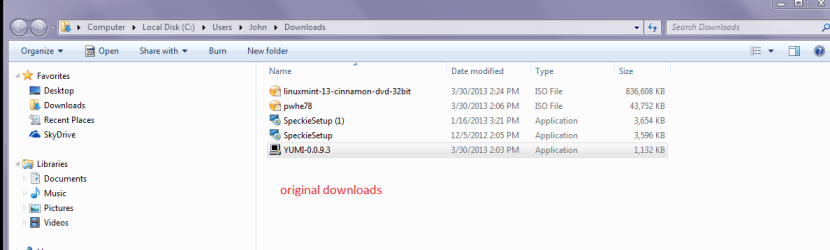
Download YUMI, Partition Wizard and LinuxMint13 from the links provided earlier.
Step 2
Insert your USB flash drive into the computer, and then run YUMI.
Step 3
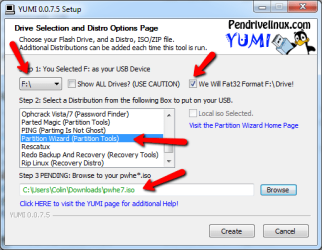
On the YUMI interface, do the following:
- select the drive letter corresponding to the USB flash drive
- place a tick in the Format Drive box (the USB flash will be formatted to FAT32)
- scroll down the distribution list and select Partition Wizard (Partition Tools)
- browse to locate and select the Partition Wizard ISO you downloaded earlier
The completed panel should look very similar to that shown below.
Step 4
Click the Create button to install Partition Wizard to the USB flash drive.
Warning
Take note of the format warning message that is displayed - the entire USB flash drive will be formatted to the required FAT32 format, so double check to see that the correct USB device is selected.
Once complete, you will be asked whether you wish to install another ISO/Distro. Click Yes, and then select the LinuxMint13 ISO as shown below. Click
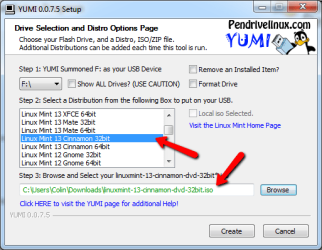
Click the Create button to write the install LinuxMint13 to the USB flash drive. Once complete, exit YUMI. For ease of reference, we will simply refer to this flash drive as the YUMI flash drive from here on in.
You have now completed Part A of the tutorial.
Part B - Manipulate the Windows 7 Partitions
Prior to installing LinuxMint13, you need to make changes to the existing Windows 7 partitions. Specifically, you need to perform these steps:
- Copy the Windows boot manager to the System C: partition
- Delete the 100MB System Reserved partition
- Resize the System partition (C: drive) into the unallocated space after deleting the System Reserved partition
- Create unallocated space for the LinuxMint13 installation by shrinking the Data partition (F: drive)
If you are unfamiliar with Partition Wizard, then I recommend reading this tutorial before proceeding further:http://www.sevenforums.com/tutorials/93322-partition-wizard-use-bootable-cd.html
Note
For the purposes of this tutorial, we will assume you have a reasonably common Windows 7 partition layout, as shown below, and comprising of:

- Primary 100MB System Reserved partition, and
- Primary System partition (C: drive), and
- Logical Data partition (F: drive)
Tip
If your partition layout is different, and you aren't sure how to proceed, then reply to this tutorial seeking advice. Be sure to include a screen capture of your Windows 7 disk management screen that clearly shows your partition layout.
Step 1 - Copy boot manager to System C: partition
Install EasyBCD to your computer. Run EasyBCD and now follow the very simple steps explained in the short tutorial below, to copy the Windows 7 boot manager from the 100MB System Reserved partition to the System C: partition:http://www.sevenforums.com/tutorials/209885-bootmgr-move-c-easybcd.html
Once you have performed this step, close EasyBCD.
Check to ensure that the boot manager has been copied correctly by examining the partition layout in the Windows Disk Management screen. Your System C: partition status should now include the Boot option under the partition status, as shown in the example below.

Close the Disk Management screen when you have verified that the Boot status is correct.
Step 2 - Delete the 100MB System Reserved partition
Insert the YUMI flash drive into your computer, and boot from it. Run Partition Wizard by selecting it from the System Tools menu, as shown below.
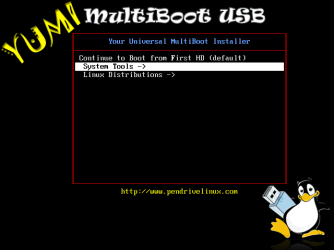

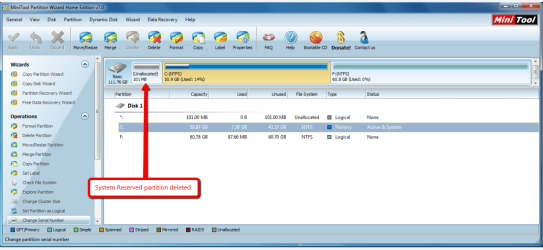
Once Partition Wizard has opened, delete the 100MB System Reserved Partition - you will now have 100MB unallocated space sitting to the left of your System partition, as shown below.
Step 3 - Resize the System partition into the unallocated space
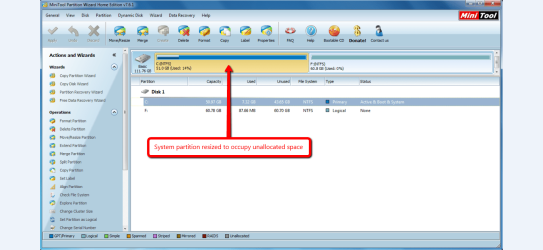
Stretch the System partition to the left, into the unallocated space created in step 2 above, so that you only have a System partition and Data partition as shown below.
Step 4 - Create unallocated space for the LinuxMint13 installation
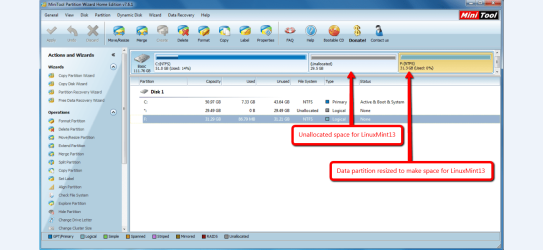
Shrink the Data partition to the right, thereby creating unallocated space between the System partition and Data partition, as shown below. This unallocated space is where LinuxMint13 will be installed too.
Tip
You can also shrink the System partition, or use combinations of resizing both the System partition and Data partition to create the unallocated space for the LinuxMint13 installation. LinuxMint13 requires a minimum of 8.6GB, but I usually assign more space for updates, data etc.
Reboot your system to complete the partition manipulation.
You have now completed Part B of the tutorial.
Part C - Install LinuxMint13
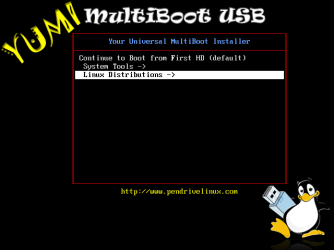
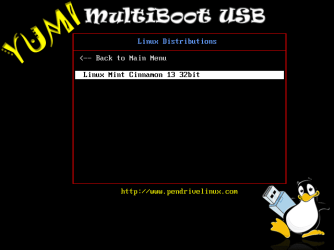
Insert the YUMI flash drive into your computer, and boot from it. Run the LinuxMint13 boot menu/installer by selecting it from from the Linux Distributions menu, as shown below.
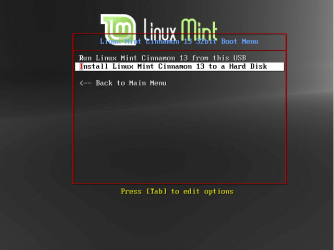
From the LinuxMint boot menu, choose to install to a hard disk, as shown below.
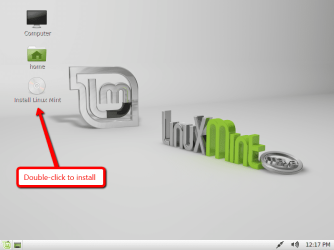
Once the LinuxMint13 desktop loads, select the Install Linux Mint option by double-clicking it, as shown below.
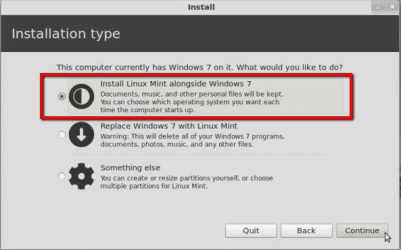
Follow the the prompts to select your language. When prompted to select your installation type, be sure to choose the option labelled Install Linux Mint alongside Windows 7, as shown below.
LinuxMint13 will now be installed into the unallocated space created in PART B of the tutorial. Whilst installation is proceeding, follow the remainder of the prompt screens to specify your locality, keyboard layout and machine name and user account details.
You will be prompted as to whether you wish to import any existing Windows 7 account details (contacts, favorites, bookmarks etc.) into the LinuxMint13 installation (as shown below) - highlight the listed Windows 7 option shown and and click Continue to do that, or simply click Continue to skip this step.
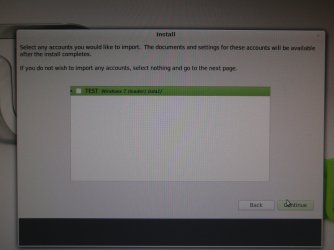
Once installation has been completed, you will be prompted to reboot your system as shown below.

Once your system reboots, you will be presented with the Linux GRUB screen - don't panic, this is perfectly normal. PART D of this tutorial will show you how to easily customise your boot order.
You have now completed PART C of the tutorial.
Part D - Customise the Windows 7/LinuxMint13 boot order
Note
The boot screen images in this part of the tutorial use Ubuntu as an example - this is simply for convenience for the tutorial. The boot screens for LinuxMint13 will look very similar, obviously with the word Ubuntu replaced by the word LinuxMint13.
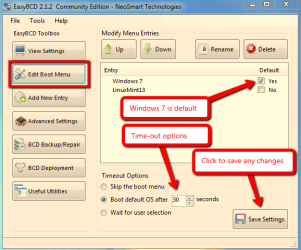
EasyBCD allows you to easily customise the boot sequence so that the familiar Windows boot screen is the screen from which you select the operating system to boot.
When you first boot your PC after installing LinuxMint13, you will be presented with the GRUB screen, as shown below.
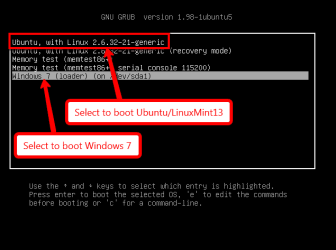
Select the Windows 7 option to boot in Windows as normal, and then run EasyBCD.
Now complete the following steps :
Step 1 - Add the LinuxMint13 boot entry
Replicate the steps shown in the image below to add the LinuxMint13 boot entry. Take note of the confirmation message that appears briefly at the bottom of the panel.
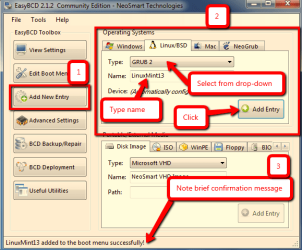
Step 2 - Add the Windows 7 boot entry
Replicate the steps shown in the image below to write the Windows 7 bootloader.Take note of the confirmation message that appears briefly at the bottom of the panel.
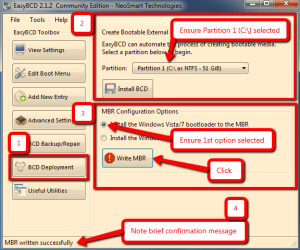
Step 3 - Review the Windows 7 / LinuxMint13 boot sequence
Review the default boot options, and make any changes if you wish.
Close EasyBCD and reboot your computer. You will now see the Windows 7 boot screen with the Windows 7 and LinuxMint13 boot options (Ubuntu is shown in this example).
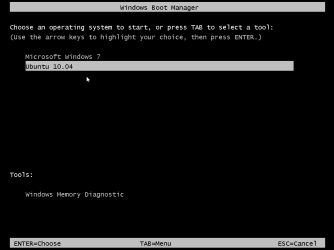
If you select the Windows 7 option, your computer will boot into Windows 7 as normal. If you select the LinuxMint13 option, then the GRUB boot screen will appear, and from that you select the LinuxMint13 option to boot it, as shown below.
You have now completed the entire tutorial.
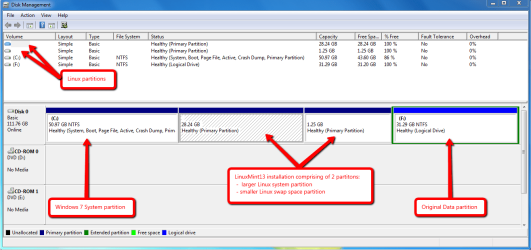
This is how the dual-boot installation look in Windows 7 Disk Manager - note the blank entries marked with arrows : Windows cannot read the format of Linux partitions.
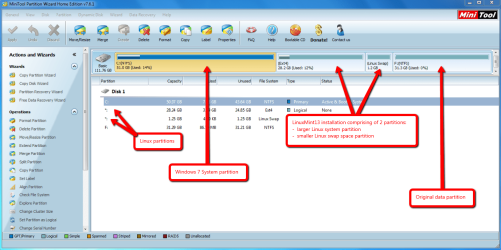
And this is how the dual-boot installation looks in Partition Wizard.
Tip
If you ever wish to remove the LinuxMint13 partitions, simple delete them using Partition Wizard - your Windows installation will be unaffected since the boot manager still resides on the first partition of the disk. Be sure to reset the boot entry using EasyBCD for aesthetics using Step 4 and Step 5 here.
Thats all there is to it : dual-booting Windows 7 and LinuxMint13 the easy way!
Regards,
Golden
Related Tutorials
- http://www.sevenforums.com/tutorials/209885-bootmgr-move-c-easybcd.html
- http://www.sevenforums.com/tutorials/93322-partition-wizard-use-bootable-cd.html
- How to Setup a Dual Boot Installation with Windows 7 and Vista
- How to Setup a Dual Boot Installation with Windows 7 and XP
- How to Setup a Dual Boot Installation with Windows Vista and XP
- How to Dual Boot Windows 7 and Ubuntu
- How to Do a Dual Boot Installation with Windows 7 and Windows 8
Last edited: