
How to Add Games to Games Explorer Folder in Vista, Windows 7, and Windows 8
"So you add a game into Games Explorer Folder and realize that the game has no
cover, no rating, no info... Well, this tutorial will show you
how to add all that missing information."
cover, no rating, no info... Well, this tutorial will show you
how to add all that missing information."
First things First.
- Adding a shortcut into Game Explorer Folder (GEF):
- Copy the main executable, then right click and select paste shortcut.
- Or Just Drag n Drop a shortcut of the game.
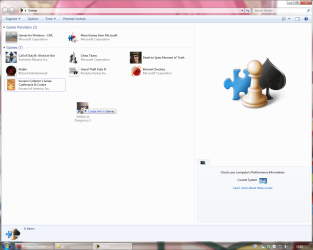
Use a shortcut, never use the main executable.
- Using the Registry Editor (REd):
- Hit the Start Orb and type regedit in the search box, an UAC prompt will ask you to authorize access by clicking Continue.
- The Files you will need:
Download
- Inside is the GameUXLegacyGDFs.txt file, Just save it for later use.
The Tutorial:
This tutorial subdivides in Semi-Automatic for games already in the database which the GEF doesn't recognize automatically and manual for the ones not included in the database.
Note
Always remember to close GEF every time you need to edit the values in the REd, otherwise the game shortcut will be deleted.
Let's Begin...
- Semi-Automatic
Step 1: Add a shortcut into the GEF and then close it.
Step 2: Extract and then open the file GameUXLegacyGDFs.txt from the downloadable file.
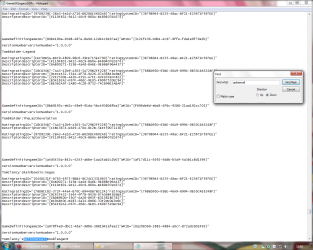
- Hit Ctrl+F to bring the search option in Notepad.
- Type just a part of the game's name.
- Hit "Find Next" button 'till you find the game your looking for.
Step 3: Open the REd and navigate to this location.
HKEY_LOCAL_MACHINE\SOFTWARE\Microsoft\Windows\CurrentVersion\GameUX
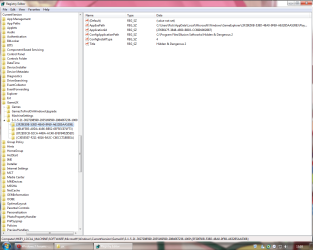
The KEY name might be different from yours.
Step 4: Once you find the KEY that belongs to your game, edit as follow:
- In AppExePath put the location of your game executable.
- In ApplicationId put the xxx value you found in *GameDefinitiongameID="xxx", on the GameUXLegacyGDFs.txt file.
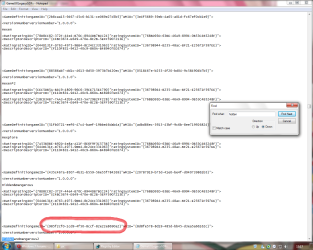
Add just the value between commas.
- In ConfigInstallType replace the value to 3.
- Delete the Title String.
- Add a new String (Right-click>New>String Value) and name it ConfigGDFBinaryPath, then in the value data space put C:\Windows\system32\GameUXLegacyGDFs.dll
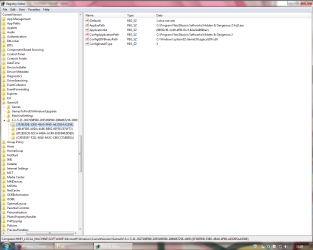
It should be look like this.
Step 5: Close the REd and open GEF, wait 'till windows updates the game info.

- Manual
Step 1: Go to All Game Guide to search your game.

Save the cover image for later use.
Step 2: Now go to Entertainment Software Rating Board and find a game with similar rating.
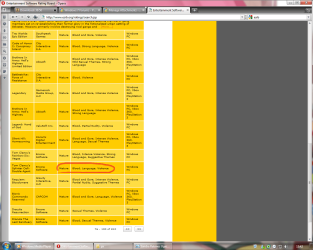
Step 3: Now lets find out if its listed on the GameUXLegacyGDFs.txt file, if not keep searching on the ESRB page.
Step 4: Open the REd and navigate to this location.
HKEY_LOCAL_MACHINE\SOFTWARE\Microsoft\Windows\CurrentVersion\GameUX
The KEY name might be different from yours.
Step 5: Once you find the KEY that belongs to your game, edit as follow:
- In AppExePath put the location of your game executable.
- In ApplicationId put the xxx value you found in *GameDefinitiongameID="xxx", on the GameUXLegacyGDFs.txt file.
Add just the value between commas.
- In ConfigInstallType replace the value to 3.
- Delete the Title String.
- Add a new String (Right-click>New>String Value) and name it ConfigGDFBinaryPath, then in the value data space put C:\Windows\system32\GameUXLegacyGDFs.dll
It should be look like this.
Step 6: Open GEF and wait to update the info.
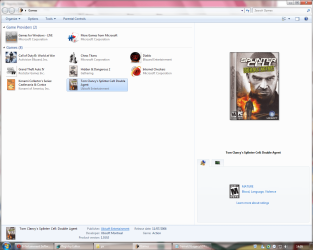
Step 7: Update the REd by hitting the F5 key and replace the info as necessary.
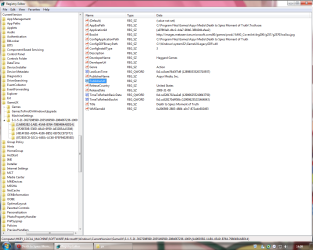
This is just the basic info only, you can fill the blank spaces if you like.
Step 8: Now copy and paste this values and put them like so:
- in TimeToRefreshBasicData: b357951d59359b57 (Hexadecimal)
- in TimeToRefreshBoxArt: 855c358859359b57 (Hexadecimal)
Step 9: Now navigate to this location and paste the image your game will use as a cover.
C:\Users\%username%\AppData\Local\Microsoft\Windows\GameExplorer\GamesBoxArt
The AppData folder is hidden by default you can learn how to unhide it in this tutorial.
Step 10: Change the name of the image with the one we're replacing.
- If you wanna use another type of image you need to edit the last part of the BoxArt String to the kind of file you wanna use.
- Or if you want to use an icon instead, just edit:
BoxArt leave it blank.

Step 11: Now open the GEF and your game should display with the new info on it.
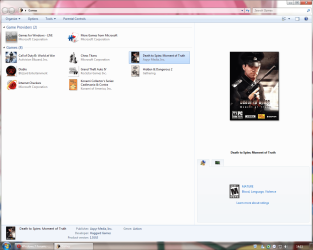
BTW, if you think is too much work for you, just take a look at this tutorial Games Explorer - Edit all credits to Darkness Warrior '96.
That's all for now...
Rjck.
Related Tutorials
- How to Delete a Game in Games Explorer Folder in Vista, Windows 7, and Windows 8
- How to Create a "Games Explorer" Shortcut in Vista, Windows 7, and Windows 8
- Hide or Unhide Games in Games Explorer Folder in Vista, Windows 7, and Windows 8
- How to Restore the Default Games in Games Explorer Folder in Windows 7
- How to Customize the Windows 7 Games Explorer Context Menu
- Games Explorer - Edit with Game Explorer Builder
- How to Add Steam Games to Windows 7 Games Explorer Folder
- Enable or Disable Game Updates in "Games Explorer" in Vista, Windows 7, and Windows 8
- Enable or Disable Last Play Time of Games in "Games Explorer" in Vista, Windows 7, and Windows 8
- Enable or Disable Game Updates in "Games Explorer" in Vista, Windows 7, and Windows 8
Attachments
Last edited by a moderator:


