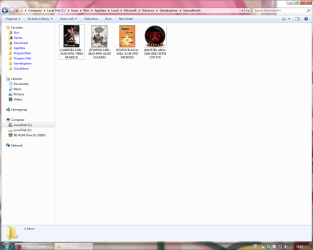
Games Explorer Folder - Add Games To

How to Add Games to Games Explorer Folder in Vista, Windows 7, and Windows 8


"So you add a game into Games Explorer Folder and realize that the game has no
cover, no rating, no info... Well, this tutorial will show you
how to add all that missing information."​


First things First.
  • Adding a shortcut into Game Explorer Folder (GEF):

  • Copy the main executable, then right click and select paste shortcut.

  • Or Just Drag n Drop a shortcut of the game.
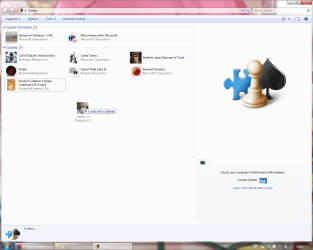
gft1.png
Use a shortcut, never use the main executable.

  • Using the Registry Editor (REd):

  • Hit the Start Orb and type regedit in the search box, an UAC prompt will ask you to authorize access by clicking Continue.

  • The Files you will need:

Download


  • Inside is the GameUXLegacyGDFs.txt file, Just save it for later use.

The Tutorial:


This tutorial subdivides in Semi-Automatic for games already in the database which the GEF doesn't recognize automatically and manual for the ones not included in the database.​

   Note
Always remember to close GEF every time you need to edit the values in the REd, otherwise the game shortcut will be deleted.


Let's Begin...


  • Semi-Automatic
Microsoft has added various old games to be recognized automatically by the GEF using a file called GameUXLegacyGDFs.dll but some of them need a little extra work to show-up.

Step 1: Add a shortcut into the GEF and then close it.

Step 2: Extract and then open the file GameUXLegacyGDFs.txt from the downloadable file.​

  • Hit Ctrl+F to bring the search option in Notepad.
  • Type just a part of the game's name.
It is very important to search only a part of the name otherwise you will cannot find any game. (e.g. if i want to find Hidden & Dangerous 2, i just type hidden in the search box).

  • Hit "Find Next" button 'till you find the game your looking for.
If you cannot find the game please refer to Manual part of this tutorial.
Step 3: Open the REd and navigate to this location.
HKEY_LOCAL_MACHINE\SOFTWARE\Microsoft\Windows\CurrentVersion\GameUX
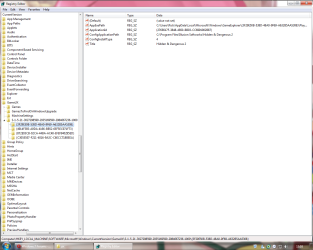
gft3.png
The KEY name might be different from yours.

Step 4: Once you find the KEY that belongs to your game, edit as follow:

  • In AppExePath put the location of your game executable.
(e.g. C:\Program Files\Illusion Softworks\Hidden & Dangerous 2\hd2.exe).

  • In ApplicationId put the xxx value you found in *GameDefinitiongameID="xxx", on the GameUXLegacyGDFs.txt file.
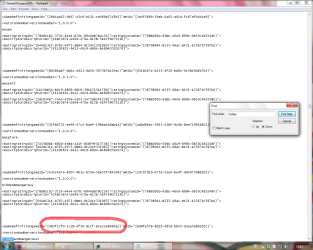
gft4.png
Add just the value between commas.

  • In ConfigInstallType replace the value to 3.
  • Delete the Title String.
  • Add a new String (Right-click>New>String Value) and name it ConfigGDFBinaryPath, then in the value data space put C:\Windows\system32\GameUXLegacyGDFs.dll
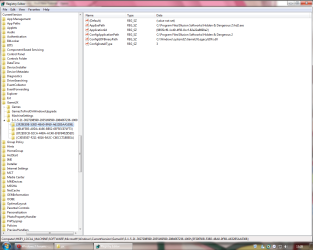
gft6.png
It should be look like this.
Step 5: Close the REd and open GEF, wait 'till windows updates the game info.
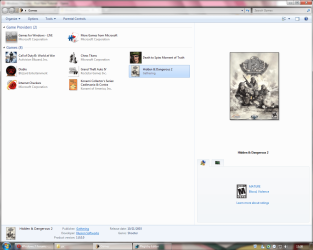
gft7.png

  • Manual
If you can't find the game your looking for in GameUXLegacyGDFs.txt, you still can use another already in the file and edit its values.
Step 1: Go to All Game Guide to search your game.
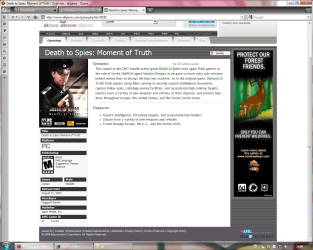
gft9.png
Save the cover image for later use.
Step 2: Now go to Entertainment Software Rating Board and find a game with similar rating.
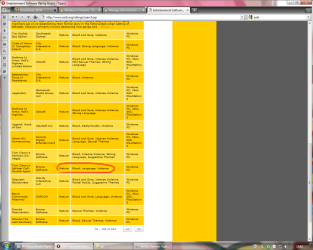
gft10.png
Step 3: Now lets find out if its listed on the GameUXLegacyGDFs.txt file, if not keep searching on the ESRB page.
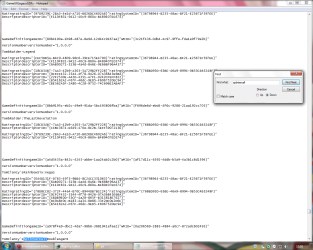
gft11.png
Step 4: Open the REd and navigate to this location.
HKEY_LOCAL_MACHINE\SOFTWARE\Microsoft\Windows\CurrentVersion\GameUX

gft3.png

The KEY name might be different from yours.


Step 5: Once you find the KEY that belongs to your game, edit as follow:


  • In AppExePath put the location of your game executable.
(e.g. C:\Program Files\Illusion Softworks\Hidden & Dangerous 2\hd2.exe).

  • In ApplicationId put the xxx value you found in *GameDefinitiongameID="xxx", on the GameUXLegacyGDFs.txt file.
gft4.png
Add just the value between commas.

  • In ConfigInstallType replace the value to 3.
  • Delete the Title String.
  • Add a new String (Right-click>New>String Value) and name it ConfigGDFBinaryPath, then in the value data space put C:\Windows\system32\GameUXLegacyGDFs.dll
gft6.png
It should be look like this.
Step 6: Open GEF and wait to update the info.
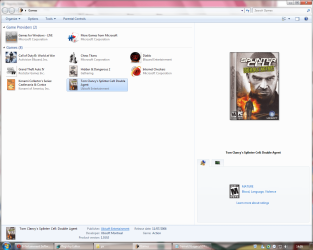
gft12.png
Step 7: Update the REd by hitting the F5 key and replace the info as necessary.
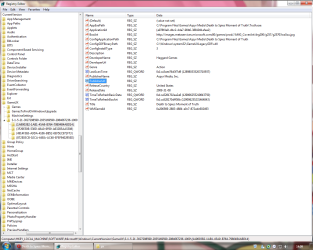
gft13.png
This is just the basic info only, you can fill the blank spaces if you like.
Step 8: Now copy and paste this values and put them like so:

  • in TimeToRefreshBasicData: b357951d59359b57 (Hexadecimal)
  • in TimeToRefreshBoxArt: 855c358859359b57 (Hexadecimal)
The given values should stop reverting the game to its defaults every once in awhile.
Step 9: Now navigate to this location and paste the image your game will use as a cover.
C:\Users\%username%\AppData\Local\Microsoft\Windows\GameExplorer\GamesBoxArt
The AppData folder is hidden by default you can learn how to unhide it in this tutorial.
Step 10: Change the name of the image with the one we're replacing.


  • If you wanna use another type of image you need to edit the last part of the BoxArt String to the kind of file you wanna use.
(e.g. ...//images.../g21004lorom.jpg) JPG/PNG/BMP.

  • Or if you want to use an icon instead, just edit:
AppExePath put the location of the icon.
BoxArt leave it blank.

gft14.png

Step 11: Now open the GEF and your game should display with the new info on it.
gft15.png
BTW, if you think is too much work for you, just take a look at this tutorial Games Explorer - Edit all credits to Darkness Warrior '96.


That's all for now...
Rjck.


Attachments

Last edited by a moderator:
Thanks! Rep+
 

My Computer

Computer type
PC/Desktop
Computer Manufacturer/Model Number
Multirama PC Expert [Bulgaria]
OS
Windows 7 Home Premium [64-Bit]
CPU
Intel Core 2 Quad CPU Q8200 @ 2.33 GHz
Motherboard
GIGABYTE GA-G31M-S2C
Memory
4094 MB DDR2
Graphics Card(s)
SAPPHIRE Radeon HD 6970 (2 GB VRAM)
Sound Card
Realtek ALC883 @ Intel 82801GB ICH7 - High Definition Audio
Monitor(s) Displays
Samsung SyncMaster BX2235 [21.5" LCD with LED Backlight]
Screen Resolution
1920x1080
Hard Drives
Hitachi HDT721075SLA360 - 750 GB
PSU
Cooler Master GX750 - 750W
Case
Multirama (Black / 2010 Revision)
Cooling
Stock + Cooler Master
Keyboard
Logitech G510 (Gaming Keyboard)
Mouse
Razer Lachesis (4000 DPI, Blue Version)
Internet Speed
Vivacom Optical [100 Mbps]
Browser
Chrome [Windows]
Great tutorial Rep+ from me!! :thumbsup:
 

My Computer

Computer Manufacturer/Model Number
HP Touchsmart IQ771.uk
OS
Windows 7 Ultimate x64
CPU
AMD Turion(tm) 64 X2 Mobile Technology TL-56
Motherboard
ASUS Pheonix
Memory
3GB Nanya PC2-6400 DDR2-SDRAM SO-DIM (400MHz)
Graphics Card(s)
NVIDIA GeForce Go 7600 256MB GDDR3 SDRAM
Sound Card
High Definition Intergrated NVIDIA MCP51
Monitor(s) Displays
46" Sony Bravia HDTV
Screen Resolution
1600x1200
Hard Drives
1.5TB Samsug
320GB Seagate ST3320820AS - SATA 3Gb/s 8MB
500GB Maxtor Basics STM305003EHD301-RK
Internet Speed
↓6.32 Mb/s ↑0.35 Mb/s ↔26ms
Other Info
BIOS - American Megatrends Inc. 5.07
Ethernet Port - NVIDIA nForce 10/100/1000 Mbps
DVD Drive - TSSTcorp DVDR/RW TS-T632L
it has been a pleasure. :D
 

My Computer

Computer type
PC/Desktop
OS
Windows 7 Ultimate x64
CPU
Intel Core i5-2500K @4.5Ghz
Motherboard
Asus Maximus V GENE
Memory
x2 Kingston KHX1600C9D3/4G
Graphics Card(s)
NVIDIA GeForce GTS 250 - 1024MB
Sound Card
SupremeFX III built-in 8-Channel High Definition Audio
Monitor(s) Displays
Samsung Syncmaster P2270
Screen Resolution
1920x1080
Hard Drives
x1 Seagate Barracuda ST3160811AS
x2 Seagate Barracuda ST380817AS
PSU
Corsair TX750
Case
Cooler Master HAF 922 Side Window Model
Cooling
Stock Intel Cooler + Tuniq TX2
Keyboard
Dell SK-8135
Mouse
Logitech G5
Internet Speed
2 Mbps
Other Info
x2 Xbox 360 Wireless Controller for Windows
Logitech Z-5550
Sennheiser HD555
Great work man, i've been looking for something like this since the early Vista days :D :D

+rep
 

My Computer

Computer Manufacturer/Model Number
Compaq Desktop
OS
Windows 7 Ultimate x64
CPU
AMD Sempron Dual Core
Memory
3GB
Graphics Card(s)
NVIDIA GeForce 6150SE nForce 430
Screen Resolution
1024x768
Hard Drives
150GB Sata
Hi, Thanks for the tutorial.

But i have one question: Where I can find the GameUXLegacyGDFs.txt file?


Thanks
 

My Computer

OS
Windows 7 Ultimate
It's at the beginning of the tutorial under the purple button that says DOWNLOAD, just need to extract the file from the zip my friend. ;)
 

My Computer

Computer type
PC/Desktop
OS
Windows 7 Ultimate x64
CPU
Intel Core i5-2500K @4.5Ghz
Motherboard
Asus Maximus V GENE
Memory
x2 Kingston KHX1600C9D3/4G
Graphics Card(s)
NVIDIA GeForce GTS 250 - 1024MB
Sound Card
SupremeFX III built-in 8-Channel High Definition Audio
Monitor(s) Displays
Samsung Syncmaster P2270
Screen Resolution
1920x1080
Hard Drives
x1 Seagate Barracuda ST3160811AS
x2 Seagate Barracuda ST380817AS
PSU
Corsair TX750
Case
Cooler Master HAF 922 Side Window Model
Cooling
Stock Intel Cooler + Tuniq TX2
Keyboard
Dell SK-8135
Mouse
Logitech G5
Internet Speed
2 Mbps
Other Info
x2 Xbox 360 Wireless Controller for Windows
Logitech Z-5550
Sennheiser HD555
Very nice! Thank you. It seems like a lot of work (I have a lot of games) but it will be worth it in the end. Too bad there isn't an automated tool.
 

My Computer

OS
Windows 7 Ultimate 64bit
CPU
Intel i5 750
Motherboard
MSI P55-GD65
Memory
4GB OCZ DDR3
Graphics Card(s)
ATI Radeon HD 4890 1GB
Monitor(s) Displays
42" LCD
Hard Drives
1TB
PSU
Ultra X3 850w Modular
Case
Thermaltake Element S
Cooling
Just a butt load of fans :p
There are some tools out there my friend but the info is the always the same in every game...
lets hope some of your games are already in the GameUXLegacyGDFs.txt file, good luck.
 

My Computer

Computer type
PC/Desktop
OS
Windows 7 Ultimate x64
CPU
Intel Core i5-2500K @4.5Ghz
Motherboard
Asus Maximus V GENE
Memory
x2 Kingston KHX1600C9D3/4G
Graphics Card(s)
NVIDIA GeForce GTS 250 - 1024MB
Sound Card
SupremeFX III built-in 8-Channel High Definition Audio
Monitor(s) Displays
Samsung Syncmaster P2270
Screen Resolution
1920x1080
Hard Drives
x1 Seagate Barracuda ST3160811AS
x2 Seagate Barracuda ST380817AS
PSU
Corsair TX750
Case
Cooler Master HAF 922 Side Window Model
Cooling
Stock Intel Cooler + Tuniq TX2
Keyboard
Dell SK-8135
Mouse
Logitech G5
Internet Speed
2 Mbps
Other Info
x2 Xbox 360 Wireless Controller for Windows
Logitech Z-5550
Sennheiser HD555
Anyone knows how to manually add an icon or image to a shortcut i put manually in the game explorer in Windows 7 ?

In Windows Vista you were able to change the shortcut properties and so you could change the icon, but now this option is gone, any help ?
Thx.
 

My Computer

OS
Windows 7 x86
Try changing this values in Regedit:
AppExePath = change the value data to the path of your icon. (e.g. C:\icon.ico)
BoxArt = Delete the value data but no the name value.

Delete the cover image from the GamesBoxArt folder from the step 8 of the optional section of the tutorial.

and thats all hope this help!!!
 
Last edited:

My Computer

Computer type
PC/Desktop
OS
Windows 7 Ultimate x64
CPU
Intel Core i5-2500K @4.5Ghz
Motherboard
Asus Maximus V GENE
Memory
x2 Kingston KHX1600C9D3/4G
Graphics Card(s)
NVIDIA GeForce GTS 250 - 1024MB
Sound Card
SupremeFX III built-in 8-Channel High Definition Audio
Monitor(s) Displays
Samsung Syncmaster P2270
Screen Resolution
1920x1080
Hard Drives
x1 Seagate Barracuda ST3160811AS
x2 Seagate Barracuda ST380817AS
PSU
Corsair TX750
Case
Cooler Master HAF 922 Side Window Model
Cooling
Stock Intel Cooler + Tuniq TX2
Keyboard
Dell SK-8135
Mouse
Logitech G5
Internet Speed
2 Mbps
Other Info
x2 Xbox 360 Wireless Controller for Windows
Logitech Z-5550
Sennheiser HD555
Both aren't working :/

Which settings must I use for the .jpg ? (resolution for example). Also, which "ConfigInstallType" should I use ?
 

My Computer

OS
Windows 7 x86
aren't working???, lets start from the begining shall we... ;)

Is the game listed in the GameUXLegacyGDFs.txt file or not?
if not. do the manual part of the tutorial.

After finish the tutorial try to change the values i post above to change the game cover picture to the icon you want.

Let me know if that helps!
 
Last edited:

My Computer

Computer type
PC/Desktop
OS
Windows 7 Ultimate x64
CPU
Intel Core i5-2500K @4.5Ghz
Motherboard
Asus Maximus V GENE
Memory
x2 Kingston KHX1600C9D3/4G
Graphics Card(s)
NVIDIA GeForce GTS 250 - 1024MB
Sound Card
SupremeFX III built-in 8-Channel High Definition Audio
Monitor(s) Displays
Samsung Syncmaster P2270
Screen Resolution
1920x1080
Hard Drives
x1 Seagate Barracuda ST3160811AS
x2 Seagate Barracuda ST380817AS
PSU
Corsair TX750
Case
Cooler Master HAF 922 Side Window Model
Cooling
Stock Intel Cooler + Tuniq TX2
Keyboard
Dell SK-8135
Mouse
Logitech G5
Internet Speed
2 Mbps
Other Info
x2 Xbox 360 Wireless Controller for Windows
Logitech Z-5550
Sennheiser HD555
No they aren't, your txt has nearly 0 games I own and you have completly missed my post :/

I want to use custom (=personal !) icon or boxart for (any) games, because thoses games are using old 64px icon and it's fugly, and in Vista you were able to change the icon to your own one (in 256px for example) in few click. And now that this option is gone in Win 7, what I am supposed to do to change the icon to a personal one like I'm used to do in Vista ?
 

My Computer

OS
Windows 7 x86
Hi Rjck, I just made a full clean install of seven and now I can do all steps in your tutorial! My older windows was buggy so I got a newer *working* version. Annoying thing is you need to repeat this for every single game... Couldn't someone make a VGEE for 7 or something...
 

My Computer

Computer type
PC/Desktop
Computer Manufacturer/Model Number
Multirama PC Expert [Bulgaria]
OS
Windows 7 Home Premium [64-Bit]
CPU
Intel Core 2 Quad CPU Q8200 @ 2.33 GHz
Motherboard
GIGABYTE GA-G31M-S2C
Memory
4094 MB DDR2
Graphics Card(s)
SAPPHIRE Radeon HD 6970 (2 GB VRAM)
Sound Card
Realtek ALC883 @ Intel 82801GB ICH7 - High Definition Audio
Monitor(s) Displays
Samsung SyncMaster BX2235 [21.5" LCD with LED Backlight]
Screen Resolution
1920x1080
Hard Drives
Hitachi HDT721075SLA360 - 750 GB
PSU
Cooler Master GX750 - 750W
Case
Multirama (Black / 2010 Revision)
Cooling
Stock + Cooler Master
Keyboard
Logitech G510 (Gaming Keyboard)
Mouse
Razer Lachesis (4000 DPI, Blue Version)
Internet Speed
Vivacom Optical [100 Mbps]
Browser
Chrome [Windows]
Ok AnthonyDA im going to update the tutorial explaining this further just let me get some time to make it.

Hi DW96 i think you could export the key from the registry and in the new installation change the user and game key path from the registry you saved it, dont worry i'll edit the tutorial explaining this further...
 

My Computer

Computer type
PC/Desktop
OS
Windows 7 Ultimate x64
CPU
Intel Core i5-2500K @4.5Ghz
Motherboard
Asus Maximus V GENE
Memory
x2 Kingston KHX1600C9D3/4G
Graphics Card(s)
NVIDIA GeForce GTS 250 - 1024MB
Sound Card
SupremeFX III built-in 8-Channel High Definition Audio
Monitor(s) Displays
Samsung Syncmaster P2270
Screen Resolution
1920x1080
Hard Drives
x1 Seagate Barracuda ST3160811AS
x2 Seagate Barracuda ST380817AS
PSU
Corsair TX750
Case
Cooler Master HAF 922 Side Window Model
Cooling
Stock Intel Cooler + Tuniq TX2
Keyboard
Dell SK-8135
Mouse
Logitech G5
Internet Speed
2 Mbps
Other Info
x2 Xbox 360 Wireless Controller for Windows
Logitech Z-5550
Sennheiser HD555
Rjck, I'm really curious about seeing your tutorial :p
I've made custom dll with directx SDK to fix my issue for now ^^
 

My Computer

OS
Windows 7 x86
awesome. looks like i got some work to do tomorrow :) +rep
 

My Computer

OS
Windows 7 Professional 32-Bit
CPU
AMD Phenom II X2 545 3GHz
Motherboard
Gigabyte MA785GM-US2H
Memory
3GB DDR2-800
Graphics Card(s)
PNY GeForce 9800 GT 512MB
Sound Card
Onboard sound
Monitor(s) Displays
e17T4 17"
Screen Resolution
1280x1024
Hard Drives
Western Digital Caviar 320GB IDE
PSU
Tiger 450W
Case
eMachines C6415 mATX
Cooling
AMD Stock Cooler
Keyboard
Logitech EX110 Wireless Keyboard
Mouse
Logitech EX110 Wireless Mouse
Internet Speed
Verizon FiOS
Other Info
Zonealarm Internet Security Suite 9 for Antivirus and Firewall
i followed the directions exactly, but i'm having problems adding Steam games (specifically HL2). when i change one of the values to 3 (i can't remember which one it was) and close the reg editor, the game deletes itself from the games folder and the registry.
 

My Computer

OS
Windows 7 Professional 32-Bit
CPU
AMD Phenom II X2 545 3GHz
Motherboard
Gigabyte MA785GM-US2H
Memory
3GB DDR2-800
Graphics Card(s)
PNY GeForce 9800 GT 512MB
Sound Card
Onboard sound
Monitor(s) Displays
e17T4 17"
Screen Resolution
1280x1024
Hard Drives
Western Digital Caviar 320GB IDE
PSU
Tiger 450W
Case
eMachines C6415 mATX
Cooling
AMD Stock Cooler
Keyboard
Logitech EX110 Wireless Keyboard
Mouse
Logitech EX110 Wireless Mouse
Internet Speed
Verizon FiOS
Other Info
Zonealarm Internet Security Suite 9 for Antivirus and Firewall
Hi Mirrorboy looks like you paste the wrong value in ApplicationId string in the registry editor, the value 3 in ConfigInstallType fails if Windows cant find the correct value in ApplicationId. For half-life 2 the value could be:

{40a84078-2cef-427a-989c-db740f4ebc39} "copy and paste all the value in bold"

This is for Steam: Half-life 2 Deathmatch but i think it has the same values as the game.
hope this helps!!!
 
Last edited:

My Computer

Computer type
PC/Desktop
OS
Windows 7 Ultimate x64
CPU
Intel Core i5-2500K @4.5Ghz
Motherboard
Asus Maximus V GENE
Memory
x2 Kingston KHX1600C9D3/4G
Graphics Card(s)
NVIDIA GeForce GTS 250 - 1024MB
Sound Card
SupremeFX III built-in 8-Channel High Definition Audio
Monitor(s) Displays
Samsung Syncmaster P2270
Screen Resolution
1920x1080
Hard Drives
x1 Seagate Barracuda ST3160811AS
x2 Seagate Barracuda ST380817AS
PSU
Corsair TX750
Case
Cooler Master HAF 922 Side Window Model
Cooling
Stock Intel Cooler + Tuniq TX2
Keyboard
Dell SK-8135
Mouse
Logitech G5
Internet Speed
2 Mbps
Other Info
x2 Xbox 360 Wireless Controller for Windows
Logitech Z-5550
Sennheiser HD555
Back
Top