Windows 7 Forums Search
Welcome to Windows 7 Forums. Our forum is dedicated to helping you find solutions with any problems, errors or issues you are experiencing with Windows 7. The Windows 7 forum also covers news and updates and has an extensive Windows 7 tutorial section that covers a wide range of tips and tricks.


Windows 7 - Show Desktop Icon on Taskbar


Show Desktop Icon on Taskbar

How to Create a "Show Desktop" Shortcut in Windows 7
Published by VicVicVic
09-25-2009
Default Show Desktop Icon on Taskbar

How to Create a "Show Desktop" Shortcut in Windows 7

information   Information
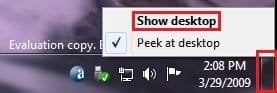
Show Desktop was a feature present in Windows XP and Windows Vista, but has been changed to the Aero Peek/Show Desktop button on the bottom right corner of the screen, near the Notification Area.

This will show you how to create or download a Show Desktop shortcut that you can use anywhere.

Note   Note
By default in Windows 7, the taskbar button on the far right side is for Show Desktop and Aero Peek.
Name:  Show_Desktop.jpg
Views: 34443
Size:  12.5 KB


OPTION ONE

To Download the "Show Desktop" Shortcut
1. Click on the Download button below to download the Show_Desktop.zip file.
download
2. Click on Save, and save the .zip file to the desktop.

3. Open the .zip file and extract the Bluetooth Devices shortcut to the desktop.

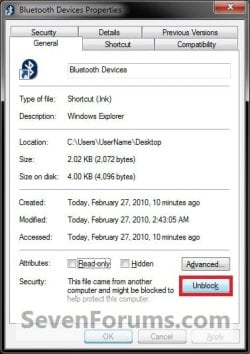
4. Right click on the Show Desktop shortcut, and click on Properties, General tab, and on the Unblock button. (See screenshot below)
NOTE: If you do not have a Unblock button under the General tab, then the shortcut is already unblocked and you can continue on to step 5.
Show Desktop Icon on Taskbar-unblock.jpg
5. When done, you can delete the downloaded .zip file on the desktop if you like, or save it to use again.

6. You can now Pin to Taskbar or Pin to Start Menu this shortcut, assign a keyboard shortcut to it, or move it where you like for easy use.


OPTION TWO

To Manually Create the "Show Desktop" Shortcut
1. Right click on a empty area on desktop, and click on New and Shortcut.

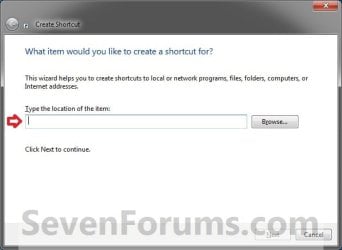
2. Copy and paste the location below into the location area, and click on the Next button. (See screenshot below)
Code:
%windir%\explorer.exe shell:::{3080F90D-D7AD-11D9-BD98-0000947B0257}
Show Desktop Icon on Taskbar-step1.jpg
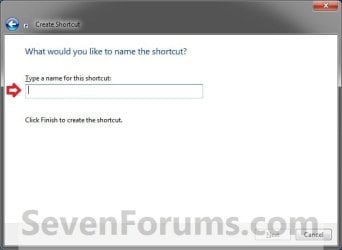
3. Type Show Desktop for the name, and click on the Finish button. (See screenshot below)
NOTE: You can name this anything you would like though.
Show Desktop Icon on Taskbar-step2.jpg
4. Right click on the new Show Desktop shortcut on the Desktop and click on Properties.

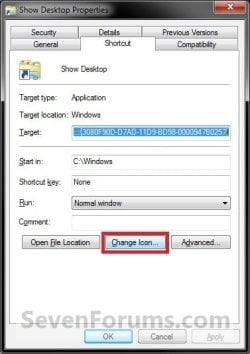
5. Click on the Shortcut tab, then click on the Change Icon button. (See screenshot below)
Show Desktop Icon on Taskbar-step3.jpg
6. In the line under "Look for icons in this file", copy and paste the location below and press Enter. (See screenshot below)
%SystemRoot%\system32\imageres.dll
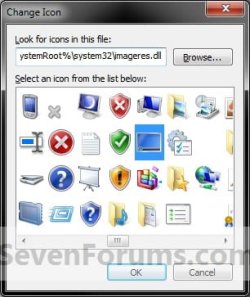
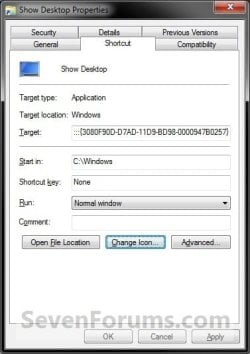
Show Desktop Icon on Taskbar-step4.jpg
7. Select the icon highlighted in blue above and click on OK. (See screenshot above)
NOTE: You can use any icon that you would like instead though.

8. Click on OK. (See screenshot below)
Show Desktop Icon on Taskbar-step5.jpg
9. You can now Pin to Taskbar or Pin to Start Menu this shortcut, assign a keyboard shortcut to it, or move it where you like for easy use.

Hope this helps,
Victor Ly


Published by
Member
Join Date: Sep 2009
Posts: 52
VicVicVic will become famous soon enoughVicVicVic will become famous soon enough

Tutorial Tools
09-26-2009   #1
kumobox


Windows 7 64bit Home


not working for me! everything is fine until i reboot and the show desktop icon is no longer there...

My System SpecsSystem Spec
09-29-2009   #2
VicVicVic


Windows 7 Professional


Quote   Quote: Originally Posted by kumobox View Post
not working for me! everything is fine until i reboot and the show desktop icon is no longer there...
Sorry about that. I have since updated the tutorial to make sure that does not happen.

Have a good day,
Victor Ly
My System SpecsSystem Spec
09-30-2009   #3
kumobox


Windows 7 64bit Home


Thanks! it's working now!
My System SpecsSystem Spec
.


10-24-2009   #4
kumobox


Windows 7 64bit Home


Not working on final release?

Hi Victor, sorry to bother you again but since installing the retail version of windows 7 home I'm unable to put show desktop on the taskbar.
If I drag it to taskbar it gets pinned either to windows explorer or to my computer, it doesn't stay directly on the taskbar, I have to click on windows explore or my computer and then its there like a jumplist.
any suggestions?
My System SpecsSystem Spec
10-24-2009   #5
derekimo


Windows 7 Pro 64 SP1


This didn't work for me either, but I found the shortcut in the Quicklaunch folder in Brinks tutorial " Quicklaunch - Enable or Disable " ,Right clicked on it to send to desktop ( create shortcut ). Then followed Charbroil57's tutorial on how to pin the Recycle bin to the Taskbar and that worked for me, I don't know if there is an easier way to go about it ?
My System SpecsSystem Spec
10-25-2009   #6
kumobox


Windows 7 64bit Home


Thanks Derekimo, I've tried that and it works but its not ideal as I have to keep the icon eiter down one side or the other.
The way the icon behaved after Viktor's tutorial was what I needed, hope he'll be able to fix it.
Thanks
My System SpecsSystem Spec
11-26-2009   #7
captnorm


Win7 Pro


Show Desktop works near start button, can I get rid of

This procedure worked perfectly. Is there any way to get rid of the small icon to the right of the time?
My System SpecsSystem Spec
12-03-2009   #8
matthewindc


Wiindows 7


Creating the desktop icon on the task bar

Hi,

This is totally minor, but I was wondering if you could tell me what I did wrong or what the fix might be: I was able to install the desktop button on my task bar, but it is not actually the desktop icon...can I get the icon image? Thanks!
My System SpecsSystem Spec
12-10-2009   #9
whs


Vista and Windows7, sometimes Ubuntu and Fedora


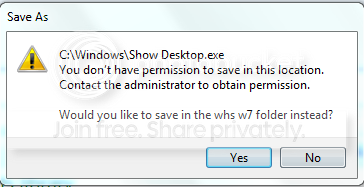
Unfortunately this did not work for me. When I wanted to save the Notepad file, I get this message. I am puzzled. I guess I will use Win+D.

My System SpecsSystem Spec
Comment

Show Desktop Icon on Taskbar problems?


Tutorial Tools


Similar Threads for: Show Desktop Icon on Taskbar
Windows 7 Tutorial Category
How do I get USB thumb drives to show a taskbar icon when inserted? General Discussion
Show Computer Icon on Desktop Customization
show desktop icon Customization
How to show only desktop icons as icon Customization
Show Desktop Icon in Taskbar? I want it. Customization


All times are GMT -5. The time now is 08:54 PM.


Windows 7 Forums is an independent web site and has not been authorized,
sponsored, or otherwise approved by Microsoft Corporation.
"Windows 7" and related materials are trademarks of Microsoft Corp.
© Designer Media Ltd
  

1 2 3 4 5 6 7 8 9 10 11 12 13 14 15 16 17 18 19 20 21 22 23 24 25 26 27 28 29 30