
How to Delete a Partition or Volume in Windows 7 and Windows 8
Information
This will show you how to delete a partition or volume on a hard disk using Disk Management or Diskpart in Windows 7 and Windows 8 to create empty unallocated space that you can use to create new partitions with.
Note
- You will not be able to delete the Windows partition that you are currently logged in to. The only way would be to delete it at boot or during a Windows installation.
- You also can't delete the system partition, boot partition, or any partition that contains the virtual memory paging file, because Windows needs this information to startup and run properly.
Warning
- You must be logged on in an administrator account to be able to do this tutorial.
- When you delete a partition, all data on the partition is erased.
- If you disable the Disk Defragmenter service, then you will get the error below when you try to do anything in Disk Management. If you get this error, then make sure that the Disk Defragmenter service is set to only Manual.

OPTION ONE
To Delete Partition or Volume using Disk Management
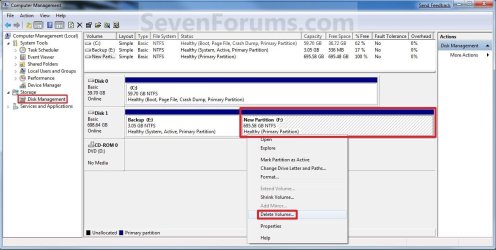
2. In the middle pane, right click on the partition of a disk that you want to delete, and click/tap on Delete Volume. (see screenshot below)
NOTE: If the partition is a logical partition, then you will need to delete the free space again to have it as unallocated space.
 3. Click/tap on Yes to confirm deletion. (see screenshot below)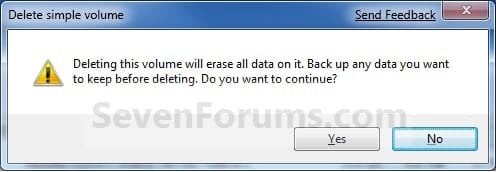
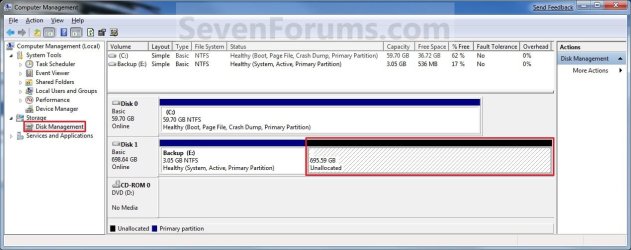
4. The selected partition (step 2) is now deleted and is unallocated space on the disk. If not, then delete the partition again until it displays as unallocated space like below. (see screenshot below)
NOTE: You can now use this unallocated space to create a new partition with, or extend another adjacent partition on that same hard disk into it.
5. You can now close Disk Management if you like.
OPTION TWO
To Delete Partition or Volume using Diskpart Command
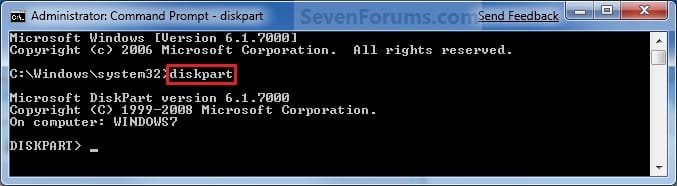
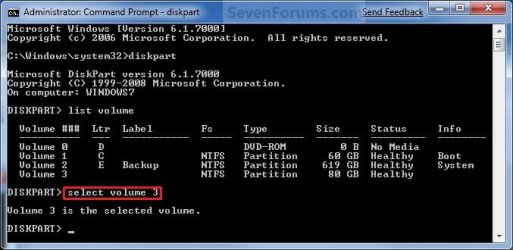
2. In the command prompt, type diskpart and press Enter. (See screenshot below)
3. In the command prompt, type list volume and press Enter. (See screenshot below)
NOTE: This will give you a list of volume numbers to select from to delete.

4. In the command prompt, type select volume # and press Enter. (See screenshot below)
NOTE: You would substitute # for the volume number listed that you want to delete. For example, I want to delete the listed volume 3, so I would type select volume 3 and press Enter.
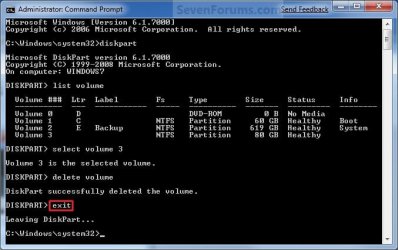
5. In the command prompt, type delete volume and press Enter. (See screenshot below)
NOTE: If it fails to delete, then use type delete volume override and press enter instead.

6. In the command prompt, type exit and press Enter. (See screenshot below)
7. Close the command prompt.
8. The selected partition (step 4) is now deleted and is unallocated space on the disk.
NOTE: You can use this unallocated space to create a new partition with, or extend another partition on that same hard disk into it.
That's it,
Shawn
Related Tutorials
- Data Partition
- How to Extend a Partition or Volume in Windows 7
- How to Create a New Partition or Volume in Windows 7
- How to Create and Attach a Virtual Hard Disk in Windows 7
- How to Shrink a Partition or Volume in Windows 7
- How to Unattach and Delete a Virtual Hard Disk in Windows 7
- How to Setup Windows 7 to Boot from a VHD (Virtual Hard Disk)
- How to Convert a FAT or FAT32 Volume to NTFS in Windows 7
- How to Convert a MBR Disk to a GPT Disk
- How to Convert a GPT Disk to a MBR Disk
- How to Convert a Basic Disk to a Dynamic Disk
- How to Convert a Dynamic Disk to a Basic Disk
- How to Clean or Clean All a Disk with the Diskpart Command
- How to Securely Wipe a Hard Disk with "Darik's Boot and Nuke"
- How to Quick Format a HDD or USB Drive
- How to Mark a Partition as Active in Windows 7
- How to Mark a Partition as Inactive in Windows 7 and Vista
- How to "Clean" or "Clean All" a Disk with the Diskpart Command
Last edited:


