
How to Create a Flip 3D Switch Between Windows Shortcut in Windows 7
Information
This will show you how to create a Switch Between Windows, also known as Flip 3D, shortcut in Windows 7.
Note
Keyboard Shortcut Keys for Flip 3D
NOTE: Press the key combinations below in blue to activate.
NOTE: Press the key combinations below in blue to activate.
- Windows Key + Tab = Press and hold Windows Key, then press Tab (or roll mouse scroll wheel) to scroll through the open windows. Choose the open window you want by releasing the Windows Key when the window is at the front.
- Ctrl + Windows Key + Tab = Scroll through the open windows by pressing the Tab key, arrow keys, or roll the mouse scroll wheel. Click on the window you want to see, or press Enter when it is up front.
Tip

Warning
Aero Requirements to be Enabled in Windows 7:
NOTE: If Aero is not enabled, then Switch Between Windows - Flip 3D - will not work.
NOTE: If Aero is not enabled, then Switch Between Windows - Flip 3D - will not work.
- 1 GHz 32-bit or 64-bit processor
- 1 GB of system memory
- A graphics card with support for DirectX 9 graphics with at least 128 MB of memory.
- The graphics card must support Pixel Shader 2.0 and the Windows Display Driver Model (WDDM).
- You must be have True Color (32 bit) set instead of High Color (16 bit).
- The desktop composition and Animate controls and elements inside windows options enabled in Visual Effects.
- The Desktop Window Manager Session Manager and Themes Services need to be set as Started and Automatic.
- Refresh or update your WEI score.
- Using a Aero theme.
EXAMPLE: Switch Between Windows - Flip-3D

OPTION ONE
To Download a Flip 3D Shortcut
1. Click on the Download button below to download the file below.
Switch_Between_Windows.zip
Download
2. Click on Save, and save the .zip file to the desktop.
3. Open the .zip file and extract the Switch Between Windows shortcut to the desktop.
4. Right click on the Switch Between Windows shortcut, and click on Properties, General tab, and on the Unblock button. (See screenshot below)
NOTE: If you do not have a Unblock button under the General tab, then the shortcut is already unblocked and you can continue on to step 5.
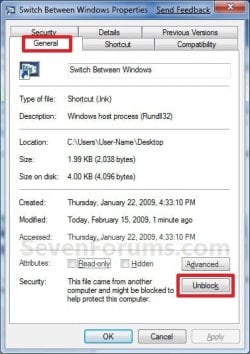
5. You can now Pin to Taskbar or Pin to Start Menu this shortcut, assign a keyboard shortcut to it, or move it where you like for easy use.
6. When done, you can delete the downloaded .zip file on the desktop if you like.
OPTION TWO
To Manually Create a Flip 3D Shortcut
1. Right click on a empty area on desktop, and click on New and Shortcut. (See screenshot below)
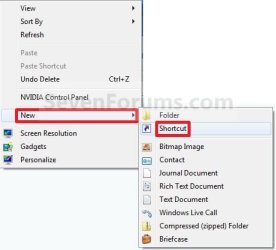
2. Copy and paste the path below into the location area, and click on the Next button. (See screenshot below)
%windir%\system32\rundll32.exe DwmApi #105
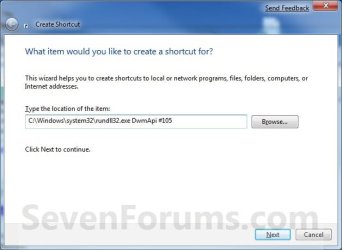
3. Type Switch Between Windows for the name, and click on the Finish button. (See screenshot below)
NOTE: You can name this anything you would like though. For example, Flip 3D.

4. Right click on the new Switch Between Windows shortcut on the Desktop and click on Properties. (See screenshot below)

5. Click on the Change Icon button. (See screenshot below)
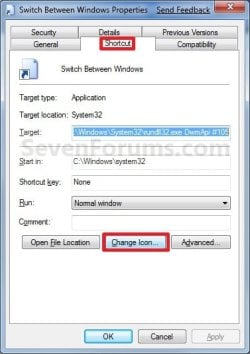
6. In the line under "Look for icons in this file", copy and paste the path below and press Enter. (See screenshot below)
%SystemRoot%\System32\imageres.dll

7. Select the Flip-3D icon in blue below and click on OK. (See screenshot above)
8. Click on OK. (See screenshot below)
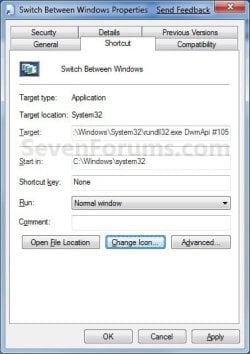
9. You can now Pin to Taskbar or Pin to Start Menu this shortcut, assign a keyboard shortcut to it, or move it where you like for easy use.

That's it,
Shawn
Related Tutorials
- Download Flip 2D Shortcut to Open CTRL+ALT+TAB in Windows
- How to Change the Number of Windows Displayed in Flip 3D
- How to Use Classic Icons or Thumbnail Previews with ALT+TAB Keyboard Shortcut
- How to Add Flip 3D to the Context Menu in Vista and Windows 7
- How to Enable or Disable Flip 3D in Vista and Windows 7
Attachments
Last edited:


 , now I wonder is it possible to replace the Show desktop / Aero peek at the bottom right corner with the Flip-3D?


