
 |
Welcome to Windows 7 Forums. Our forum is dedicated to helping you find solutions with any problems, errors or issues you are experiencing with Windows 7. The Windows 7 forum also covers news and updates and has an extensive Windows 7 tutorial section that covers a wide range of tips and tricks.
Windows 7 - Switch Between Windows - Flip 3D Shortcut Switch Between Windows - Flip 3D Shortcut How to Create a Flip 3D Switch Between Windows Shortcut in Windows 7
Published by Brink
01-22-2009
| Switch Between Windows - Flip 3D Shortcut How to Create a Flip 3D Switch Between Windows Shortcut in Windows 7  Information This will show you how to create a Switch Between Windows, also known as Flip 3D, shortcut in Windows 7.  Note Keyboard Shortcut Keys for Flip 3D NOTE: Press the key combinations below in blue to activate. - Windows Key + Tab = Press and hold Windows Key, then press Tab (or roll mouse scroll wheel) to scroll through the open windows. Choose the open window you want by releasing the Windows Key when the window is at the front.
- Ctrl + Windows Key + Tab = Scroll through the open windows by pressing the Tab key, arrow keys, or roll the mouse scroll wheel. Click on the window you want to see, or press Enter when it is up front.
If you would like to assign your own keyboard shortcut to the shortcut in this tutorial, then for how, see: How to Create a Keyboard Shortcut for a Program in Vista and Windows 7  Tip  Warning Aero Requirements to be Enabled in Windows 7: NOTE: If Aero is not enabled, then Switch Between Windows - Flip 3D - will not work. EXAMPLE: Switch Between Windows - Flip-3D OPTION ONE
To Download a Flip 3D Shortcut
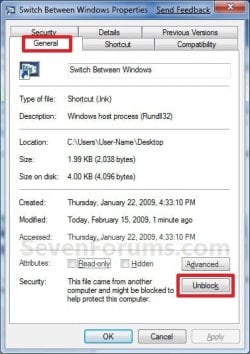
1. Click on the Download button below to download the file below.Switch_Between_Windows.zip  2. Click on Save, and save the .zip file to the desktop. 3. Open the .zip file and extract the Switch Between Windows shortcut to the desktop. 4. Right click on the Switch Between Windows shortcut, and click on Properties, General tab, and on the Unblock button. (See screenshot below) NOTE: If you do not have a Unblock button under the General tab, then the shortcut is already unblocked and you can continue on to step 5. 5. You can now Pin to Taskbar or Pin to Start Menu this shortcut, assign a keyboard shortcut to it, or move it where you like for easy use. 6. When done, you can delete the downloaded .zip file on the desktop if you like. OPTION TWO
To Manually Create a Flip 3D Shortcut
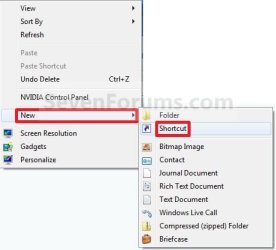
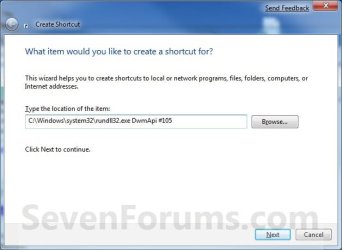
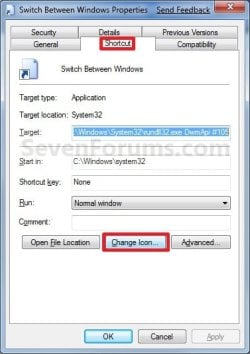
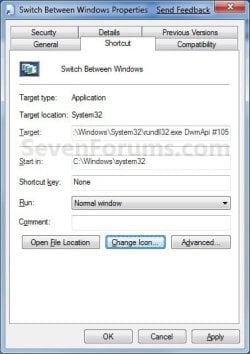
1. Right click on a empty area on desktop, and click on New and Shortcut. (See screenshot below) 2. Copy and paste the path below into the location area, and click on the Next button. (See screenshot below)%windir%\system32\rundll32.exe DwmApi #105 3. Type Switch Between Windows for the name, and click on the Finish button. (See screenshot below) NOTE: You can name this anything you would like though. For example, Flip 3D. 4. Right click on the new Switch Between Windows shortcut on the Desktop and click on Properties. (See screenshot below) 5. Click on the Change Icon button. (See screenshot below) 6. In the line under "Look for icons in this file", copy and paste the path below and press Enter. (See screenshot below)%SystemRoot%\System32\imageres.dll 7. Select the Flip-3D icon in blue below and click on OK. (See screenshot above) 8. Click on OK. (See screenshot below) 9. You can now Pin to Taskbar or Pin to Start Menu this shortcut, assign a keyboard shortcut to it, or move it where you like for easy use. 
That's it,
Shawn |  Published by | | Administrator Join Date: Oct 2008 Location: Texas Posts: 37,303 | |
 Tutorial Tools | | | | | | | | | |
01-22-2009
|
#1 | | Windows 7 Ultimate x64 SP1 |
Another good one Shawn. | My System Specs | | System Manufacturer/Model Number Airbot 2.0 OS Windows 7 Ultimate x64 SP1 CPU Core i7 920 (D0) @ 4Ghz, *26c idle *65c full load on air Motherboard Asus P6X58D Premium - Sata 6Gb/s - USB 3.0 Memory 12GB DDR3 Corsair Dominator -CMD12GX3M6A1600C8 at 1600MHz Graphics Card EVGA GeForce GTX 480 -Aftermaket Accelero Xtreme Plus cooler Sound Card ASUS Xonar D2X Monitor(s) Displays 1 LG 24" Flatron W2453V-PF 1 Samsung 24" P2450H both 2ms RT Screen Resolution 1920x1080@60hz Keyboard Logitech Wireless MK700 Mouse Logitech Wireless MK700 PSU Corsair HX1000W Case Cooler Master HAF 932 Cooling Case Fans *3 230mm, *1 140mm/CPU - *Tuniq Tower 120 Extreme Hard Drives 1 OCZ Vertex2 180GB SSD
1 TB Samsung Spinpoint F1 7200RPM 32MB cache
2 500GB WD Caviar Blacks 7200RPM 32MB cache (WD5001AALS)
Pioneer DVD Burner DVR-S18M Internet Speed DL 15 Mbps UL 0.98 Mbps Other Info Processor-7.7 *RAM- 7.9 *Graphics-7.9 *Gaming Graphics- 7.9 *SSD- 7.8 W.E.I final score= 7.7
*Phone- Samsung Galaxy Nexus |
01-22-2009
|
#2 | | Windows 7 Ultimate x64 SP1 |
Thank you Aaron. | My System Specs | | System Manufacturer/Model Number Self built custom OS Windows 7 Ultimate x64 SP1 CPU Intel i7-980X 3.3 Ghz (3.48 Ghz OC'd) Motherboard ASUS P6X58D Premium Memory 12 GB (2GBx6) DDR3 PC3-16000 2000 MHz Kingston HyperX Graphics Card Sapphire HD5870 Eyefinity 6 2GB Sound Card Realtek HD Audio ALC889 Integrated Chip Monitor(s) Displays 3x 27" Asus VE278Q Screen Resolution 1920x1080 Keyboard Logitech Cordless Desktop MX 5500 Revolution Mouse Logitech Cordless Desktop MX 5500 Revolution PSU OCZ Series Gold OCZZ1000M 1000W Case Corsair Obsidian 800D Cooling Thermalright Ultra 120 Extreme Copper CPU heat sink w/120 MM Hard Drives 160GB OCZ RevoDrive X2
** 2 x 1TB Samsung HDD HD154UI SATA Internet Speed 50 Mb/s Download and 2 Mb/s Upload Other Info Microsoft LifeCam Cinema
** Lite-On iHBS212 12x BD Writer
** Samsung CLX-3175FW Printer
** Netgear WNDR3800 Router
** Motorola SBG6580 Cable Modem
** 2x APC Back-UPS XS 1500 |
02-06-2009
|
#3 | | |
Hoooooray Beer!
Hooooooray FLIP3D!
this thing is great brink. Coming from a non-vista using longtime xp user.... this has answered one of my small issues with Windows 7 and the ie window/tab grouping that i have had. Figured out my mouse has a wheel and why they call this "FLIP"3D.... lol... now i can still be happy with the use of taskbar preview and not get lost when having many many things open, or having to switch to non-grouping. | My System Specs | | System Manufacturer/Model Number CUSTOM OS XP/win7 x86 build 7127 CPU Athlon64 X2 DUAL 4200+ 2.21ghz Motherboard ASUS K8 PRO SLI Memory 2GB Dual Chan DDR2 Corsair Graphics Card Nvidia 6800GT Sound Card nvidia Monitor(s) Displays 19' LCD Screen Resolution 1280x1024 Keyboard MS wireless Mouse MS Wireless PSU coolermaster 450 Case SUPERFLOWER Cooling 1 HDD bay fan, 5x80mm Case Fans, AEROGATE II Fan/Temp Hard Drives WD 250, 2x500, 2x1TB IDE/USB
WD 250 SATA (system)
SEAGATE 120 Sata Internet Speed fassssssssst |
02-06-2009
|
#4 | | Windows 7 Ultimate x64 SP1 |
I'm happy to hear that it was able to help you out Digger. | My System Specs | | System Manufacturer/Model Number Self built custom OS Windows 7 Ultimate x64 SP1 CPU Intel i7-980X 3.3 Ghz (3.48 Ghz OC'd) Motherboard ASUS P6X58D Premium Memory 12 GB (2GBx6) DDR3 PC3-16000 2000 MHz Kingston HyperX Graphics Card Sapphire HD5870 Eyefinity 6 2GB Sound Card Realtek HD Audio ALC889 Integrated Chip Monitor(s) Displays 3x 27" Asus VE278Q Screen Resolution 1920x1080 Keyboard Logitech Cordless Desktop MX 5500 Revolution Mouse Logitech Cordless Desktop MX 5500 Revolution PSU OCZ Series Gold OCZZ1000M 1000W Case Corsair Obsidian 800D Cooling Thermalright Ultra 120 Extreme Copper CPU heat sink w/120 MM Hard Drives 160GB OCZ RevoDrive X2
** 2 x 1TB Samsung HDD HD154UI SATA Internet Speed 50 Mb/s Download and 2 Mb/s Upload Other Info Microsoft LifeCam Cinema
** Lite-On iHBS212 12x BD Writer
** Samsung CLX-3175FW Printer
** Netgear WNDR3800 Router
** Motorola SBG6580 Cable Modem
** 2x APC Back-UPS XS 1500 |
02-14-2009
|
#5 | | Windows Vista And installing Windows Se7en now! |
Hey Shawn,
when i used method 2 and created a shortcut, i got this message when i tried to open it,
Error loading DwnApi
The specified procedure could not be found
may i know why?
Regards,
Ashok | My System Specs | | OS Windows Vista And installing Windows Se7en now! CPU Core 2 Quad 2.4 Ghz Motherboard Intel DG 35 EC Memory 4 GB Graphics Card Nvidia 8500 GT Monitor(s) Displays ViewSonic 19" Screen Resolution 1400x900 Hard Drives 500GB Seagate! |
02-14-2009
|
#6 | | Windows 7 Ultimate x64 SP1 |
Hello Ashok,
Double check to make sure that you do not have a typo from step 2. Does the download shortcut work for you? | My System Specs | | System Manufacturer/Model Number Self built custom OS Windows 7 Ultimate x64 SP1 CPU Intel i7-980X 3.3 Ghz (3.48 Ghz OC'd) Motherboard ASUS P6X58D Premium Memory 12 GB (2GBx6) DDR3 PC3-16000 2000 MHz Kingston HyperX Graphics Card Sapphire HD5870 Eyefinity 6 2GB Sound Card Realtek HD Audio ALC889 Integrated Chip Monitor(s) Displays 3x 27" Asus VE278Q Screen Resolution 1920x1080 Keyboard Logitech Cordless Desktop MX 5500 Revolution Mouse Logitech Cordless Desktop MX 5500 Revolution PSU OCZ Series Gold OCZZ1000M 1000W Case Corsair Obsidian 800D Cooling Thermalright Ultra 120 Extreme Copper CPU heat sink w/120 MM Hard Drives 160GB OCZ RevoDrive X2
** 2 x 1TB Samsung HDD HD154UI SATA Internet Speed 50 Mb/s Download and 2 Mb/s Upload Other Info Microsoft LifeCam Cinema
** Lite-On iHBS212 12x BD Writer
** Samsung CLX-3175FW Printer
** Netgear WNDR3800 Router
** Motorola SBG6580 Cable Modem
** 2x APC Back-UPS XS 1500 |
02-15-2009
|
#7 | | |
Hi shawn, tried your TUTE, did it both ways , did everything as you said but when I click on the shortcut I get this window every time ,if you have any ideas ,no hurry ,and keep up the great work the tutorials are brilliant,Thank You.
Last edited by Brink; 07-21-2009 at 04:00 PM..
| My System Specs | | System Manufacturer/Model Number Self Build 64bit OS Vista Ult64, Win7600 CPU Intel Core 2 Quad Q6600 @ 2400 MHz 64bit OS Motherboard Asus P5E3 Deluxe WiFi @p 64 bit OS Memory 4096 MB DDR3-SDRAM Graphics Card ATI Radeon HD 3870 Series x2 Crossfired Sound Card Realtek on board Monitor(s) Displays Samsung SyncMaster - 23 inches Screen Resolution 1680x1050 pixels at 60 Hz in True Colors Keyboard Wireless Mouse Wireless PSU Cooler Master 1000w Case Cooler Master Cosmos 1000. Cooling Fans and fresh air, Hard Drives Hitachi (250 GB)/Samsung 750 GB. /Barracuda 160 GB.
My Book 1 TB external.. Internet Speed Never fast enough Other Info I use a Magnum. |
02-15-2009
|
#8 | | Windows 7 Ultimate Vista Ultimate x64 |
Try mine to see if it's still the same Switch between windows.zip | My System Specs | | System Manufacturer/Model Number Home Brew OS Windows 7 Ultimate Vista Ultimate x64 CPU Core 2 Duo E8500 3.16Ghz @ 3.8Ghz Motherboard eVGA 750i FTW Memory 2x2Gigs Patriot PC2-6400 LL Graphics Card Inno3D GeForce GTX260 216 SP Monitor(s) Displays ASUS VW222U 22" 2ms Response time Screen Resolution 1680x1050 Keyboard Logitech G15 Gaming Keyboard Mouse Logitech G9 Gaming Mouse PSU HYTEC 600W & Thermaltake 650W Toughpower Power Exp Case Thermaltake Armor LCS (Liquid Cooling System) Cooling Liquid Cooling System Hard Drives SATA 150GB
SATA II 250GB
USB IDE 750GB Ext. |
02-15-2009
|
#9 | | |

Quote: Originally Posted by Mr GRiM Try mine to see if it's still the same Attachment 4716 Hi Thank's for that it worked immediatly ,brilliant well done. | My System Specs | | System Manufacturer/Model Number Self Build 64bit OS Vista Ult64, Win7600 CPU Intel Core 2 Quad Q6600 @ 2400 MHz 64bit OS Motherboard Asus P5E3 Deluxe WiFi @p 64 bit OS Memory 4096 MB DDR3-SDRAM Graphics Card ATI Radeon HD 3870 Series x2 Crossfired Sound Card Realtek on board Monitor(s) Displays Samsung SyncMaster - 23 inches Screen Resolution 1680x1050 pixels at 60 Hz in True Colors Keyboard Wireless Mouse Wireless PSU Cooler Master 1000w Case Cooler Master Cosmos 1000. Cooling Fans and fresh air, Hard Drives Hitachi (250 GB)/Samsung 750 GB. /Barracuda 160 GB.
My Book 1 TB external.. Internet Speed Never fast enough Other Info I use a Magnum. Switch Between Windows - Flip 3D Shortcut problems? All times are GMT -5. The time now is 02:28 AM. |  |
