Windows 7 Forums


Windows 7: Office 2013 Start Screen - Turn On or Off


Office 2013 Start Screen - Turn On or Off

How to Turn the Start Screen On or Off in Office 2013 Apps
Published 07 Jan 2013
Published by

Featured Tutorial

Troubleshooting Steps for Windows 7


User Profile - Customize During Installation

How to Customize Default User Profile in Audit Mode

Dual Boot - Windows 7 and Linux

How to Correctly Setup a Dual Boot with Windows 7 and LinuxMint13

Microsoft Accounts - Link

How to Link your Microsoft Accounts

Portable OS - Carry your OS on an External Drive

How to Create a Portable OS on an External Drive

Restore Point - Add "Create Restore Point" to Context Menu in Windows

How to Add "Create Restore Point" to Context Menu in XP, Vista, Windows 7, and Windows 8
How to Turn the Start Screen On or Off in Office 2013 Apps

information   Information
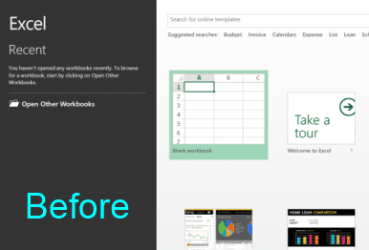
By default Word, Excel, PowerPoint, Publisher 2013 opens a Start screen where you can select a template (on the right) or recent document on the left.

This tutorial will show you how to turn the Start screen on or off in Office 2013 apps including Word, Excel, PowerPoint, Publisher, etc.


Here's How:

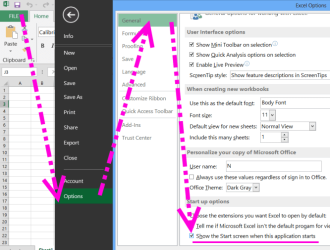
1. Once you have loaded any template and can see Ribbon menu, click on the FILE menu.

2. Go all the way down, and click on the OPTIONS tab.

3. In Options window, go to the General tab and uncheck option Show the Start screen when this application starts (at the very bottom of the window).
Office 2013 Start Screen - Turn On or Off-start_screen.png
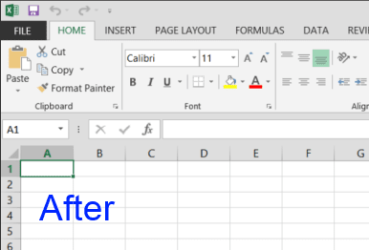
4. Now your Office application will load automatically into first general template like in previous version of Office!
Office 2013 Start Screen - Turn On or Off-start_screen1.png Office 2013 Start Screen - Turn On or Off-tno_start_screen1.png


Related Tutorials


Need more help? Try searching our extensive help and support site.
Loading
Comment

 Office 2013 Start Screen - Turn On or Off problems?


Tutorial Tools


Similar help and support threads for: Office 2013 Start Screen - Turn On or Off
Windows 7 Tutorial Category
Office 2013 - Activate Tutorials
Outlook 2013 (Office 2013) Help to De-Uglify Microsoft Office
Can I keep 64 bit Viso along with 32 bit office 2013? Microsoft Office
BSOD while using office 2013 BSOD Help and Support
Office 2013 - Why? Microsoft Office


All times are GMT -5. The time now is 09:32 AM.


Seven Forums Android App Seven Forums IOS App Follow us on Facebook

Windows 7 Forums is an independent web site and has not been authorized,
sponsored, or otherwise approved by Microsoft Corporation.
"Windows 7" and related materials are trademarks of Microsoft Corp.
© Designer Media Ltd
  

1 2 3 4 5 6 7 8 9 10 11 12 13 14 15 16 17 18 19 20 21 22 23 24 25 26 27 28 29 30 31 32