
Homegroup - Add Android Phone or Tablet

How to Add an Android Phone or Tablet to a Homegroup in Windows 7 and Windows 8


   Information
This tutorial will show you how to link any Android phone or tablet device to your homegroup in Windows 7 and Windows 8.


Here's How:

1. Enable File sharing on the Device you want to share it will give you a choice on accepting protocal This will be under Nearby Devices setting

FP-SSD and FTP you will need these in order for windows and sharing to see your Devices these will automaticly be installed you can also delete them but you will need it to link with the PC windows uses FP-SSD for file transfer


2. Install and run ES File Explorer File Manager from the Google store.

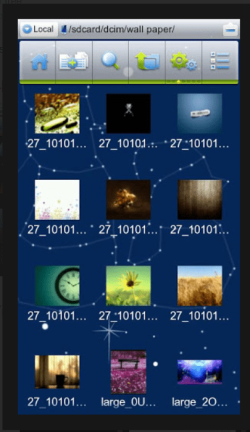
3. Now in the left hand top corner you should see Local Lan FTP Bluetooth you will want to select LAN (Local Area Network
es3.PNG
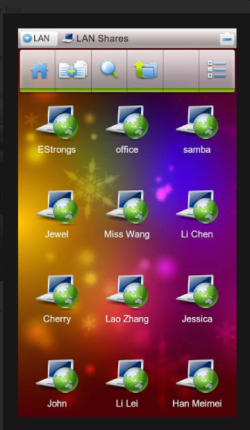
4. Now that you have chosen LAN there is a Plus sign at the top of the menu bar that is for adding different Servers you will want to choose the SCAN option you can manually set your info or even set your log in to Anonynomous but scanning it is much easier

5. Now once you have choosen the scan for Server your IP adress should appear now if you have a password protected system meaning Windows log in it will ask for this not the Internet router password

6. Once you have entered the Computer name and password it should grant you access like you are in Homegroup all Network drives and Fully playable movies and streaming with no lag
es2.PNG
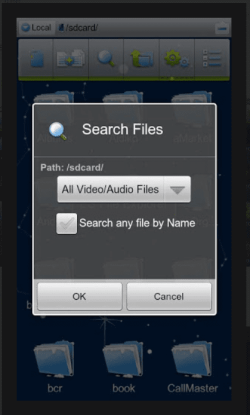
Also I would advise in modding the video player settings at the highest Buff rate possible this will keep you from having stuttering video or choppy running videos
es5.PNG
   Note
Extended Information : You will not see your Device in Homegroup you will only see it in Added Devices for FileSharing

If you do not have any kind of Anti Virus programs I also suggest this https://play.google.com/store/search?q=webroot+secureanywhere+mobile&c=apps
Long list of Virus protection software ,I would use this because you are now in Fileshare Mode and need as much Protection as Possible also Droidwall https://play.google.com/store/apps/...EsImNvbS5nb29nbGVjb2RlLmRyb2lkd2FsbC5mcmVlIl0.


If I have left anything out please PM me this is my first Tut so forgive me if something is missing


Last edited by a moderator:
Nice, too bad you have no spoken narrative in the video.
 

My Computer

Computer Manufacturer/Model Number
HP, Dell, Gateway, Toshiba - 4 laptops and 2 desktops
OS
Vista, Windows7, Mint Mate, Zorin, Windows 8
CPU
from 1.6GHz Duo to i7
Monitor(s) Displays
2x HP w2207
Hard Drives
5x HDD, 7x SSD, 12x Externals
Keyboard
with trackball - no mices
Mouse
Trackball mice
Internet Speed
DSL 6000
Yeah there is not much information i could provide with that but i am going to put some shots up in order to help it along
 

My Computer

Computer type
PC/Desktop
Computer Manufacturer/Model Number
CoreI7-6700K MrFingerIII Special Builds
OS
Windows 10 Home Premium 64bit sp1
CPU
Intel I7-6700K @ 4.6 Ghz 1.344 volts everyday OC
Motherboard
Asrock Fatality K6 Z170 Socket 1151
Memory
32GB G-Skill TridentZ 3200mhz 16-18-18-38 DDR4
Graphics Card(s)
Sli Gigabyte Windforce GTX 980 G1
Sound Card
AC97 Creative Rage Tactic 3D Headphones Bluetooth
Monitor(s) Displays
27" Asus ROG Swift PG278Q G-Sync 48" Vizio Smart HD TV
Screen Resolution
2560x1440p 27"- 48" Currently Gaming at 2560x1440p Res 2K
Hard Drives
250GB Samsung Evo840SSD Seagate baracuda 500 GB WD Mybook 500Gb 1TB Seagate Barracuda
PSU
HX1050w Corsair Silver 80plus certified crosfire/sli
Case
Enthod Pro Full Tower
Cooling
Corsair H110i GT 280 mm High Performance WaterBlock
Keyboard
Logitech wireless keyboard
Mouse
Logitech wireless mouse
Internet Speed
Cox Cable 100+ mb
Antivirus
WebRoot Spysweeper with Antivirus
Browser
IE-10, Chrome, Opera
Other Info
My Other Rig is a AMD FX8320E @4.6Ghz 16GB Ballistic Sport Ram
Mobo Asrock Fatality 990FX 120GB OCZ SSD 1TB Seagate Barracuda Corsair H75 Cooling PSU Corsair CX750
GPU GTX Gigabyte 970G1
got all the way to step 5. not sure what you mean by windows log in. we do have two desktops with separate names but no passwords for these. so what do i use here? the computer does have a name on the network but no password. usingthat failed too
 

My Computer

Computer Manufacturer/Model Number
HP pavillion de 9640us
OS
windows 7
got all the way to step 5. not sure what you mean by windows log in. we do have two desktops with separate names but no passwords for these. so what do i use here? the computer does have a name on the network but no password. usingthat failed too
I f it has no name use Annonymous

so if your pc just boots into windows that is what you would use instead of typing in a password and it has to be exact if it is all uppercase or lowercase or combination of both has to be put in that exact way way
 

My Computer

Computer type
PC/Desktop
Computer Manufacturer/Model Number
CoreI7-6700K MrFingerIII Special Builds
OS
Windows 10 Home Premium 64bit sp1
CPU
Intel I7-6700K @ 4.6 Ghz 1.344 volts everyday OC
Motherboard
Asrock Fatality K6 Z170 Socket 1151
Memory
32GB G-Skill TridentZ 3200mhz 16-18-18-38 DDR4
Graphics Card(s)
Sli Gigabyte Windforce GTX 980 G1
Sound Card
AC97 Creative Rage Tactic 3D Headphones Bluetooth
Monitor(s) Displays
27" Asus ROG Swift PG278Q G-Sync 48" Vizio Smart HD TV
Screen Resolution
2560x1440p 27"- 48" Currently Gaming at 2560x1440p Res 2K
Hard Drives
250GB Samsung Evo840SSD Seagate baracuda 500 GB WD Mybook 500Gb 1TB Seagate Barracuda
PSU
HX1050w Corsair Silver 80plus certified crosfire/sli
Case
Enthod Pro Full Tower
Cooling
Corsair H110i GT 280 mm High Performance WaterBlock
Keyboard
Logitech wireless keyboard
Mouse
Logitech wireless mouse
Internet Speed
Cox Cable 100+ mb
Antivirus
WebRoot Spysweeper with Antivirus
Browser
IE-10, Chrome, Opera
Other Info
My Other Rig is a AMD FX8320E @4.6Ghz 16GB Ballistic Sport Ram
Mobo Asrock Fatality 990FX 120GB OCZ SSD 1TB Seagate Barracuda Corsair H75 Cooling PSU Corsair CX750
GPU GTX Gigabyte 970G1
I'm also having problems with this.

I am sharing the drives and not just folders and I have access enabled for everyone. My two computers connected to the homegroup can see/access/read/write to the shared drives but not the tablet.

I have ES installed on the android tablet, I can see the IP address of the computers, I can see the shared folder list, but when I go to open it, it says I have no access.

My computers have no password (should probably fix that) and ES doesn't ask me for any username.

Something worth mentioning is that you can us ES to setup an FTP server so you can access your phone/tablet from your pc. It's painfully slow to transfer files that way though
 

My Computer

OS
Windows 7 Professional x64
CPU
AMD Athlon II X3 440, Rana
Motherboard
Gigabzte GA-870A-UD3
Memory
8GB (2x4GB) Corsair XMS3 DDR3 1600MHz
Graphics Card(s)
nVidea 7900 GT
Monitor(s) Displays
Dell U2311H
Screen Resolution
1920x1080
Hard Drives
4x WD 250GB SATA
1x Samsung 60GB SSD
PSU
Corsair 450W HX
Case
Coolermaster Elite
Cooling
2x 120mm case fans, 1x Zalman heatsink with 120mm fan
Badly written article, not helped by the fact that it is now 2 years old and shows an old version of ES file explorer. The English and Grammar is bad and the punctuation poor making the article unreadable. The frame grab from ES file explorer shown is wrong, it should be the one for LAN!
All in all, I could not make head or tails of this article. I did manage to do the networking in the end by reading other web articles. It is quite simple, really! I suggest that this article is reviewed and brought up to date. 1/10!
 

My Computer

Computer type
Laptop
Computer Manufacturer/Model Number
Dell Inspiron
OS
7 Home premium 64 bit
Browser
Chrome
The English and Grammar is bad and the punctuation poor making the article unreadable.

A quick correction of your English, grammar and punctuation:

The English and grammar is bad, and the punctuation poor, making the article unreadable.

Its always easy to criticize someone's freely volunteered work, especially the language. Be sure you do it properly, less you end up with egg on your face.
 

My Computer

Computer type
PC/Desktop
Computer Manufacturer/Model Number
Golden Mk. I.4
OS
Windows 10 Pro x64 ; Xubuntu x64
CPU
Intel i7 860 @ 2.80 GHz O/C'ed to 4.0GHz
Motherboard
Gigabyte P55A-UD3R Rev.1. Award BIOS F13
Memory
16GB Corsair Vengance DDR3 @ 661 MHz Dual Channel (9-9-9-24)
Graphics Card(s)
EVGA NVidia GTX 560 1024MB
Sound Card
Realtek Integrated
Monitor(s) Displays
Dual Samsung SyncMaster 2494HS
Screen Resolution
1920*1080 and 1920*1080
Hard Drives
1*Samsung 840 EVO 120GB SSD;
1*OCZ Vertex 2 60GB SSD;
2*Samsung F3 SpinPoint 1TB in RAID0;
1*Samsung F1 SpinPoint 1TB;
2*Western Digital 1TB External USB 3.0
1*Western Digital 500GB External USB 3.0
1*Seagate 500GB External USB 2.0
PSU
Thermaltake ToughPower QFan 750W
Case
Thermaltake Element S VK60001W2Z
Cooling
Corsair H60 Water Cooling, 2*230mm and 2*80mm case fans
Keyboard
Logitech G110
Mouse
Logitech MX518
  • Like
Reactions: Arc
Badly written article, not helped by the fact that it is now 2 years old and shows an old version of ES file explorer. The English and Grammar is bad and the punctuation poor making the article unreadable. The frame grab from ES file explorer shown is wrong, it should be the one for LAN!
All in all, I could not make head or tails of this article. I did manage to do the networking in the end by reading other web articles. It is quite simple, really! I suggest that this article is reviewed and brought up to date. 1/10!


To the contrary these steps worked for me and for the record this is Android you are dealing with any updated version will change the whole layout of the app too bad though lmao you can't read or comprehend but that is most people who come here for help then talk a bunch of gibberish and then leave lol
 

My Computer

Computer type
PC/Desktop
Computer Manufacturer/Model Number
CoreI7-6700K MrFingerIII Special Builds
OS
Windows 10 Home Premium 64bit sp1
CPU
Intel I7-6700K @ 4.6 Ghz 1.344 volts everyday OC
Motherboard
Asrock Fatality K6 Z170 Socket 1151
Memory
32GB G-Skill TridentZ 3200mhz 16-18-18-38 DDR4
Graphics Card(s)
Sli Gigabyte Windforce GTX 980 G1
Sound Card
AC97 Creative Rage Tactic 3D Headphones Bluetooth
Monitor(s) Displays
27" Asus ROG Swift PG278Q G-Sync 48" Vizio Smart HD TV
Screen Resolution
2560x1440p 27"- 48" Currently Gaming at 2560x1440p Res 2K
Hard Drives
250GB Samsung Evo840SSD Seagate baracuda 500 GB WD Mybook 500Gb 1TB Seagate Barracuda
PSU
HX1050w Corsair Silver 80plus certified crosfire/sli
Case
Enthod Pro Full Tower
Cooling
Corsair H110i GT 280 mm High Performance WaterBlock
Keyboard
Logitech wireless keyboard
Mouse
Logitech wireless mouse
Internet Speed
Cox Cable 100+ mb
Antivirus
WebRoot Spysweeper with Antivirus
Browser
IE-10, Chrome, Opera
Other Info
My Other Rig is a AMD FX8320E @4.6Ghz 16GB Ballistic Sport Ram
Mobo Asrock Fatality 990FX 120GB OCZ SSD 1TB Seagate Barracuda Corsair H75 Cooling PSU Corsair CX750
GPU GTX Gigabyte 970G1
Back
Top