
How to Open "Devices and Printers" in Windows 7 and Windows 8
Information
Device Stage, or Devices and Printers, gives you a quick view and access of all of your connected and wireless devices on your computer in one place. By viewing the contents of this folder, you can check to see which devices you have connected, view details about the devices, and learn what tasks you can perform with them by right clicking on the device and selecting the task you would like to do.
This will show you how to open the Devices and Printers window in Windows 7 and Windows 8.
This will show you how to open the Devices and Printers window in Windows 7 and Windows 8.
Note
The Devices and Printers folder also lets you add new wired, wireless, and network devices and printers to your computer.
Devices you add can be connected to your computer with a universal serial bus (USB) cable or other wired connection, or through Bluetooth, Wireless USB, Wi-Fi or other wireless connections. You can add compatible network-enabled devices that are already connected to the same network as your computer.
Once you add a new device, it will appear in Device Stage. You can see a list of products that take advantage of Device Stage at this link.
Devices listed include:
NOTE: You can find devices that are connected to your computer, but that are not listed in the Devices and Printers folder, in Device Manager.
Devices you add can be connected to your computer with a universal serial bus (USB) cable or other wired connection, or through Bluetooth, Wireless USB, Wi-Fi or other wireless connections. You can add compatible network-enabled devices that are already connected to the same network as your computer.
Once you add a new device, it will appear in Device Stage. You can see a list of products that take advantage of Device Stage at this link.
Devices listed include:
- Portable devices you carry with you and occasionally connect to your computer, such as mobile phones, portable music players, and digital cameras.
- All devices you plug into a USB port on your computer, including internal SATA drives, external USB hard drives, flash drives, webcams, keyboards, and mice.
- All printers connected to your computer. This includes printers connected by USB cable, the network, or wirelessly.
- Wireless devices connected to your computer, including Bluetooth devices and Wireless USB devices.
- Your computer.
- Compatible network devices connected to your computer, such as network-enabled scanners, media extenders, or Network Attached Storage devices (NAS devices).
NOTE: You can find devices that are connected to your computer, but that are not listed in the Devices and Printers folder, in Device Manager.
- Some devices installed inside your computer case, such as sound cards, video cards (graphics cards), memory (RAM), processors, and other internal computer components.
- Speakers connected to your computer with conventional speaker wires. (Note that USB and wireless speakers can be displayed.)
- Certain older devices, such as keyboards and mice that connect to your computer through a PS/2 or serial port.
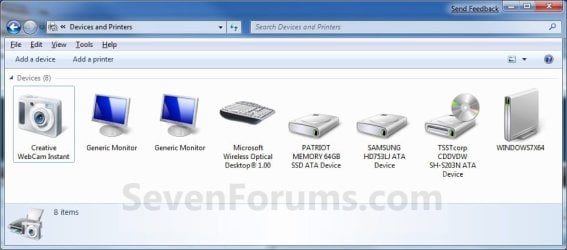
Here's How:
1. Do step 2, 3, or 4 below for how you would like to open Devices and Printers.
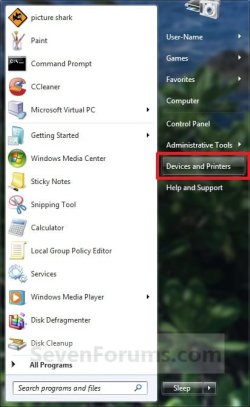
2. Open the Start Menu, and click on the Devices and Printers button. (see screenshot below)
NOTE: This step is only available in Windows 7.
3. Open the Control Panel (icons view) in Windows 7 or Windows 8, and click/tap on the Devices and Printers icon.
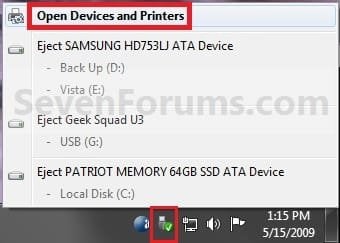
4. Click/tap on the Safely Remove Hardware notification area icon, then click/tap on Open Devices and Printers. (see screenshot below)
That's it,
Shawn
Related Tutorials
- How to Create a "Devices and Printers" Shortcut in Windows 7 and Windows 8
- How to Add "Devices and Printers" to "Computer" or "This PC" in Windows 7 and Windows 8
- How to Change the Device Driver and Information Installation Settings in Windows 7
- How to Create a "Scanners and Cameras" Shortcut in Windows 7 and Windows 8
- How to Open and Use the "Scanner and Camera Installation Wizard" in Windows 7 and Windows 8
- How to Automatically Switch Default Printers with Location Aware Printing in Vista, Windows 7, and Windows 8
- How to Create a "Printers" Folder Shortcut in Vista, Windows 7, and Windows 8
- How to Use Safely Remove Hardware to Eject a Device in Windows 7 and Windows 8
- How to Create a "Bluetooth Devices" Shortcut in Windows 7
- How to Create a "Bluetooth Devices" Shortcut in Windows 8 and 8.1
- How to Create a "Devices and Printers Troubleshoot" Shortcut in Windows 7
- How to Create a "Printing Troubleshoot" Shortcut in Windows 7
- How to Create an "Add a Device" Shortcut in Windows 7
- How to Create an "Add Hardware Wizard" Shortcut in Windows 7
- How to Create a "Printer Migration Wizard" Shortcut in Vista, Windows 7, and Windows 8
- How to Roll Back a Device Driver in Device Manager
- How to Print to the Microsoft XPS Document Writer
- How to Change Icons in Devices and Printers with Custom Icons
- How to Uninstall a Device in Windows 7 and Windows 8
Last edited:


