Windows 7: Transparency - Enable or Disable
Transparency - Enable or Disable How to Enable or Disable Windows 7 Transparency
Published 02 Nov 2008
Published by
Featured Tutorial
How to Enable or Disable Windows 7 Transparency
Information
This will show you how to enable or disable tranparency for windows, the Start Menu, and the taskbar in Windows 7 .
The Windows 7 Starter and Home Basic editions do not have Aero Transparency included in them.
OPTION ONE
Through Personalization
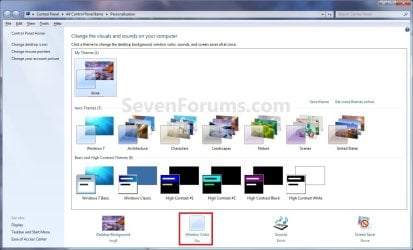
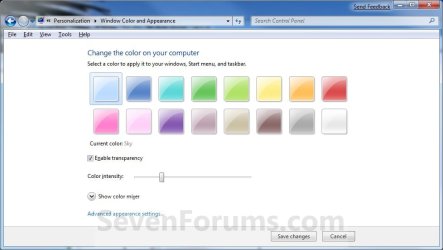
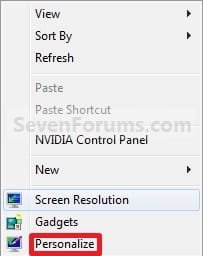
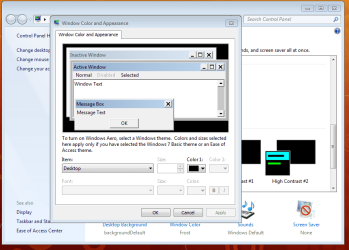
1. Right click on a empty space on the desktop and click on Personalize . (See screenshot below) 2. Click on the Window Color link at the bottom of the window. (See screenshot below) NOTE: The name in gray under Windows Color is the current color selected . 3. To Enable Transparency A) Check the Enable transparency box. (See screenshot below step 5)
B) Adjust your Color intensity slider for how transparent you want it.Slide LEFT = More transparent Slide RIGHT = Less to not transparent C) Go to step 5. 4. To Disable Transparency A) Uncheck the Enable transparency box. (See screenshot below) 5. Click on Save changes . OPTION TWO
Through Visual Effects
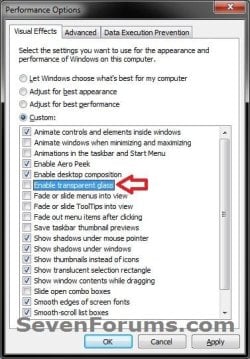
1. Open Visual Effects . 2. To Enable Transparency A) Check the Enable transparent glass box, and click on OK . (see screenshot below) B) Go to step 4. 3. To Disable Transparency A) Uncheck the Enable transparent glass box, and click on OK . (see screenshot above) OPTION THREE
Using a REG File Download
1. To Enable Transparency NOTE: This is the default setting .A) Click on the download button below to download the file below.Enable_Transparent_Glass.reg B) Go to step 3. 2. To Disable Transparency A) Click on the download button below to download the file below. Disable_Transparent_Glass.reg 3. Save the .reg file to the Desktop . 4. Right click on the downloaded .reg file, and click on Merge . 5. Click on Run , Yes (Windows 7) or Continue (Vista), Yes , and OK when prompted. 6. Log off and log on, or restart the computer to apply the changes. 7. When done, you can delete the downloaded .reg file if you like. OPTION FOUR
Manually in Registry Editor
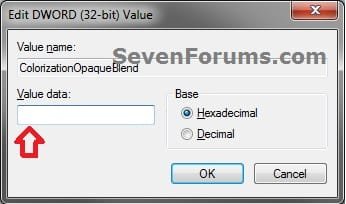
1. Open the Start Menu, then type regedit in the search boxand press Enter . 2. If prompted by UAC , then click on Yes (Windows 7) or Continue (Vista). 3. In regedit, navigate to the location below. (see screenshot below)HKEY_CURRENT_USER\Software\Microsoft\Windows\DWM 4. In the right pane, double click on ColorizationOpaqueBlend . (see screenshot above) 5. To Enable Transparency A) Type in 0 , and click on OK . (see screenshot below) NOTE: This is the default setting . B) Go to step 7. 6. To Disable Transparency A) Type in 1 , and click on OK . (see screenshot above) 7. Close regedit. 8. Log off and log on, or restart the computer to apply the changes. That's it,
Shawn
Need more help? Try searching our extensive help and support site.
Loading
02 Nov 2009
#1
Windows 7 Eternity™ 2009
Malaysia
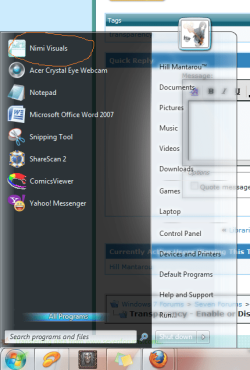
hello ..i used nimi visuals software to make start menu become transparent and it done good, but i think better to me to do manually..can u show me how to make start menu become transparent manually or with using registry..?
Last edited by Brink; 02 Nov 2009 at 10:13 AM ..
My System Specs
System Manufacturer/Model Number GantZ™ OS Windows 7 Eternity™ 2009 CPU Boing-boing Inside™
02 Nov 2009
#2
64-bit Windows 7 Ultimate SP1 & Windows 8 Enterprise
Texas
Hello Hill,
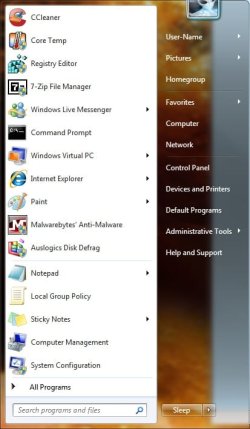
You can just follow the tutorial to enable Transparency to make the Start Menu transparent if this is what you meant.
Hope this helps,
Shawn
My System Specs
Computer type PC/Desktop System Manufacturer/Model Number Self built custom OS 64-bit Windows 7 Ultimate SP1 & Windows 8 Enterprise CPU Intel i7-3930K 3.2 Ghz (O/C 4 Ghz) Motherboard ASRock X79 Extreme11 Memory 32 GB (8GBx4) G.SKILL DDR3 Quad PC3-19200 2400MHz Graphics Card Sapphire HD5870 Eyefinity 6 2GB Sound Card SB Recon 3Di Integrated Chip Monitor(s) Displays 3x 27" Asus VE278Q Screen Resolution 1920x1080
Keyboard Logitech Cordless Desktop MX 5500 Revolution Mouse Logitech Cordless Desktop MX 5500 Revolution PSU OCZ Series Gold OCZZ1000M 1000W Case Thermaltake Level 10 GT Snow Edition Cooling Corsair Hydro H100 Hard Drives 256GB OCZ Vector
160GB OCZ RevoDrive X2
2 x 1TB Samsung HDD HD154UI SATA Internet Speed 50 Mb/s Download and 2 Mb/s Upload Other Info Microsoft LifeCam Cinema
Lite-On iHBS212 12x BD Writer
Samsung CLX-3175FW Printer
Netgear WNDR3800 Router
Motorola SBG6580 Cable Modem
2x APC Back-UPS XS 1500
02 Nov 2009
#3
Windows 7 Eternity™ 2009
Malaysia
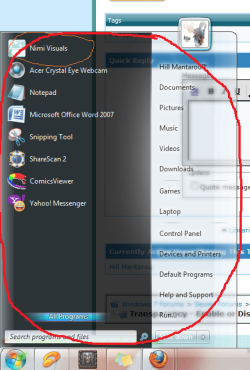
that just will make taskbar transparent right?.. that i can see in your tutorial..but what i mean is the whole "start menu "..
can u find a way to make it become transparent?? coz i don really like a 3rd party software.
My System Specs
System Manufacturer/Model Number GantZ™ OS Windows 7 Eternity™ 2009 CPU Boing-boing Inside™
02 Nov 2009
#4
64-bit Windows 7 Ultimate SP1 & Windows 8 Enterprise
Texas
Yes, it will make the dark side of the default Start Menu transparent, as well as the taskbar and Windows Explorer window borders.
My System Specs
Computer type PC/Desktop System Manufacturer/Model Number Self built custom OS 64-bit Windows 7 Ultimate SP1 & Windows 8 Enterprise CPU Intel i7-3930K 3.2 Ghz (O/C 4 Ghz) Motherboard ASRock X79 Extreme11 Memory 32 GB (8GBx4) G.SKILL DDR3 Quad PC3-19200 2400MHz Graphics Card Sapphire HD5870 Eyefinity 6 2GB Sound Card SB Recon 3Di Integrated Chip Monitor(s) Displays 3x 27" Asus VE278Q Screen Resolution 1920x1080
Keyboard Logitech Cordless Desktop MX 5500 Revolution Mouse Logitech Cordless Desktop MX 5500 Revolution PSU OCZ Series Gold OCZZ1000M 1000W Case Thermaltake Level 10 GT Snow Edition Cooling Corsair Hydro H100 Hard Drives 256GB OCZ Vector
160GB OCZ RevoDrive X2
2 x 1TB Samsung HDD HD154UI SATA Internet Speed 50 Mb/s Download and 2 Mb/s Upload Other Info Microsoft LifeCam Cinema
Lite-On iHBS212 12x BD Writer
Samsung CLX-3175FW Printer
Netgear WNDR3800 Router
Motorola SBG6580 Cable Modem
2x APC Back-UPS XS 1500
03 Nov 2009
#5
Windows 7 Eternity™ 2009
Malaysia
thanks brink..but i think u did't really understand what im asking..
anyway..thanks 4 ur help..
My System Specs
System Manufacturer/Model Number GantZ™ OS Windows 7 Eternity™ 2009 CPU Boing-boing Inside™
03 Nov 2009
#6
64-bit Windows 7 Ultimate SP1 & Windows 8 Enterprise
Texas
Hill,
Well, the Start Menu's dark side is transparent using this method after enabling transparency and sliding the intensity level to the left. What did you want instead?
My System Specs
Computer type PC/Desktop System Manufacturer/Model Number Self built custom OS 64-bit Windows 7 Ultimate SP1 & Windows 8 Enterprise CPU Intel i7-3930K 3.2 Ghz (O/C 4 Ghz) Motherboard ASRock X79 Extreme11 Memory 32 GB (8GBx4) G.SKILL DDR3 Quad PC3-19200 2400MHz Graphics Card Sapphire HD5870 Eyefinity 6 2GB Sound Card SB Recon 3Di Integrated Chip Monitor(s) Displays 3x 27" Asus VE278Q Screen Resolution 1920x1080
Keyboard Logitech Cordless Desktop MX 5500 Revolution Mouse Logitech Cordless Desktop MX 5500 Revolution PSU OCZ Series Gold OCZZ1000M 1000W Case Thermaltake Level 10 GT Snow Edition Cooling Corsair Hydro H100 Hard Drives 256GB OCZ Vector
160GB OCZ RevoDrive X2
2 x 1TB Samsung HDD HD154UI SATA Internet Speed 50 Mb/s Download and 2 Mb/s Upload Other Info Microsoft LifeCam Cinema
Lite-On iHBS212 12x BD Writer
Samsung CLX-3175FW Printer
Netgear WNDR3800 Router
Motorola SBG6580 Cable Modem
2x APC Back-UPS XS 1500
03 Nov 2009
#7
Windows 7 Home Premium x64 - Mac OS X 10.6.4 x64
North Carolina, United States of America
Quote: Originally Posted by
Brink Hill,
Well, the Start Menu's dark side is transparent using this method after enabling transparency and sliding the intensity level to the left. What did you want instead?
He is wanting the entire start menu transparent (including were the recently opened items appear)
This is only possible in a custom theme
My System Specs
System Manufacturer/Model Number Compal JFT02 (Custom Build Laptop) OS Windows 7 Home Premium x64 - Mac OS X 10.6.4 x64 CPU Intel Core 2 Duo T9300 2.5 GHz Motherboard JFT02 Memory 4GB Kingston DDR2-800 Graphics Card NVIDIA Geforce 8600M GT (512MB Model) Sound Card Realtek HD Audio Monitor(s) Displays WUXGA Standard Laptop Display Screen Resolution 1680*1050
Keyboard Standard Laptop 105 Key-Keyboard Mouse Synaptics Touchpad PSU Standard Laptop Power Supply Case Standard Laptop Case Cooling Standard Laptop Cooling Hard Drives Toshiba 320GB 5400RPM Laptop HD Internet Speed Verizion Online DSL 3360/864 kbs (dl/up)
03 Nov 2009
#8
64-bit Windows 7 Ultimate SP1 & Windows 8 Enterprise
Texas
Ah, then yes only with a 3rd party custom theme.
My System Specs
Computer type PC/Desktop System Manufacturer/Model Number Self built custom OS 64-bit Windows 7 Ultimate SP1 & Windows 8 Enterprise CPU Intel i7-3930K 3.2 Ghz (O/C 4 Ghz) Motherboard ASRock X79 Extreme11 Memory 32 GB (8GBx4) G.SKILL DDR3 Quad PC3-19200 2400MHz Graphics Card Sapphire HD5870 Eyefinity 6 2GB Sound Card SB Recon 3Di Integrated Chip Monitor(s) Displays 3x 27" Asus VE278Q Screen Resolution 1920x1080
Keyboard Logitech Cordless Desktop MX 5500 Revolution Mouse Logitech Cordless Desktop MX 5500 Revolution PSU OCZ Series Gold OCZZ1000M 1000W Case Thermaltake Level 10 GT Snow Edition Cooling Corsair Hydro H100 Hard Drives 256GB OCZ Vector
160GB OCZ RevoDrive X2
2 x 1TB Samsung HDD HD154UI SATA Internet Speed 50 Mb/s Download and 2 Mb/s Upload Other Info Microsoft LifeCam Cinema
Lite-On iHBS212 12x BD Writer
Samsung CLX-3175FW Printer
Netgear WNDR3800 Router
Motorola SBG6580 Cable Modem
2x APC Back-UPS XS 1500
03 Nov 2009
#9
Windows 7 Eternity™ 2009
Malaysia
owh..i see..
looks like i gonna used 3rd party software anyway..
anyway..thanks brink n zidane
My System Specs
System Manufacturer/Model Number GantZ™ OS Windows 7 Eternity™ 2009 CPU Boing-boing Inside™
Transparency - Enable or Disable problems?
All times are GMT -5. The time now is 07:44 PM .