How to Turn System Icons On or Off in Windows 7 and Windows 8
Information
System icons, including Input indicator (Windows 8 only), Clock, Volume, Network, Power, and Action Center are special icons that are part of Windows. For these icons, you can change how the icons and notifications appear, and also whether they show up at all. You might turn off a system icon if either you or your computer manufacturer have installed a similar program. If you turn a system icon off, you can always turn it back on later.
This tutorial will show you how to turn a system icon on the taskbar on or off in Windows 7 and Windows 8.
This tutorial will show you how to turn a system icon on the taskbar on or off in Windows 7 and Windows 8.
Note
The Power icon will be grayed out and off unless your computer is running with battery power. For example, a laptop with it's battery pack connected or a desktop computer on a UPS backup battery.
Tip
If a system icon you want to turn on or off is grayed out, then see: How to Enable or Disable Windows 7 Notification System Icons
Warning
Turning off a system icon will remove the icon from the taskbar and turns off notifications for the icon.
EXAMPLE: System Icons on the Taskbar

Here's How:
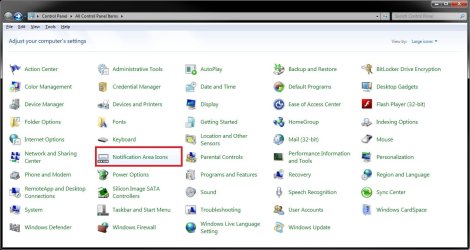
1. In Windows 7 open the Control Panel (icons view), click/tap on the System Icons icon, and do step 3, 4, or 5 below.
OR
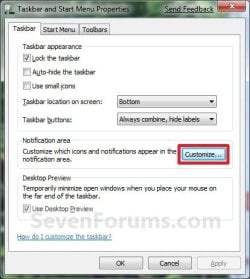
2. Right click or press and hold on the taskbar, and click/tap on Properties.
A) Click/tap on the Customize button to the right of "Notification area". (See screenshot below)
B) Click/tap on Cancel to close the Taskbar and Start Menu Properties window.
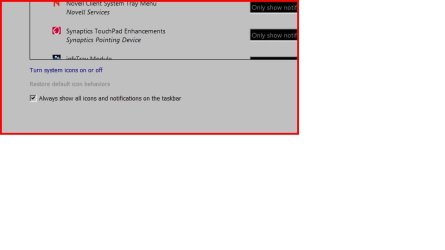
C) Click/tap on the Turn system icons on or off link at the bottom, and do step 3, 4, or 5 below. (See screenshot below)
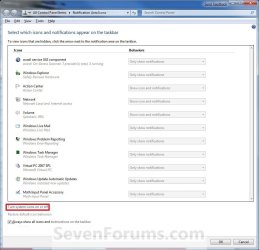
3. To Turn a System Icon On
A) Click/tap on the Behaviors drop down menu to the left of the system icon you want to turn on. (See screenshot below step 6)
B) Click/tap on ON to select it.
C) Go to step 6.
4. To Turn a System Icon Off
A) Click/tap on the Behaviors drop down menu to the left of the system icon you want to turn off. (See screenshot below step 6)
B) Click/tap on OFF to select it.
C) Go to step 6.
5. To Restore the Default System Icons Behaviors
A) Click/tap on the Restore default icon behaviors link below. (See screenshot below step 6)
6. Click/tap on OK. (See screenshots below)
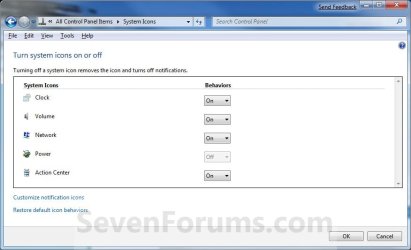
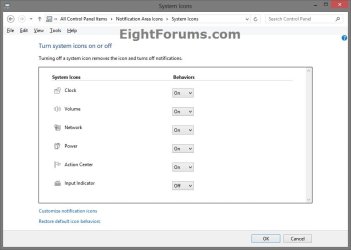
7. Click/tap on OK. (See screenshot below step 2C)
NOTE: You will not see this if you had opened the System Icons window from the Control Panel above.
That's it,
Shawn
Related Tutorials
- How to Hide or Show System Icons and Notifications in Windows 7 and Windows 8
- How to Create a "System Icons" Settings Shortcut in Windows 7 and Windows 8
- How to Change the Action Center Message Settings in Windows 7
- How to Turn On or Off Action Center Messages in Windows 8
- How to Enable or Disable Windows 7 Balloon Notifications
- How to Enable or Disable Notification Area System Icons in Windows 7 and Windows 8
- How to Add or Remove the Notification Area from the Taskbar in Windows 7
- How to Create a "Notification Area Icons" Shortcut in Windows 7 and Windows 8
- How to Customize the Notification Area Icons in Windows 7
- How to Create a Taskbar Properties Shortcut in Windows 7
- How to Enable or Disable Changing "Notification Area Icons" Settings in Windows 7
- How to Create a "Volume Mixer" Shortcut in Windows 7 and Vista
- How to Create a "Volume" Shortcut in Windows 7 and Vista
- Enable or Disable Automatic Promotion of Notification Area Icons to Taskbar in Windows 7 and 8
Attachments

Last edited: