Welcome to Windows 7 Forums. Our forum is dedicated to helping you find support and solutions for any problems regarding your Windows 7 PC be it Dell, HP, Acer, Asus or a custom build. We also provide an extensive Windows 7 tutorial section that covers a wide range of tips and tricks.
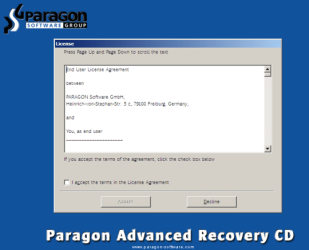
Boot the computer from Paragon Windows PE 3.0 based CD/DVD.
Accept the end user license agreement, otherwise you are not able to use the tool.
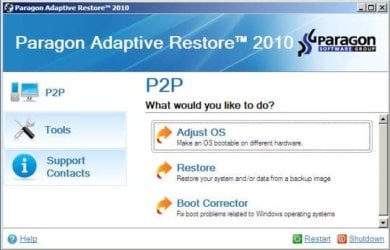
Launch P2P Adjust OS.
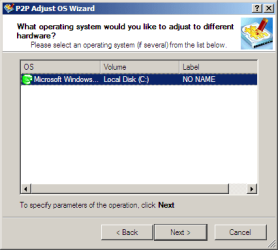
Select the operating system you need to adjust to your new hardware.
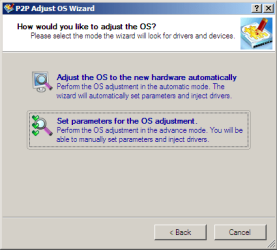
Choose whether you want to add third-party drivers or not, and the way to do it.
If you chose "Adjust the OS to the new hardware automatically", the P2P Adjust OS Wizard will automatically accomplish all the necessary actions.
The only thing that might need your interaction is to specify additional driver repository.
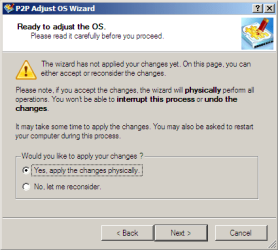
At last, choose "Yes, apply the changes physically" and then restart your computer after operations are done. Do remember, you cannot interrupt the process or undo the changes.
Just before the OS adjustment, you can additionally:
Warning
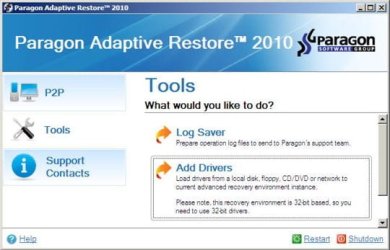
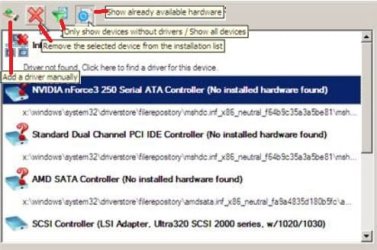
Sometimes the internal hard drive is not recognized in Paragon P2P Adjust OS due to missing SATA or RAID driver. In that case add specific drivers to Windows PE based Paragon Recovery Environment.
Click to open Add Drivers dialog.
Browse for an .INF file of the required driver, then click the Open button to initiate the process.
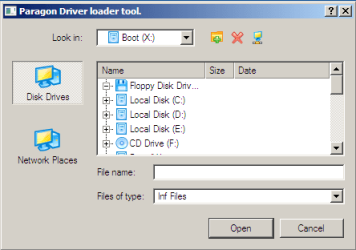
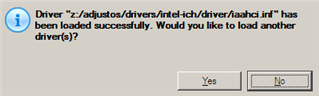
Click Yes to confirm the operation.
Information
You can only add third-party drivers in INF file. If they are zipped, you need to unpack them before processing the steps.
The Windows PE environment is 32bit-based, so you need to use 32-bit drivers for injection.
After procedure has finished succesfully and system boots fine:
Oh my god....I love you. I just used this program because I had a desktop that I had been using for 2+ years and I didn't want to lose all my niche settings and programs and what not, but I was told that under NO circumstances would I be able to pull my drive out of my old computer and install it (without losing anything) into my new computer. This program and guide saved my butt in SO many ways. I thank you *SO* much for this guide!!!!
Glad you have a working computer again.
Did you have to reenter the Windows 7 product key to activate Windows 7?
Did you have to install extra drivers within "P2P adjust OS", or did the program all automatically (replacing drivers with generic ones)?
Computer type Laptop System Manufacturer/Model Number ACER ASPIRE 5742G OS Microsoft Windows 7 Home Premium 64-bits 7601 Multiprocessor Free Service Pack 1 CPU Intel(R) Core(TM) i3 CPU M 370 @ 2.40GHz Motherboard Acer Aspire 5742G Memory 4,00 GB Graphics Card ATI Mobility Radeon HD 5400 Series Sound Card (1) AMD High Definition Audio Device (2) Realtek High Defi Screen Resolution 1366 x 768 x 32 bits (4294967296 colors) @ 60 Hz
Oh my god....I love you. I just used this program because I had a desktop that I had been using for 2+ years and I didn't want to lose all my niche settings and programs and what not, but I was told that under NO circumstances would I be able to pull my drive out of my old computer and install it (without losing anything) into my new computer. This program and guide saved my butt in SO many ways. I thank you *SO* much for this guide!!!!
Your new computer most likely has another network card and graphics card. Were these old drivers not listed anymore after running P2P adjust OS and booting? So did it cleanup "device management" stuff?
Computer type Laptop System Manufacturer/Model Number ACER ASPIRE 5742G OS Microsoft Windows 7 Home Premium 64-bits 7601 Multiprocessor Free Service Pack 1 CPU Intel(R) Core(TM) i3 CPU M 370 @ 2.40GHz Motherboard Acer Aspire 5742G Memory 4,00 GB Graphics Card ATI Mobility Radeon HD 5400 Series Sound Card (1) AMD High Definition Audio Device (2) Realtek High Defi Screen Resolution 1366 x 768 x 32 bits (4294967296 colors) @ 60 Hz
Oh my god....I love you. I just used this program because I had a desktop that I had been using for 2+ years and I didn't want to lose all my niche settings and programs and what not, but I was told that under NO circumstances would I be able to pull my drive out of my old computer and install it (without losing anything) into my new computer. This program and guide saved my butt in SO many ways. I thank you *SO* much for this guide!!!!
Glad you have a working computer again.
Did you have to reenter the Windows 7 product key to activate Windows 7?
Did you have to install extra drivers within "P2P adjust OS", or did the program all automatically (replacing drivers with generic ones)?
I did NOT have to reenter my key, that really shocked me. I didn't have to enter any other drivers either. The program put them all in automatically. Granted on boot (and first reboot), I did have a lot of drivers Windows 7 installed for me.
Oh my god....I love you. I just used this program because I had a desktop that I had been using for 2+ years and I didn't want to lose all my niche settings and programs and what not, but I was told that under NO circumstances would I be able to pull my drive out of my old computer and install it (without losing anything) into my new computer. This program and guide saved my butt in SO many ways. I thank you *SO* much for this guide!!!!
Your new computer most likely has another network card and graphics card. Were these old drivers not listed anymore after running P2P adjust OS and booting? So did it cleanup "device management" stuff?
The new motherboard was ENTIRELY different, I went from a Intel Core 2 Quad to an Intel i7 960. Everything was basically changed. And yes it cleaned up device management from what I noticed. I only had a few drivers that were not installed automatically (which is not shocking since the motherboard had a few non-standard addons to it, bluetooth/wifi both built into the motherboard, a Xonar add on card to name a few). I swear overall this was the least painless computer procedure I have EVER encountered.
Oh my god....I love you. I just used this program because I had a desktop that I had been using for 2+ years and I didn't want to lose all my niche settings and programs and what not, but I was told that under NO circumstances would I be able to pull my drive out of my old computer and install it (without losing anything) into my new computer. This program and guide saved my butt in SO many ways. I thank you *SO* much for this guide!!!!
Your new computer most likely has another network card and graphics card. Were these old drivers not listed anymore after running P2P adjust OS and booting? So did it cleanup "device management" stuff?
The new motherboard was ENTIRELY different, I went from a Intel Core 2 Quad to an Intel i7 960. Everything was basically changed. And yes it cleaned up device management from what I noticed. I only had a few drivers that were not installed automatically (which is not shocking since the motherboard had a few non-standard addons to it, bluetooth/wifi both built into the motherboard, a Xonar add on card to name a few). I swear overall this was the least painless computer procedure I have EVER encountered.
So Windows 7 needn't to be reactivated? nice.
All useless drivers are gone in device management... nice. Default ones were installed instead.
Windows update did finish the process.
You had to install "non standard" driverstuff... as you said... quite normal. Just the same as replacing a network card for example.
To recap... just a few clicks and all was working?
Computer type Laptop System Manufacturer/Model Number ACER ASPIRE 5742G OS Microsoft Windows 7 Home Premium 64-bits 7601 Multiprocessor Free Service Pack 1 CPU Intel(R) Core(TM) i3 CPU M 370 @ 2.40GHz Motherboard Acer Aspire 5742G Memory 4,00 GB Graphics Card ATI Mobility Radeon HD 5400 Series Sound Card (1) AMD High Definition Audio Device (2) Realtek High Defi Screen Resolution 1366 x 768 x 32 bits (4294967296 colors) @ 60 Hz
Yeah everything seemed to be working well when I stopped the project until I get my new case delivered. I would say from burning the iso to dvd, booting, running the program, booting into Windows 7, rebooting and letting it install drivers, then rebooting again....total time was under 30min. That's even with Windows 7 slowly adding drivers in one by one.
Are you very sure step 4 wasn't needed??
Step 1 wasn't needed as well?? If so... I think the p2p adjust OS procedure replaced the graphics driver with "standard vga driver". Afterwards you or windows plug and play did install the correct gpu-driver. Correct?
Computer type Laptop System Manufacturer/Model Number ACER ASPIRE 5742G OS Microsoft Windows 7 Home Premium 64-bits 7601 Multiprocessor Free Service Pack 1 CPU Intel(R) Core(TM) i3 CPU M 370 @ 2.40GHz Motherboard Acer Aspire 5742G Memory 4,00 GB Graphics Card ATI Mobility Radeon HD 5400 Series Sound Card (1) AMD High Definition Audio Device (2) Realtek High Defi Screen Resolution 1366 x 768 x 32 bits (4294967296 colors) @ 60 Hz
Are you very sure step 4 wasn't needed??
Step 1 wasn't needed as well?? If so... I think the p2p adjust OS procedure replaced the graphics driver with "standard vga driver". Afterwards you or windows plug and play did install the correct gpu-driver. Correct?
I need that info to update my tutorial
No, i actually did step #1 and stripped the drivers, the p2p did adjust the driver to a generic which filled itself in once Windows booted. All in all, other than two or three non-standard devices, Windows 7 installed *ALL* the drivers itself without any problems. #4 I did not have to do, but that may just be a fluke.
By the way...on chance I tested it on Vista (yes, yes, laugh all you want) and it did the same results in almost twice the amount of time. I had a spare IBM/Lenovo laptop and swapped the Vista drive to a Dell, ran the program, voila....works fine (these were just laptops I repaired/restored to sell, so no harm, no foul).
Windows 7 Forums is an independent web site and has not been authorized,
sponsored, or otherwise approved by Microsoft Corporation.
"Windows 7" and related materials are trademarks of Microsoft Corp.