
 | | Welcome to Windows 7 Forums. Our forum is dedicated to helping you find solutions with any problems, errors or issues you are experiencing with Windows 7. The Windows 7 forum also covers news and updates and has an extensive Windows 7 tutorial section that covers a wide range of tips and tricks. | Windows 7 - Folder Options - Open
Folder Options - Open How to Open Folder Options in Windows 7
Published by Brink
11-03-2008
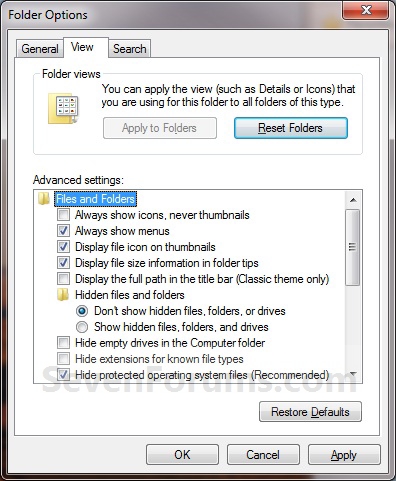
| Folder Options - Open How to Open Folder Options in Windows 7  Information This will show you the various methods of how to open the Folder Options window in Windows 7.  Note Folder Options can change the way files and folders function, as well as how the content in folders are displayed. EXAMPLE: Folder Options   OPTION ONE
To Open Folder Options in the Control Panel
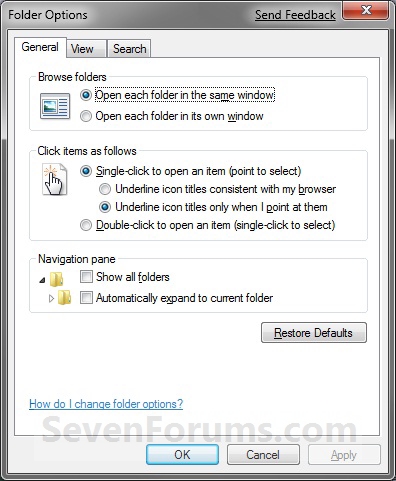
NOTE: The Apply to Folders option will be grayed out unless you open Folder Options (Method Two or Method Three) from within the same Windows Explorer window that you want to have applied to the other folders that have the same folder template. 1. Open the Control Panel (All Items View). 2. Click on the Folder Options icon. OPTION TWO
To Open Folder Options in Windows Explorer Organize Button
1. Open a Windows Explorer window. 2. Click on the Organize button. (See screenshot below) 3. Click on Folder and Search Options.
OPTION THREE
To Open Folder Options in Windows Explorer Tools Menu
1. Open a Windows Explorer window. 2. Click on the Tools (ALT and ALT+T) Menu bar item. (See screenshot below) 3. Click on Folder Options.
That's it,
Shawn |  Published by | | Administrator Join Date: Oct 2008 Location: Texas Posts: 34,657 | |
 Tutorial Tools | | | | | | | | | |
03-13-2010
|
#1 | | |
If there's some 'globality' for using methods two or three, as opposed to possibly only changing folder options for 'whatever group one might be in' when using method one, disclosing this might be helpful.
| My System Specs | | System Manufacturer/Model Number HP DV4-1030ee OS Windows 7 Pro CPU 7350@2.00GHz, 2 Core Logical Processors Motherboard Compal 30F8 99.74 Memory Total Physical Memory 2.00 GB Graphics Card NVIDIA GeForce9200M GS Sound Card NVIDIA HDMI Audio with IDT High Definition Audio CODEC Monitor(s) Displays Generic PnP Monitor (14.0"vis) Screen Resolution 1200 X 800 recommended, but set to 1074 X 768 Keyboard Stock Mouse Logitech M-UV96 PSU High Performance Case Stock Cooling Stock Hard Drives FUJITSU MHY2160BH 160.04 GB drive 0 Internet Speed down 2.89 Mb/s & up 0.73 Mb/s Other Info Acer Aspire One, XPH SP3, x86, 'Windows NT', 2.0 Ghz CPU, 2 Gb RAM, Mobile Intel 945 Express Chipset Family graphics
'card', RealtekHD Audio Driver v5.10.0.5628 audio 'card', and USB 2.0. |
03-13-2010
|
#2 | | Windows 7 Ultimate x64 SP1 |
Hello Wguru,
Could you be a bit more specific on what you mean?? | My System Specs | | System Manufacturer/Model Number Self built custom OS Windows 7 Ultimate x64 SP1 CPU Intel i7-980X 3.3 Ghz (3.48 Ghz OC'd) Motherboard ASUS P6X58D Premium Memory 12 GB (2GBx6) DDR3 PC3-16000 2000 MHz Kingston HyperX Graphics Card Sapphire HD5870 Eyefinity 6 2GB Sound Card Realtek HD Audio ALC889 Integrated Chip Monitor(s) Displays 3x 27" Asus VE278Q Screen Resolution 1920x1080 Keyboard Logitech Cordless Desktop MX 5500 Revolution Mouse Logitech Cordless Desktop MX 5500 Revolution PSU OCZ Series Gold OCZZ1000M 1000W Case Corsair Obsidian 800D Cooling Thermalright Ultra 120 Extreme Copper CPU heat sink w/120 MM Hard Drives 160GB OCZ RevoDrive X2
** 2 x 1TB Samsung HDD HD154UI SATA Internet Speed 50 Mb/s Download and 2 Mb/s Upload Other Info Microsoft LifeCam Cinema
** Lite-On iHBS212 12x BD Writer
** Samsung CLX-3175FW Printer
** Netgear WNDR3800 Router
** Motorola SBG6580 Cable Modem
** 2x APC Back-UPS XS 1500 |
03-15-2010
|
#3 | | |
I believe that Windows 'folders options' (Vista and Windows 7) may now be keyed to 'folder groups' (My Documents, My Videos, etc.).
I was curious if your article's context also applies to that aspect of 'folder options', ie; while accessing folder options in any of those manners, are cerain manners specific to folder groups, ref. 'globality'? | My System Specs | | System Manufacturer/Model Number HP DV4-1030ee OS Windows 7 Pro CPU 7350@2.00GHz, 2 Core Logical Processors Motherboard Compal 30F8 99.74 Memory Total Physical Memory 2.00 GB Graphics Card NVIDIA GeForce9200M GS Sound Card NVIDIA HDMI Audio with IDT High Definition Audio CODEC Monitor(s) Displays Generic PnP Monitor (14.0"vis) Screen Resolution 1200 X 800 recommended, but set to 1074 X 768 Keyboard Stock Mouse Logitech M-UV96 PSU High Performance Case Stock Cooling Stock Hard Drives FUJITSU MHY2160BH 160.04 GB drive 0 Internet Speed down 2.89 Mb/s & up 0.73 Mb/s Other Info Acer Aspire One, XPH SP3, x86, 'Windows NT', 2.0 Ghz CPU, 2 Gb RAM, Mobile Intel 945 Express Chipset Family graphics
'card', RealtekHD Audio Driver v5.10.0.5628 audio 'card', and USB 2.0. |
03-15-2010
|
#4 | | Windows 7 Ultimate x64 SP1 |
Wguru,
I'm sorry, I may be dense today, but I'm still not catching what you mean by folder groups, or group that you are in. Do you mean standard vs administrator?
The Folder Option settings are global only in the user account that they are set in. The exception is the "Apply to Folders" options using METHOD ONE instead of the other methods. | My System Specs | | System Manufacturer/Model Number Self built custom OS Windows 7 Ultimate x64 SP1 CPU Intel i7-980X 3.3 Ghz (3.48 Ghz OC'd) Motherboard ASUS P6X58D Premium Memory 12 GB (2GBx6) DDR3 PC3-16000 2000 MHz Kingston HyperX Graphics Card Sapphire HD5870 Eyefinity 6 2GB Sound Card Realtek HD Audio ALC889 Integrated Chip Monitor(s) Displays 3x 27" Asus VE278Q Screen Resolution 1920x1080 Keyboard Logitech Cordless Desktop MX 5500 Revolution Mouse Logitech Cordless Desktop MX 5500 Revolution PSU OCZ Series Gold OCZZ1000M 1000W Case Corsair Obsidian 800D Cooling Thermalright Ultra 120 Extreme Copper CPU heat sink w/120 MM Hard Drives 160GB OCZ RevoDrive X2
** 2 x 1TB Samsung HDD HD154UI SATA Internet Speed 50 Mb/s Download and 2 Mb/s Upload Other Info Microsoft LifeCam Cinema
** Lite-On iHBS212 12x BD Writer
** Samsung CLX-3175FW Printer
** Netgear WNDR3800 Router
** Motorola SBG6580 Cable Modem
** 2x APC Back-UPS XS 1500 |
03-17-2010
|
#5 | | |
No problem. Thanks for sticking with me.
As I understand it, Vista and Windows 7 platforms 'inovated' the Windows folders by 'grouping' them.
In that the tutorial simply defines differing ways of accessing 'folder views', I'm just asking if there's any meaningful purpose for Windows so affoding three ways to access folder views.
As such, I'm left wondering if because post XP users now "set their preferred folder view" (doing so in a given folder group), eg; the "My Videos" group, as opposed other grouped folders like "My Documents", "My Pictures", etc., and the user's preferred folder view thereafter pertains to but that one 'group' of folders.
Again, since there may be some meaningfulness in how one accesses 'folder views', I'm curious if one methond over the other two, may or may not set 'all folder groups' as opposed to one group.
Maybe I'm using the wrong term, there, but you should get the gist of it.
So again, 'if' there's some 'globality' (group wise) for using (the tutoria's) methods two or three, as opposed to possibly only changing folder options for 'whatever group one might be in' (when using method one), disclosing it might be helpful. | My System Specs | | System Manufacturer/Model Number HP DV4-1030ee OS Windows 7 Pro CPU 7350@2.00GHz, 2 Core Logical Processors Motherboard Compal 30F8 99.74 Memory Total Physical Memory 2.00 GB Graphics Card NVIDIA GeForce9200M GS Sound Card NVIDIA HDMI Audio with IDT High Definition Audio CODEC Monitor(s) Displays Generic PnP Monitor (14.0"vis) Screen Resolution 1200 X 800 recommended, but set to 1074 X 768 Keyboard Stock Mouse Logitech M-UV96 PSU High Performance Case Stock Cooling Stock Hard Drives FUJITSU MHY2160BH 160.04 GB drive 0 Internet Speed down 2.89 Mb/s & up 0.73 Mb/s Other Info Acer Aspire One, XPH SP3, x86, 'Windows NT', 2.0 Ghz CPU, 2 Gb RAM, Mobile Intel 945 Express Chipset Family graphics
'card', RealtekHD Audio Driver v5.10.0.5628 audio 'card', and USB 2.0. |
03-17-2010
|
#6 | | Windows 7 Ultimate x64 SP1 |
Ah, ok.
I have a NOTE box under Step One to let folks know that you will not be able to "Apply to Folders" if Folder Options is opened through the Control Panel instead of from within the Windows Explorer window. For more details on this though, this may help. http://www.sevenforums.com/tutorials...l-folders.html Folder View - Set a Default for All Folders | My System Specs | | System Manufacturer/Model Number Self built custom OS Windows 7 Ultimate x64 SP1 CPU Intel i7-980X 3.3 Ghz (3.48 Ghz OC'd) Motherboard ASUS P6X58D Premium Memory 12 GB (2GBx6) DDR3 PC3-16000 2000 MHz Kingston HyperX Graphics Card Sapphire HD5870 Eyefinity 6 2GB Sound Card Realtek HD Audio ALC889 Integrated Chip Monitor(s) Displays 3x 27" Asus VE278Q Screen Resolution 1920x1080 Keyboard Logitech Cordless Desktop MX 5500 Revolution Mouse Logitech Cordless Desktop MX 5500 Revolution PSU OCZ Series Gold OCZZ1000M 1000W Case Corsair Obsidian 800D Cooling Thermalright Ultra 120 Extreme Copper CPU heat sink w/120 MM Hard Drives 160GB OCZ RevoDrive X2
** 2 x 1TB Samsung HDD HD154UI SATA Internet Speed 50 Mb/s Download and 2 Mb/s Upload Other Info Microsoft LifeCam Cinema
** Lite-On iHBS212 12x BD Writer
** Samsung CLX-3175FW Printer
** Netgear WNDR3800 Router
** Motorola SBG6580 Cable Modem
** 2x APC Back-UPS XS 1500 |
05-11-2010
|
#7 | | Windows 7 Ultimate,32bit edition |
Hi my dear friends. I'm from Iran and I don't know English well.
I have a question about "Folder Options" page.
I think a virus affect my PC and my Folder Options.but its not the virus brontok.
however seems my Anti Virus has detected the virus and cleaned it.
before this i couldn't view my Folder Options.but now i can. but it appears like the image below: 
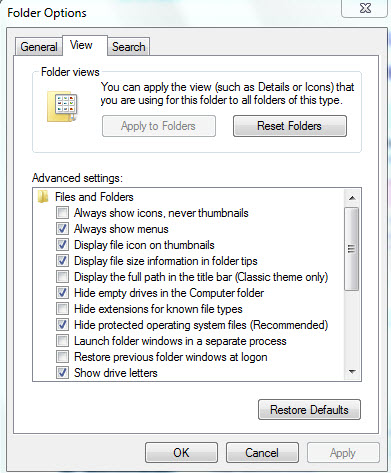
Namely the categories of Folder Options does'nt show up.And all of
lines are in on category.
Thanks for your help. | My System Specs | | OS Windows 7 Ultimate,32bit edition CPU Dual core 2.5 GHz Motherboard ASUS Memory 2GB Graphics Card G-force 8400 xfx Monitor(s) Displays LG1760TR Screen Resolution 1280*1024 Hard Drives MAXTOR 40GB |
05-11-2010
|
#8 | | Windows 7 Ultimate x64 SP1 |
Hello Strikerboy, and welcome to Seven Forums.
Using the tutorial below to enable Hidden files and folders may be able to restore this option for you. Hidden Files and Folders Option - Add or Remove - Vista Forums
Hope this helps,
Shawn | My System Specs | | System Manufacturer/Model Number Self built custom OS Windows 7 Ultimate x64 SP1 CPU Intel i7-980X 3.3 Ghz (3.48 Ghz OC'd) Motherboard ASUS P6X58D Premium Memory 12 GB (2GBx6) DDR3 PC3-16000 2000 MHz Kingston HyperX Graphics Card Sapphire HD5870 Eyefinity 6 2GB Sound Card Realtek HD Audio ALC889 Integrated Chip Monitor(s) Displays 3x 27" Asus VE278Q Screen Resolution 1920x1080 Keyboard Logitech Cordless Desktop MX 5500 Revolution Mouse Logitech Cordless Desktop MX 5500 Revolution PSU OCZ Series Gold OCZZ1000M 1000W Case Corsair Obsidian 800D Cooling Thermalright Ultra 120 Extreme Copper CPU heat sink w/120 MM Hard Drives 160GB OCZ RevoDrive X2
** 2 x 1TB Samsung HDD HD154UI SATA Internet Speed 50 Mb/s Download and 2 Mb/s Upload Other Info Microsoft LifeCam Cinema
** Lite-On iHBS212 12x BD Writer
** Samsung CLX-3175FW Printer
** Netgear WNDR3800 Router
** Motorola SBG6580 Cable Modem
** 2x APC Back-UPS XS 1500 |
05-11-2010
|
#9 | | Windows 7 Ultimate,32bit edition |
Realy thanks for your help Mr.Shawn.
this topic solved my problem.again thank you.
Arash | My System Specs | | OS Windows 7 Ultimate,32bit edition CPU Dual core 2.5 GHz Motherboard ASUS Memory 2GB Graphics Card G-force 8400 xfx Monitor(s) Displays LG1760TR Screen Resolution 1280*1024 Hard Drives MAXTOR 40GB Folder Options - Open problems? All times are GMT -5. The time now is 12:11 PM. |  |