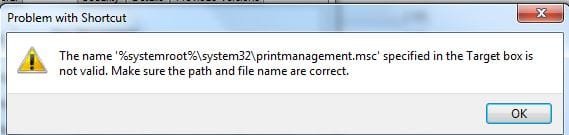
How to Restore the Default Windows 7 Administrative Tools
Information
Administrative Tools is a folder in Control Panel that contains tools for system administrators and advanced users. The tools in the folder might vary depending on which edition of Windows 7 you are using. This will show you how to restore the default Administrative Tools and it's shortcuts in Windows 7.
Tip
Administrative Tools is located at the hidden system folder below.
%ProgramData%\Microsoft\Windows\Start Menu\Programs\Administrative Tools
If the Admnistrative Tools folder is missing from this location, then you will see this Location is not available error below when you try to open Administrative Tools from any location.
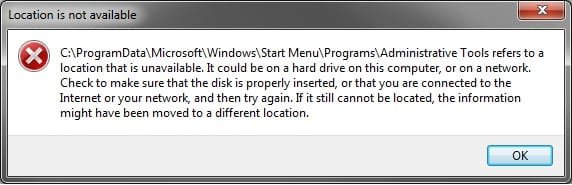
%ProgramData%\Microsoft\Windows\Start Menu\Programs\Administrative Tools
If the Admnistrative Tools folder is missing from this location, then you will see this Location is not available error below when you try to open Administrative Tools from any location.
Some common Administrative Tools in this folder include:
Component Services|Configure and administer Component Object Model (COM) components. Component Services is designed for use by developers and administrators.
Computer Management| Manage local or remote computers by using a single, consolidated desktop tool. Using Computer Management, you can perform many tasks, such as monitoring system events, configuring hard disks, and managing system performance.
Data Sources (ODBC)| Use Open Database Connectivity (ODBC) to move data from one type of database (a data source) to another. For more information, see What is ODBC?
Event Viewer| View information about significant events, such as a program starting or stopping, or a security error, which are recorded in event logs.
iSCSI Initiator| Configure advanced connections between storage devices on a network. For more information, see What is Internet Small Computer System Interface (iSCSI)?
Local Security Policy | View and edit Group Policy security settings.
Performance Monitor| View advanced system information about the central processing unit (CPU), memory, hard disk, and network performance.
Print Management| Manage printers and print servers on a network and perform other administrative tasks.
Services | Manage the different services that run in the background on your computer.
System Configuration| Identify problems that might be preventing Windows from running correctly. For more information, see Using System Configuration.
Task Scheduler| Schedule programs or other tasks to run automatically. For more information, see Schedule a task.
Windows Firewall with Advanced Security| Configure advanced firewall settings on both this computer and remote computers on your network.
Windows Memory Diagnostic | Check your computer's memory to see if it's functioning properly.
Windows PowerShell Modules |Lets you organize your Windows PowerShell scripts and functions into independent, self-contained units.
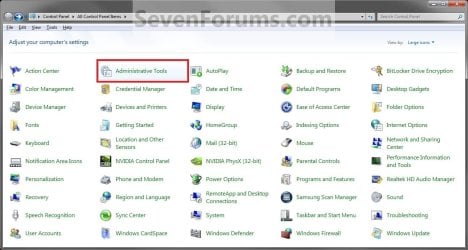
EXAMPLE: Administrative Tools in Start Menu
NOTE: To add or remove the Administrative Tools button from the Start menu, see How to Add or Remove Administrative Tools in Windows 7 Start Menu.

Here's How:
1. Click on the Download button below to download, and save the file below to your desktop.
NOTE: This is the same in both the 32-bit and 64-bit Windows 7.
Administrative_Tools.zip
Download
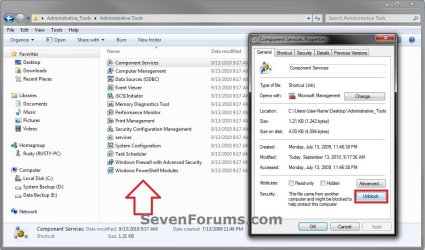
2. Unblock the ZIP file.
3. Open the downloaded ZIP file, and extract (drag and drop) the Administrative Tools folder to your desktop.
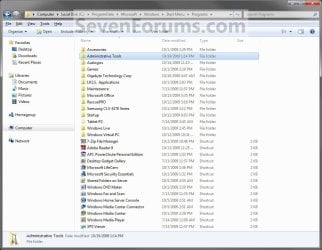
4. In Windows Explorer, navigate to the hidden system folder below. (see screenshot below)
NOTE: You can also open the Start Menu and right click on All Programs,click on Open All Users, and open the Programs folder to get to this location below as well.
C:\ProgramData\Microsoft\Windows\Start Menu\Programs
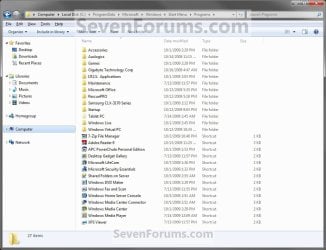
5. Drag the extracted Administrative Tools folder from step 3 above into the folder location in step 4, and drop it to an empty area in the main window (not in Navigation Pane). (see screenshot above)
6. If Administrative Tools Folder is in the Programs folder (step 4)
NOTE: If not, then go to step 7 instead.
A) Click on Yes. (see screenshot below)
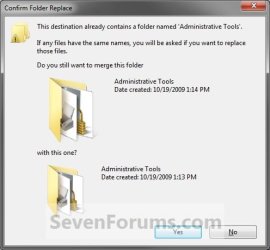
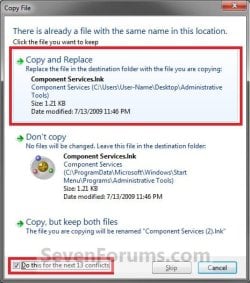
B) Check the Do this for next ## conflicts box at the bottom, and click on the Copy and Replace option. (see screenshot below)
7. Click on Continue. (see screenshot below)
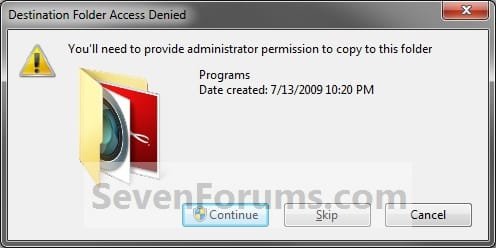
8. If prompted by UAC, click on Yes.
9. The Administrative Tools folder (step 2) has now been restored to the Programs folder (step 4). You should now be able to open Adminsitrative Tools from the Control Panel and Start Menu.
That's it,
Shawn
Related Tutorials
- How to Add or Remove Administrative Tools in Windows 7 Start Menu
- How to Restore Missing Default Shortcuts in the Windows 7 Start Menu
- How to Create a Administrative Tools Shortcut in Windows 7
- How to Restore the Default Games in Windows 7 Games Explorer Folder
- How to Add a "Administrative Tools" Cascading Desktop Context Menu in Windows 7
Attachments
Last edited:


 You Fricking Rocked it!!! Thanx for the very PREcise; CONcise and most importantly Spot on help tutorial that I can't remember any other such as easy and quick to follow and to a quick gratification of succession to my problem. My Hat is off to you, well in-knowledged Sir !! Hats Off!
 I Bow to your worthiness !

 , all sorted.