
Clean Install with a Upgrade Windows 7 Version

How to Do a Clean Install with an Upgrade Windows 7 Version


   Information
This will show you how to do a Clean Install using a retail Upgrade Windows 7 installation disc.

   Warning
Remember that you need to legally own a valid qualifying previous version of Windows to use a Upgrade Windows 7, and to stop using (or uninstall) the qualifying OS while you have the upgrade installed. Microsoft only made doing a clean install from a upgrade Windows 7 possible to make it more convenient so you do not have to reinstall both the old Windows version (ex: Vista) and upgrade to Windows 7 everytime you needed or wanted to reinstall.

If you do not legally own a valid qualifying previous version of Windows, then you are violating the terms of Microsoft's Windows 7 End User License Agreement and could get your product key number invalidated by Microsoft. Plus, it is considered illegal.

For more about this, please see: Microsoft SMB Community Blog : Regardless of what any hack says, a Windows 7 Upgrade is an Upgrade. What you need to know.


OPTION ONE

A Normal Clean Install


1. Do a clean install at boot without checking the Automatically activate Windows when I'm online box during the installation process.

2. When the installation is finished, then manually activate Windows 7 with your product key number.

3. If your Windows should fail to activate, then pick up at step 2 in OPTION THREE below.


OPTION TWO

Through a Custom Install


   Note
This option will let you do a clean install of Windows 7 without formating the current Windows installation to have your current Windows installation backed up to the Windows.old folder during the installation of your retail upgrade Windows 7. This way you can copy any files back that you want from the C:\Windows.old folder (previous installation) back into your new installation afterwards.

1. Do a custom install at boot or from within your current Windows installation without checking the Automatically activate Windows when I'm online box during the installation process.

2. When the installation is finished, then manually activate Windows 7 with your product key number.

3. Copy any files that you want back from the C:\Windows.old folder into where you want it in you new installation.

4. You can now delete the Windows.old folder using Disk Cleanup to have a clean install now.


OPTION THREE

Clean Install with a Registry Workaround for Error Code 0xc004f061


   Note
If you get a activation error code 0xc004f061 while doing OPTION ONE or OPTION TWO above, then you will need to use this option instead
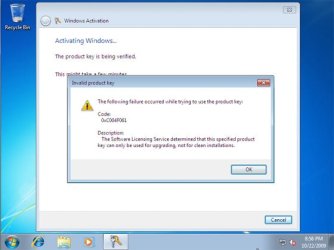
win7_upgrade_media_06.jpg


1. Do a clean install of your upgrade Windows 7 at boot without checking the Automatically activate Windows when I'm online box during the installation process.
NOTE: If you already did this from OPTION ONE above and got a activation error, then skip this step and just proceed to step 2 below instead. There's no need to reinstall again.

2. Click on the Download button below to download the .bat file below, and save it to your desktop.
Activate_Windows_Upgrade_after_Clean_Install.bat


Download


3. Right click on the downloaded .bat file, and click on Run as administrator.

4. If prompted, click/tap on Run and Yes (UAC).
NOTE: If you like, you can stop getting the Run prompt by unblocking the downloaded .bat file.

5. You will now notice a command prompt quickly open and close while applying the changes to your registry.

6. Click/tap on OK. (see screenshot below)
OK.jpg
7. Restart the computer.

8. When the computer is finished restarting, then manually activate Windows 7 with your product key number.


OPTION FOUR

Double Installing Windows 7


   Note
This option is the same that was used to do a clean install of an upgrade copy of Windows 7. It's more work, but if the options above did not work for you, then this should since this is the most reliable option.

1. Do a clean install of your upgrade Windows 7 at boot without checking the Automatically activate Windows when I'm online box during the installation process, and do not activate Windows 7. When finished with the clean install, do not or install any Windows Updates, drivers, or programs yet.

2. When finished with the clean install, start at step 4 at this link to do an in-place "upgrade" install with your upgrade Windows 7 installation disk from within the just now finished clean install of Windows 7.

3. When the in-place upgrade installation is completely finished, then manually activate Windows 7 with your product key number. You can now also install any Windows Updates drivers, and programs you like.
That's it,
Shawn


Attachments

Last edited:
brink,i have the following questions,

1)can I boot from dvd drive?
2)will this provide clean install(advanced)option?
 

My Computer

Computer Manufacturer/Model Number
acer aspire 5920
OS
windows 7 ultimate x64
CPU
core 2 duo T5550
Motherboard
acer chapala
Memory
4 GB DDR2
Graphics Card(s)
Intel GMA X3100
Hard Drives
500 GB
Hello Manjunath,

If you have a retail copy of a "Full" Windows 7 or "Upgrade" Windows 7, then yes to both questions. :)

Hope this helps,
Shawn
 

My Computer

Computer type
PC/Desktop
Computer Manufacturer/Model Number
Self built custom
OS
64-bit Windows 11 Pro for Workstations
CPU
Intel i7-8700K OC'd to 5 GHz
Motherboard
ASUS ROG Maximus XI Formula Z390
Memory
64 GB (4x16GB) G.SKILL TridentZ RGB DDR4 3600 MHz
Graphics Card(s)
ASUS ROG-STRIX-GTX1080TI-O11G-GAMING
Sound Card
Integrated
Monitor(s) Displays
2 x Samsung Odyssey G7 27"
Screen Resolution
2560x1440
Hard Drives
1TB Samsung 990 PRO M.2,
4TB Samsung 990 PRO PRO M.2,
TerraMaster F8 SSD Plus NAS
PSU
Seasonic Prime Titanium 850W
Case
Thermaltake Core P3
Cooling
Corsair Hydro H115i
Keyboard
Logitech wireless K800
Mouse
Logitech MX Master 4
Internet Speed
2 Gb/s Download and 100 Mb/s Upload
Antivirus
Malwarebyte Anti-Malware Premium
Browser
Google Chrome
Other Info
Logitech Z625 speaker system,
Logitech BRIO 4K Pro webcam,
HP Color LaserJet Pro MFP M477fdn,
APC SMART-UPS RT 1000 XL - SURT1000XLI,
Galaxy S23 Plus phone
how will upgrade disk check for my previous os if I boot from dvd??
 

My Computer

Computer Manufacturer/Model Number
acer aspire 5920
OS
windows 7 ultimate x64
CPU
core 2 duo T5550
Motherboard
acer chapala
Memory
4 GB DDR2
Graphics Card(s)
Intel GMA X3100
Hard Drives
500 GB
There will be no need for it to if you wanted to do a clean (formatted) install of Windows 7 with the upgrade copy.

If you wanted to do a inplace upgrade install, then you will need to do this tutorial below instead. This will have you install your upgrade Windows 7 from within the previous OS (Vista).

http://www.sevenforums.com/tutorials/1818-upgrade-install-windows-7-a.html
 

My Computer

Computer type
PC/Desktop
Computer Manufacturer/Model Number
Self built custom
OS
64-bit Windows 11 Pro for Workstations
CPU
Intel i7-8700K OC'd to 5 GHz
Motherboard
ASUS ROG Maximus XI Formula Z390
Memory
64 GB (4x16GB) G.SKILL TridentZ RGB DDR4 3600 MHz
Graphics Card(s)
ASUS ROG-STRIX-GTX1080TI-O11G-GAMING
Sound Card
Integrated
Monitor(s) Displays
2 x Samsung Odyssey G7 27"
Screen Resolution
2560x1440
Hard Drives
1TB Samsung 990 PRO M.2,
4TB Samsung 990 PRO PRO M.2,
TerraMaster F8 SSD Plus NAS
PSU
Seasonic Prime Titanium 850W
Case
Thermaltake Core P3
Cooling
Corsair Hydro H115i
Keyboard
Logitech wireless K800
Mouse
Logitech MX Master 4
Internet Speed
2 Gb/s Download and 100 Mb/s Upload
Antivirus
Malwarebyte Anti-Malware Premium
Browser
Google Chrome
Other Info
Logitech Z625 speaker system,
Logitech BRIO 4K Pro webcam,
HP Color LaserJet Pro MFP M477fdn,
APC SMART-UPS RT 1000 XL - SURT1000XLI,
Galaxy S23 Plus phone
Hi, Brink;

Great turorial. But I just want to clarify something, so that I know what to expect. This will work on an already activated copy of a Windows 7 installation? I preordered Windows 7 and have been using it (activated) since it was released last year... I did a custom install on top of my existing Vista installation (maintaining the "windows.old" directory). However, I've got a brand new hard drive on the way and I wish to do a completely clean install of Windows 7 on the new hard drive (I don't want to mess with transferring my current drive to the new one, I want to start absolutely clean by letting Windows 7 format the new drive and install brand new). One of the sites I've seen linked from this one is Paul Thurrott's Super Site for Windows, and the following post caught my eye:

http://community.winsupersite.com/b...r-multiple-installs-with-one-product-key.aspx

In it, he states the following:

"Each product key (with the exception of those supplied by the Windows 7 Family Pack, of course) allows for only one electronic, automatic activation".

Is this true? Am I going to have to call Microsoft this time, to get it activated? Or will the normal online activation work more than once? If I have to call, then so be it... but I just want to make sure I'm prepared with the correct phone number, support hours, etcetra. I would appreciate any clarification that you can offer.

Thanks again for the great post, and for taking the time to follow up with everyone's questions. :)

Jeff
Hello Jeff, and welcome to Seven Forums.

Yes, you can activate Windows 7 on that same computer with the same product key number as many times as you like as long as it's only installed on that computer and only once. :)

A retail Windows 7 can be installed and activated on any computer as long as it has been uninstalled from any previous computer first. Sometimes a phone activation may be required instead of a normal online activation.

A OEM Windows 7 can only be installed and activated on the exact same first computer it was activated on. It is permanently tied to the first computer and cannot activated on another computer. This is why a OEM Windows 7 is much cheaper than a retail (full) Windows 7.

Hope this helps,
Shawn

Hi, Shawn and all;

I just wanted to confirm that I was able to successfully install and activate a full install of Windows 7 on my brand new empty hard drive with my Windows 7 Upgrade DVD, by following the registry workaround advice (option #3 on the first page of this thread, at "http://www.sevenforums.com/tutorials/31402-clean-install-upgrade-windows-7-version.html"). I simply went through the install routine without entering my product code, and unchecking the "Automatically activate Windows when I'm online" setting... then I performed the registry tweak and DOS command after everything had finished installing, and rebooted. I was then able to activate without a hitch, it worked like a charm. It's good to know that I can do a reformat and clean install if I want to.

Now I just need to keep working on reconfiguring the eleventy-billion different settings that I had tweaked over the last several months since initially installing Win7, to get things back to where I like them... :confused:

Thanks again for the help, and for a great forum!
Jeff
 

My Computer

Computer Manufacturer/Model Number
Dell Dimension XPS Gen 5
OS
Windows 7 Professional, 32-bit (retail upgrade)
CPU
Pentium D 830 with Dual Core Technology (3 GHz, 800 FSB)
Motherboard
Intel
Memory
4 GB Dual Channel DDR2 SDRAM - 800 MHz
Graphics Card(s)
1024MB PCI Express 2.0 x16 nVidia GeForce 9600 GT
Sound Card
Sound Blaster Audigy 2 ZS
Monitor(s) Displays
Dell S2409W 24” 1080p HD Monitor
Screen Resolution
1920x1080 HD
Hard Drives
Dual (non-RAID) Seagate 640 GB SATA Hard Drives (7200 RPM)
Keyboard
Microsoft Natural Keyboard Pro (USB)
Mouse
Microsoft Wireless Laser Mouse 6000 (USB)
Internet Speed
Road Runner Cable (~10 Mb/sec)
That's great news Jeff. I'm happy to hear that you got it installed without issue. Hopefully getting the settings the way you like them will go as fast and easy for you.
 

My Computer

Computer type
PC/Desktop
Computer Manufacturer/Model Number
Self built custom
OS
64-bit Windows 11 Pro for Workstations
CPU
Intel i7-8700K OC'd to 5 GHz
Motherboard
ASUS ROG Maximus XI Formula Z390
Memory
64 GB (4x16GB) G.SKILL TridentZ RGB DDR4 3600 MHz
Graphics Card(s)
ASUS ROG-STRIX-GTX1080TI-O11G-GAMING
Sound Card
Integrated
Monitor(s) Displays
2 x Samsung Odyssey G7 27"
Screen Resolution
2560x1440
Hard Drives
1TB Samsung 990 PRO M.2,
4TB Samsung 990 PRO PRO M.2,
TerraMaster F8 SSD Plus NAS
PSU
Seasonic Prime Titanium 850W
Case
Thermaltake Core P3
Cooling
Corsair Hydro H115i
Keyboard
Logitech wireless K800
Mouse
Logitech MX Master 4
Internet Speed
2 Gb/s Download and 100 Mb/s Upload
Antivirus
Malwarebyte Anti-Malware Premium
Browser
Google Chrome
Other Info
Logitech Z625 speaker system,
Logitech BRIO 4K Pro webcam,
HP Color LaserJet Pro MFP M477fdn,
APC SMART-UPS RT 1000 XL - SURT1000XLI,
Galaxy S23 Plus phone
Firstly would like to say thanks for the pictorial write up. Just need some clarifications on my Win7 install if you don’t mind

I’ve bought a 64bit Windows 7 Professional Upgrade via itsnotcheating website. I currently have the disc in front of me with the valid upgrade key.

Questions
1. At the time of the order, i paid for a 64bit disc but i’ve changed my mind now and would like to install a 32bit version as i can’t justify sacrificing Firefox and possible compatibility issues with my apps / games for now.
- Is there a 32bit install option from the same disc?
- If not, is there a Microsoft link to download the 32 bit iso? Don’t really trust torrents if you know what i mean

2. I currently have Windows XP Professional in my hard disc and i would like to do a clean install using option 1 (yes, i’ve read through the tutorials). Do i need to reformat my hard disk which is currently on XP before performing the clean install via:-
(a) Insert Windows XP cd and boot into the XP installation menu (blue menu)
(b) Delete the XP OS partition (windows desktop will not let you delete/format OS partitions afaik)
(c) Exit the installation screen
(d.) Reinsert Windows 7 cd to begin the clean install?

3. From what i have gathered, the Win7 cd itself is irrelevant - tweaking the ei.cfg files unlocks the multiple version of Win7 in a single disc. What determines the type of Win7 you have (i.e. Pro, Ultimate, Home) is based on the product key you have. Will i then be able to install Win7 using a Retail (not an upgrade) Win7 Pro 32 bit cd and then activate it using my upgrade key?
 

My Computer

OS
XP
Hello m4sopmod, and welcome to Seven Forums.

Q1) It depends on if the DVD offers 32-bit install option instead of just the 64-bit version that you purchased, and if it is a OEM or Retail product key number.

However, the 64-bit Windows 7 supports installing 32-bit applications as well. You can check at the link below to see if the are listed as being supported by 64-bit Windows 7 to be safe though.

Windows 7 Compatibility: Software Programs and Hardware Devices: Find Updates, Drivers, and Downloads


Q2) Yes, to do a clean install you will need to format and install Windows 7 as outlined in Option One of the tutorial. This is all done from booting from your Windows 7 installation disk, delete the XP partition, then continue installing Windows 7.

Q3) Yes, the product key number determines what edition of Windows 7 you can install and activate. It would be much easier to use the installation disc that came with the product key number though. You will need to check with where you purchased this though to see if it's a OEM or Retail product key number. Some OEM numbers may be limited to only what you purchased.

Hope this helps,
Shawn
 

My Computer

Computer type
PC/Desktop
Computer Manufacturer/Model Number
Self built custom
OS
64-bit Windows 11 Pro for Workstations
CPU
Intel i7-8700K OC'd to 5 GHz
Motherboard
ASUS ROG Maximus XI Formula Z390
Memory
64 GB (4x16GB) G.SKILL TridentZ RGB DDR4 3600 MHz
Graphics Card(s)
ASUS ROG-STRIX-GTX1080TI-O11G-GAMING
Sound Card
Integrated
Monitor(s) Displays
2 x Samsung Odyssey G7 27"
Screen Resolution
2560x1440
Hard Drives
1TB Samsung 990 PRO M.2,
4TB Samsung 990 PRO PRO M.2,
TerraMaster F8 SSD Plus NAS
PSU
Seasonic Prime Titanium 850W
Case
Thermaltake Core P3
Cooling
Corsair Hydro H115i
Keyboard
Logitech wireless K800
Mouse
Logitech MX Master 4
Internet Speed
2 Gb/s Download and 100 Mb/s Upload
Antivirus
Malwarebyte Anti-Malware Premium
Browser
Google Chrome
Other Info
Logitech Z625 speaker system,
Logitech BRIO 4K Pro webcam,
HP Color LaserJet Pro MFP M477fdn,
APC SMART-UPS RT 1000 XL - SURT1000XLI,
Galaxy S23 Plus phone
Hi Brink

Thanks for addressing Question 2

I reckon i have the Retail Upgrade key instead of an OEM key as i've bought the Win7 via the official itsnotcheating site

Do you know where i can acquire a win7 pro upgrade 32bit cd (i.e. link). I currently have the 64bit cd
 

My Computer

OS
XP
My Windows 7 pro upgrade disc came with 32 bit and 64 bit. It was the pre-purchase order from last May/June
 

My Computer

Computer type
PC/Desktop
Computer Manufacturer/Model Number
Evga X58
OS
Windows 7 Ultimate x64
CPU
Core i7 950 - 3.06 GHz
Motherboard
EVGA X58 SLI
Memory
Corsair XMS3 Dominator CMP12GX3M3A1600C9 12GB
Graphics Card(s)
eVGA GTX 550 TI-FPB 1GB
Sound Card
High Definition Audio
Monitor(s) Displays
ASUS VH242H 24 LCD
Screen Resolution
1920 X 1080
Hard Drives
2x - Seagate 1000GB Hard Drive SATA 3Gb/s 32MB Cache
Seagate 750GB Barracuda 7200.12 SATA II w/ 32MB Cache
WDC WD2500AAJB-00J3A0 ATA Device
PSU
OCZ ZX Series 1250W PSU
Case
ANTEC NINE HUNDRED TWO
Cooling
Zalman Reserator 3 MAX Dual CPU Cooler
Keyboard
Logitech
Mouse
Logitech
Other Info
2 x- HL-DT-ST DVDRAM GH24NS50 ATA Device
m4sopmod,

If it didn't come with both 32-bit and 64-bit like it did for Windrider, then you will need to contact the itsnotcheating site to see what they may be able to do to get you one since you had purchased it from them.
 

My Computer

Computer type
PC/Desktop
Computer Manufacturer/Model Number
Self built custom
OS
64-bit Windows 11 Pro for Workstations
CPU
Intel i7-8700K OC'd to 5 GHz
Motherboard
ASUS ROG Maximus XI Formula Z390
Memory
64 GB (4x16GB) G.SKILL TridentZ RGB DDR4 3600 MHz
Graphics Card(s)
ASUS ROG-STRIX-GTX1080TI-O11G-GAMING
Sound Card
Integrated
Monitor(s) Displays
2 x Samsung Odyssey G7 27"
Screen Resolution
2560x1440
Hard Drives
1TB Samsung 990 PRO M.2,
4TB Samsung 990 PRO PRO M.2,
TerraMaster F8 SSD Plus NAS
PSU
Seasonic Prime Titanium 850W
Case
Thermaltake Core P3
Cooling
Corsair Hydro H115i
Keyboard
Logitech wireless K800
Mouse
Logitech MX Master 4
Internet Speed
2 Gb/s Download and 100 Mb/s Upload
Antivirus
Malwarebyte Anti-Malware Premium
Browser
Google Chrome
Other Info
Logitech Z625 speaker system,
Logitech BRIO 4K Pro webcam,
HP Color LaserJet Pro MFP M477fdn,
APC SMART-UPS RT 1000 XL - SURT1000XLI,
Galaxy S23 Plus phone
Clean install of Professional Upgrade

Brink,

Is a clean install different than a full install?

In one of your previous posts on this form, you quoted Microsoft, which I can't find now, and I took it to mean allowing a clean full install from the $30 ($29.99) Professional Upgrade.

I installed it on a Mac running bootcamp, and it wouldn't accept my activation key, saying that it was upgrade only. So I have Win 7 Professional running just fine on the Mac, but it expires in 30 days :(

Will I have to buy a different version to get the appropriate key?
Thanks...
 

My Computer

Computer Manufacturer/Model Number
HP slimline
OS
Win 7 Prof
CPU
pentium dualcore
Motherboard
asus
Memory
4 gb
Graphics Card(s)
nvidia
Monitor(s) Displays
dell 24 inch
Hello Skyaflya, and welcome to Seven Forums.

You would have either a "Full" or "Upgrade" copy of Windows 7, and would do either a "Clean" (format), "Upgrade", or "Custom" install with that copy of Windows 7.

If you have a retail upgrade copy of Windows 7, and not a student or OEM copy, then you will be able to do a clean install using the steps in the tutorial on the first page.

Hope this helps,
Shawn
 

My Computer

Computer type
PC/Desktop
Computer Manufacturer/Model Number
Self built custom
OS
64-bit Windows 11 Pro for Workstations
CPU
Intel i7-8700K OC'd to 5 GHz
Motherboard
ASUS ROG Maximus XI Formula Z390
Memory
64 GB (4x16GB) G.SKILL TridentZ RGB DDR4 3600 MHz
Graphics Card(s)
ASUS ROG-STRIX-GTX1080TI-O11G-GAMING
Sound Card
Integrated
Monitor(s) Displays
2 x Samsung Odyssey G7 27"
Screen Resolution
2560x1440
Hard Drives
1TB Samsung 990 PRO M.2,
4TB Samsung 990 PRO PRO M.2,
TerraMaster F8 SSD Plus NAS
PSU
Seasonic Prime Titanium 850W
Case
Thermaltake Core P3
Cooling
Corsair Hydro H115i
Keyboard
Logitech wireless K800
Mouse
Logitech MX Master 4
Internet Speed
2 Gb/s Download and 100 Mb/s Upload
Antivirus
Malwarebyte Anti-Malware Premium
Browser
Google Chrome
Other Info
Logitech Z625 speaker system,
Logitech BRIO 4K Pro webcam,
HP Color LaserJet Pro MFP M477fdn,
APC SMART-UPS RT 1000 XL - SURT1000XLI,
Galaxy S23 Plus phone
Brink,

:( well it was in fact the student copy being the $30 version from ultimatesteal. So, it won't work... i take it.

Would this work? Purchase a copy of "Windows 7 Home Premium 64 Bit OEM 1pk" then simply use that activation key?

If not, any suggestions, given that I already have the non-returnable student Professional upgrade?

Great forum, gives me a positive feeling about this new setup.
Thanks again...
 

My Computer

Computer Manufacturer/Model Number
HP slimline
OS
Win 7 Prof
CPU
pentium dualcore
Motherboard
asus
Memory
4 gb
Graphics Card(s)
nvidia
Monitor(s) Displays
dell 24 inch
Skyaflya,

It would need to be a "retail" upgrade Windows 7 copy instead of a OEM copy to be able to do a clean install with a upgrade. You would still need to reinstall the retaill copy though. :(

You could use a full OEM Windows 7 instead of a upgrade OEM copy, and just do a clean install with it.
 

My Computer

Computer type
PC/Desktop
Computer Manufacturer/Model Number
Self built custom
OS
64-bit Windows 11 Pro for Workstations
CPU
Intel i7-8700K OC'd to 5 GHz
Motherboard
ASUS ROG Maximus XI Formula Z390
Memory
64 GB (4x16GB) G.SKILL TridentZ RGB DDR4 3600 MHz
Graphics Card(s)
ASUS ROG-STRIX-GTX1080TI-O11G-GAMING
Sound Card
Integrated
Monitor(s) Displays
2 x Samsung Odyssey G7 27"
Screen Resolution
2560x1440
Hard Drives
1TB Samsung 990 PRO M.2,
4TB Samsung 990 PRO PRO M.2,
TerraMaster F8 SSD Plus NAS
PSU
Seasonic Prime Titanium 850W
Case
Thermaltake Core P3
Cooling
Corsair Hydro H115i
Keyboard
Logitech wireless K800
Mouse
Logitech MX Master 4
Internet Speed
2 Gb/s Download and 100 Mb/s Upload
Antivirus
Malwarebyte Anti-Malware Premium
Browser
Google Chrome
Other Info
Logitech Z625 speaker system,
Logitech BRIO 4K Pro webcam,
HP Color LaserJet Pro MFP M477fdn,
APC SMART-UPS RT 1000 XL - SURT1000XLI,
Galaxy S23 Plus phone
Brink,

The Home Premium box I mentioned does not have the word "Upgrade" on it, so can I assume that it is the full version and fits your alternative suggestion?

To recap, if the Home Premium OEM version is also the Full version, and since the Professional Upgrade is the Student version, this means that I am planning to upgrade a clean install of OEM Full Home Premium with a Student Upgrade version of Professional. Is this doable?
Thanks again.
 
Last edited:

My Computer

Computer Manufacturer/Model Number
HP slimline
OS
Win 7 Prof
CPU
pentium dualcore
Motherboard
asus
Memory
4 gb
Graphics Card(s)
nvidia
Monitor(s) Displays
dell 24 inch
Normally you can upgrade from Home Premium to Professional, but I have not tried it from a OEM to Student copy before. It will be worth trying to see, but I would recommend backing up anything that you do not want to lose to be safe.

It will either allow you to upgrade or not. Please let us know how it went for you.


However, instead of purchasing a "Windows 7 Home Premium 64 Bit OEM 1pk" that may or may not let you upgrade with a Student Pro upgrade version, you might consider just purchasing a "Windows 7 Professional 64 Bit OEM 1pk" that you can just do a straight clean install without any issues.
 

My Computer

Computer type
PC/Desktop
Computer Manufacturer/Model Number
Self built custom
OS
64-bit Windows 11 Pro for Workstations
CPU
Intel i7-8700K OC'd to 5 GHz
Motherboard
ASUS ROG Maximus XI Formula Z390
Memory
64 GB (4x16GB) G.SKILL TridentZ RGB DDR4 3600 MHz
Graphics Card(s)
ASUS ROG-STRIX-GTX1080TI-O11G-GAMING
Sound Card
Integrated
Monitor(s) Displays
2 x Samsung Odyssey G7 27"
Screen Resolution
2560x1440
Hard Drives
1TB Samsung 990 PRO M.2,
4TB Samsung 990 PRO PRO M.2,
TerraMaster F8 SSD Plus NAS
PSU
Seasonic Prime Titanium 850W
Case
Thermaltake Core P3
Cooling
Corsair Hydro H115i
Keyboard
Logitech wireless K800
Mouse
Logitech MX Master 4
Internet Speed
2 Gb/s Download and 100 Mb/s Upload
Antivirus
Malwarebyte Anti-Malware Premium
Browser
Google Chrome
Other Info
Logitech Z625 speaker system,
Logitech BRIO 4K Pro webcam,
HP Color LaserJet Pro MFP M477fdn,
APC SMART-UPS RT 1000 XL - SURT1000XLI,
Galaxy S23 Plus phone
Sounds like the way to go: Windows 7 Professional 64 Bit OEM 1pk actually. I may do this and return the OEM disk that i am waiting for in the mail.

I have a new OEM concern: given your suggestion works, would i need two separate licenses to operate it toggling between Bootcamp and Parallels on the same machine? The Mac forums are inconclusive about it, as was the MS Activation Center. It seems that the single key works for some but not for others (on the Mac).
 

My Computer

Computer Manufacturer/Model Number
HP slimline
OS
Win 7 Prof
CPU
pentium dualcore
Motherboard
asus
Memory
4 gb
Graphics Card(s)
nvidia
Monitor(s) Displays
dell 24 inch
Shyaflya,

A OEM product key can only be used to activate a single installed Windows 7 on one computer. Once activated on a computer, the OEM product key will be permanently tied to that specific computer and cannot be used to activate a Widows 7 on any other computer. You can uninstall and reinstall Windows 7 as many times as you like on only that specific computer though, but you cannot install more than one copy on that copy either.

Hope this helps,
Shawn
 

My Computer

Computer type
PC/Desktop
Computer Manufacturer/Model Number
Self built custom
OS
64-bit Windows 11 Pro for Workstations
CPU
Intel i7-8700K OC'd to 5 GHz
Motherboard
ASUS ROG Maximus XI Formula Z390
Memory
64 GB (4x16GB) G.SKILL TridentZ RGB DDR4 3600 MHz
Graphics Card(s)
ASUS ROG-STRIX-GTX1080TI-O11G-GAMING
Sound Card
Integrated
Monitor(s) Displays
2 x Samsung Odyssey G7 27"
Screen Resolution
2560x1440
Hard Drives
1TB Samsung 990 PRO M.2,
4TB Samsung 990 PRO PRO M.2,
TerraMaster F8 SSD Plus NAS
PSU
Seasonic Prime Titanium 850W
Case
Thermaltake Core P3
Cooling
Corsair Hydro H115i
Keyboard
Logitech wireless K800
Mouse
Logitech MX Master 4
Internet Speed
2 Gb/s Download and 100 Mb/s Upload
Antivirus
Malwarebyte Anti-Malware Premium
Browser
Google Chrome
Other Info
Logitech Z625 speaker system,
Logitech BRIO 4K Pro webcam,
HP Color LaserJet Pro MFP M477fdn,
APC SMART-UPS RT 1000 XL - SURT1000XLI,
Galaxy S23 Plus phone
Normally you can upgrade from Home Premium to Professional, but I have not tried it from a OEM to Student copy before. It will be worth trying to see, but I would recommend backing up anything that you do not want to lose to be safe.

It will either allow you to upgrade or not. Please let us know how it went for you.

The OEM HP works fine but, yes, MS doesn't appear to allow student professional upgrade. However, all i get is an error 0x80070005, but nothing else. If MS doesn't allow something usually it is a very clear no-no message.

So at any rate unless there is a way around the error message, i have a working HP OEM setup, but my student professional upgrade key is useless, unless there is a hack for this error message.
 

My Computer

Computer Manufacturer/Model Number
HP slimline
OS
Win 7 Prof
CPU
pentium dualcore
Motherboard
asus
Memory
4 gb
Graphics Card(s)
nvidia
Monitor(s) Displays
dell 24 inch
Back
Top