
Clean Install with a Upgrade Windows 7 Version

How to Do a Clean Install with an Upgrade Windows 7 Version


   Information
This will show you how to do a Clean Install using a retail Upgrade Windows 7 installation disc.

   Warning
Remember that you need to legally own a valid qualifying previous version of Windows to use a Upgrade Windows 7, and to stop using (or uninstall) the qualifying OS while you have the upgrade installed. Microsoft only made doing a clean install from a upgrade Windows 7 possible to make it more convenient so you do not have to reinstall both the old Windows version (ex: Vista) and upgrade to Windows 7 everytime you needed or wanted to reinstall.

If you do not legally own a valid qualifying previous version of Windows, then you are violating the terms of Microsoft's Windows 7 End User License Agreement and could get your product key number invalidated by Microsoft. Plus, it is considered illegal.

For more about this, please see: Microsoft SMB Community Blog : Regardless of what any hack says, a Windows 7 Upgrade is an Upgrade. What you need to know.


OPTION ONE

A Normal Clean Install


1. Do a clean install at boot without checking the Automatically activate Windows when I'm online box during the installation process.

2. When the installation is finished, then manually activate Windows 7 with your product key number.

3. If your Windows should fail to activate, then pick up at step 2 in OPTION THREE below.


OPTION TWO

Through a Custom Install


   Note
This option will let you do a clean install of Windows 7 without formating the current Windows installation to have your current Windows installation backed up to the Windows.old folder during the installation of your retail upgrade Windows 7. This way you can copy any files back that you want from the C:\Windows.old folder (previous installation) back into your new installation afterwards.

1. Do a custom install at boot or from within your current Windows installation without checking the Automatically activate Windows when I'm online box during the installation process.

2. When the installation is finished, then manually activate Windows 7 with your product key number.

3. Copy any files that you want back from the C:\Windows.old folder into where you want it in you new installation.

4. You can now delete the Windows.old folder using Disk Cleanup to have a clean install now.


OPTION THREE

Clean Install with a Registry Workaround for Error Code 0xc004f061


   Note
If you get a activation error code 0xc004f061 while doing OPTION ONE or OPTION TWO above, then you will need to use this option instead
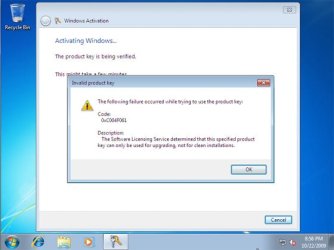
win7_upgrade_media_06.jpg


1. Do a clean install of your upgrade Windows 7 at boot without checking the Automatically activate Windows when I'm online box during the installation process.
NOTE: If you already did this from OPTION ONE above and got a activation error, then skip this step and just proceed to step 2 below instead. There's no need to reinstall again.

2. Click on the Download button below to download the .bat file below, and save it to your desktop.
Activate_Windows_Upgrade_after_Clean_Install.bat


Download


3. Right click on the downloaded .bat file, and click on Run as administrator.

4. If prompted, click/tap on Run and Yes (UAC).
NOTE: If you like, you can stop getting the Run prompt by unblocking the downloaded .bat file.

5. You will now notice a command prompt quickly open and close while applying the changes to your registry.

6. Click/tap on OK. (see screenshot below)
OK.jpg
7. Restart the computer.

8. When the computer is finished restarting, then manually activate Windows 7 with your product key number.


OPTION FOUR

Double Installing Windows 7


   Note
This option is the same that was used to do a clean install of an upgrade copy of Windows 7. It's more work, but if the options above did not work for you, then this should since this is the most reliable option.

1. Do a clean install of your upgrade Windows 7 at boot without checking the Automatically activate Windows when I'm online box during the installation process, and do not activate Windows 7. When finished with the clean install, do not or install any Windows Updates, drivers, or programs yet.

2. When finished with the clean install, start at step 4 at this link to do an in-place "upgrade" install with your upgrade Windows 7 installation disk from within the just now finished clean install of Windows 7.

3. When the in-place upgrade installation is completely finished, then manually activate Windows 7 with your product key number. You can now also install any Windows Updates drivers, and programs you like.
That's it,
Shawn


Attachments

Last edited:
To each their own . Doubt Microsoft would call up their lawyers I'd they found out . They have more fish to fry .

Note : don't worry i buy my windows copies from retail stores .

We do have a very strict policy that anyone found to purposely perform or recommend any illegal action will be permanently banned from the site, and I would personally turn them in to Microsoft to have their key deactivated.
 

My Computer

Computer type
PC/Desktop
Computer Manufacturer/Model Number
Self built custom
OS
64-bit Windows 11 Pro for Workstations
CPU
Intel i7-8700K OC'd to 5 GHz
Motherboard
ASUS ROG Maximus XI Formula Z390
Memory
64 GB (4x16GB) G.SKILL TridentZ RGB DDR4 3600 MHz
Graphics Card(s)
ASUS ROG-STRIX-GTX1080TI-O11G-GAMING
Sound Card
Integrated
Monitor(s) Displays
2 x Samsung Odyssey G7 27"
Screen Resolution
2560x1440
Hard Drives
1TB Samsung 990 PRO M.2,
4TB Samsung 990 PRO PRO M.2,
TerraMaster F8 SSD Plus NAS
PSU
Seasonic Prime Titanium 850W
Case
Thermaltake Core P3
Cooling
Corsair Hydro H115i
Keyboard
Logitech wireless K800
Mouse
Logitech MX Master 4
Internet Speed
2 Gb/s Download and 100 Mb/s Upload
Antivirus
Malwarebyte Anti-Malware Premium
Browser
Google Chrome
Other Info
Logitech Z625 speaker system,
Logitech BRIO 4K Pro webcam,
HP Color LaserJet Pro MFP M477fdn,
APC SMART-UPS RT 1000 XL - SURT1000XLI,
Galaxy S23 Plus phone
He stated XP has never been installed on that computer . So as long as you own a physical copy of previous windows versions you may legally install windows 7 with an upgrade disk to do a clean install ?

If it's a retail copy of a qualifying OS, then yes.

This is exactly what I wanted to hear. Even if I could get away with it either way, it would drive me nuts knowing something about my setup was illegal in anyway. Thank you a million times over Brink. :party:

Thank you for your involvement as well Vistaking. You ask just the right questions. ;)


EDIT: Brink, that policy is a good one indeed, and is one reason why I asked you. I knew you would by honest about it.
 

My Computer

Computer type
Laptop
Computer Manufacturer/Model Number
Toshiba P775-S7100
OS
Windows 7 Professional SP1 64-bit
CPU
Intel Core i5-2450M @2.5 GHz
Memory
6 GB DDR3 1333MHz
Graphics Card(s)
Intel HD 3000
Monitor(s) Displays
Built-in 17.3" LED; 22" Insignia NS-L22Q-10A
Screen Resolution
1600x900; 1360x768
Hard Drives
750 GB Hitachi
1TB Seagate FreeAgent External
Internet Speed
Verizon DSL Speed(Down/Up): 3360 Kbps / 800 Kbps
Antivirus
MSE and MBAM Pro
Browser
IE10
Glad we could help Petey. :)
 

My Computer

Computer type
PC/Desktop
Computer Manufacturer/Model Number
Self built custom
OS
64-bit Windows 11 Pro for Workstations
CPU
Intel i7-8700K OC'd to 5 GHz
Motherboard
ASUS ROG Maximus XI Formula Z390
Memory
64 GB (4x16GB) G.SKILL TridentZ RGB DDR4 3600 MHz
Graphics Card(s)
ASUS ROG-STRIX-GTX1080TI-O11G-GAMING
Sound Card
Integrated
Monitor(s) Displays
2 x Samsung Odyssey G7 27"
Screen Resolution
2560x1440
Hard Drives
1TB Samsung 990 PRO M.2,
4TB Samsung 990 PRO PRO M.2,
TerraMaster F8 SSD Plus NAS
PSU
Seasonic Prime Titanium 850W
Case
Thermaltake Core P3
Cooling
Corsair Hydro H115i
Keyboard
Logitech wireless K800
Mouse
Logitech MX Master 4
Internet Speed
2 Gb/s Download and 100 Mb/s Upload
Antivirus
Malwarebyte Anti-Malware Premium
Browser
Google Chrome
Other Info
Logitech Z625 speaker system,
Logitech BRIO 4K Pro webcam,
HP Color LaserJet Pro MFP M477fdn,
APC SMART-UPS RT 1000 XL - SURT1000XLI,
Galaxy S23 Plus phone
Petey7 said:
Thank you for your involvement as well Vistaking. You ask just the right questions. ;)


I was speaking as the ones that don't know . All of my software are legit !
 

My Computer

Computer Manufacturer/Model Number
Custom Built
OS
Windows 7 Ultimate 32-Bit & Windows 7 Ultimate 64-Bit
CPU
Intel Core i7 CPU 950 @ 3.07GHz
Motherboard
ASUS P6T DELUXE V2
Memory
OCZ 6GB (3 x 2GB) 240-Pin DDR3 SDRAM DDR3 1600 OCZ3X1600R2
Graphics Card(s)
ATI Radeon HD 5700 Series
Sound Card
OnBoard
Hard Drives
WD6400AACS-00M3B0 (640GB SATA )
PSU
CORSAIR 850w
Case
NZXT LEXA
Cooling
Intel Stock Heatsink Fan
Keyboard
Microsoft Wireless Laser Keyboard 7000
Mouse
Microsoft Wireless Laser Mouse 7000
No worries VK. We know you wouldn't do anything dumb like that. :)

That message was for those that didn't know as well.
 

My Computer

Computer type
PC/Desktop
Computer Manufacturer/Model Number
Self built custom
OS
64-bit Windows 11 Pro for Workstations
CPU
Intel i7-8700K OC'd to 5 GHz
Motherboard
ASUS ROG Maximus XI Formula Z390
Memory
64 GB (4x16GB) G.SKILL TridentZ RGB DDR4 3600 MHz
Graphics Card(s)
ASUS ROG-STRIX-GTX1080TI-O11G-GAMING
Sound Card
Integrated
Monitor(s) Displays
2 x Samsung Odyssey G7 27"
Screen Resolution
2560x1440
Hard Drives
1TB Samsung 990 PRO M.2,
4TB Samsung 990 PRO PRO M.2,
TerraMaster F8 SSD Plus NAS
PSU
Seasonic Prime Titanium 850W
Case
Thermaltake Core P3
Cooling
Corsair Hydro H115i
Keyboard
Logitech wireless K800
Mouse
Logitech MX Master 4
Internet Speed
2 Gb/s Download and 100 Mb/s Upload
Antivirus
Malwarebyte Anti-Malware Premium
Browser
Google Chrome
Other Info
Logitech Z625 speaker system,
Logitech BRIO 4K Pro webcam,
HP Color LaserJet Pro MFP M477fdn,
APC SMART-UPS RT 1000 XL - SURT1000XLI,
Galaxy S23 Plus phone
Hi, I've read this whole thread, and while trying to keep it all straight in my head I still have a question;
I'm running an upgrade version of W7 Ultimate, which I installed a couple years ago over a retail version of Vista Ultimate. Now I need a bigger C drive, and plan to install a new, larger SSD. It appears I'll have to use Option Three to reinstall W7 Upgrade, is that right?
The instructions say to download the .bat file and save to the desktop. I assume it'll have to be saved to a flash drive or dvd as the desktop would be wiped clean after installing the new SSD.
When I did the W7 Upgrade on this pc2 years ago, I also installed the Vista Ultimate 32 bit version on an older pc. That's been running with no problem since. But the thing is, that 32 bit version uses the same activation key as the original 64 bit version I replaced on this pc, with the W7 upgrade.
My take on this is that W7 upgrades are version dependant from the same activation key. Do I have this right?
 

My Computer

Computer type
PC/Desktop
Computer Manufacturer/Model Number
Homebuilt
OS
Windows 7 Ultimate x64
CPU
i7 930 A 2.8 GHz
Motherboard
Gigabyte X58A-UD3R
Memory
12 GB
Graphics Card(s)
NVidia GeForce GTX 470, NVidia GeForce 8800 GT
Monitor(s) Displays
2 Necs, 1 Dell
Hard Drives
Intel SSD
Seagate 1 TB
Seagate 1 TB
Seagate 2 TB
Seagate 500 GB
Seagate 759 GB
Case
Lian Li
Cooling
8 Fans
Hello Swamped,

Yep, your Windows 7 product key number will be able to install both the 32-bit or 64-bit version of your Windows 7 Ultimate. However, the installation disc is either 32-bit or 64-bit, so you will need to have the correct one you want to install as well. Of course, you can only have one installed at the same time and not both.

Actually, I find that using OPTION FOUR works the best, but it does a take a bit longer to do.

OPTION THREE is mostly only for if you get that error message.

Hope this helps, :)
Shawn
 

My Computer

Computer type
PC/Desktop
Computer Manufacturer/Model Number
Self built custom
OS
64-bit Windows 11 Pro for Workstations
CPU
Intel i7-8700K OC'd to 5 GHz
Motherboard
ASUS ROG Maximus XI Formula Z390
Memory
64 GB (4x16GB) G.SKILL TridentZ RGB DDR4 3600 MHz
Graphics Card(s)
ASUS ROG-STRIX-GTX1080TI-O11G-GAMING
Sound Card
Integrated
Monitor(s) Displays
2 x Samsung Odyssey G7 27"
Screen Resolution
2560x1440
Hard Drives
1TB Samsung 990 PRO M.2,
4TB Samsung 990 PRO PRO M.2,
TerraMaster F8 SSD Plus NAS
PSU
Seasonic Prime Titanium 850W
Case
Thermaltake Core P3
Cooling
Corsair Hydro H115i
Keyboard
Logitech wireless K800
Mouse
Logitech MX Master 4
Internet Speed
2 Gb/s Download and 100 Mb/s Upload
Antivirus
Malwarebyte Anti-Malware Premium
Browser
Google Chrome
Other Info
Logitech Z625 speaker system,
Logitech BRIO 4K Pro webcam,
HP Color LaserJet Pro MFP M477fdn,
APC SMART-UPS RT 1000 XL - SURT1000XLI,
Galaxy S23 Plus phone

My Computer

Computer type
PC/Desktop
Computer Manufacturer/Model Number
Homebuilt
OS
Windows 7 Ultimate x64
CPU
i7 930 A 2.8 GHz
Motherboard
Gigabyte X58A-UD3R
Memory
12 GB
Graphics Card(s)
NVidia GeForce GTX 470, NVidia GeForce 8800 GT
Monitor(s) Displays
2 Necs, 1 Dell
Hard Drives
Intel SSD
Seagate 1 TB
Seagate 1 TB
Seagate 2 TB
Seagate 500 GB
Seagate 759 GB
Case
Lian Li
Cooling
8 Fans
Correct, but you would start "2)" from step 4 and use step 9 when you get to it. :)
 

My Computer

Computer type
PC/Desktop
Computer Manufacturer/Model Number
Self built custom
OS
64-bit Windows 11 Pro for Workstations
CPU
Intel i7-8700K OC'd to 5 GHz
Motherboard
ASUS ROG Maximus XI Formula Z390
Memory
64 GB (4x16GB) G.SKILL TridentZ RGB DDR4 3600 MHz
Graphics Card(s)
ASUS ROG-STRIX-GTX1080TI-O11G-GAMING
Sound Card
Integrated
Monitor(s) Displays
2 x Samsung Odyssey G7 27"
Screen Resolution
2560x1440
Hard Drives
1TB Samsung 990 PRO M.2,
4TB Samsung 990 PRO PRO M.2,
TerraMaster F8 SSD Plus NAS
PSU
Seasonic Prime Titanium 850W
Case
Thermaltake Core P3
Cooling
Corsair Hydro H115i
Keyboard
Logitech wireless K800
Mouse
Logitech MX Master 4
Internet Speed
2 Gb/s Download and 100 Mb/s Upload
Antivirus
Malwarebyte Anti-Malware Premium
Browser
Google Chrome
Other Info
Logitech Z625 speaker system,
Logitech BRIO 4K Pro webcam,
HP Color LaserJet Pro MFP M477fdn,
APC SMART-UPS RT 1000 XL - SURT1000XLI,
Galaxy S23 Plus phone
So after the completion of #1, I will have already installed the device drivers, and Windows Updates?

Not being picky, I'm just having a hard time wrapping my head around this idea of a double installation process.
 

My Computer

Computer type
PC/Desktop
Computer Manufacturer/Model Number
Homebuilt
OS
Windows 7 Ultimate x64
CPU
i7 930 A 2.8 GHz
Motherboard
Gigabyte X58A-UD3R
Memory
12 GB
Graphics Card(s)
NVidia GeForce GTX 470, NVidia GeForce 8800 GT
Monitor(s) Displays
2 Necs, 1 Dell
Hard Drives
Intel SSD
Seagate 1 TB
Seagate 1 TB
Seagate 2 TB
Seagate 500 GB
Seagate 759 GB
Case
Lian Li
Cooling
8 Fans
So after the completion of #1, I will have already installed the device drivers, and Windows Updates?

Not being picky, I'm just having a hard time wrapping my head around this idea of a double installation process.

Nope. You would do step 1 in OPTION FOUR to just have a clean install without it being activated, or anything else installed.

Then you would do the upgrade install, activate, and install your drivers, programs, and such. :)
 

My Computer

Computer type
PC/Desktop
Computer Manufacturer/Model Number
Self built custom
OS
64-bit Windows 11 Pro for Workstations
CPU
Intel i7-8700K OC'd to 5 GHz
Motherboard
ASUS ROG Maximus XI Formula Z390
Memory
64 GB (4x16GB) G.SKILL TridentZ RGB DDR4 3600 MHz
Graphics Card(s)
ASUS ROG-STRIX-GTX1080TI-O11G-GAMING
Sound Card
Integrated
Monitor(s) Displays
2 x Samsung Odyssey G7 27"
Screen Resolution
2560x1440
Hard Drives
1TB Samsung 990 PRO M.2,
4TB Samsung 990 PRO PRO M.2,
TerraMaster F8 SSD Plus NAS
PSU
Seasonic Prime Titanium 850W
Case
Thermaltake Core P3
Cooling
Corsair Hydro H115i
Keyboard
Logitech wireless K800
Mouse
Logitech MX Master 4
Internet Speed
2 Gb/s Download and 100 Mb/s Upload
Antivirus
Malwarebyte Anti-Malware Premium
Browser
Google Chrome
Other Info
Logitech Z625 speaker system,
Logitech BRIO 4K Pro webcam,
HP Color LaserJet Pro MFP M477fdn,
APC SMART-UPS RT 1000 XL - SURT1000XLI,
Galaxy S23 Plus phone
Right. I just re read Option Four. Got it, and thanks for your patience, Brink.
 

My Computer

Computer type
PC/Desktop
Computer Manufacturer/Model Number
Homebuilt
OS
Windows 7 Ultimate x64
CPU
i7 930 A 2.8 GHz
Motherboard
Gigabyte X58A-UD3R
Memory
12 GB
Graphics Card(s)
NVidia GeForce GTX 470, NVidia GeForce 8800 GT
Monitor(s) Displays
2 Necs, 1 Dell
Hard Drives
Intel SSD
Seagate 1 TB
Seagate 1 TB
Seagate 2 TB
Seagate 500 GB
Seagate 759 GB
Case
Lian Li
Cooling
8 Fans
You're most welcome. Please let us know how it went. :)
 

My Computer

Computer type
PC/Desktop
Computer Manufacturer/Model Number
Self built custom
OS
64-bit Windows 11 Pro for Workstations
CPU
Intel i7-8700K OC'd to 5 GHz
Motherboard
ASUS ROG Maximus XI Formula Z390
Memory
64 GB (4x16GB) G.SKILL TridentZ RGB DDR4 3600 MHz
Graphics Card(s)
ASUS ROG-STRIX-GTX1080TI-O11G-GAMING
Sound Card
Integrated
Monitor(s) Displays
2 x Samsung Odyssey G7 27"
Screen Resolution
2560x1440
Hard Drives
1TB Samsung 990 PRO M.2,
4TB Samsung 990 PRO PRO M.2,
TerraMaster F8 SSD Plus NAS
PSU
Seasonic Prime Titanium 850W
Case
Thermaltake Core P3
Cooling
Corsair Hydro H115i
Keyboard
Logitech wireless K800
Mouse
Logitech MX Master 4
Internet Speed
2 Gb/s Download and 100 Mb/s Upload
Antivirus
Malwarebyte Anti-Malware Premium
Browser
Google Chrome
Other Info
Logitech Z625 speaker system,
Logitech BRIO 4K Pro webcam,
HP Color LaserJet Pro MFP M477fdn,
APC SMART-UPS RT 1000 XL - SURT1000XLI,
Galaxy S23 Plus phone
I would upgrade the hard drive first. fss casper 7.0 - you should get the bootable ISO, so license requires you must get the windows version and also pay the extra $10 to get the ISO version. so total $69.95 I think. recommended dock(s) are the ICY Dock MB981U3-1SA. it has a detachable module and it's USB 3.0/2.0 and handles up to 4TB, SATA, 3.5" IDE, and 2.5" ide. ICY DOCK MB981U3-1SA 2.5"/3.5" USB 3.0 SATA Docking Station with IDE Adapter - Newegg.com
https://www.fssdev.com/products/casper/
http://www.newegg.com/Product/Product.aspx?Item=N82E16817198048
it will auto-grow the partition(s).
 

My Computer

OS
win7ult64sp1retail
CPU
intel i7-3970x 6C, 12T
Motherboard
ASUS P9X79 Deluxe mobo
Memory
64GiB
Graphics Card(s)
Gigabyte GTX 670
Sound Card
onboard
Monitor(s) Displays
NEC LCD195WXM, AcerS231HL, NEC LCD195WXM
Screen Resolution
1440x900, 1920x1080, 1440x900
Hard Drives
2x4TB, 1xsamsung 840 Pro 256GB,
backups and virus scans are a bear.
PSU
Corsair AX850
Case
Corsair 500r
Cooling
6 fans
Keyboard
cheap (but useful layout) keyboard:GE WK 3013
Mouse
$9 mouse
Internet Speed
50Mbps/10Mbps
Other Info
hard disk is always the limiting factor... :-) oh look! something faster just came out. I will stick with what I got.
I would upgrade the hard drive first. fss casper 7.0 - you should get the bootable ISO, so license requires you must get the windows version and also pay the extra $10 to get the ISO version. so total $69.95 I think. recommended dock(s) are the ICY Dock MB981U3-1SA. it has a detachable module and it's USB 3.0/2.0 and handles up to 4TB, SATA, 3.5" IDE, and 2.5" ide. ICY DOCK MB981U3-1SA 2.5"/3.5" USB 3.0 SATA Docking Station with IDE Adapter - Newegg.com
https://www.fssdev.com/products/casper/

it will auto-grow the partition(s).
Upgrade the hard drive? :confused:
This tutorial needs no purchases. If you mean make a back up of the drive, then we use the free Windows backup of free Macrium, but that is another tutorial, not for the Upgrade install.

http://www.sevenforums.com/tutorials/73828-imaging-free-macrium.html#post648001
 

My Computer

Computer type
PC/Desktop
Computer Manufacturer/Model Number
Home Built Desktop By DataTech
OS
Windows 7 Ultimate X64 SP1
CPU
Intel i5-2550K, Differing ~4.4-4.8GHz No built in GPU
Motherboard
ASUS P8Z68-V PRO/GEN3
Memory
16GB G.Skill Sniper 1866MHz @ 2133MHz 2x8GB
Graphics Card(s)
ASUS GTX650TIB-DC2OC-2GD5, (650TI Boost)
Sound Card
Onboard Realtek 5-1
Monitor(s) Displays
Samsung P2570HD
Screen Resolution
1920x1080
Hard Drives
Samsung 840 Pro 256GB SSD for OS, 500GB Seagate Constellation (Enterprise drive) for Data
PSU
Corsair HX650W
Case
Inwin Dragon Rider
Cooling
Hyper 212 EVO w/two Noctua fans, push-pull, @1300 RPM
Keyboard
E-Z Eyes, bright yellow keys with large characters
Mouse
steelseries SENSEI Laser Pro Gaming
Internet Speed
48-51Mbs Mbs down, 11 Mbs up Xfinity Cable
Antivirus
Norton Internet Security 2013
Browser
IE 10, Opera, Pale Moon if needed
Other Info
4 case fans, LG BluRay-RE, ASUS DVD-RW, Mr. Fusion power supply, 1.21 gigawatts.
I would upgrade the hard drive first. fss casper 7.0 - you should get the bootable ISO, so license requires you must get the windows version and also pay the extra $10 to get the ISO version. so total $69.95 I think. recommended dock(s) are the ICY Dock MB981U3-1SA. it has a detachable module and it's USB 3.0/2.0 and handles up to 4TB, SATA, 3.5" IDE, and 2.5" ide. ICY DOCK MB981U3-1SA 2.5"/3.5" USB 3.0 SATA Docking Station with IDE Adapter - Newegg.com
https://www.fssdev.com/products/casper/

it will auto-grow the partition(s).
Upgrade the hard drive? :confused:
This tutorial needs no purchases. If you mean make a back up of the drive, then we use the free Windows backup of free Macrium, but that is another tutorial, not for the Upgrade install.

http://www.sevenforums.com/tutorials/73828-imaging-free-macrium.html#post648001

oops - sorry, not sure what I was thinking, good solution, but for totally different problem unrelated to this thread. this is only for the need to get a bigger hard drive or replace a hard drive. it does backups too, but I don't use it for that.
 

My Computer

OS
win7ult64sp1retail
CPU
intel i7-3970x 6C, 12T
Motherboard
ASUS P9X79 Deluxe mobo
Memory
64GiB
Graphics Card(s)
Gigabyte GTX 670
Sound Card
onboard
Monitor(s) Displays
NEC LCD195WXM, AcerS231HL, NEC LCD195WXM
Screen Resolution
1440x900, 1920x1080, 1440x900
Hard Drives
2x4TB, 1xsamsung 840 Pro 256GB,
backups and virus scans are a bear.
PSU
Corsair AX850
Case
Corsair 500r
Cooling
6 fans
Keyboard
cheap (but useful layout) keyboard:GE WK 3013
Mouse
$9 mouse
Internet Speed
50Mbps/10Mbps
Other Info
hard disk is always the limiting factor... :-) oh look! something faster just came out. I will stick with what I got.
Thanks once again for these instructions. I had a migrating problem with the BSOD related to my Nvida drivers and other issues I never tracked down, as well as 251 shell extensions running. Instead of trying to troubleshoot the problems, I first decided to do a no format, non-destructive repair install to see if that would help. Since the drivers are all retained in the repair, the fix did not resolve the issues. So, I just did a clean install using my upgrade version and this tutorial. It worked like a charm and I'm spending a few hours this rainy morning reinstalling selected programs.
 

My Computer

OS
Win 7 RC
Hello Defender3,

I'm happy to hear that your clean install went well. :)
 

My Computer

Computer type
PC/Desktop
Computer Manufacturer/Model Number
Self built custom
OS
64-bit Windows 11 Pro for Workstations
CPU
Intel i7-8700K OC'd to 5 GHz
Motherboard
ASUS ROG Maximus XI Formula Z390
Memory
64 GB (4x16GB) G.SKILL TridentZ RGB DDR4 3600 MHz
Graphics Card(s)
ASUS ROG-STRIX-GTX1080TI-O11G-GAMING
Sound Card
Integrated
Monitor(s) Displays
2 x Samsung Odyssey G7 27"
Screen Resolution
2560x1440
Hard Drives
1TB Samsung 990 PRO M.2,
4TB Samsung 990 PRO PRO M.2,
TerraMaster F8 SSD Plus NAS
PSU
Seasonic Prime Titanium 850W
Case
Thermaltake Core P3
Cooling
Corsair Hydro H115i
Keyboard
Logitech wireless K800
Mouse
Logitech MX Master 4
Internet Speed
2 Gb/s Download and 100 Mb/s Upload
Antivirus
Malwarebyte Anti-Malware Premium
Browser
Google Chrome
Other Info
Logitech Z625 speaker system,
Logitech BRIO 4K Pro webcam,
HP Color LaserJet Pro MFP M477fdn,
APC SMART-UPS RT 1000 XL - SURT1000XLI,
Galaxy S23 Plus phone
So after the completion of #1, I will have already installed the device drivers, and Windows Updates?

Not being picky, I'm just having a hard time wrapping my head around this idea of a double installation process.

Nope. You would do step 1 in OPTION FOUR to just have a clean install without it being activated, or anything else installed.

Then you would do the upgrade install, activate, and install your drivers, programs, and such. :)


Brink, I'm back. Haven't done the reinstall yet. My new SSD is arriving today. But in reading through these instructions again I find I don't yet fully understand. Why do you suggest doing the upgrade install after the steps in Number Four? I don't still have Vista on this machine. This is a W7 Upgrade Re-install. The reason I'm doing it is because my system is slow and running out of C drive space. So I'm going from a 75GB SSD to a 256GB SSD. I just want to be very clear in my thinking before I begin. Thanks.
 

My Computer

Computer type
PC/Desktop
Computer Manufacturer/Model Number
Homebuilt
OS
Windows 7 Ultimate x64
CPU
i7 930 A 2.8 GHz
Motherboard
Gigabyte X58A-UD3R
Memory
12 GB
Graphics Card(s)
NVidia GeForce GTX 470, NVidia GeForce 8800 GT
Monitor(s) Displays
2 Necs, 1 Dell
Hard Drives
Intel SSD
Seagate 1 TB
Seagate 1 TB
Seagate 2 TB
Seagate 500 GB
Seagate 759 GB
Case
Lian Li
Cooling
8 Fans
swamped,

I'm happy to hear that your SSD is arriving today.

If you don't do the steps exactly in OPTION FOUR, it may not activate Windows. The upgrade afterwards allows it to be activated properly. :)

If you get the error in OPTION THREE, then you could also use it to legally activate.
 
Last edited:

My Computer

Computer type
PC/Desktop
Computer Manufacturer/Model Number
Self built custom
OS
64-bit Windows 11 Pro for Workstations
CPU
Intel i7-8700K OC'd to 5 GHz
Motherboard
ASUS ROG Maximus XI Formula Z390
Memory
64 GB (4x16GB) G.SKILL TridentZ RGB DDR4 3600 MHz
Graphics Card(s)
ASUS ROG-STRIX-GTX1080TI-O11G-GAMING
Sound Card
Integrated
Monitor(s) Displays
2 x Samsung Odyssey G7 27"
Screen Resolution
2560x1440
Hard Drives
1TB Samsung 990 PRO M.2,
4TB Samsung 990 PRO PRO M.2,
TerraMaster F8 SSD Plus NAS
PSU
Seasonic Prime Titanium 850W
Case
Thermaltake Core P3
Cooling
Corsair Hydro H115i
Keyboard
Logitech wireless K800
Mouse
Logitech MX Master 4
Internet Speed
2 Gb/s Download and 100 Mb/s Upload
Antivirus
Malwarebyte Anti-Malware Premium
Browser
Google Chrome
Other Info
Logitech Z625 speaker system,
Logitech BRIO 4K Pro webcam,
HP Color LaserJet Pro MFP M477fdn,
APC SMART-UPS RT 1000 XL - SURT1000XLI,
Galaxy S23 Plus phone
Back
Top