Windows 7 USB/DVD Download Tool

How to Get and Use the Windows 7 USB/DVD Download Tool


Introduction
   Information
If you would like to burn your downloaded or converted .iso image to a DVD or create a bootable USB flash drive, this free Microsoft utility is for you.

In very little time this can be accomplished by even a novice, and in this tutorial I'm gonna show you how. I have seperated this tutorial into 2 sections: Part 1 covers how to burn a bootable DVD and Part 2 is on creating a bootable flash drive.

This is primarily going to be useful to XP and Vista users who do not have .iso burning software installed on their current HDD and wish to perform a clean install.
   Note
The Windows 7 USB/DVD Download Tool does not support using Windows XP .iso files.

If you do not have a Windows 7 with SP1 ISO, then you can download the latest official Windows 7 with SP1 ISO file here:

:ar: Microsoft Software Recovery

:ar: Microsoft: Windows 7 Direct Download Links


   Warning
The Windows 7 USB/DVD Download Tool does not work with UEFI.

To create a 64-bit Windows 7 or Windows 8 UEFI USB flash drive, see:

How to Create a Bootable UEFI USB Flash Drive for Installing Windows 7 and Windows 8


Here's How:

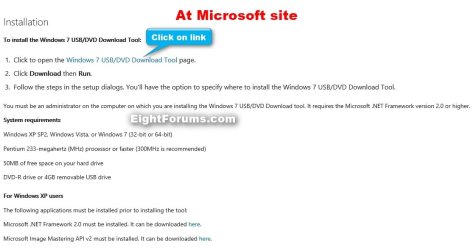
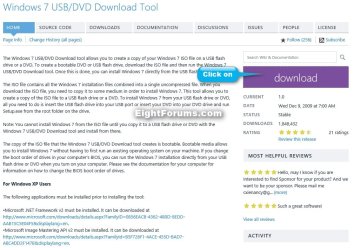
First visit the MS Store Website to download and install the Windows 7 USB/DVD download tool.

   Note
If the download links are broken at the sites below, then you can click on the blue Download button below to directly download an official copy of the Windows7-USB-DVD-tool.exe file below from here instead.


Download


USB-DVD_Download_Tool_Site.jpg

USB-DVD_Download_Tool_Site-2.jpg
After you have successfully downloaded and installed the Windows 7 USB/DVD Download Tool, you should see its icon on your desktop. Double click to start the program.USB icon.JPG
PART 1 - How to Burn a bootable Windows 7 DVD

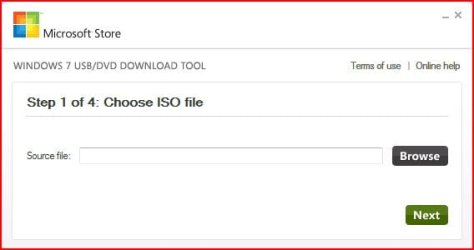
1) After you run the Windows 7 USB/DVD download tool, you will see the Step 1 of 4 dialog box. Here you will navigate to the location of your .iso file by clicking the Browse button. Once you have successfully located your iso file click Next to continue to step 2.USB DVD DL TOOL_1.JPG
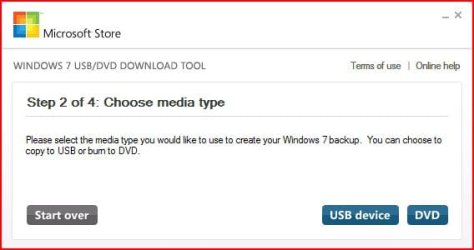
2) In step 2 of 4 you are given the choice of making a bootable DVD or a bootable USB flash. In this first section of my tutorial I show you how to burn a bootable DVD. So click DVD if that is what you want.USB DVD DL TOOL_2.JPG
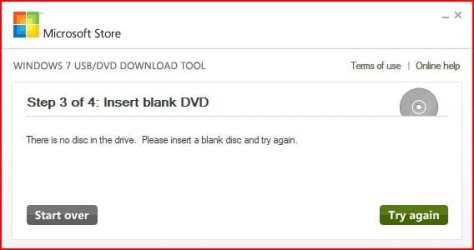
3) Make sure you have a blank DVD in your optical drive, or you may see this message.USB DVD DL TOOL_3.JPG
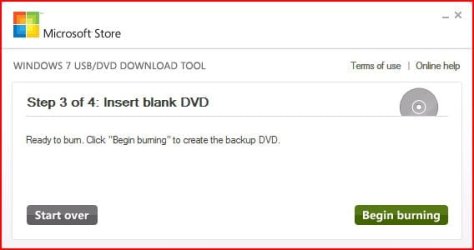
4) Once you have inserted a blank DVD you will see the folowing screen, click Begin burning to continue.USB DVD DL TOOL_4.JPG
5) Once the burn starts, you should see the progress bar here at Step 4 of 4. Remember the amount of time it takes to complete the burn depends on many factors... be patient.USB DVD DL TOOL_5.JPG
6) If all you wanted was a bootable DVD, you are finished when you see the image below, close the program or start over if you wish to make a 2nd copy.USB DVD DL TOOL_6.JPG
PART 2 - How to create a bootable Windows 7 USB Flash Drive


   Warning
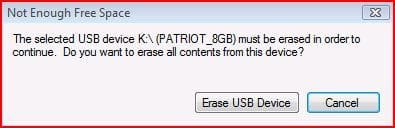
You need a USB flash drive with at least 4GB of free space, and the flash drive will be formattted to NTFS! So backup your data before creating this bootable USB, or you will lose all your data!


Follow the instructions in the Introduction at the beginning of tutorial and download and install the tool. The installation will add the program shortcut to your desktop, just double click to start.

1) After you launch the app, you will see the Step 1 of 4 dialog box. Here you will navigate to the location of your .iso file by clicking the Browse button. Once you have successfully located your iso file click Next to continue to step 2.USB DVD DL TOOL_1.JPG
2) In step 2 of 4 you are given the choice of making a bootable DVD or a bootable USB flash. Here in Part 2 of my tutorial I show you how to create a bootable USB Flash Drive. So click USB device if that is what you want.USB DVD DL TOOL_2.JPG
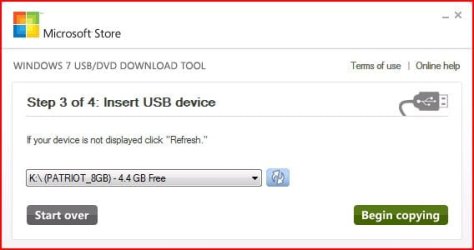
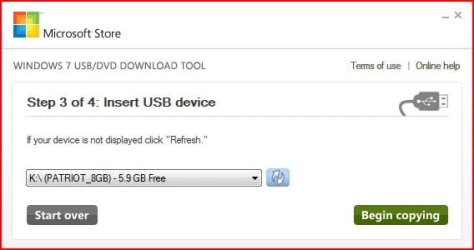
3) Here in step 3 of 4 you will select the USB flash drive of your choice by using the drop down list arrow. Once you have chosen the correct Drive, click the Begin copying button.USB DVD DL TOOL_USB1.JPG

USB DVD DL TOOL_USB4a.JPG
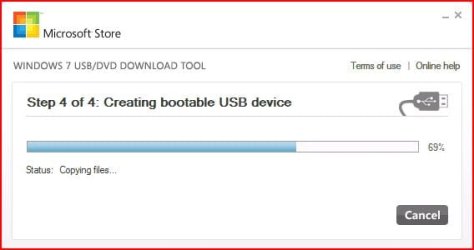
4) Here in step 4 of 4: Creating bootable USB device, you should see the progress bar move across the screen. As always your speed depends on many factors, have patience!USB DVD DL TOOL_USB4.JPG
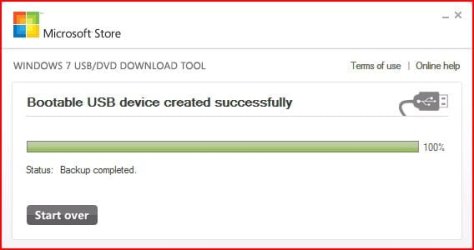
5) Once completed you should see the following dialog box.USB DVD DL TOOL_USB5.JPG
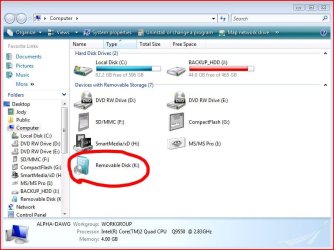
I found it interesting that the USB device icon in "Computer" now looks identical to that of the DVD!USB DVD DL TOOL_USB6.JPG
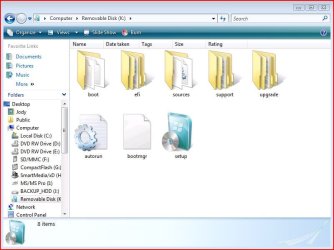
Here are the contents of the USB device after completion...USB DVD DL TOOL_USB_Contents.JPG
I hope this helps out some of you who are "stuck" when it comes to burning an iso to DVD or creating a bootable USB device.

Thanks!


Attachments

  • USB DVD DL TOOL_USB3.JPG
    USB DVD DL TOOL_USB3.JPG
    31.6 KB · Views: 123
  • USB DVD DL TOOL_USB2.JPG
    USB DVD DL TOOL_USB2.JPG
    20.1 KB · Views: 134
  • Windows7-USB-DVD-tool.zip
    Windows7-USB-DVD-tool.zip
    2.5 MB · Views: 61,475
Last edited by a moderator:
Sorry for bumping the thread, but i have a weird problem, i have a friend that is stuck with "A required CD/DVD device driver is missing", so i figured that most times the problem is because of faulty iso, so i told him to burn it onto a USB via this tool and try to install through it.

But he/i keeps on getting this error, he/i are trying on a GPT partitioned windows 8.1/10, is there a way that we could succeed?

Thanks
 

Attachments

  • 2016-01-28_152344.png
    2016-01-28_152344.png
    11.1 KB · Views: 1,269

My Computer

Computer type
PC/Desktop
Computer Manufacturer/Model Number
Custom Build
OS
Microsoft Windows 7 Ultimate 64-bit 7601 Multiprocessor Free Service Pack 1
CPU
Intel(R) Core(TM) i5-4430 CPU @ 3.00GHz
Motherboard
Gigabyte Technology Co., Ltd. P85-D3
Memory
8.00 GB
Graphics Card(s)
(1) NVIDIA GeForce GTX 750 Ti (2) Intel(R) HD Graphics 460
Sound Card
(1) NVIDIA High Definition Audio (2) Realtek High Definiti
Screen Resolution
1920 x 1080 x 32 bits (4294967296 colors) @ 60 Hz
Hard Drives
(1) Crucial_ CT120M500SSD1 SCSI Disk Device (2) WDC WD10EADS-00L5B1 SCSI Disk Device (3) WDC WD10EZEX-00ER1A0 SCSI Disk Device (4) StoreJet Transcend USB Device (5) StoreJet Transcend USB Device
Antivirus
eset
Browser
chrome

My Computer

Computer type
PC/Desktop
Computer Manufacturer/Model Number
Custom assembled by me :}
OS
Win-7-Pro64bit 7-H-Prem-64bit
CPU
i7-5930K 2nd i9-9940x both water blocked VRM's too
Motherboard
ASUS SABERTOOTH X99 2nd ASUS x299 Apex
Memory
Trident-z 3200C14 2nd Trident-z 3600C16
Graphics Card(s)
EVGA 1080ti ftw3 2nd Titan Xp both water blocked
Sound Card
Built-in Realtek
Monitor(s) Displays
1-AOC G2460PG 24"G-Sync 144Hz/ 2nd 1-ASUS VG248QE 24" 144Hz
Screen Resolution
1920 x 1080 144Hz
Hard Drives
2-Samsung M.2 Evo & Evo Plus
2-Samsung 850 EVO 500GB SSD's/ 3-2.5 W.D. Black 1tb-&3-1tb/3-3.5 WD Black 1tb hdd's
PSU
EVGA SuperNOVA 1000-P2 2nd 1200-P2
Case
2-Corsair Obsidian Series 450D Black ATX Mid Tower
Cooling
Custom water loops
Keyboard
Logitech G710+/ 2nd Logitech G910
Mouse
2-RedDragon M901 Perdition 16400 dpi Gaming mouse = wired
Internet Speed
Comcast Ping 19ms 89.31mbps download speed 6.12mbps upload
Antivirus
Malwarebytes Pro/ Superantispyware Pro
Browser
FireFox & Pale moon
Other Info
2nd ASUS X299 Apex/Intel i9-9940x with Custom water loop/7H-Prem-x64/Corsair 450D case/Ram Trident-z 3600C16 4x8gb / Samsung970Evo plus 500gb SSD/Dual ssd EZ swap evo/PSU EVGA SuperNova 1200w-P2 80+Platinum/GPU Titan Xp /8-ML-140 on push-pull on 2-280GTX rads

My Computer

Computer type
PC/Desktop
Computer Manufacturer/Model Number
Custom Build
OS
Microsoft Windows 7 Ultimate 64-bit 7601 Multiprocessor Free Service Pack 1
CPU
Intel(R) Core(TM) i5-4430 CPU @ 3.00GHz
Motherboard
Gigabyte Technology Co., Ltd. P85-D3
Memory
8.00 GB
Graphics Card(s)
(1) NVIDIA GeForce GTX 750 Ti (2) Intel(R) HD Graphics 460
Sound Card
(1) NVIDIA High Definition Audio (2) Realtek High Definiti
Screen Resolution
1920 x 1080 x 32 bits (4294967296 colors) @ 60 Hz
Hard Drives
(1) Crucial_ CT120M500SSD1 SCSI Disk Device (2) WDC WD10EADS-00L5B1 SCSI Disk Device (3) WDC WD10EZEX-00ER1A0 SCSI Disk Device (4) StoreJet Transcend USB Device (5) StoreJet Transcend USB Device
Antivirus
eset
Browser
chrome
It's either of 3 things,
The usb/ iso or the program sux :)
 

My Computer

Computer type
PC/Desktop
Computer Manufacturer/Model Number
Custom assembled by me :}
OS
Win-7-Pro64bit 7-H-Prem-64bit
CPU
i7-5930K 2nd i9-9940x both water blocked VRM's too
Motherboard
ASUS SABERTOOTH X99 2nd ASUS x299 Apex
Memory
Trident-z 3200C14 2nd Trident-z 3600C16
Graphics Card(s)
EVGA 1080ti ftw3 2nd Titan Xp both water blocked
Sound Card
Built-in Realtek
Monitor(s) Displays
1-AOC G2460PG 24"G-Sync 144Hz/ 2nd 1-ASUS VG248QE 24" 144Hz
Screen Resolution
1920 x 1080 144Hz
Hard Drives
2-Samsung M.2 Evo & Evo Plus
2-Samsung 850 EVO 500GB SSD's/ 3-2.5 W.D. Black 1tb-&3-1tb/3-3.5 WD Black 1tb hdd's
PSU
EVGA SuperNOVA 1000-P2 2nd 1200-P2
Case
2-Corsair Obsidian Series 450D Black ATX Mid Tower
Cooling
Custom water loops
Keyboard
Logitech G710+/ 2nd Logitech G910
Mouse
2-RedDragon M901 Perdition 16400 dpi Gaming mouse = wired
Internet Speed
Comcast Ping 19ms 89.31mbps download speed 6.12mbps upload
Antivirus
Malwarebytes Pro/ Superantispyware Pro
Browser
FireFox & Pale moon
Other Info
2nd ASUS X299 Apex/Intel i9-9940x with Custom water loop/7H-Prem-x64/Corsair 450D case/Ram Trident-z 3600C16 4x8gb / Samsung970Evo plus 500gb SSD/Dual ssd EZ swap evo/PSU EVGA SuperNova 1200w-P2 80+Platinum/GPU Titan Xp /8-ML-140 on push-pull on 2-280GTX rads

1. OMG are you writing from your grave :shock:

2. i know that i could use rufus i just want to know why this program doesn't succeed.

Thanks
Well if it involves putting 7 on a drive that involves 8.1 or 10 in any way I would head over to those forums - the latter best bet mate it has lots of little idiosyncrasies that could be causing your problem.
 

My Computer

Computer type
PC/Desktop
Computer Manufacturer/Model Number
Own build (new) Desk1 / Asus ROG Win 7 / Desk2 1st build
OS
Desk1 7 Home Prem / Desk2 10 Pro / Main lap Asus ROG 10 Pro 2 laptop Toshiba 7 Pro Asus P2520 7 & 10
CPU
Desk1 i5 3750K / Laptop i7 GTX 860M / Desk2 i5 2500
Motherboard
Desk1 Asus P877-V / Desk2 Gigabyte H67 UD3H / Laptop ?
Memory
Desk1 8GB (1866) / Desk2 16GB (1333) / Laptop 8Gb DDR3
Graphics Card(s)
Desk 1& 2NVidia GTX 650 & Laptops on board Intel
Sound Card
Desk 1 & 2 -XONAR DG Realtek High Def audio Laptop
Monitor(s) Displays
Desk 1 Benq HD 2450 / Desk2 Philips 24" / Laptop 17.5"
Screen Resolution
1920x1080 D1 & D2 & Laptop 1
Hard Drives
Desk1 Samsung 120GB 830 SSD
Asus ROG 256GB 850 Pro SSD
Desk2 Samsung 840 256 SSD
Toshiba 120GB EVO
PSU
Desk 1 Corsair HX 1050/ Laptop ? / Desk 2 Corsair HX 650
Case
Desk 1 Cooler HAF XM ? Toshiba laptop / Desk2 Coolermaster
Cooling
Fans on all Desk1 -2 Desk2 - all Coolermasters 5 Laptop ?
Keyboard
Desk 1 MS Sidewinder X6 Desk 2 MS Sidewinder X 4
Mouse
Desk 1&2 - Gigabyte MS 900 gamer - laptop - Logitec wireless
Internet Speed
ADSL2+
Other Info
One other Desktop (tester) and spare Toshba laptop both with SSD's
Running Kaspersky 2016 ISS on all machines config'd identically
Logitec audio stereo systems on each machine (x3)
Canon MG5250MFC
Router/modem TP-Link running WPA2SK
I have one question that no one asked before.

Is there a way to make a USB repair drive by using the content of my own retail DVD disc?
Win7 Pro with SP1 included / DVD production of 2011.
 

My Computer

Computer type
PC/Desktop
Computer Manufacturer/Model Number
custom build
OS
Win 7 Professional x64 UK (Retail) SP1 & SP2
CPU
Q6600
Motherboard
ASUS P5QC
Memory
4GB DDR3
Graphics Card(s)
HD5770
Sound Card
X-Fi Extreme Audio
Monitor(s) Displays
DELL 23"
Hard Drives
RAID1 - WD RAPTOR
PSU
750W
Cooling
Prolimatech - ARMAGEDON
Browser
Firefox
I have one question that no one asked before.

Is there a way to make a USB repair drive by using the content of my own retail DVD disc?
Win7 Pro with SP1 included / DVD production of 2011.

This is an older thread, but to anyone that might be interested...
I suppose you could make an ISO of it and use this tool to put it on a USB thumb drive. This might not work for your needs though. After however many updates to my Windows 7 Pro install over the years, the original install DVD was no longer compatible with the installed version of Windows. I had to download the Windows 7 ISO from Microsoft using my Windows key, flash that to a bootable USB thumb drive, and boot to that to repair my Windows 7 startup.

I used Rufus to make the bootable USB drive using the downloaded ISO after not finding the Windows 7 USB/DVD Download Tool hosted by Microsoft any more since it is no longer supported. That's how I also eventually made my way here out of morbid curiosity.

Cheers.
 

My Computer

Computer type
PC/Desktop
OS
Windows 7 Professional SP1 64bit, Manjaro Xfce, Debian 10 64bit Xfce
CPU
Intel i7-3930K @ 4.2GHz
Motherboard
ASUS P9X79 WS
Memory
Corsair Dominator 64GB Quad Channel DDR3 @ 1600MHz
Graphics Card(s)
EVGA GeForce GTX Titan Black Superclocked (×2, SLI)
Monitor(s) Displays
Sony Bravia 46"
Screen Resolution
1920×1080 (Full Screen), 1366×768 (Windows)
Hard Drives
Samsung 860 PRO 4TB SSD, Samsung 850 EVO 1TB SSD, Western Digital WD Gold 16TB 7200 RPM 512MB Cache HDD
PSU
Corsair AX1200 (1200W, 100.4A @ 12V)
Case
Corsair Obsidian 750D
Cooling
Corsair H110, 5 NOCTUA NF-A14 industrialPPC-3000 PWM Fans
Keyboard
Logitech K360
Mouse
Logitech M220
Browser
Firefox Developer Edition, Pale Moon, Tor
There is no need to create an iso . Just copy and paste the dvd contents onto a usb stick that you have formatted to fat32
 

My Computers

System One System Two

  • Computer type
    PC/Desktop
    OS
    7 X64
    CPU
    i5 8400
    Motherboard
    gigabyte b365m ds3h
    Memory
    2x8gb 3200mhz
    Hard Drives
    various
    PSU
    pure power 11 400w cm
    Case
    Coolermaster
    Cooling
    cryorig m9i
  • Computer type
    PC/Desktop
    OS
    7x64
    CPU
    g5400
    Motherboard
    ga b365m ds3h
    Memory
    8gb ddr4 2400
    PSU
    xfx pro 450w
There is no need to create an iso . Just copy and paste the dvd contents onto a usb stick that you have formatted to fat32
So in my case where the original Windows DVD was no longer compatible are you saying I could have just extracted the downloaded iso and copied the files over to a FAT32 formatted USB flash drive and booted to that instead of bothering with Rufus or the USB/DVD Download Tool?
 

My Computer

Computer type
PC/Desktop
OS
Windows 7 Professional SP1 64bit, Manjaro Xfce, Debian 10 64bit Xfce
CPU
Intel i7-3930K @ 4.2GHz
Motherboard
ASUS P9X79 WS
Memory
Corsair Dominator 64GB Quad Channel DDR3 @ 1600MHz
Graphics Card(s)
EVGA GeForce GTX Titan Black Superclocked (×2, SLI)
Monitor(s) Displays
Sony Bravia 46"
Screen Resolution
1920×1080 (Full Screen), 1366×768 (Windows)
Hard Drives
Samsung 860 PRO 4TB SSD, Samsung 850 EVO 1TB SSD, Western Digital WD Gold 16TB 7200 RPM 512MB Cache HDD
PSU
Corsair AX1200 (1200W, 100.4A @ 12V)
Case
Corsair Obsidian 750D
Cooling
Corsair H110, 5 NOCTUA NF-A14 industrialPPC-3000 PWM Fans
Keyboard
Logitech K360
Mouse
Logitech M220
Browser
Firefox Developer Edition, Pale Moon, Tor
instead of bothering with Rufus or the USB/DVD Download Tool?

Even if you created a bootable USB stick, you still have the original DVD files on it so you got both the files AND a bootable device which give you more choices.
 

My Computer

Computer type
PC/Desktop
Computer Manufacturer/Model Number
Custom build
OS
Windows 7 Ultimate x64
CPU
Intel i5-6600K 3.50GHz
Motherboard
Asus Pro Z170 Gaming
Memory
Corsair DDR4 2x8GB
Graphics Card(s)
MSI GeForce GTX1070 Gaming X
Sound Card
On board Realtek
Monitor(s) Displays
Dell SP2309W
Screen Resolution
1920x1080
Hard Drives
OS Samsung 850 EVO 500GB SATA III SSD
2x Hitachi Deskstar 1GB SATA data drives
1x Western Digital Caviar Black 1TB SATA data drive
PSU
Corsair HX650W
Case
CoolerMaster CM 690 III
Cooling
Coolermaster Hyper 212 EVO 1x200mm 1x140mm 2x120mm case fan
Keyboard
Logitech usb keyboard
Mouse
Logitech G500 $27 bargain :)
Internet Speed
ADSL2
Antivirus
Microsoft Security Essential, MalwareBytes
Browser
SRWare Iron, Internet Explorer
Other Info
Very happy with this buid.
I struggled a lot to find all compatible parts since I wanted an Intel 1151 based motherboard so to be able to install Windows 7.
I chose this case because it has amazing air flow, it's sturdy and looks good.
The case included 1x 200mm front and 1x 120mm back fans, I added 1x 200mm on the top and 1x120 bottom fans and modded the panels with black stockings for women s
OK, I hadn't read post #21 in this thread. Sorry for any confusion.
Also of note, if you're wanting to format to FAT32, the drive should be 32GB or less for Windows to cooperate.
Cheers.
 
Last edited:

My Computer

Computer type
PC/Desktop
OS
Windows 7 Professional SP1 64bit, Manjaro Xfce, Debian 10 64bit Xfce
CPU
Intel i7-3930K @ 4.2GHz
Motherboard
ASUS P9X79 WS
Memory
Corsair Dominator 64GB Quad Channel DDR3 @ 1600MHz
Graphics Card(s)
EVGA GeForce GTX Titan Black Superclocked (×2, SLI)
Monitor(s) Displays
Sony Bravia 46"
Screen Resolution
1920×1080 (Full Screen), 1366×768 (Windows)
Hard Drives
Samsung 860 PRO 4TB SSD, Samsung 850 EVO 1TB SSD, Western Digital WD Gold 16TB 7200 RPM 512MB Cache HDD
PSU
Corsair AX1200 (1200W, 100.4A @ 12V)
Case
Corsair Obsidian 750D
Cooling
Corsair H110, 5 NOCTUA NF-A14 industrialPPC-3000 PWM Fans
Keyboard
Logitech K360
Mouse
Logitech M220
Browser
Firefox Developer Edition, Pale Moon, Tor
So in my case where the original Windows DVD was no longer compatible are you saying I could have just extracted the downloaded iso and copied the files over to a FAT32 formatted USB flash drive and booted to that instead of bothering with Rufus or the USB/DVD Download Tool?

If you have old ( pre SP1) media, it is sensible to d/l more recent media.

People that already have an installation dvd including SP1 can create bootable usb by formatting it to fat32 and copying the dvd contents to it.

Or if you have a downloaded iso , the contents of the iso can be extracted to fat32 formatted usb.
 

My Computers

System One System Two

  • Computer type
    PC/Desktop
    OS
    7 X64
    CPU
    i5 8400
    Motherboard
    gigabyte b365m ds3h
    Memory
    2x8gb 3200mhz
    Hard Drives
    various
    PSU
    pure power 11 400w cm
    Case
    Coolermaster
    Cooling
    cryorig m9i
  • Computer type
    PC/Desktop
    OS
    7x64
    CPU
    g5400
    Motherboard
    ga b365m ds3h
    Memory
    8gb ddr4 2400
    PSU
    xfx pro 450w
For the sake of curiosity, I set up the USB thumb drive again and formatted it to NTFS (it's a 64GB drive, so won't easily format to FAT32 in Windows), while otherwise using the diskpart steps as show in post #21 of this thread. Then I extracted the downloaded Windows install ISO to a folder and copied the contents over to the USB.

This worked and I was able to boot to the USB drive and Windows setup.

I had needed to use the newer downloaded version from Microsoft to fix a startup error. The original install DVD (which is actually SP1 and originally used to install Windows on the computer) was no longer compatible with repairing Windows startup for whatever reason, which I thought was rather strange. But as mentioned, fortunately the newly downloaded version worked to repair the installed Windows startup. To do this I had used Rufus, but could have just followed the steps mentioned here instead.

It took a bit of messing about to sort out, but was likely still faster than setting up and copying over a 1.42 TB backup to the system drive.

Have a good one. :-)
 

My Computer

Computer type
PC/Desktop
OS
Windows 7 Professional SP1 64bit, Manjaro Xfce, Debian 10 64bit Xfce
CPU
Intel i7-3930K @ 4.2GHz
Motherboard
ASUS P9X79 WS
Memory
Corsair Dominator 64GB Quad Channel DDR3 @ 1600MHz
Graphics Card(s)
EVGA GeForce GTX Titan Black Superclocked (×2, SLI)
Monitor(s) Displays
Sony Bravia 46"
Screen Resolution
1920×1080 (Full Screen), 1366×768 (Windows)
Hard Drives
Samsung 860 PRO 4TB SSD, Samsung 850 EVO 1TB SSD, Western Digital WD Gold 16TB 7200 RPM 512MB Cache HDD
PSU
Corsair AX1200 (1200W, 100.4A @ 12V)
Case
Corsair Obsidian 750D
Cooling
Corsair H110, 5 NOCTUA NF-A14 industrialPPC-3000 PWM Fans
Keyboard
Logitech K360
Mouse
Logitech M220
Browser
Firefox Developer Edition, Pale Moon, Tor
Really late to ask these Qs - so apologies, but urgent --
  1. can I use this thread to create a Win 7 install USB specifically to repair my existing Win 7 Pro 64-bit OS that won't start?
  2. My PC actually dual-boots Win 7 Pro 64-bit and Win 10 Pro 64-bit. How can I use this technique to repair only the Win 7 and not touch the Win 10?
  3. For my peace of mind - will this technique really preserve my existing apps and files on the Win 7?
Many thanks!
 

My Computer

Computer type
PC/Desktop
Computer Manufacturer/Model Number
Dell Optiplex 7010 MT
OS
Dual boot - Win 10 Pro 64-bit (good) and Win 7 Pro 64-bit (won't boot on the NVMe)
CPU
Intel Core i5 3470 @ 3.2GHz
Motherboard
Dell 0GY6Y8 - what would the Intel number be? - Q77 chipset
Memory
16GB RAM DDR3 (Four x 4GB)
Graphics Card(s)
Intel HD Graphics (on the CPU)
Sound Card
Realtek High Definition Audio - and Intel Display Audio
Monitor(s) Displays
Dell E176FP - nothing fancy
Screen Resolution
1280 x 1024 @ 60 Hz
Hard Drives
Now a Samsung 970 EVO Plus SSD NVMe, which works for the Win 10 only

Used to be two 500GB WDC WD5000AAKX (SATA @ 6GB/sec)

- External WD My Book 1110 USB device
PSU
What means PSU? I'm at sea level
Cooling
Ice cubes
Keyboard
Noisy
Mouse
Micky
Internet Speed
Verizon FIOS 500 Mbps (was 1Gbps but I can't type that fast)
Antivirus
Win 10 Windows Defender - Win 7 Avast Free
Browser
Firefox only with lots of security drives my wife crazy
Other Info
Also I still have an old but important XP SP3 machine that can run - Optiplex 755 Desktop w 4GB RAM and Momentus XT hybrid HD-SSD 500 GB hard drive. Used the registry hack to get more updates through "XP Embedded" or "POS" so now the machine rings like a cash register and the CD drawer opens to give change.
Back
Top