Windows 7 Forums Search
Welcome to Windows 7 Forums. Our forum is dedicated to helping you find solutions with any problems, errors or issues you are experiencing with Windows 7. The Windows 7 forum also covers news and updates and has an extensive Windows 7 tutorial section that covers a wide range of tips and tricks.


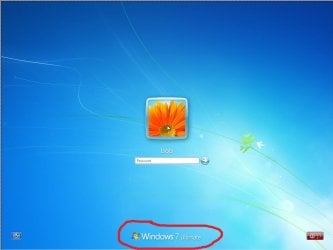
Windows 7 - Log On Screen - Change or Remove Text Branding


10-25-2009   #9
Dridzz


Windows 7 x64 Bit


Log On Screen - Change or Remove Text Branding

...


Last edited by Brink; 2 Weeks Ago at 03:01 PM..
My System SpecsSystem Spec
01-01-2010   #10
Venths


Windows 7 Ultimate x64 SP1


How can i EDIT the Text ???? am not able to edit.

I was able to upload the default resource BMP and tried Editing. I just cleared the text and changed the background to black. Hence, i replaced with a Black BMP of the same size with no text. Now the color of the default text changed to Black and the text as not affected.

So how do i change the text ???


Last edited by Venths; 01-01-2010 at 05:02 PM..
My System SpecsSystem Spec
01-02-2010   #11
comicbookguy


Dule Boot Windows XP (x32) Windows 7 Ultimate (x64)


try it in dule boot with xp or use virtual pc xp mode to edit the files works great
My System SpecsSystem Spec
01-04-2010   #12
j7ody


Windows 7 64bit


Have installed the take ownership Reg Hack. Have installed Restorator Trial. Have opened dll. Have deleted Bitmap folder... tried to save and unable to

As an alternative I also tried reshacker and when I open the dll file, nothing, the reshacker window stays blank, showing no contents or folders to delete

Jody
My System SpecsSystem Spec
01-04-2010   #13
Venths


Windows 7 Ultimate x64 SP1


Quote   Quote: Originally Posted by comicbookguy View Post
try it in dule boot with xp or use virtual pc xp mode to edit the files works great
What if I do not have XP mode? my processor doesn't support
My System SpecsSystem Spec
.


01-05-2010   #14
JordanJP


Windows 7 baby ! : D


**** why mess with something like this ? the way I see it, and seeing how I learned things the hard way, I believe that there's no reason to fix something If it aint broken.

Cheers
My System SpecsSystem Spec
01-05-2010   #15
Brink


Windows 7 Ultimate x64 SP1


Hello Jordan,

This is not about fixing, but about customizing and personalizing to fit one's needs or wants instead. That's all.
My System SpecsSystem Spec
01-05-2010   #16
EdTeach


win 7


ok so i edited my .bmp there were 6 of them, recompiled .dll and now it still says windows 7 + build info only instead of the text being the origional colors it is colored with the new image i made, kinda like if u were to cut letters out of paper to make a stencil and then put the stencil over a picter, still says windows 7 such n such with my picture peakin out the holes. any idea where this secondary water mark is so i can kill it?
My System SpecsSystem Spec
01-10-2010   #17
BSkiLLs


Win-7HP, VistaHP, XP


Dridzz, i was about to change mine and forgot where it was located so came here to double check and noticed. Maybe might want to add in the tut to add / rename the default one to basebrd-BACKUP.dll
or whoops, really mean even better like the branding folder to branding-backup

Just incase they want to go back or need to etc.. Plus incase of mess up, testing or whatever.. etc etc...

Right?

oohh forgot. Anybody that has done it so far ...

Which exact number is the one we need to change to custom the .bmp to our own brand ? All of them or 2120 ??

Quote   Quote: Originally Posted by Venths View Post
How can i EDIT the Text ???? am not able to edit.

I was able to upload the default resource BMP and tried Editing. I just cleared the text and changed the background to black. Hence, i replaced with a Black BMP of the same size with no text. Now the color of the default text changed to Black and the text as not affected.

So how do i change the text ???
Did you create a new bmp image with the text you want on it ? and also did you redo/create all of them or just one ?

Last edited by Brink; 01-10-2010 at 11:27 PM.. Reason: merged posts
My System SpecsSystem Spec
01-17-2010   #18
aazmath


Se7en


yeah! Can some exactly tell what do I need to do? Witch one do I need to edit etc... Step by step
My System SpecsSystem Spec
01-20-2010   #19
Barefoot


Windows 7 Professional 64-bit


Interesting that restorator's last update was July 2007.
My System SpecsSystem Spec
Comment

Log On Screen - Change or Remove Text Branding problems?


Tutorial Tools


Similar Threads for: Log On Screen - Change or Remove Text Branding
Windows 7 Tutorial Category
Logon Screen "Windows 7" logo remove/change? Customization
Change Desktop Icon Text but NOT Start Menu Text Customization
Logon screen, change/remove logon picture Customization
CTRL+ALT+DEL Screen - Add or Remove Change Password Tutorials
Log On Screen Text Shadow - Change Tutorials


All times are GMT -5. The time now is 05:37 AM.


Windows 7 Forums is an independent web site and has not been authorized,
sponsored, or otherwise approved by Microsoft Corporation.
"Windows 7" and related materials are trademarks of Microsoft Corp.
© Designer Media Ltd
  

1 2 3 4 5 6 7 8 9 10 11 12 13 14 15 16 17 18 19 20 21 22 23 24 25 26 27 28 29 30