How to Create a Bootable ISO from Windows 7 Installation Files
Information
How to EASILY make a bootable .iso file from Windows 7 or Vista Installation files with the FREE vlite.
Vlite can be installed on 32 and 64 bit versions of XP, Vista and Windows 7.
Homepage and Information:
Vlite can be installed on 32 and 64 bit versions of XP, Vista and Windows 7.
Homepage and Information:
Tip
If you got the student d/l and have 3 files :
* Windows 7-HP-Retail-en-us-x64.exe
* setup1.box * setup2.box
1. Rt click each file, Properties > Unblock>Apply>OK. NOTE: Make sure read only boxes are clear
2. Rt click and run as admin on the .exe. You will get a folder called expandedSetup on your dektop.
If you receive this error:
We are unable to create or save new files in the folder in which this application was downloaded. Please check the folder properties to make sure that you have security permission on the folder to write files and that the folder is not read-only.
Continue with the tutorial to make the .iso
* Windows 7-HP-Retail-en-us-x64.exe
* setup1.box * setup2.box
1. Rt click each file, Properties > Unblock>Apply>OK. NOTE: Make sure read only boxes are clear
2. Rt click and run as admin on the .exe. You will get a folder called expandedSetup on your dektop.
If you receive this error:
We are unable to create or save new files in the folder in which this application was downloaded. Please check the folder properties to make sure that you have security permission on the folder to write files and that the folder is not read-only.
Continue with the tutorial to make the .iso
Here's How:
1. Download and Install vlite.
Note
vlite v1.1.6 is self contained and needs no additional applications.
vlite v1.2 requires the large WAIK download from MS.
It is possible to install v1.2 over the top of v1.1.6 if you wish
vlite v1.2 requires the large WAIK download from MS.
It is possible to install v1.2 over the top of v1.1.6 if you wish
2. Rt click vlite shortcut and Run as Admin. Click Install Wimfilter.
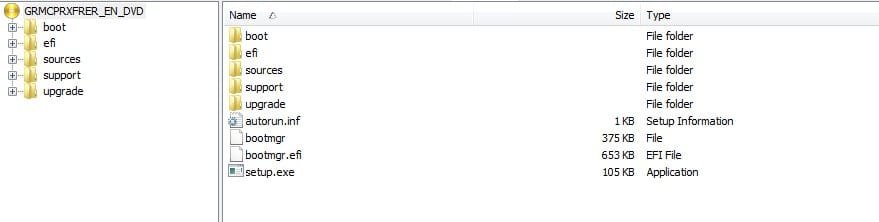
3. Click Browse and browse to Windows Installation Files folder:
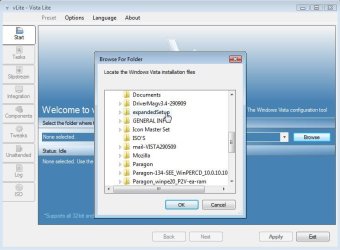
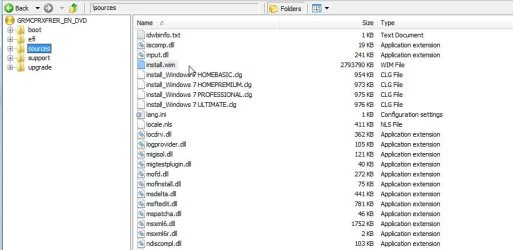
4. Select your Edition:

It takes a few seconds to load the files - then click Next.
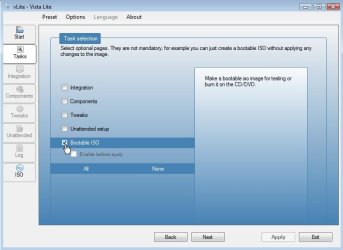
5. Tick Bootable .iso and click Next:
6. Make sure it says Create Image - and type a label if you wish. Then Click Make .iso:

7. Select where to Save the .iso

After you click the Save button, vlite starts making the .iso

When done, click Next
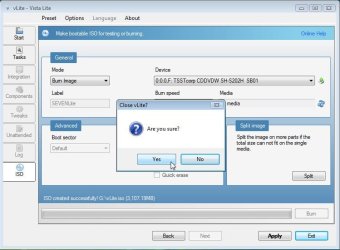
8. EITHER - TO MAKE A BOOTABLE DVD - put an unformatted recordable dvd inthe drive and select Burn Image.
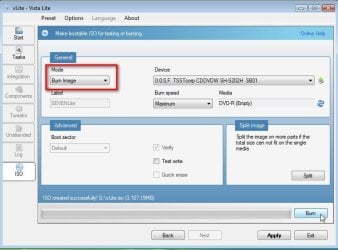
OR-TO MAKE A BOOTABLE FLASH DRIVE- click Exit and confirm - the .iso will be in the location you selected in Step 7.
Tip
The iso can be used to create a bootable flash drive with the Windows 7 DVD/USB Download Tool below.
http://www.sevenforums.com/tutorials/31541-windows-7-usb-dvd-download-tool.html#post328729
Info:
http://www.sevenforums.com/tutorials/2432-usb-windows-7-installation-key-drive-create.html
http://www.sevenforums.com/tutorials/31541-windows-7-usb-dvd-download-tool.html#post328729
Info:
http://www.sevenforums.com/tutorials/2432-usb-windows-7-installation-key-drive-create.html
Related Tutorials
- http://www.sevenforums.com/tutorials/30470-make-bootable-iso-student-d-l.html
- Windows 7 DVD/USB Download Tool
- http://www.sevenforums.com/tutorials/17453-custom-windows-installations-windows-7-a.html
- http://www.sevenforums.com/tutorials/2432-usb-windows-7-installation-key-drive-create.html
- http://www.sevenforums.com/tutorials/16917-bootable-iso-create-older-iso.html
- http://www.sevenforums.com/tutorials/31402-clean-install-upgrade-windows-7-version.html
- http://www.sevenforums.com/tutorials/1649-clean-install-windows-7-a.html
- How to Burn a "ISO" or "IMG" Disc Image file to a CD/DVD in Windows 7 and Windows 8
- How to make Windows Boot Manager Boot an ISO from your Hard Drive
- How to Extract an ISO File to the Desktop
Last edited by a moderator: