How to Turn the Windows 7 Disk Defragmenter Schedule On or Off
Information
This will show you how to turn the Disk Defragmenter schedule on or off to allow it to run automatically in Windows 7 or not. Disk Defragmenter is set to run on a automatic schedule by default in Windows 7.
Note
The Disk Deframenter .exe file is located at C:\Windows\System32\dfrgui.exe.
Warning
Solid State Drives (SSD) do not need to be defragmented. Doing so may shorten the lifespan of the SSD drive.
Disk Defragmenter will show all disks including SSDs. If you have the Disk Defragmenter schedule turned on, then be sure to check that the SSD has been excluded (unchecked).
Disk Defragmenter will show all disks including SSDs. If you have the Disk Defragmenter schedule turned on, then be sure to check that the SSD has been excluded (unchecked).
Here's How:
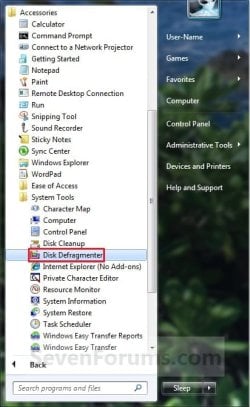
1. Open the Start Menu, and click on All Programs, Accessories, System Tools, and Disk Defragmenter. (See screenshot below)
A) Go to step 3.
OR
2. Open the Start Menu, then type dfrgui into the search line and press Enter.
3. To Turn On the Disk Defragmenter Schedule
NOTE: If you have a SSD, then check and make sure that any SSD installed has been excluded (unchecked).
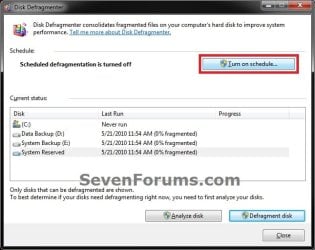
A) Click on the Turn on schedule button. (See screenshot below)
B) If prompted by UAC, click on Yes (if administrator) or type in administrator's password (if standard user).
C) Check the Run on a Schedule box. (See screenshot below)
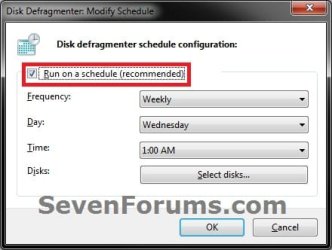
D) Choose the frequency, day, time, and disks to be used for the schedule. (See screenshot above)
E) Go to step 5.
4. To Turn Off the Disk Defragmenter Schedule
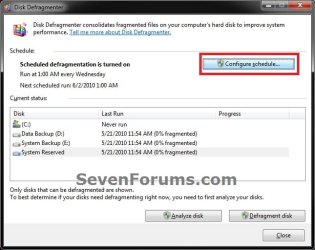
A) Click on the Configure schedule button. (See screenshot below)
B) If prompted by UAC, click on Yes (if administrator) or type in administrator's password (if standard user).
C) Uncheck the Run on a Schedule box. (See screenshot below)

5. Click on OK. (See screenshot above or below step 3C)
6. Click on the Close button. (See screenshot below step 3A or 4A)
That's it,
Shawn
Last edited: