Windows Explorer Address and Search Bar - Change Size

How to Change the Size of the Windows 7 Explorer and IE8 Address and Search Bar

   Information
This will show you how to change the length size for the Windows Explorer Address bar and Search bar in Windows 7.

This also applies to the address bar in Internet Explorer 8 (IE8) as well.

   Note
The length size that you set for the Address and search bar will be remembered and used for all newly opened Windows Explorer windows.


Here's How: 1. Open a Windows Explorer window or Internet Explorer 8 (IE8).

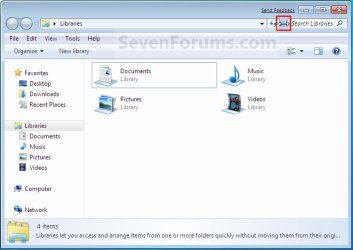
2. Move the mouse pointer inbetween the Address bar and Search box until it turns into a double arrow. (See screenshot below)
NOTE: Internet Explorer 9 only has a address bar, and does not have a separate search box like Internet Explorer 8. Step1.jpg

IE9.jpg

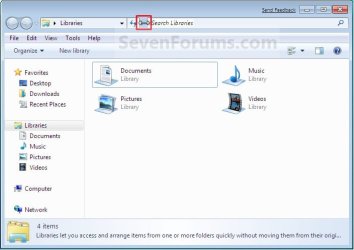
3. Left click and hold, then drag the Address bar and Search bar to the length size that you want for them and release the left mouse button. (See screenshots below) Move-1.jpg
Move-2.jpg

That's it,
Shawn


Last edited:
Please help.
I have installed build 7048 x64, everything works perfectly so far. However, I am absolutely unable to adjust the size of the search bar. I'm well familiar with the method described in the tutorial.. attaching a screenshot of this obscenity. NO matter what I do, search bar won't budge. This is ex-tre-mely bothering. Any ideas, tweaks, suggestions? Thanks.

http://img140.imageshack.us/img140/953/exampler.png
 

My Computer

Computer Manufacturer/Model Number
DIY
OS
Windows 7 RTM x64
CPU
i7 [email protected]
Motherboard
EVGA Classified
Memory
12gb@2000Mhz
Graphics Card(s)
2 of HD 4870 X2 Quad GPU CrossfireX
Sound Card
Creative X-Fi Platinum
Monitor(s) Displays
HP LP3065c 30''
Screen Resolution
2560x1600
Hard Drives
~13Tb in 17 drives
OS: 2x 640gb WD Raid-0
PSU
OCZ ProXstream 1000W
Case
Thermaltake Kandalf LCS
Cooling
Apogee GTZ+MCP355+3x120mm rad
Keyboard
Dinovo Edge/ Logitech V250 numpad
Mouse
Mx Revolution
Internet Speed
10 mbit
Other Info
Z-5500 speakers
Etymotic HF2 headphones
Samsung SE-224Q 22X External USB 2.0 DVD Writer
Epson Photoperfection 1650U Scanner
Konica Minolta 2400W Laser Colour Printer
Linksys WRT300N 802.11n
Hello Maxstep,

Is it pointer turning into a double arrow for you when you move it inbetween the address bar and search bar?
 

My Computer

Computer type
PC/Desktop
Computer Manufacturer/Model Number
Self built custom
OS
64-bit Windows 11 Pro for Workstations
CPU
Intel i7-8700K OC'd to 5 GHz
Motherboard
ASUS ROG Maximus XI Formula Z390
Memory
64 GB (4x16GB) G.SKILL TridentZ RGB DDR4 3600 MHz
Graphics Card(s)
ASUS ROG-STRIX-GTX1080TI-O11G-GAMING
Sound Card
Integrated
Monitor(s) Displays
2 x Samsung Odyssey G7 27"
Screen Resolution
2560x1440
Hard Drives
1TB Samsung 990 PRO M.2,
4TB Samsung 990 PRO PRO M.2,
TerraMaster F8 SSD Plus NAS
PSU
Seasonic Prime Titanium 850W
Case
Thermaltake Core P3
Cooling
Corsair Hydro H115i
Keyboard
Logitech wireless K800
Mouse
Logitech MX Master 4
Internet Speed
2 Gb/s Download and 100 Mb/s Upload
Antivirus
Malwarebyte Anti-Malware Premium
Browser
Google Chrome
Other Info
Logitech Z625 speaker system,
Logitech BRIO 4K Pro webcam,
HP Color LaserJet Pro MFP M477fdn,
APC SMART-UPS RT 1000 XL - SURT1000XLI,
Galaxy S23 Plus phone
Thanks for replying.
Yes it does, however when i try to drag it nothing happens. It was perfectly adjustable in the 7000 x64 build.. Can't do anything to move the damn bar.
 

My Computer

Computer Manufacturer/Model Number
DIY
OS
Windows 7 RTM x64
CPU
i7 [email protected]
Motherboard
EVGA Classified
Memory
12gb@2000Mhz
Graphics Card(s)
2 of HD 4870 X2 Quad GPU CrossfireX
Sound Card
Creative X-Fi Platinum
Monitor(s) Displays
HP LP3065c 30''
Screen Resolution
2560x1600
Hard Drives
~13Tb in 17 drives
OS: 2x 640gb WD Raid-0
PSU
OCZ ProXstream 1000W
Case
Thermaltake Kandalf LCS
Cooling
Apogee GTZ+MCP355+3x120mm rad
Keyboard
Dinovo Edge/ Logitech V250 numpad
Mouse
Mx Revolution
Internet Speed
10 mbit
Other Info
Z-5500 speakers
Etymotic HF2 headphones
Samsung SE-224Q 22X External USB 2.0 DVD Writer
Epson Photoperfection 1650U Scanner
Konica Minolta 2400W Laser Colour Printer
Linksys WRT300N 802.11n
Strange. It works perfectly in my 7048 x64 build. :confused:

You might restart the computer to see if it may just be a temporary glitch. You might also see if running a sfc /scannow command can find and fix any bad system files that may be responsible.
 

My Computer

Computer type
PC/Desktop
Computer Manufacturer/Model Number
Self built custom
OS
64-bit Windows 11 Pro for Workstations
CPU
Intel i7-8700K OC'd to 5 GHz
Motherboard
ASUS ROG Maximus XI Formula Z390
Memory
64 GB (4x16GB) G.SKILL TridentZ RGB DDR4 3600 MHz
Graphics Card(s)
ASUS ROG-STRIX-GTX1080TI-O11G-GAMING
Sound Card
Integrated
Monitor(s) Displays
2 x Samsung Odyssey G7 27"
Screen Resolution
2560x1440
Hard Drives
1TB Samsung 990 PRO M.2,
4TB Samsung 990 PRO PRO M.2,
TerraMaster F8 SSD Plus NAS
PSU
Seasonic Prime Titanium 850W
Case
Thermaltake Core P3
Cooling
Corsair Hydro H115i
Keyboard
Logitech wireless K800
Mouse
Logitech MX Master 4
Internet Speed
2 Gb/s Download and 100 Mb/s Upload
Antivirus
Malwarebyte Anti-Malware Premium
Browser
Google Chrome
Other Info
Logitech Z625 speaker system,
Logitech BRIO 4K Pro webcam,
HP Color LaserJet Pro MFP M477fdn,
APC SMART-UPS RT 1000 XL - SURT1000XLI,
Galaxy S23 Plus phone
Sigh. It works if I bump the resolution down from 2560x1600 to any other. But for obvious reasons, not a good choice... is there an .ini file or some registry key that is responsible for storing the positioning values? Or maybe there is a way to disable search toolbar altogether. So frustrating! And thank you, Brink.
 

My Computer

Computer Manufacturer/Model Number
DIY
OS
Windows 7 RTM x64
CPU
i7 [email protected]
Motherboard
EVGA Classified
Memory
12gb@2000Mhz
Graphics Card(s)
2 of HD 4870 X2 Quad GPU CrossfireX
Sound Card
Creative X-Fi Platinum
Monitor(s) Displays
HP LP3065c 30''
Screen Resolution
2560x1600
Hard Drives
~13Tb in 17 drives
OS: 2x 640gb WD Raid-0
PSU
OCZ ProXstream 1000W
Case
Thermaltake Kandalf LCS
Cooling
Apogee GTZ+MCP355+3x120mm rad
Keyboard
Dinovo Edge/ Logitech V250 numpad
Mouse
Mx Revolution
Internet Speed
10 mbit
Other Info
Z-5500 speakers
Etymotic HF2 headphones
Samsung SE-224Q 22X External USB 2.0 DVD Writer
Epson Photoperfection 1650U Scanner
Konica Minolta 2400W Laser Colour Printer
Linksys WRT300N 802.11n
I have not seen this before. I suppose that you could temporarily lower the screen resolution, set the bars how you like them, then set the resolution back.
 

My Computer

Computer type
PC/Desktop
Computer Manufacturer/Model Number
Self built custom
OS
64-bit Windows 11 Pro for Workstations
CPU
Intel i7-8700K OC'd to 5 GHz
Motherboard
ASUS ROG Maximus XI Formula Z390
Memory
64 GB (4x16GB) G.SKILL TridentZ RGB DDR4 3600 MHz
Graphics Card(s)
ASUS ROG-STRIX-GTX1080TI-O11G-GAMING
Sound Card
Integrated
Monitor(s) Displays
2 x Samsung Odyssey G7 27"
Screen Resolution
2560x1440
Hard Drives
1TB Samsung 990 PRO M.2,
4TB Samsung 990 PRO PRO M.2,
TerraMaster F8 SSD Plus NAS
PSU
Seasonic Prime Titanium 850W
Case
Thermaltake Core P3
Cooling
Corsair Hydro H115i
Keyboard
Logitech wireless K800
Mouse
Logitech MX Master 4
Internet Speed
2 Gb/s Download and 100 Mb/s Upload
Antivirus
Malwarebyte Anti-Malware Premium
Browser
Google Chrome
Other Info
Logitech Z625 speaker system,
Logitech BRIO 4K Pro webcam,
HP Color LaserJet Pro MFP M477fdn,
APC SMART-UPS RT 1000 XL - SURT1000XLI,
Galaxy S23 Plus phone
And it reverts back to the original state.. Well, beta is a beta I guess. I tried all the possible change scenarios: changing dpi, changing position on low.res. than reverting to original, doing so with res. windows open, closed, same for explorer windows - to no avail. Adjusting search bar doesn't work on 2560x1600 nohow and it always reverts back to the described position. A shame, really.
 

My Computer

Computer Manufacturer/Model Number
DIY
OS
Windows 7 RTM x64
CPU
i7 [email protected]
Motherboard
EVGA Classified
Memory
12gb@2000Mhz
Graphics Card(s)
2 of HD 4870 X2 Quad GPU CrossfireX
Sound Card
Creative X-Fi Platinum
Monitor(s) Displays
HP LP3065c 30''
Screen Resolution
2560x1600
Hard Drives
~13Tb in 17 drives
OS: 2x 640gb WD Raid-0
PSU
OCZ ProXstream 1000W
Case
Thermaltake Kandalf LCS
Cooling
Apogee GTZ+MCP355+3x120mm rad
Keyboard
Dinovo Edge/ Logitech V250 numpad
Mouse
Mx Revolution
Internet Speed
10 mbit
Other Info
Z-5500 speakers
Etymotic HF2 headphones
Samsung SE-224Q 22X External USB 2.0 DVD Writer
Epson Photoperfection 1650U Scanner
Konica Minolta 2400W Laser Colour Printer
Linksys WRT300N 802.11n
Have you installed the monitor driver already?

You might also uninstall and reinstall the video driver to see if that may help as well.
 

My Computer

Computer type
PC/Desktop
Computer Manufacturer/Model Number
Self built custom
OS
64-bit Windows 11 Pro for Workstations
CPU
Intel i7-8700K OC'd to 5 GHz
Motherboard
ASUS ROG Maximus XI Formula Z390
Memory
64 GB (4x16GB) G.SKILL TridentZ RGB DDR4 3600 MHz
Graphics Card(s)
ASUS ROG-STRIX-GTX1080TI-O11G-GAMING
Sound Card
Integrated
Monitor(s) Displays
2 x Samsung Odyssey G7 27"
Screen Resolution
2560x1440
Hard Drives
1TB Samsung 990 PRO M.2,
4TB Samsung 990 PRO PRO M.2,
TerraMaster F8 SSD Plus NAS
PSU
Seasonic Prime Titanium 850W
Case
Thermaltake Core P3
Cooling
Corsair Hydro H115i
Keyboard
Logitech wireless K800
Mouse
Logitech MX Master 4
Internet Speed
2 Gb/s Download and 100 Mb/s Upload
Antivirus
Malwarebyte Anti-Malware Premium
Browser
Google Chrome
Other Info
Logitech Z625 speaker system,
Logitech BRIO 4K Pro webcam,
HP Color LaserJet Pro MFP M477fdn,
APC SMART-UPS RT 1000 XL - SURT1000XLI,
Galaxy S23 Plus phone
Thank you for bearing with me.
I did install it before; just tried uninstalling and reinstalling both drivers (I'm using cat 9.2, tested it before under 7000 - no complaints) just to be greeted by the same old. If there's no way to hide or disable the built-in search pane, I'm fresh out of ideas :/
 

My Computer

Computer Manufacturer/Model Number
DIY
OS
Windows 7 RTM x64
CPU
i7 [email protected]
Motherboard
EVGA Classified
Memory
12gb@2000Mhz
Graphics Card(s)
2 of HD 4870 X2 Quad GPU CrossfireX
Sound Card
Creative X-Fi Platinum
Monitor(s) Displays
HP LP3065c 30''
Screen Resolution
2560x1600
Hard Drives
~13Tb in 17 drives
OS: 2x 640gb WD Raid-0
PSU
OCZ ProXstream 1000W
Case
Thermaltake Kandalf LCS
Cooling
Apogee GTZ+MCP355+3x120mm rad
Keyboard
Dinovo Edge/ Logitech V250 numpad
Mouse
Mx Revolution
Internet Speed
10 mbit
Other Info
Z-5500 speakers
Etymotic HF2 headphones
Samsung SE-224Q 22X External USB 2.0 DVD Writer
Epson Photoperfection 1650U Scanner
Konica Minolta 2400W Laser Colour Printer
Linksys WRT300N 802.11n
I've searched Group Policy, but there is not an option that I could find to remove the Search bar from Windows Explorer.

I do not know what else to suggest other than a repair install to see if that may help. However, it seems more like some issue with the video driver and may not help anyway. Perhaps when the 9.3 version comes out it may be resolved. You might send in a report to AMD/ATI about the 9.2 driver and this issue to help make them aware of this issue to.
 

My Computer

Computer type
PC/Desktop
Computer Manufacturer/Model Number
Self built custom
OS
64-bit Windows 11 Pro for Workstations
CPU
Intel i7-8700K OC'd to 5 GHz
Motherboard
ASUS ROG Maximus XI Formula Z390
Memory
64 GB (4x16GB) G.SKILL TridentZ RGB DDR4 3600 MHz
Graphics Card(s)
ASUS ROG-STRIX-GTX1080TI-O11G-GAMING
Sound Card
Integrated
Monitor(s) Displays
2 x Samsung Odyssey G7 27"
Screen Resolution
2560x1440
Hard Drives
1TB Samsung 990 PRO M.2,
4TB Samsung 990 PRO PRO M.2,
TerraMaster F8 SSD Plus NAS
PSU
Seasonic Prime Titanium 850W
Case
Thermaltake Core P3
Cooling
Corsair Hydro H115i
Keyboard
Logitech wireless K800
Mouse
Logitech MX Master 4
Internet Speed
2 Gb/s Download and 100 Mb/s Upload
Antivirus
Malwarebyte Anti-Malware Premium
Browser
Google Chrome
Other Info
Logitech Z625 speaker system,
Logitech BRIO 4K Pro webcam,
HP Color LaserJet Pro MFP M477fdn,
APC SMART-UPS RT 1000 XL - SURT1000XLI,
Galaxy S23 Plus phone
Alright than. Since I just installed this build, repair install probably won't help. About the driver, I personally would blame the build, due to the fact that the very same driver was performing flawlessly under the 7000. But who knows. Thanks for all the help, and I will post here if I'll find a solution.
 

My Computer

Computer Manufacturer/Model Number
DIY
OS
Windows 7 RTM x64
CPU
i7 [email protected]
Motherboard
EVGA Classified
Memory
12gb@2000Mhz
Graphics Card(s)
2 of HD 4870 X2 Quad GPU CrossfireX
Sound Card
Creative X-Fi Platinum
Monitor(s) Displays
HP LP3065c 30''
Screen Resolution
2560x1600
Hard Drives
~13Tb in 17 drives
OS: 2x 640gb WD Raid-0
PSU
OCZ ProXstream 1000W
Case
Thermaltake Kandalf LCS
Cooling
Apogee GTZ+MCP355+3x120mm rad
Keyboard
Dinovo Edge/ Logitech V250 numpad
Mouse
Mx Revolution
Internet Speed
10 mbit
Other Info
Z-5500 speakers
Etymotic HF2 headphones
Samsung SE-224Q 22X External USB 2.0 DVD Writer
Epson Photoperfection 1650U Scanner
Konica Minolta 2400W Laser Colour Printer
Linksys WRT300N 802.11n
Ok maxstep. I hope you get one soon.
 

My Computer

Computer type
PC/Desktop
Computer Manufacturer/Model Number
Self built custom
OS
64-bit Windows 11 Pro for Workstations
CPU
Intel i7-8700K OC'd to 5 GHz
Motherboard
ASUS ROG Maximus XI Formula Z390
Memory
64 GB (4x16GB) G.SKILL TridentZ RGB DDR4 3600 MHz
Graphics Card(s)
ASUS ROG-STRIX-GTX1080TI-O11G-GAMING
Sound Card
Integrated
Monitor(s) Displays
2 x Samsung Odyssey G7 27"
Screen Resolution
2560x1440
Hard Drives
1TB Samsung 990 PRO M.2,
4TB Samsung 990 PRO PRO M.2,
TerraMaster F8 SSD Plus NAS
PSU
Seasonic Prime Titanium 850W
Case
Thermaltake Core P3
Cooling
Corsair Hydro H115i
Keyboard
Logitech wireless K800
Mouse
Logitech MX Master 4
Internet Speed
2 Gb/s Download and 100 Mb/s Upload
Antivirus
Malwarebyte Anti-Malware Premium
Browser
Google Chrome
Other Info
Logitech Z625 speaker system,
Logitech BRIO 4K Pro webcam,
HP Color LaserJet Pro MFP M477fdn,
APC SMART-UPS RT 1000 XL - SURT1000XLI,
Galaxy S23 Plus phone
Noticed this thread when searching for the same problem. I also use a 30" monitor at 2560x1600 and no matter what I've done I cannot resize the explorer path and search fields.

Here's how I can replicate the bug:


  • Create a new account
  • Log into it
  • Open Explorer
  • At this point everything works just fine, fields can be resized.
  • Resize the window in any way and close the Explorer window
  • Open Explorer again
  • Problem is there, resizing fields no longer possible
I've tried reinstalling, installing 7000 first and upgrading to 7048, installing with stock clock speeds..no help. I can also resize the fields if I move down to a lower resolution.
I don't think it's a graphics driver issue either because it happens with the Nvidia 179.something as well as the 181 version available from their website.

I checked with process monitor and it seems that Windows somehow loses the registry key or class that handles this feature, gives some sort of NOT FOUND messages. I don't know enough about the registry to tell which key is the issue.

7000 doesn't have this issue but does have something similar in the Open dialogs, the path bar is really small in those too but you can still resize, the setting just isn't saved.
 
Last edited:

My Computer

OS
Windows 7
Hello Laxu,

This must be a bug. I would recommend to send feedback to Microsoft on this to help make them aware of this issue. Hopefully with enough feedback they can come up with a fix this in the next release.
 

My Computer

Computer type
PC/Desktop
Computer Manufacturer/Model Number
Self built custom
OS
64-bit Windows 11 Pro for Workstations
CPU
Intel i7-8700K OC'd to 5 GHz
Motherboard
ASUS ROG Maximus XI Formula Z390
Memory
64 GB (4x16GB) G.SKILL TridentZ RGB DDR4 3600 MHz
Graphics Card(s)
ASUS ROG-STRIX-GTX1080TI-O11G-GAMING
Sound Card
Integrated
Monitor(s) Displays
2 x Samsung Odyssey G7 27"
Screen Resolution
2560x1440
Hard Drives
1TB Samsung 990 PRO M.2,
4TB Samsung 990 PRO PRO M.2,
TerraMaster F8 SSD Plus NAS
PSU
Seasonic Prime Titanium 850W
Case
Thermaltake Core P3
Cooling
Corsair Hydro H115i
Keyboard
Logitech wireless K800
Mouse
Logitech MX Master 4
Internet Speed
2 Gb/s Download and 100 Mb/s Upload
Antivirus
Malwarebyte Anti-Malware Premium
Browser
Google Chrome
Other Info
Logitech Z625 speaker system,
Logitech BRIO 4K Pro webcam,
HP Color LaserJet Pro MFP M477fdn,
APC SMART-UPS RT 1000 XL - SURT1000XLI,
Galaxy S23 Plus phone
Laxu, I'm happy to hear it's working for you in this build. Thank you for posting back your results. :)
 

My Computer

Computer type
PC/Desktop
Computer Manufacturer/Model Number
Self built custom
OS
64-bit Windows 11 Pro for Workstations
CPU
Intel i7-8700K OC'd to 5 GHz
Motherboard
ASUS ROG Maximus XI Formula Z390
Memory
64 GB (4x16GB) G.SKILL TridentZ RGB DDR4 3600 MHz
Graphics Card(s)
ASUS ROG-STRIX-GTX1080TI-O11G-GAMING
Sound Card
Integrated
Monitor(s) Displays
2 x Samsung Odyssey G7 27"
Screen Resolution
2560x1440
Hard Drives
1TB Samsung 990 PRO M.2,
4TB Samsung 990 PRO PRO M.2,
TerraMaster F8 SSD Plus NAS
PSU
Seasonic Prime Titanium 850W
Case
Thermaltake Core P3
Cooling
Corsair Hydro H115i
Keyboard
Logitech wireless K800
Mouse
Logitech MX Master 4
Internet Speed
2 Gb/s Download and 100 Mb/s Upload
Antivirus
Malwarebyte Anti-Malware Premium
Browser
Google Chrome
Other Info
Logitech Z625 speaker system,
Logitech BRIO 4K Pro webcam,
HP Color LaserJet Pro MFP M477fdn,
APC SMART-UPS RT 1000 XL - SURT1000XLI,
Galaxy S23 Plus phone
My system has this bug :(
 

My Computer

Computer Manufacturer/Model Number
acer timeline 3810t
OS
Windows 7 64-bit Windows 7 32-bit
CPU
Intel Core 2 Solo (1.4 GHz)
Memory
4 GB DDR3 SDRAM - 1066 MHz SO DIMM 204-pin
Graphics Card(s)
Intel GMA 4500MHD Dynamic Video Memory Technology 5.0
Monitor(s) Displays
Widescreen 13.3 in TFT active matrix
Hard Drives
# 250 GB - Serial ATA-150 - 5400 rpm
Case
# Ultraportable (Under 4 lbs.) , Budget
Back
Top