
How to Create a Custom Screen Refresh Rate with NIVIDIA Control Panel in Windows
Information
Microsoft answer:
Certain monitors report a TV-compatibility timing of 59.94Hz. Therefore, Windows 7 exposes two frequencies, 59Hz and 60Hz, for every resolution that is supported at that timing. The 59Hz setting makes sure that a TV-compatible timing is always available for an application such as Windows Media Center. The 60Hz setting maintains compatibility for applications that expect 60Hz.
In Windows 7, when a user selects 60Hz, the OS stores a value of 59.94Hz. However, 59Hz is shown in the Screen refresh rate in Control Panel, even though the user selected 60Hz.
This will show you how to create and set a custom screen refresh rate using the NVIDIA Control Panel in Windows. The NVIDIA Control Panel is only available when you have a NIVIDIA graphics card or chip installed in your computer along with the drivers.
Certain monitors report a TV-compatibility timing of 59.94Hz. Therefore, Windows 7 exposes two frequencies, 59Hz and 60Hz, for every resolution that is supported at that timing. The 59Hz setting makes sure that a TV-compatible timing is always available for an application such as Windows Media Center. The 60Hz setting maintains compatibility for applications that expect 60Hz.
In Windows 7, when a user selects 60Hz, the OS stores a value of 59.94Hz. However, 59Hz is shown in the Screen refresh rate in Control Panel, even though the user selected 60Hz.
This will show you how to create and set a custom screen refresh rate using the NVIDIA Control Panel in Windows. The NVIDIA Control Panel is only available when you have a NIVIDIA graphics card or chip installed in your computer along with the drivers.
Tip
Be sure to have the lastest NVIDIA video and your monitor driver versions for Windows 7 installed to see if they may support the screen refresh rate that you are wanting first.
This can be handy if you cannot set a refresh rate normally. For example, it will not stay set above 59 Hertz despite setting it to 60 Hertz, and your monitor supports 60 or above Hertz.
This can be handy if you cannot set a refresh rate normally. For example, it will not stay set above 59 Hertz despite setting it to 60 Hertz, and your monitor supports 60 or above Hertz.
Note
Credit for this tip belongs to our member Jimmy.
Warning
DO NOT set the refresh rate above what your monitor supports. Doing so can damage your monitor permanently. Please look up your monitor's specifications at it's manufacturer's website to confirm what refresh rates it supports.
Here's How:
1. Right click on the desktop, and click on NVIDIA Control Panel.

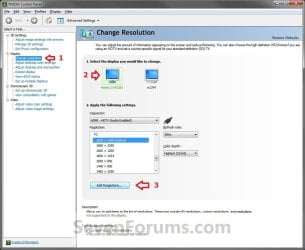
2. In the left pane, select Change resolution. Now select the monitor that you want to change the refresh rate for, then click on the Add Resolutions button. (See screenshot below)
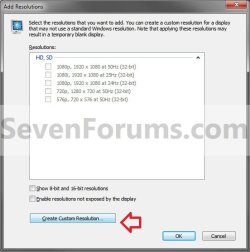
3. Click on the Create Custom Resolution button. (See screenshot below)
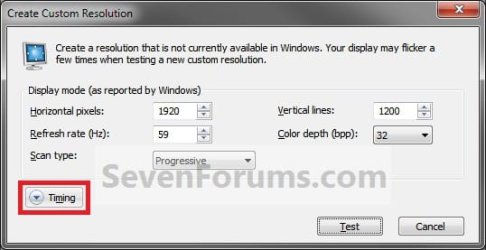
4. Click on Timing. (See screenshot below)
5. Under the Standard drop down menu, select Manual. (See screenshot below)
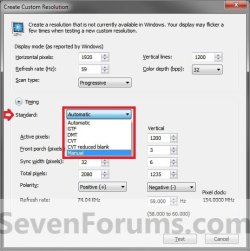
6. At the top (1 in image below), change the Refresh rate to the closest rate to what you want to set it as (ex: 60Hz). (See screenshot below)
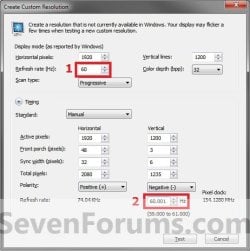
7. At the bottom (2 in image above), change the refresh rate to .001 above the refresh rate you want to change it to. For example, if you wanted to have a 60Hz refresh rate, change this value to 60.001. Click on the Test button. (See screenshot above)
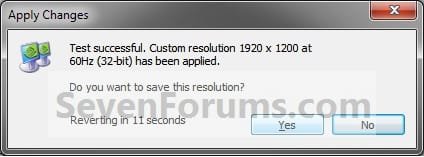
8. If the display looks ok, then click on Yes and go to step 9. If not, then click on No, and repeat steps 6 and 7 until it does or cancel the change. (See screenshot below)
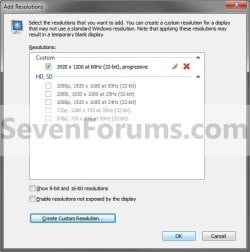
9. Click on OK. (See screenshot below)
NOTE: If you wanted to Edit (pencil icon) or Delete (red X icon) this custom screen refresh rate, then you will need to select another screen resolution in the window below step 2 or 10 first before you will be able to. You cannot edit or delete a custom resolution if it is set as your current one.
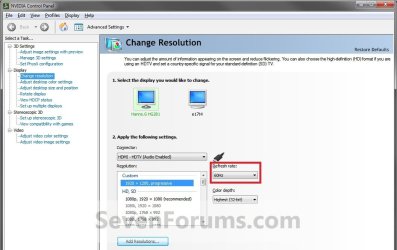
10. You will now notice that you screen refresh rate (ex: now 60Hz instead of 59Hz) has been changed. (See screenshot below)
That's it,
Shawn
Last edited:


