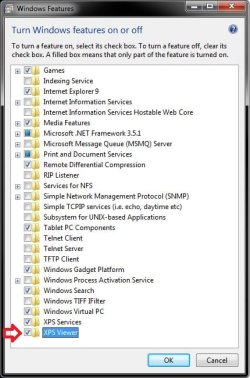
How to Open the XPS Viewer in Vista, Windows 7, and Windows 8
Information
The XPS viewer is an application used to view XPS documents. By default, XPS Viewer will open automatically when you open a XPS document. This will show you how to manually open the XPS Viewer.
Note
An XPS document is any file that is saved to the XML Paper Specification or .xps file format. Although you can create XPS documents (.xps files) by using any program that you can print from in Windows, you can view XPS documents only by using the XPS Viewer, which is included in Vista, Windows 7, and Windows 8.
When you click anXPS document, it will open automatically in the XPS Viewer. The two toolbars that appear at the top and bottom of the XPS Viewer provide options for viewing and managing XPS documents, including:
Saving a copy of the XPS document to your computer.
Finding a word or phrase in the read-only XPS document.
Going to a specific page by typing a page number or by navigating forward and back through the document pages.
Zooming in or out to make text and pictures easier to read.
Viewing one or more pages at a time on your screen.
Digitally signing the XPS document.
Determining who can access the document and for how long by applying document permissions.
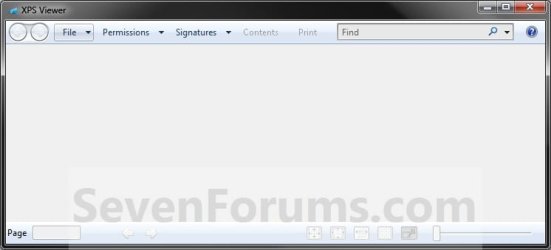
EXAMPLE: XPS Viewer
Here's How:
1. Press the Windows+R keys to open the Run dialog, type xpsrchvw.exe, and press Enter.
OR
2. Opening a XPS document will open into the XPS Viewer by default.
OR
3. In Vista or Windows 7, open the Start Menu, click on All Programs and on the XPS Viewer shortcut. (see screenshot below)
An XPS document is a new Microsoft document format that you can use to archive content in a standardized format or publish content in an easily viewable form. You can also use this format to ensure that no one is able to edit your original work.
System Manufacturer/Model Number Dell M1330 XPS - Laptop OS Windows 7 Build 7100 CPU Core 2 Duo T7250 Motherboard Dell Inc. 0U8042 Memory 2GB PC2-5300 Graphics Card NVIDIA 8400M GS Sound Card Standard HD Audio Monitor(s) Displays 13" LCD Widescreen Screen Resolution 1280x800
Your suggestions do not apply to me. There is no XPS Viewer on my start menu. Microsoft XPS Writer shows up on list of printers, but once saved, does not allow me to open it. Even as Administrator, I am denied permission to change permissions.
Computer type PC/Desktop System Manufacturer/Model Number Home made Desktop OS Windows 7 Home Premium 64 bit. SP-1 CPU Intel i7-960-3.2 @ 4.25 Motherboard ASUS P6X58D-E Memory KINGSTON KHX2000C9, Hyper X,12 GIGS Graphics Card MSI/Nvidia/460GTX-Cyclone 1GD5/OC Monitor(s) Displays DYNEX 40 IN. Screen Resolution 1920-1080 or 1280-720 HDMI
Keyboard M/S 3000 v 2.0 wireless Mouse M/S 5000 wireless PSU Corsair AX-850 Plus Gold Case Corsair 600T (Black) + side panel with 2 140 mm Noctua fans Cooling Corsair H50/2 Noctua NF-P12 (120 mm) Push/Pull- Hard Drives INTEL SSD 120GB-SER 510
Seagate 1TB SATA 600 7200 rpm Hard Drive Internet Speed 3.0 mb Antivirus Microsoft Security Eesentials Browser I.E. 10 default/Firefox Other Info LG BluRay-Read/Write
Sound system
KLipsch-THX
Asus Router RTN-12
2 Noctua 140 added on top of 600t case
Malwarebytes Anti Malware Professional
Windows 7 Firewall
Thank you for your suggestion. I can now open XPS Viewer as both Administrator or User. However, I can only use it while logged on as Administrator. As Administrator I can open and read xps documents. But I am not allowed to modify permissions to allow me to use XPS Viewer as a User. When logged on as User -- which is all the time preferably, I can activate XPS Viewer, but not open a document.
Brink -- Again, thank you for your attention. Yes I have tried everywhich way I can think of. While logged on as User I selected XPS as a printer and saved the file to my (User) Desktop.
Then clicked on it and XPS Viewer came up, but said I do not have permission to use it. I then switched to Administrator and opened XPS Viewer and navigated to my User Desktop. I was able to open the document. I also copied the file to my Administrator Desktop and opened it OK.
I then tried to set permissions to allow access by the User, but was denied -- "The XPS Viewer cannot activate any rights on this machine."
Brink --
I give up. To be positive of the step and responses for my reply to you, I repeated step-for-step the same action I had previously done.
I am the sole user of the computer. I created two accounts -- one as Administrator and one as Standard User.
While logged on as User, I created a file and selected Microsoft XPS Document Writer from the print menu and saved it to the (User) Desktop. I then double-clicked on the file on the Desktop and opened up the XPS Viewer.
When I did it before and started down this road of frustration because nothing worked right, double-clicking on the file opened up the XPX Viewer, but it would not let me view it because I did not have the right permissions although I was the one who created it.
Now, I repeated those same steps, and everything works exactly as advertised. Thank you for your help. I am sorry that apparently it was time wasted. However, I am clueless as to what was wrong before.