|
 |
|
Activate Windows 7 Online
How to Activate Windows 7 Online
Published by Brink
02 Feb 2009
|
 Published by |
|
|
How to Activate Windows 7 Online
 Information
Activation is the required process of ensuring that Windows 7 on your computer is genuine and used according to the Microsoft Software License Terms. This will show you how to activate Windows 7 online with your valid product key number. To activate online, your computer will need an Internet connection.
 Note
Genuine Windows is a recurring process that checks your product key to ensure it's being used with the hardware it was paired with during activation. If the product key is found to be non-genuine, or not valid, it's likely that the product key is either being used on another computer or is counterfeit. Try doing the Diagnostics and Validate Windows options. For more information about genuine Windows, go to the genuine Windows website for FAQ's.
- A Windows 7 product key number can only be used to activate the same edition of Windows 7 that it was for, and cannot be used to activate a different edition of Windows 7.
- A Family Pack Windows 7 product key number can be used to activate the Family Pack Windows 7 copy on up to 3 computers at any one time.
- A OEM Windows 7 product key number can only be used to activate a OEM Windows 7 copy on the same computer that it was first activated on, and no other computer.
- A retail Windows 7 product key number can be used to activate a retail Windows 7 copy on any computer, but only on up to one computer at any one time.
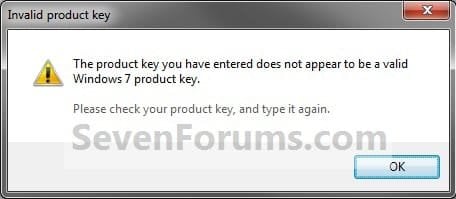
Windows 7 activation error: invalid product key
If you receive an error indicating that your product key is not valid when installing Windows 7, it could be for the following reasons: - You might have mistyped your product key. Try retyping it.
- You might be using a product key that doesn't match the version of Windows 7 that came preinstalled on your computer. Check the product key to make sure it is for the version that you are trying to activate. You can't use a product key for Windows 7 with Service Pack 1 (SP1) to activate a copy of Windows 7 without SP1.
- The product key is for an upgrade version of Windows 7 and a previous version of Windows wasn't on your computer when Windows 7 was installed. To install an upgrade version of Windows 7, Windows Vista or Windows XP must be installed on your computer. If you formatted the drive before starting the installation process, you won't be able to use the upgrade product key to activate Windows 7. To activate Windows 7, you'll need to install your previous version of Windows, and then reinstall Windows 7.
For more information about Windows 7 activation errors, see Windows 7 activation error: 0xC004F061 and Activation Error Codes.
You might have to activate Windows 7 again if:- You uninstall Windows 7 on one computer and then install it on another. During installation, enter the product key that came with Windows. If automatic activation fails, follow the instructions that walk you through activating Windows by phone. You will have 30 days to activate Windows.
- You make a significant hardware change to your computer, such as upgrading the hard disk and memory at the same time. If a major hardware change requires activating Windows again, you will be notified and will have three days to activate Windows.
- You reformat your hard disk. Reformatting erases your activation status. In this case, you’ll have 30 days to activate Windows again.
- A virus or malware infects your computer and deletes your activation status.
 Warning
- You must activate Windows 7 within the 30 days grace period after installation before it expires. When Windows 7 is activated, you'll be able to use every feature of Windows 7.
- If you chose to Automatically activate Windows when I'm online when you set up your computer, automatic activation begins trying to activate your copy of Windows 7 three days after you log on for the first time. See METHOD ONE below.
- If you install Windows 7 on a second computer, you must buy an additional product key number to activate the second installation to continue using Windows 7 on both computers.
What happens if you don't activate Windows 7?
Despite what you may have read elsewhere, there's no "reduced functionality mode" in Windows 7 like there was in Vista. If the 30-day trial or activation key expires: - Your desktop background goes black. You can change it, but every 60 minutes, it will return to black until you activate Windows.
- You will have a "This copy of windows is not genuine" watermark on the bottom right corner of your desktop.
- You will get a notification balloon stating that you may be a victim of software piracy.
- You will be prompted to activate Windows every time you log in.
- You will receive periodic reminders to activate Windows.
- Windows Updates will be limited, but you will still be able to get critical security updates. However, access to optional updates or benefits available exclusively to genuine Windows customers, such as Microsoft Security Essentials, might be restricted.
See also: Genuine Windows: frequently asked questions - Microsoft Windows
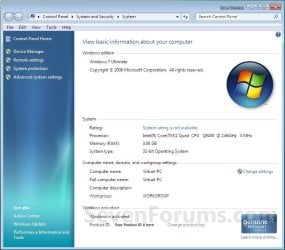
EXAMPLE: Windows 7 Activated
 OPTION ONE 
To Automatically Activate Windows 7 Online
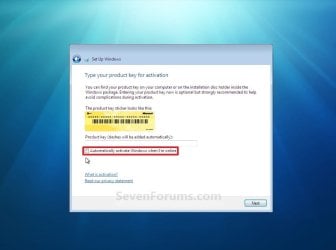
NOTE: This is for when you are doing a Clean install or Upgrade install of Windows 7.1. When you get to this step during installation below, type in your valid product key number and check the Automatically activate Windows when I'm online box.
NOTE: Automatic activation will now begin trying to activate your copy of Windows 7 three days after you log on for the first time.
 OPTION TWO 
To Manually Activate Windows 7
1. Open the Control Panel (icons view), and click on the System icon.A) Go to step 3 or 4.
OR
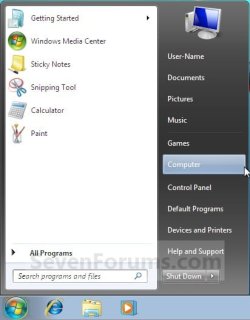
2. Open the Start Menu, and right click on the Computer button and click on Properties. (See screenshot below)
A) Go to step 3 or 4.
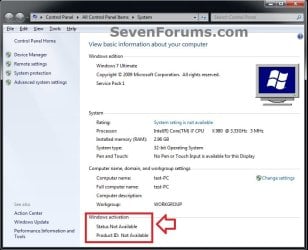
3. If You Have a "Activate Windows now" Link in System PropertiesA) Under the Windows activation secton at the bottom, click on the 30 days to activate. Activate Windows now link. (See screenshot below)
NOTE: If you did METHOD ONE above, then you will see 3 days to activate. Activate Windows now instead.
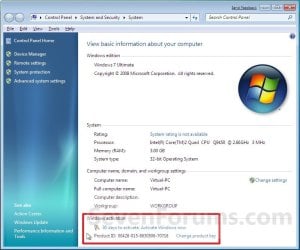
B) Select the Activate Windows online now option. (See screenshot below)
C) If prompted by UAC, then click on Yes.
D) Go to step 5.
4. If You Do Not Have a "Activate Windows now" Link in System PropertiesA) Close the System Properties window.
B) Open the Start Menu, type slui.exe in the search box and press Enter.
C) Continue on to step 5.
5. Type in your valid Windows 7 product key number, and click on the Next button. (See screenshot below)
NOTE: You will not see this screen if you have entered your product key number during the Clean installation or Upgrade installation of Windows 7, or if you did METHOD ONE above.
6. If Activation is Successful A) click on the Close button. (See screenshot below)
 Note
If the product key is found to be non-genuine, or not valid, it's likely that the product key is either being used on another computer or is counterfeit. For more information about genuine Windows, go to the genuine Windows website.
B) Windows 7 is now activated and genuine. (See screenshot below)
NOTE: Genuine Windows is a recurring process that checks your product key is being used with the hardware it was paired with during activation.
7. If Activation FailedA) If you got an activation error code, then look it up at the link below to see what it means.Activation Error Codes
B) You may need to try and activate by phone instead.
That's it,
Shawn
|
|
|
|
|
08 Feb 2009
|
#1
|
|
|
Well, I wish this would work for me.. Windows 7 will not activate in Australia, nor do any Microsoft activate phone numbers work.
All I get is error code 0x80072EFD which is so popular it has it's own MS KB page - so a lot of people must be mad with Microsoft - and they in turn are unable to fix this problem.
When it gets to retail the ****s really going to hit the fan ...
|
My System Specs |
|
System Manufacturer/Model Number Built myself
OS Windows 7 (7000) public beta
CPU E2180 2 GHz over clocked to 3 Ghz
Motherboard Asus P5KPL-CM (crash free BIOS) (Stable over clocker)
Memory 4 GB Hynix 2Gb 800MHz DDR2
Graphics Card Asus EAH3450-HTP-512 RADEON
Sound Card Onboard VY 1708B, 8-CH High-Definition Audio Codex
Monitor(s) Displays AOC 22" panel 1680x1050 (Certified for Windows Vista :-)
Screen Resolution 1680x1050
Keyboard Logitech black deluxe 250 DT PS2 (US layout - Vista)
Mouse Gigabyte GM-M6800 optical mouse (No game,like comfort grip)
PSU 450 watt in case standard
Case MCG Deluxe Miditower Case - 450W Black (2 front side USB)
Cooling Stock box Intel heat sink & fan - & CPU paste
Hard Drives Samsung 160Gb 7200RPM 8Mb Cache SATA2
Internet Speed Vodafone Wireless B/Band Australia - official 1500 up & down
Other Info USB ReadyBoost 4 GB SanDisk (I don't know if these help or not - all quiet as to if it's used in Windows 7.)
|
08 Feb 2009
|
#2
|
|
|
Hello Graham IV,
Have you tried another beta product key number to see if you may have a bad one?
If so, then you can use the extend trial period tutorial for now on the Beta since the RC1 Windows 7 is rumored to be available around April 9th. Hopefully you will be able activate that one instead.
Shawn
|
My System Specs |
|
Computer type PC/Desktop
System Manufacturer/Model Number Self built custom
OS 64-bit Windows 10 Pro
CPU Intel i7-3930K 3.2 Ghz (O/C 4 Ghz)
Motherboard ASRock X79 Extreme11
Memory 32 GB (4x8GB) G.SKILL DDR3 Quad PC3-19200 2400MHz
Graphics Card MSI N760 TF 4GB5/OC GTX 760 4GB
Sound Card SB Recon 3Di Integrated Chip
Monitor(s) Displays 3 x 27" Asus VE278Q
Screen Resolution 1920x1080
Keyboard Logitech wireless K800
Mouse Logitech MX Master
PSU OCZ Series Gold OCZZ1000M 1000W
Case Thermaltake Level 10 GT Snow Edition
Cooling Corsair Hydro H100
Hard Drives 256GB OCZ Vector
6TB WD Black WD6001FZWX
Internet Speed 100 Mb/s Download and 10 Mb/s Upload
Antivirus Malwarebyte Anti-Malware Premium
Browser IE11
Other Info Creative F200 webcam
* Lite-On iHBS212 12x BD Writer
* Samsung CLX-3175FW Printer
* Linksys EA9500 Router
* Arris SB6183 Cable Modem
* APC SMART-UPS RT 1000 XL
|
14 Feb 2009
|
#3
|
|
|
Now that, was some pretty useful tutorial..
Thanx Bro, 
Regards,
Ashok
|
My System Specs |
|
OS Windows Vista And installing Windows Se7en now!
CPU Core 2 Quad 2.4 Ghz
Motherboard Intel DG 35 EC
Memory 4 GB
Graphics Card Nvidia 8500 GT
Monitor(s) Displays ViewSonic 19"
Screen Resolution 1400x900
Hard Drives 500GB Seagate!
Computer type PC/Desktop
System Manufacturer/Model Number Self built custom
OS 64-bit Windows 10 Pro
CPU Intel i7-3930K 3.2 Ghz (O/C 4 Ghz)
Motherboard ASRock X79 Extreme11
Memory 32 GB (4x8GB) G.SKILL DDR3 Quad PC3-19200 2400MHz
Graphics Card MSI N760 TF 4GB5/OC GTX 760 4GB
Sound Card SB Recon 3Di Integrated Chip
Monitor(s) Displays 3 x 27" Asus VE278Q
Screen Resolution 1920x1080
Keyboard Logitech wireless K800
Mouse Logitech MX Master
PSU OCZ Series Gold OCZZ1000M 1000W
Case Thermaltake Level 10 GT Snow Edition
Cooling Corsair Hydro H100
Hard Drives 256GB OCZ Vector
6TB WD Black WD6001FZWX
Internet Speed 100 Mb/s Download and 10 Mb/s Upload
Antivirus Malwarebyte Anti-Malware Premium
Browser IE11
Other Info Creative F200 webcam
* Lite-On iHBS212 12x BD Writer
* Samsung CLX-3175FW Printer
* Linksys EA9500 Router
* Arris SB6183 Cable Modem
* APC SMART-UPS RT 1000 XL
|
28 Feb 2009
|
#5
|
|
|

Quote: Originally Posted by graham.lv
Well, I wish this would work for me.. Windows 7 will not activate in Australia, nor do any Microsoft activate phone numbers work.
All I get is error code 0x80072EFD which is so popular it has it's own MS KB page - so a lot of people must be mad with Microsoft - and they in turn are unable to fix this problem.
When it gets to retail the ****s really going to hit the fan ...
G'day Grahame |V, had no problems here in Queensland. I've now activated on three machines with the same number. See you later.
|
My System Specs |
|
System Manufacturer/Model Number Homebuilt
OS Windows 7 Ultimate x64
CPU AMD Phenom II 955BE
Motherboard Gigabyte GA-MA770T-UD3P
Memory Skil 8G(4x2G) DDR3 1333 PC10666
Graphics Card Sapphire HD4890 VaporX 1G GDDR5
Sound Card ALC 888 via Sencor Amp and B.I.C Venturi speakers
Monitor(s) Displays Dell 2209WA
Screen Resolution 1680 x 1050
Keyboard MS wireless laser 6000
Mouse MS wireless Laser 5000
PSU Seasonic M12 700W
Case Coolermaster Ammo 533
Cooling Noctua U12P
Hard Drives Samsung 500gb x3
Internet Speed 1.5 mbs
|
05 Apr 2009
|
#6
|
|
|
Thanks - Activated as Genuine using METHOD 2
Thanks Brink for on a First Place to starting this forum {because of people like you this EARTH is going on..you dont have to go in society physically to Serve/Help it...this forum is a Warm Gesture from your End  }.
I activate my copy of probable leaked windows 7 build 7068 (x86) on some torrent site, using METHOD 2 guided by you. I though have few ques. - 1.) Desktop still shows "Evaluation Copy Build 7068.."
2.) Whats the difference between "Genuine" & "Validate"? Shall i visit http://www.microsoft.com/genuine/ to Validate my copy of NOW 'Genuine' Windows 7?
3.) Prior to making windows 7 genuine, i have 30 days to make it genuine. NOW how many days i have with me for using this copy  ? As i suppose this is build is NOT a FINAL release of Windows.
Kindly reply..Warm Regards.
|
My System Specs |
|
OS Windows 7 Build 7068 (x86)
|
05 Apr 2009
|
#7
|
|
|
Hello blackpearl,
Welcome to the Seven Forums.
Validation is what makes the Genuine show up. It is still an evaluation because it is beta software. Previous builds had 'For testing purposes only' instead of evaluation. I can't remember for sure, I'm in build 7000 at the moment, but I think that 7068 is good until march 2010. All of these beta builds have a time limit built in, so you will need to install another OS before that time. You can check the date by typing 'winver' (no quotes) in the start menu search bar and hit enter.
Hope you enjoy your stay.
Gary
|
My System Specs |
|
System Manufacturer/Model Number Dell XPS420
OS Vista Ult 64 bit Seven Ult RTM x64
CPU Intel Core2 Quad Q6600 2.40 gigahertz
Memory Crucial Ballistix 4x2GB PC2 6400
Graphics Card NVIDIA GeForce 8600 GTS 256 MB
Sound Card Creative SB X-Fi audio
Monitor(s) Displays HP w2207 + HPvs15
Screen Resolution 1680x1050 + 1024x768
Keyboard Microsoft Comfort Curve
Mouse MX Revolution
Hard Drives 2-WD5000AAKS-500 GB
WD5000AAV-500 GB external
Other Info Wacom Intuos 2 Graphics Tablet
Experience Index=5.5
|
05 Apr 2009
|
#8
|
|
|
Hello Blackpearl, and welcome to Seven Forums.
Gary pretty much covered it. If you have the Genuine logo after activating, then you are good to go until 03/01/2010 with the 7068 build when the evaluation period expires.
Shawn
|
My System Specs |
|
Computer type PC/Desktop
System Manufacturer/Model Number Self built custom
OS 64-bit Windows 10 Pro
CPU Intel i7-3930K 3.2 Ghz (O/C 4 Ghz)
Motherboard ASRock X79 Extreme11
Memory 32 GB (4x8GB) G.SKILL DDR3 Quad PC3-19200 2400MHz
Graphics Card MSI N760 TF 4GB5/OC GTX 760 4GB
Sound Card SB Recon 3Di Integrated Chip
Monitor(s) Displays 3 x 27" Asus VE278Q
Screen Resolution 1920x1080
Keyboard Logitech wireless K800
Mouse Logitech MX Master
PSU OCZ Series Gold OCZZ1000M 1000W
Case Thermaltake Level 10 GT Snow Edition
Cooling Corsair Hydro H100
Hard Drives 256GB OCZ Vector
6TB WD Black WD6001FZWX
Internet Speed 100 Mb/s Download and 10 Mb/s Upload
Antivirus Malwarebyte Anti-Malware Premium
Browser IE11
Other Info Creative F200 webcam
* Lite-On iHBS212 12x BD Writer
* Samsung CLX-3175FW Printer
* Linksys EA9500 Router
* Arris SB6183 Cable Modem
* APC SMART-UPS RT 1000 XL
|
05 Apr 2009
|
#9
|
|
|
Garysgold & Brink..thanks for the prompt reply. Winver.exe shows me how much long i can enjoy this 'beta' windows 7. It says until Jan. 2010. Thats a long period for me, as i enjoy the life each day as its comes and thanks God for alloting each day for me to enjoy.  . Warm Regards.
|
My System Specs |
|
OS Windows 7 Build 7068 (x86)
|
|