
How to Activate Windows 7 Online
Information
Activation is the required process of ensuring that Windows 7 on your computer is genuine and used according to the Microsoft Software License Terms. This will show you how to activate Windows 7 online with your valid product key number. To activate online, your computer will need an Internet connection.
Note
Genuine Windows is a recurring process that checks your product key to ensure it's being used with the hardware it was paired with during activation. If the product key is found to be non-genuine, or not valid, it's likely that the product key is either being used on another computer or is counterfeit. Try doing the Diagnostics and Validate Windows options. For more information about genuine Windows, go to the genuine Windows website for FAQ's.
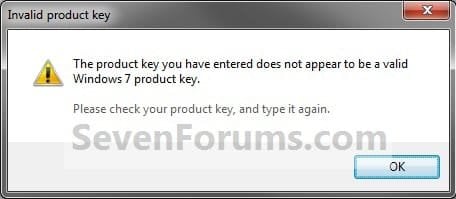
If you receive an error indicating that your product key is not valid when installing Windows 7, it could be for the following reasons:
You might have to activate Windows 7 again if:
- A Windows 7 product key number can only be used to activate the same edition of Windows 7 that it was for, and cannot be used to activate a different edition of Windows 7.
- A Family Pack Windows 7 product key number can be used to activate the Family Pack Windows 7 copy on up to 3 computers at any one time.
- A OEM Windows 7 product key number can only be used to activate a OEM Windows 7 copy on the same computer that it was first activated on, and no other computer.
- A retail Windows 7 product key number can be used to activate a retail Windows 7 copy on any computer, but only on up to one computer at any one time.
If you receive an error indicating that your product key is not valid when installing Windows 7, it could be for the following reasons:
- You might have mistyped your product key. Try retyping it.
- You might be using a product key that doesn't match the version of Windows 7 that came preinstalled on your computer. Check the product key to make sure it is for the version that you are trying to activate. You can't use a product key for Windows 7 with Service Pack 1 (SP1) to activate a copy of Windows 7 without SP1.
- The product key is for an upgrade version of Windows 7 and a previous version of Windows wasn't on your computer when Windows 7 was installed. To install an upgrade version of Windows 7, Windows Vista or Windows XP must be installed on your computer. If you formatted the drive before starting the installation process, you won't be able to use the upgrade product key to activate Windows 7. To activate Windows 7, you'll need to install your previous version of Windows, and then reinstall Windows 7.
You might have to activate Windows 7 again if:
- You uninstall Windows 7 on one computer and then install it on another. During installation, enter the product key that came with Windows. If automatic activation fails, follow the instructions that walk you through activating Windows by phone. You will have 30 days to activate Windows.
- You make a significant hardware change to your computer, such as upgrading the hard disk and memory at the same time. If a major hardware change requires activating Windows again, you will be notified and will have three days to activate Windows.
- You reformat your hard disk. Reformatting erases your activation status. In this case, you’ll have 30 days to activate Windows again.
- A virus or malware infects your computer and deletes your activation status.
Warning
- You must activate Windows 7 within the 30 days grace period after installation before it expires. When Windows 7 is activated, you'll be able to use every feature of Windows 7.
- If you chose to Automatically activate Windows when I'm online when you set up your computer, automatic activation begins trying to activate your copy of Windows 7 three days after you log on for the first time. See METHOD ONE below.
- If you install Windows 7 on a second computer, you must buy an additional product key number to activate the second installation to continue using Windows 7 on both computers.
Despite what you may have read elsewhere, there's no "reduced functionality mode" in Windows 7 like there was in Vista. If the 30-day trial or activation key expires:
- Your desktop background goes black. You can change it, but every 60 minutes, it will return to black until you activate Windows.
- You will have a "This copy of windows is not genuine" watermark on the bottom right corner of your desktop.
- You will get a notification balloon stating that you may be a victim of software piracy.
- You will be prompted to activate Windows every time you log in.
- You will receive periodic reminders to activate Windows.
- Windows Updates will be limited, but you will still be able to get critical security updates. However, access to optional updates or benefits available exclusively to genuine Windows customers, such as Microsoft Security Essentials, might be restricted.
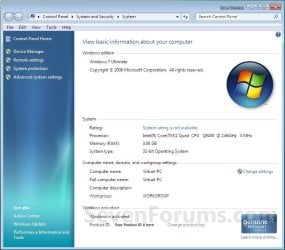
EXAMPLE: Windows 7 Activated
OPTION ONE
To Automatically Activate Windows 7 Online
NOTE: This is for when you are doing a Clean install or Upgrade install of Windows 7.
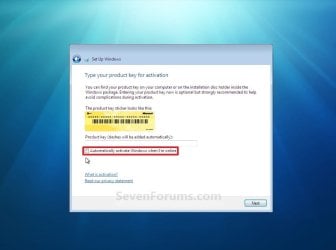
1. When you get to this step during installation below, type in your valid product key number and check the Automatically activate Windows when I'm online box.
NOTE: Automatic activation will now begin trying to activate your copy of Windows 7 three days after you log on for the first time.
OPTION TWO
To Manually Activate Windows 7
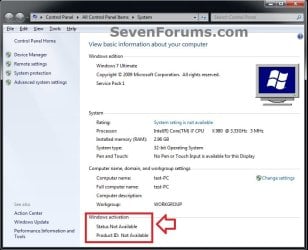
1. Open the Control Panel (icons view), and click on the System icon.
A) Go to step 3 or 4.
OR
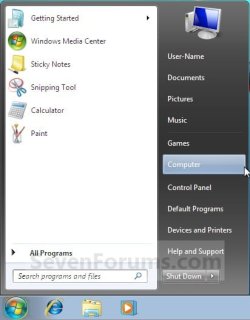
2. Open the Start Menu, and right click on the Computer button and click on Properties. (See screenshot below)
A) Go to step 3 or 4.
3. If You Have a "Activate Windows now" Link in System Properties
A) Under the Windows activation secton at the bottom, click on the 30 days to activate. Activate Windows now link. (See screenshot below)
NOTE: If you did METHOD ONE above, then you will see 3 days to activate. Activate Windows now instead.
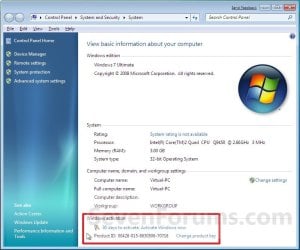
B) Select the Activate Windows online now option. (See screenshot below)

C) If prompted by UAC, then click on Yes.
D) Go to step 5.
4. If You Do Not Have a "Activate Windows now" Link in System Properties
A) Close the System Properties window.
B) Open the Start Menu, type slui.exe in the search box and press Enter.
C) Continue on to step 5.
5. Type in your valid Windows 7 product key number, and click on the Next button. (See screenshot below)
NOTE: You will not see this screen if you have entered your product key number during the Clean installation or Upgrade installation of Windows 7, or if you did METHOD ONE above.

6. If Activation is Successful
A) click on the Close button. (See screenshot below)
Note
If the product key is found to be non-genuine, or not valid, it's likely that the product key is either being used on another computer or is counterfeit. For more information about genuine Windows, go to the genuine Windows website.

B) Windows 7 is now activated and genuine. (See screenshot below)
NOTE: Genuine Windows is a recurring process that checks your product key is being used with the hardware it was paired with during activation.
7. If Activation Failed
A) If you got an activation error code, then look it up at the link below to see what it means.
Activation Error Codes
B) You may need to try and activate by phone instead.
That's it,
Shawn
Related Tutorials
- How to Activate Windows 7 by Phone
- How to Do a Upgrade Installation with Windows 7
- How to Do a Clean Installation with Windows 7
- How to Change the Product Key Number in Windows 7
- How to Find and See the Windows 7 Product Key Number
- How to Uninstall the Product Key Number and Deactivate Vista, Windows 7, or Windows 8
- Windows Genuine and Activation Issue Posting Instructions
- How to Activate Office 2013
Last edited:


 ? As i suppose this is build is NOT a FINAL release of Windows.


