Repair Install

How to Do a Repair Install to Fix Windows 7


   Information
This will show you how to do a repair install (aka: in-place upgrade install) to fix your currently installed Windows 7 and preserve your user accounts, data, programs, and system drivers.
   Note
Do a Repair installation if:
  • A System Restore did not help fix your Windows 7.
  • There is no other easier option left that can fix your Windows 7.
  • You DO NOT want to do a Clean reinstall of Windows 7.
  • You DO want to preserve your user accounts, data, programs, and system drivers.
   Tip
ITEMS THAT WILL BE RESET TO DEFAULT OR AFFECTED:
  • Sounds
  • Services
  • Visual Effects Settings
  • Device Drivers - Be sure to have these handy to reinstall. They do not always remain after the repair (upgrade) install.
  • You may lose the ability to sign on to MSN Messenger, to solve this problem have a look at this thread Unable to sign in to WLM.
  • You may lose your custom themes due to not having permisions set on the old themes. Go to the hidden themes folder at C:/Users/(User-Name)/AppData/Local/Microsoft/Windows/Themes, then Take Ownership of the themes folder and you will now have all your themes back.
  • It has been reported that you may also lose your Media Center gadget after doing the repair install.
  • Windows Updates will need to be checked and reinstalled again.
   Warning

  • You can only do a repair install with the same edition Windows 7 installation disc for the same edition of Windows 7 that you have installed.
  • You cannot use a OEM Windows 7 "Factory" Restore/Recovery type of installation disc that came with or created from a store bought computer to do a repair install with. These can only be used do a clean install instead.
  • You can do a repair install on a factory OEM installation with the latest official Windows 7 with SP1 ISO file here: Microsoft: Windows 7 Direct Download Links, and use Windows 7 USB-DVD Download Tool to create a bootable DVD or USB flash drive with the ISO to do the repair install from within Windows 7.
  • You can use a retail OEM Windows 7 installation disc to do a repair install with.
  • You can use a retail (full or upgrade) Windows 7 installation disc to do a repair install with.
  • You cannot do a repair install with a System Repair Disc. A System Repair Disc is not a installation disc, and will only boot to the System Recovery Options screen.
  • If you have a 32-bit (x86) Windows 7 currently installed, then you must use a 32-bit Windows 7 installation disc to be able to do a repair install with.
  • If you have a 64-bit (x64) Windows 7 currently installed, then you must use a 64-bit Windows 7 installation disc to be able to do a repair install with.
  • You can use a retail Windows 7 SP1 installation disc (ex: Technet (available), MSDN (available), or retail (when available)) to do a repair install with on a currently installed Windows 7 SP1.
  • You can use a Windows 7 SP1 installation disc (ex: Technet (available), MSDN (available), or retail (when available)) to do a repair install with on a currently installed slipstream Windows 7 SP1.
  • You cannot use a slipstream Windows 7 installation disc to do a repair install with on a currently installed Windows 7 SP1.
  • You cannot use a slipstream Windows 7 installation disc to do a repair install with on a currently installed slipstream Windows 7 SP1.
  • You can only do a repair install from within Windows 7.
  • You cannot do a repair install at boot or in Safe Mode.
  • You must be logged into Windows 7 in a administrator account to be able to do a repair install.
  • You must have at least 8.87 GB + what is currently being used of free space (more if you have a larger installation) on the hard drive/partition Windows 7 is installed on to do a repair install.
  • If you changed the default location of a user account's profile folder, then you will need to change it back to the default C:\Users location first.
  • If you moved the default location of a user folder, then you will need to change it back to the default C:\Users\(user-name) location first.


Here's How:
NOTE: Be sure to back up anything that you do not want to lose first to be extra safe.1. Start Windows 7, and log on to an administrator account.

2. Disable any 3rd party firewall, antivirus, or other security program to avoid it from possibly preventing the repair in-place upgrade installation of Windows 7.

3. Do either step 4, step 5, or step 6 below depending if your retail Windows 7 installation ISO/DVD/USB has SP1 or not, and if your currently installed Windows 7 has SP1 installed or not.

4. Repair Installed Windows 7 SP1 using Windows 7 with SP1 ISO

   Note
If you do not have a Windows 7 with SP1 ISO, then you can download an official ISO with your retail product key from Microsoft at the link below.

:ar: Microsoft Software Recovery

You can also download the latest official Windows 7 SP1 Media Refresh (SP1 U) ISO file at the link below, but this link is not always available for download.

:ar: Microsoft: Windows 7 Direct Download Links

A) If you have not already, you will need to install a program like 7-Zip that supports extracting a ISO to a folder.

B) Using the program (ex: 7-Zip) from step 1, extract the Windows 7 SP1 ISO file to a folder on a partition or HDD other than the current Windows 7 partition. (see screenshot below)
NOTE: For example with 7-Zip, right click on ISO, click on 7-Zip, Extract files, browse button, select where you want to extract to, and click on OK twice.7-Zip.jpg
C) While in Windows 7 SP1, open the folder that you extracted the ISO into, and run the setup.exe file.

D) Go to step 7 below.
5. Repair Installed Windows 7 SP1 using Windows 7 with SP1 DVD/USB

   Note
If you do not have a Windows 7 with SP1 ISO, then you can download an official ISO with your retail product key from Microsoft at the link below.

:ar: http://www.microsoft.com/en-us/software-recovery

You can also download the latest official Windows 7 SP1 Media Refresh (SP1 U) ISO file at the link below, but this link is not always available for download.

:ar: Microsoft: Windows 7 Direct Download Links

Afterwards, you can use Windows 7 USB-DVD Download Tool to create a bootable DVD or USB flash drive with the ISO to do the repair install from within Windows 7 using this step.

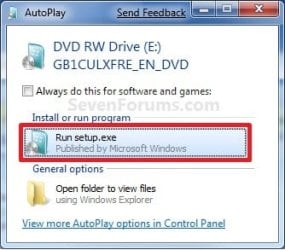
A) While in Windows 7 SP1, insert your retail Windows 7 SP1 installation DVD into the DVD drive, or connect your Windows 7 with SP1 installation USB thumb drive, and click on the Run setup.exe option in AutoPlay. (see screenshot below)
NOTE: If the AutoPlay window does not open, then open the drive folder in Computer and run the setup.exe file.AutoPlay.jpg
B) Go to Go to step 7 below.
6. Repair Installed Windows 7 without SP1 using Windows 7 without SP1 DVD/USB

   Note
If you do not have a Windows 7 without SP1 installation DVD/USB, then you can download the latest official Windows 7 Professional or Home Premium without SP1 ISO file here: Microsoft: Windows 7 Direct Download Links, and use Windows 7 USB-DVD Download Tool to create a bootable DVD or USB flash drive with the ISO to do the repair install from within Windows 7 using this step.

It is preferred to have SP1 installed on your PC and to use step 4 or step 5 above to do a repair install with instead though.

A) While in Windows 7 SP1 installed, insert your retail Windows 7 installation DVD into the DVD drive, or connect your Windows 7 installation USB thumb drive, and click on the Run setup.exe option in AutoPlay. (see screenshot below)
NOTE: If the AutoPlay window does not open, then open the drive folder in Computer and run the setup.exe file.AutoPlay.jpg
B) Go to Go to step 7 below.
7. If prompted by UAC, then click on Yes.

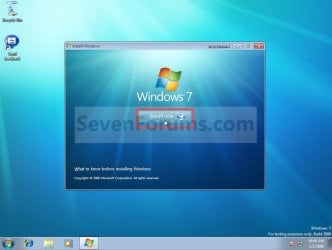
8. Click on the Install Now button to start the installation. (see screenshot below)Step1.jpg
9. If prompted, uncheck the I want to help make Windows installation better box (unless you would like to :) ), and click on the Go online to get the latest updates for installation option. (see screenshot below)Step2.jpg
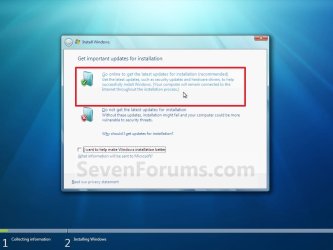
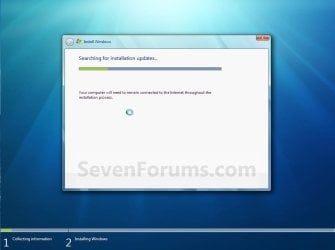
A) Windows 7 will now check online for and install any available installation updates. (see screenshots below)Step2A.jpg

Step2B.jpg

10. Check the I accept the license terms box, and click on Next. (see screenshot below)Step3.jpg
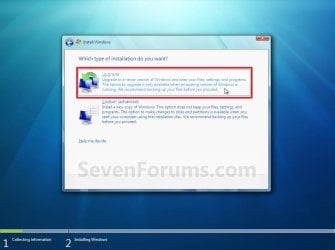
11. Click on the Upgrade option. (see screenshot below)Step4.jpg
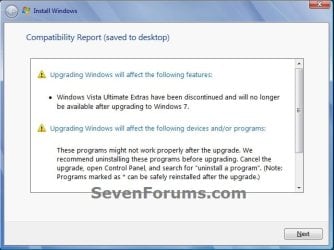
12. Windows will now check for any compatibility issues. If any are found like in the example below, click on the red X to cancel the repair install and close this "Install Windows" window, take care of any found issues (ex: uninstall any incompatible program), then restart the repair install process over again.Compatibility-Report.jpg
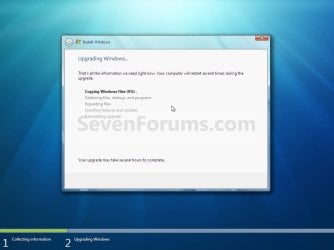
13. The installation of Windows 7 will now begin. (see screenshot below)
NOTE: During the installation process, your screen may flash and computer will restart a few times.Step5.jpg
14. After the final restart, you will see this screen for a moment. (see screenshot below)Step6.jpg
15. Type in your Windows 7 product key number. (see screenshot below step 16)

16. Uncheck the Automatically activate Windows when I'm online box unchecked, then click on the Next button. (see screenshot below)
NOTE: You can activate Windows 7 later after you make sure it is running properly. (see step 23 below)
If you chose to automatically activate Windows online when you set up your computer, automatic activation begins trying to activate your copy of Windows three days after you log on for the first time.Step7.jpg
17. Click on Use recommended settings. (see screenshot below)

:note: You will always be able to change your Windows Update settings at anytime in Windows 7.

Step8.jpg
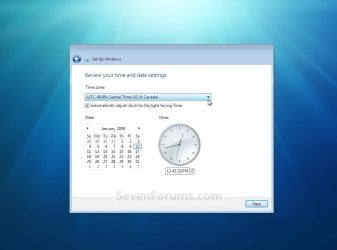
18. Select your time zone and set your time and date settings, then click on the Next button. (see screenshot below)Step9.jpg
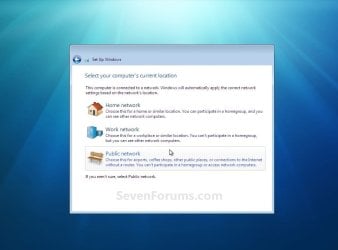
19. Click on the option for your computer's location to select the correct network location type settings to be applied for that location. (see screenshot below)
NOTE: It is best to select Public location for the best security.Step10.jpg
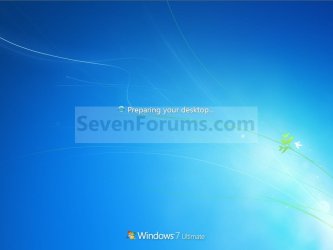
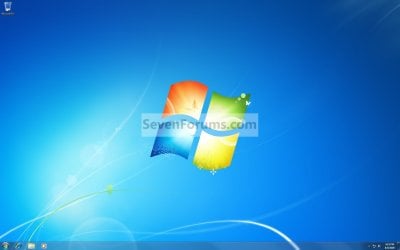
20. Windows 7 will now prepare your desktop to startup. (see screenshots below)Step11A.jpg

Desktop.jpg

21. If you used a DVD or USB to do the repair install with, then you can remove the DVD or USB when the repair install has successfully completed and you are logged in to Windows 7.

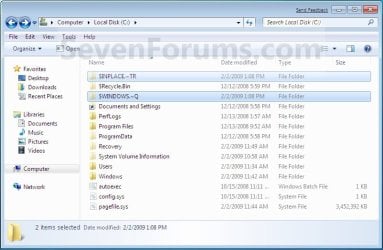
22. Check to see if you are missing any user files. If you are, then you can copy them from the C:\Windows.old or the hidden protected operating system C:\$INPLACE.~TR and C:\WINDOWS.~Q backup folders. (see screenshot below)Old_Install.jpg
23. If everything checks out in step 21, then you can run Disk Cleanup (step 5 at this link). You will need to click on the Clean up system files button first, and then could check the Files discarded by Windows upgrade, Previous Windows installations, and Windows upgrade log files boxes. (see screenshot below)
NOTE: This will delete the C:\Windows.old, C:\$INPLACE.~TR and C:\WINDOWS.~Q folders from step 21 above.Disk_Cleanup.jpg
24. Refresh your Windows Experience Index (WEI) score.

25. When finished, activate Windows 7, and make sure that your 3rd party security programs (if applicable) are enabled again.
That's it,
Shawn


Last edited:
Hello vtails, and welcome to Ten Forums. :)

I'm not 100% sure what "numbers" it's asking for, but you do not get asked for a product key to download a Windows 10 ISO file.

Windows 10 ISO Download - Windows 10 Forums
 

My Computer My Computer

At a glance

64-bit Windows 11 Pro for WorkstationsIntel i7-8700K OC'd to 5 GHz64 GB (4x16GB) G.SKILL TridentZ RGB DDR4 3600...ASUS ROG-STRIX-GTX1080TI-O11G-GAMING
Computer type
PC/Desktop
Computer Manufacturer/Model Number
Self built custom
OS
64-bit Windows 11 Pro for Workstations
CPU
Intel i7-8700K OC'd to 5 GHz
Motherboard
ASUS ROG Maximus XI Formula Z390
Memory
64 GB (4x16GB) G.SKILL TridentZ RGB DDR4 3600 MHz
Graphics Card(s)
ASUS ROG-STRIX-GTX1080TI-O11G-GAMING
Sound Card
Integrated
Monitor(s) Displays
2 x Samsung Odyssey G7 27"
Screen Resolution
2560x1440
Hard Drives
1TB Samsung 990 PRO M.2,
4TB Samsung 990 PRO PRO M.2,
TerraMaster F8 SSD Plus NAS
PSU
Seasonic Prime Titanium 850W
Case
Thermaltake Core P3
Cooling
Corsair Hydro H115i
Keyboard
Logitech wireless K800
Mouse
Logitech MX Master 4
Internet Speed
2 Gb/s Download and 100 Mb/s Upload
Antivirus
Malwarebyte Anti-Malware Premium
Browser
Google Chrome
Other Info
Logitech Z625 speaker system,
Logitech BRIO 4K Pro webcam,
HP Color LaserJet Pro MFP M477fdn,
APC SMART-UPS RT 1000 XL - SURT1000XLI,
Galaxy S23 Plus phone
Sorry about the miss info it was the download link for Windows 7 on the first page of the Thread, it has the numbers section and then the verify tab, I'm not sure why they would do this just to D/L Win 7. I didn't want to have them apply the number's to this computer, I am not sure I know enough to fix all the issue's as I keep finding more problems as I go.I have done 2 clean installs and each has had issue's, I have changed the H/D and Memory it hasn't changed anything. I've used this disk on a few computer's over the years and not had trouble at all. It was an XP before and also had Snow Leopard on it a while back, I think my grandkids are just going to have to be patient , I think I should have a laptop so I could look for solutions while working on a problem. Thank you for reading my problems.
 

My Computer My Computer

At a glance

Windows 7 Home Preminiun x64 Windows 10 home x64Turion Dual core TL-684 gig's DDR2 6400ATI 1150
Computer type
Laptop
Computer Manufacturer/Model Number
Dell Inspiron
OS
Windows 7 Home Preminiun x64 Windows 10 home x64
CPU
Turion Dual core TL-68
Motherboard
AMD UNKNOW MAKER
Memory
4 gig's DDR2 6400
Graphics Card(s)
ATI 1150
Hard Drives
300 gig's
Antivirus
F-SECURE
Browser
IE 11
Ah, ok.

The product key is only used to verify ownership to download the ISO. It doesn't affect activation. :)
 

My Computer My Computer

At a glance

64-bit Windows 11 Pro for WorkstationsIntel i7-8700K OC'd to 5 GHz64 GB (4x16GB) G.SKILL TridentZ RGB DDR4 3600...ASUS ROG-STRIX-GTX1080TI-O11G-GAMING
Computer type
PC/Desktop
Computer Manufacturer/Model Number
Self built custom
OS
64-bit Windows 11 Pro for Workstations
CPU
Intel i7-8700K OC'd to 5 GHz
Motherboard
ASUS ROG Maximus XI Formula Z390
Memory
64 GB (4x16GB) G.SKILL TridentZ RGB DDR4 3600 MHz
Graphics Card(s)
ASUS ROG-STRIX-GTX1080TI-O11G-GAMING
Sound Card
Integrated
Monitor(s) Displays
2 x Samsung Odyssey G7 27"
Screen Resolution
2560x1440
Hard Drives
1TB Samsung 990 PRO M.2,
4TB Samsung 990 PRO PRO M.2,
TerraMaster F8 SSD Plus NAS
PSU
Seasonic Prime Titanium 850W
Case
Thermaltake Core P3
Cooling
Corsair Hydro H115i
Keyboard
Logitech wireless K800
Mouse
Logitech MX Master 4
Internet Speed
2 Gb/s Download and 100 Mb/s Upload
Antivirus
Malwarebyte Anti-Malware Premium
Browser
Google Chrome
Other Info
Logitech Z625 speaker system,
Logitech BRIO 4K Pro webcam,
HP Color LaserJet Pro MFP M477fdn,
APC SMART-UPS RT 1000 XL - SURT1000XLI,
Galaxy S23 Plus phone
That's what I wanted to know, I didn't want to burn the key on this till I know if I can fix it. I've fixed some issue's so far and I think it will do for the grandkids a while. It be great have a Program That would just fix all issue's and be done but it does give me something to do at the Hanger while I take a break. Thank you for the info.
 

My Computer My Computer

At a glance

Windows 7 Home Preminiun x64 Windows 10 home x64Turion Dual core TL-684 gig's DDR2 6400ATI 1150
Computer type
Laptop
Computer Manufacturer/Model Number
Dell Inspiron
OS
Windows 7 Home Preminiun x64 Windows 10 home x64
CPU
Turion Dual core TL-68
Motherboard
AMD UNKNOW MAKER
Memory
4 gig's DDR2 6400
Graphics Card(s)
ATI 1150
Hard Drives
300 gig's
Antivirus
F-SECURE
Browser
IE 11
You're welcome. I hope you get it sorted.
 

My Computer My Computer

At a glance

64-bit Windows 11 Pro for WorkstationsIntel i7-8700K OC'd to 5 GHz64 GB (4x16GB) G.SKILL TridentZ RGB DDR4 3600...ASUS ROG-STRIX-GTX1080TI-O11G-GAMING
Computer type
PC/Desktop
Computer Manufacturer/Model Number
Self built custom
OS
64-bit Windows 11 Pro for Workstations
CPU
Intel i7-8700K OC'd to 5 GHz
Motherboard
ASUS ROG Maximus XI Formula Z390
Memory
64 GB (4x16GB) G.SKILL TridentZ RGB DDR4 3600 MHz
Graphics Card(s)
ASUS ROG-STRIX-GTX1080TI-O11G-GAMING
Sound Card
Integrated
Monitor(s) Displays
2 x Samsung Odyssey G7 27"
Screen Resolution
2560x1440
Hard Drives
1TB Samsung 990 PRO M.2,
4TB Samsung 990 PRO PRO M.2,
TerraMaster F8 SSD Plus NAS
PSU
Seasonic Prime Titanium 850W
Case
Thermaltake Core P3
Cooling
Corsair Hydro H115i
Keyboard
Logitech wireless K800
Mouse
Logitech MX Master 4
Internet Speed
2 Gb/s Download and 100 Mb/s Upload
Antivirus
Malwarebyte Anti-Malware Premium
Browser
Google Chrome
Other Info
Logitech Z625 speaker system,
Logitech BRIO 4K Pro webcam,
HP Color LaserJet Pro MFP M477fdn,
APC SMART-UPS RT 1000 XL - SURT1000XLI,
Galaxy S23 Plus phone
A once system-saving site now totally obsolete.

Microsoft links that supposedly provide access to Win7 iso files are presently available only in French and Korean languages. I am forced to assume that MS aggressive promotion of windows 10 now extends to blocking efforts to repair Win7.
 

My Computer My Computer

At a glance

Win7 AND WinXPP44GB (3.7 avail)Quadro FX540 128 GB
Computer Manufacturer/Model Number
Dell
OS
Win7 AND WinXP
CPU
P4
Motherboard
Dell
Memory
4GB (3.7 avail)
Graphics Card(s)
Quadro FX540 128 GB
Sound Card
Intel onboard
Monitor(s) Displays
IBM C220 (CRT)
Hard Drives
150GB WD Raptor (OSs), Seagate 320GB (Data etc), Seagate 500GB External (eSATA)
Yep, one has to resort to other sources to find a reliable Windows 7 ISO these days.
 

My Computer My Computer

At a glance

64-bit Windows 11 Pro for WorkstationsIntel i7-8700K OC'd to 5 GHz64 GB (4x16GB) G.SKILL TridentZ RGB DDR4 3600...ASUS ROG-STRIX-GTX1080TI-O11G-GAMING
Computer type
PC/Desktop
Computer Manufacturer/Model Number
Self built custom
OS
64-bit Windows 11 Pro for Workstations
CPU
Intel i7-8700K OC'd to 5 GHz
Motherboard
ASUS ROG Maximus XI Formula Z390
Memory
64 GB (4x16GB) G.SKILL TridentZ RGB DDR4 3600 MHz
Graphics Card(s)
ASUS ROG-STRIX-GTX1080TI-O11G-GAMING
Sound Card
Integrated
Monitor(s) Displays
2 x Samsung Odyssey G7 27"
Screen Resolution
2560x1440
Hard Drives
1TB Samsung 990 PRO M.2,
4TB Samsung 990 PRO PRO M.2,
TerraMaster F8 SSD Plus NAS
PSU
Seasonic Prime Titanium 850W
Case
Thermaltake Core P3
Cooling
Corsair Hydro H115i
Keyboard
Logitech wireless K800
Mouse
Logitech MX Master 4
Internet Speed
2 Gb/s Download and 100 Mb/s Upload
Antivirus
Malwarebyte Anti-Malware Premium
Browser
Google Chrome
Other Info
Logitech Z625 speaker system,
Logitech BRIO 4K Pro webcam,
HP Color LaserJet Pro MFP M477fdn,
APC SMART-UPS RT 1000 XL - SURT1000XLI,
Galaxy S23 Plus phone
It's been a few years since I did a repair/install on my Win7 machine. Now I need to do so for my wife's Win7. After reading your instructions, I'm unclear on a few points and need to clarify before proceeding.

1. The Lenovo OEM OS key is located on a label on the machine's exterior. You say "The product key is only used to verify ownership to download the ISO. It doesn't affect activation". If that's the case then what do I (the machine) need for the activation process?

2. Under Computer/Properties, at the bottom is Product ID. This is not the key but is it necessary for the process (I think this is the identifier that Jelly Bean extracts).

3. Is it likely to initiate and substantially complete the process only for MS to say no at the end and you're left restoring the OS from a previously backed up image? If so, is there a way to get the end answer at the beginning ;-)

4. If I can find a MS ISO Professional 64 bit SP1, is there any way of consolidating/shortening the time involved to download and install the zillion updates post SP1?
 

My Computer My Computer

At a glance

Windows 7 & Windows 10
Computer type
PC/Desktop
OS
Windows 7 & Windows 10
Hello Mark, :)

Q1) You would need the product key on the COA sticker to be able to activate Windows 7.

Q2) The identifier would be needed if you had to activate by phone.

Q3) There's always a chance the repair install could fail at the end, but it will usually always automatically revert back to where you started unless interrupted.

Q4) Getting the latest ISO version helps some, but there are still a ton of updates that will be available even with the latest ISO.
 

My Computer My Computer

At a glance

64-bit Windows 11 Pro for WorkstationsIntel i7-8700K OC'd to 5 GHz64 GB (4x16GB) G.SKILL TridentZ RGB DDR4 3600...ASUS ROG-STRIX-GTX1080TI-O11G-GAMING
Computer type
PC/Desktop
Computer Manufacturer/Model Number
Self built custom
OS
64-bit Windows 11 Pro for Workstations
CPU
Intel i7-8700K OC'd to 5 GHz
Motherboard
ASUS ROG Maximus XI Formula Z390
Memory
64 GB (4x16GB) G.SKILL TridentZ RGB DDR4 3600 MHz
Graphics Card(s)
ASUS ROG-STRIX-GTX1080TI-O11G-GAMING
Sound Card
Integrated
Monitor(s) Displays
2 x Samsung Odyssey G7 27"
Screen Resolution
2560x1440
Hard Drives
1TB Samsung 990 PRO M.2,
4TB Samsung 990 PRO PRO M.2,
TerraMaster F8 SSD Plus NAS
PSU
Seasonic Prime Titanium 850W
Case
Thermaltake Core P3
Cooling
Corsair Hydro H115i
Keyboard
Logitech wireless K800
Mouse
Logitech MX Master 4
Internet Speed
2 Gb/s Download and 100 Mb/s Upload
Antivirus
Malwarebyte Anti-Malware Premium
Browser
Google Chrome
Other Info
Logitech Z625 speaker system,
Logitech BRIO 4K Pro webcam,
HP Color LaserJet Pro MFP M477fdn,
APC SMART-UPS RT 1000 XL - SURT1000XLI,
Galaxy S23 Plus phone
Yep, one has to resort to other sources to find a reliable Windows 7 ISO these days.
I found this site, it's a German mirror of all the ISOs.
Code:
http://mirror.corenoc.de/digitalrivercontent.net/
 

My Computer My Computer

At a glance

Windows 7 Home Premium x64Intel i7 950 @ 3.0712 GB
Computer type
PC/Desktop
Computer Manufacturer/Model Number
Acer Aspire G7750
OS
Windows 7 Home Premium x64
CPU
Intel i7 950 @ 3.07
Memory
12 GB
Antivirus
Norton 360 Premier
Browser
Firefox
Email notification problem(?)

I received notification of a new thread post 3/28/16. Here's the link: http://www.sevenforums.com/tutorials/3413-repair-install-new-post.html.


and the contents:


Here is the message that has just been posted:
***************
I found this site, it's a German mirror of all the ISOs.
Code:
---------
[URL]http://mirror.corenoc.de/digitalrivercontent.net/


The link takes me to Brink's last post. I confirmed the target was the last post since '>' didn't move any further. I searched the page for both 'German' and 'abishaij1' with zero hits?


While I'm here I may as well ask my three questions about the post's content:


1. Are the ISO's in German or English?


2. Has anyone verified the integrity of the mirror site?


3. Is the site superior to that which the tutorial suggests?


Mark
http://mirror.corenoc.de/digitalrivercontent.net/


[/URL]
 

My Computer My Computer

At a glance

Windows 7 & Windows 10
Computer type
PC/Desktop
OS
Windows 7 & Windows 10
Hello Mark, :)

Q1) The ISOs listed with "EN" in front of their names are the English versions.

Q2) I've never downloaded anything from them, so I can't verify how safe they are. I can verify the links in the tutorial are safe and official ISO files.

Q3) Unknown.
 

My Computer My Computer

At a glance

64-bit Windows 11 Pro for WorkstationsIntel i7-8700K OC'd to 5 GHz64 GB (4x16GB) G.SKILL TridentZ RGB DDR4 3600...ASUS ROG-STRIX-GTX1080TI-O11G-GAMING
Computer type
PC/Desktop
Computer Manufacturer/Model Number
Self built custom
OS
64-bit Windows 11 Pro for Workstations
CPU
Intel i7-8700K OC'd to 5 GHz
Motherboard
ASUS ROG Maximus XI Formula Z390
Memory
64 GB (4x16GB) G.SKILL TridentZ RGB DDR4 3600 MHz
Graphics Card(s)
ASUS ROG-STRIX-GTX1080TI-O11G-GAMING
Sound Card
Integrated
Monitor(s) Displays
2 x Samsung Odyssey G7 27"
Screen Resolution
2560x1440
Hard Drives
1TB Samsung 990 PRO M.2,
4TB Samsung 990 PRO PRO M.2,
TerraMaster F8 SSD Plus NAS
PSU
Seasonic Prime Titanium 850W
Case
Thermaltake Core P3
Cooling
Corsair Hydro H115i
Keyboard
Logitech wireless K800
Mouse
Logitech MX Master 4
Internet Speed
2 Gb/s Download and 100 Mb/s Upload
Antivirus
Malwarebyte Anti-Malware Premium
Browser
Google Chrome
Other Info
Logitech Z625 speaker system,
Logitech BRIO 4K Pro webcam,
HP Color LaserJet Pro MFP M477fdn,
APC SMART-UPS RT 1000 XL - SURT1000XLI,
Galaxy S23 Plus phone
I just now made an account because I originally was going to ask what other places you can go since the sites in the tutorial both don't give the ISOs anymore, but then I read the last page and saw no one else seemed to know either. I can't confirm that they're safe as I haven't tried them yet; when i went to make a partition I found that the manufacturer had a recovery partition already and did the built in recovery. Now I'm getting a "Windows could not complete the installation. To install Windows on this computer, restart the installation." loop. Now I have to download it on my tablet since the fix seems to be a recovery disk, ironic that the recovery ****ed me into needing a recovery even more than I did before.
 

My Computer My Computer

At a glance

Windows 7 Home Premium x64Intel i7 950 @ 3.0712 GB
Computer type
PC/Desktop
Computer Manufacturer/Model Number
Acer Aspire G7750
OS
Windows 7 Home Premium x64
CPU
Intel i7 950 @ 3.07
Memory
12 GB
Antivirus
Norton 360 Premier
Browser
Firefox
I just now made an account because I originally was going to ask what other places you can go since the sites in the tutorial both don't give the ISOs anymore, but then I read the last page and saw no one else seemed to know either. I can't confirm that they're safe as I haven't tried them yet; when i went to make a partition I found that the manufacturer had a recovery partition already and did the built in recovery. Now I'm getting a "Windows could not complete the installation. To install Windows on this computer, restart the installation." loop. Now I have to download it on my tablet since the fix seems to be a recovery disk, ironic that the recovery ****ed me into needing a recovery even more than I did before.

It is good to always have reliable installation media. :(
 

My Computer My Computer

At a glance

64-bit Windows 11 Pro for WorkstationsIntel i7-8700K OC'd to 5 GHz64 GB (4x16GB) G.SKILL TridentZ RGB DDR4 3600...ASUS ROG-STRIX-GTX1080TI-O11G-GAMING
Computer type
PC/Desktop
Computer Manufacturer/Model Number
Self built custom
OS
64-bit Windows 11 Pro for Workstations
CPU
Intel i7-8700K OC'd to 5 GHz
Motherboard
ASUS ROG Maximus XI Formula Z390
Memory
64 GB (4x16GB) G.SKILL TridentZ RGB DDR4 3600 MHz
Graphics Card(s)
ASUS ROG-STRIX-GTX1080TI-O11G-GAMING
Sound Card
Integrated
Monitor(s) Displays
2 x Samsung Odyssey G7 27"
Screen Resolution
2560x1440
Hard Drives
1TB Samsung 990 PRO M.2,
4TB Samsung 990 PRO PRO M.2,
TerraMaster F8 SSD Plus NAS
PSU
Seasonic Prime Titanium 850W
Case
Thermaltake Core P3
Cooling
Corsair Hydro H115i
Keyboard
Logitech wireless K800
Mouse
Logitech MX Master 4
Internet Speed
2 Gb/s Download and 100 Mb/s Upload
Antivirus
Malwarebyte Anti-Malware Premium
Browser
Google Chrome
Other Info
Logitech Z625 speaker system,
Logitech BRIO 4K Pro webcam,
HP Color LaserJet Pro MFP M477fdn,
APC SMART-UPS RT 1000 XL - SURT1000XLI,
Galaxy S23 Plus phone
This version of d:\boot\bootsect.exe is not compatible with the version of Windows you're running. Check your computer's system information and then contact the software publisher.

trying to fix my desktop which runs off of win7x64 right now im on a tablet/laptop which is running win8x86. what should i do to get this usb bootable?
 

My Computer My Computer

At a glance

Windows 7 Home Premium x64Intel i7 950 @ 3.0712 GB
Computer type
PC/Desktop
Computer Manufacturer/Model Number
Acer Aspire G7750
OS
Windows 7 Home Premium x64
CPU
Intel i7 950 @ 3.07
Memory
12 GB
Antivirus
Norton 360 Premier
Browser
Firefox
This version of d:\boot\bootsect.exe is not compatible with the version of Windows you're running. Check your computer's system information and then contact the software publisher.

trying to fix my desktop which runs off of win7x64 right now im on a tablet/laptop which is running win8x86. what should i do to get this usb bootable?

Using OPTION TWO below to create a boot Windows 7 installation USB works great. :)

http://www.sevenforums.com/tutorials/2432-usb-windows-7-installation-key-drive-create.html
 

My Computer My Computer

At a glance

64-bit Windows 11 Pro for WorkstationsIntel i7-8700K OC'd to 5 GHz64 GB (4x16GB) G.SKILL TridentZ RGB DDR4 3600...ASUS ROG-STRIX-GTX1080TI-O11G-GAMING
Computer type
PC/Desktop
Computer Manufacturer/Model Number
Self built custom
OS
64-bit Windows 11 Pro for Workstations
CPU
Intel i7-8700K OC'd to 5 GHz
Motherboard
ASUS ROG Maximus XI Formula Z390
Memory
64 GB (4x16GB) G.SKILL TridentZ RGB DDR4 3600 MHz
Graphics Card(s)
ASUS ROG-STRIX-GTX1080TI-O11G-GAMING
Sound Card
Integrated
Monitor(s) Displays
2 x Samsung Odyssey G7 27"
Screen Resolution
2560x1440
Hard Drives
1TB Samsung 990 PRO M.2,
4TB Samsung 990 PRO PRO M.2,
TerraMaster F8 SSD Plus NAS
PSU
Seasonic Prime Titanium 850W
Case
Thermaltake Core P3
Cooling
Corsair Hydro H115i
Keyboard
Logitech wireless K800
Mouse
Logitech MX Master 4
Internet Speed
2 Gb/s Download and 100 Mb/s Upload
Antivirus
Malwarebyte Anti-Malware Premium
Browser
Google Chrome
Other Info
Logitech Z625 speaker system,
Logitech BRIO 4K Pro webcam,
HP Color LaserJet Pro MFP M477fdn,
APC SMART-UPS RT 1000 XL - SURT1000XLI,
Galaxy S23 Plus phone
To upgrade, you need to be running Windows 7 with service pack 1 installed. Close the installation, open windows update and then check updates for service pack 1.

I only even got that far by using shift f10 to open cmd and run the setup once I got to the

Windows can't install

Part... Am I ****ed? I have alot of data I really can't afford to lose.
 

My Computer My Computer

At a glance

Windows 7 Home Premium x64Intel i7 950 @ 3.0712 GB
Computer type
PC/Desktop
Computer Manufacturer/Model Number
Acer Aspire G7750
OS
Windows 7 Home Premium x64
CPU
Intel i7 950 @ 3.07
Memory
12 GB
Antivirus
Norton 360 Premier
Browser
Firefox
I've just performed a repair install (sp1), and am now in the Update loop...

MS update says it has never been performed. That makes sense based on doing the repair install. However, it is stuck in the "checking for updates..." loop for about 3 hours. Is that normal???

Thanks,
Ken
 

My Computer My Computer

At a glance

Microsoft Windows 7 Home Premium 64-bit 7601 ...AMD FX(tm)-8350 Eight-Core Processor16.00 GBNVIDIA GeForce GTX 670
Computer type
PC/Desktop
Computer Manufacturer/Model Number
Custom build
OS
Microsoft Windows 7 Home Premium 64-bit 7601 Multiprocessor Free Service Pack 1
CPU
AMD FX(tm)-8350 Eight-Core Processor
Motherboard
ASUSTeK Computer INC. M5A88-M
Memory
16.00 GB
Graphics Card(s)
NVIDIA GeForce GTX 670
Sound Card
(1) Realtek High Definition Audio (2) NVIDIA Virtual Audio
Monitor(s) Displays
Through AVR to one of two TV/Projector
Screen Resolution
1920 x 1080 x 32 bits (4294967296 colors) @ 60 Hz
Hard Drives
Samsung SSD 850 PRO 256G SATA Disk Device
Case
Silverstone GD09
Cooling
Air
Antivirus
Kaspersky Internet Security, 2015
Hello Ken, :)

It can sometimes take a long time to finish a repair install. Especially if you had many issues before.

If you still have hard drive activity indicating that it's still working on something, then it's best to let it sit until finished.

If it's not doing anything, then you could perform a hard shutdown and restart the PC to hopefully have it pick up where it left off. Doing this can risk the repair install failing and reverting back to where you were prior though.
 

My Computer My Computer

At a glance

64-bit Windows 11 Pro for WorkstationsIntel i7-8700K OC'd to 5 GHz64 GB (4x16GB) G.SKILL TridentZ RGB DDR4 3600...ASUS ROG-STRIX-GTX1080TI-O11G-GAMING
Computer type
PC/Desktop
Computer Manufacturer/Model Number
Self built custom
OS
64-bit Windows 11 Pro for Workstations
CPU
Intel i7-8700K OC'd to 5 GHz
Motherboard
ASUS ROG Maximus XI Formula Z390
Memory
64 GB (4x16GB) G.SKILL TridentZ RGB DDR4 3600 MHz
Graphics Card(s)
ASUS ROG-STRIX-GTX1080TI-O11G-GAMING
Sound Card
Integrated
Monitor(s) Displays
2 x Samsung Odyssey G7 27"
Screen Resolution
2560x1440
Hard Drives
1TB Samsung 990 PRO M.2,
4TB Samsung 990 PRO PRO M.2,
TerraMaster F8 SSD Plus NAS
PSU
Seasonic Prime Titanium 850W
Case
Thermaltake Core P3
Cooling
Corsair Hydro H115i
Keyboard
Logitech wireless K800
Mouse
Logitech MX Master 4
Internet Speed
2 Gb/s Download and 100 Mb/s Upload
Antivirus
Malwarebyte Anti-Malware Premium
Browser
Google Chrome
Other Info
Logitech Z625 speaker system,
Logitech BRIO 4K Pro webcam,
HP Color LaserJet Pro MFP M477fdn,
APC SMART-UPS RT 1000 XL - SURT1000XLI,
Galaxy S23 Plus phone
I'm not at all sure that I am posting in the right place. I have several questions concerning details of doing a Repair Install of Windows 7. However, I note that the last post in this thread was in 2008, so I won't ask my questions until I know I'm in the right place. Assuming that this is NOT the correct place to ask questions and seek clarification on this issue, I hope someone can point me to where I need to be. Thanks for any assistance.
 

My Computer My Computer

At a glance

Windows 7 Ultimate 64Intel i7-97512 GBATI Radeon HD 5870
Computer Manufacturer/Model Number
Dell
OS
Windows 7 Ultimate 64
CPU
Intel i7-975
Memory
12 GB
Graphics Card(s)
ATI Radeon HD 5870
Sound Card
Sound Blaster X-Fi Titanium
Monitor(s) Displays
Dell U2410
Hard Drives
3, SATA 1.5 TB each
Back
Top