Repair Install

How to Do a Repair Install to Fix Windows 7


   Information
This will show you how to do a repair install (aka: in-place upgrade install) to fix your currently installed Windows 7 and preserve your user accounts, data, programs, and system drivers.
   Note
Do a Repair installation if:
  • A System Restore did not help fix your Windows 7.
  • There is no other easier option left that can fix your Windows 7.
  • You DO NOT want to do a Clean reinstall of Windows 7.
  • You DO want to preserve your user accounts, data, programs, and system drivers.
   Tip
ITEMS THAT WILL BE RESET TO DEFAULT OR AFFECTED:
  • Sounds
  • Services
  • Visual Effects Settings
  • Device Drivers - Be sure to have these handy to reinstall. They do not always remain after the repair (upgrade) install.
  • You may lose the ability to sign on to MSN Messenger, to solve this problem have a look at this thread Unable to sign in to WLM.
  • You may lose your custom themes due to not having permisions set on the old themes. Go to the hidden themes folder at C:/Users/(User-Name)/AppData/Local/Microsoft/Windows/Themes, then Take Ownership of the themes folder and you will now have all your themes back.
  • It has been reported that you may also lose your Media Center gadget after doing the repair install.
  • Windows Updates will need to be checked and reinstalled again.
   Warning

  • You can only do a repair install with the same edition Windows 7 installation disc for the same edition of Windows 7 that you have installed.
  • You cannot use a OEM Windows 7 "Factory" Restore/Recovery type of installation disc that came with or created from a store bought computer to do a repair install with. These can only be used do a clean install instead.
  • You can do a repair install on a factory OEM installation with the latest official Windows 7 with SP1 ISO file here: Microsoft: Windows 7 Direct Download Links, and use Windows 7 USB-DVD Download Tool to create a bootable DVD or USB flash drive with the ISO to do the repair install from within Windows 7.
  • You can use a retail OEM Windows 7 installation disc to do a repair install with.
  • You can use a retail (full or upgrade) Windows 7 installation disc to do a repair install with.
  • You cannot do a repair install with a System Repair Disc. A System Repair Disc is not a installation disc, and will only boot to the System Recovery Options screen.
  • If you have a 32-bit (x86) Windows 7 currently installed, then you must use a 32-bit Windows 7 installation disc to be able to do a repair install with.
  • If you have a 64-bit (x64) Windows 7 currently installed, then you must use a 64-bit Windows 7 installation disc to be able to do a repair install with.
  • You can use a retail Windows 7 SP1 installation disc (ex: Technet (available), MSDN (available), or retail (when available)) to do a repair install with on a currently installed Windows 7 SP1.
  • You can use a Windows 7 SP1 installation disc (ex: Technet (available), MSDN (available), or retail (when available)) to do a repair install with on a currently installed slipstream Windows 7 SP1.
  • You cannot use a slipstream Windows 7 installation disc to do a repair install with on a currently installed Windows 7 SP1.
  • You cannot use a slipstream Windows 7 installation disc to do a repair install with on a currently installed slipstream Windows 7 SP1.
  • You can only do a repair install from within Windows 7.
  • You cannot do a repair install at boot or in Safe Mode.
  • You must be logged into Windows 7 in a administrator account to be able to do a repair install.
  • You must have at least 8.87 GB + what is currently being used of free space (more if you have a larger installation) on the hard drive/partition Windows 7 is installed on to do a repair install.
  • If you changed the default location of a user account's profile folder, then you will need to change it back to the default C:\Users location first.
  • If you moved the default location of a user folder, then you will need to change it back to the default C:\Users\(user-name) location first.


Here's How:
NOTE: Be sure to back up anything that you do not want to lose first to be extra safe.1. Start Windows 7, and log on to an administrator account.

2. Disable any 3rd party firewall, antivirus, or other security program to avoid it from possibly preventing the repair in-place upgrade installation of Windows 7.

3. Do either step 4, step 5, or step 6 below depending if your retail Windows 7 installation ISO/DVD/USB has SP1 or not, and if your currently installed Windows 7 has SP1 installed or not.

4. Repair Installed Windows 7 SP1 using Windows 7 with SP1 ISO

   Note
If you do not have a Windows 7 with SP1 ISO, then you can download an official ISO with your retail product key from Microsoft at the link below.

:ar: Microsoft Software Recovery

You can also download the latest official Windows 7 SP1 Media Refresh (SP1 U) ISO file at the link below, but this link is not always available for download.

:ar: Microsoft: Windows 7 Direct Download Links

A) If you have not already, you will need to install a program like 7-Zip that supports extracting a ISO to a folder.

B) Using the program (ex: 7-Zip) from step 1, extract the Windows 7 SP1 ISO file to a folder on a partition or HDD other than the current Windows 7 partition. (see screenshot below)
NOTE: For example with 7-Zip, right click on ISO, click on 7-Zip, Extract files, browse button, select where you want to extract to, and click on OK twice.7-Zip.jpg
C) While in Windows 7 SP1, open the folder that you extracted the ISO into, and run the setup.exe file.

D) Go to step 7 below.
5. Repair Installed Windows 7 SP1 using Windows 7 with SP1 DVD/USB

   Note
If you do not have a Windows 7 with SP1 ISO, then you can download an official ISO with your retail product key from Microsoft at the link below.

:ar: http://www.microsoft.com/en-us/software-recovery

You can also download the latest official Windows 7 SP1 Media Refresh (SP1 U) ISO file at the link below, but this link is not always available for download.

:ar: Microsoft: Windows 7 Direct Download Links

Afterwards, you can use Windows 7 USB-DVD Download Tool to create a bootable DVD or USB flash drive with the ISO to do the repair install from within Windows 7 using this step.

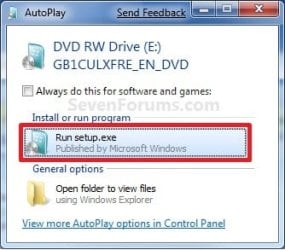
A) While in Windows 7 SP1, insert your retail Windows 7 SP1 installation DVD into the DVD drive, or connect your Windows 7 with SP1 installation USB thumb drive, and click on the Run setup.exe option in AutoPlay. (see screenshot below)
NOTE: If the AutoPlay window does not open, then open the drive folder in Computer and run the setup.exe file.AutoPlay.jpg
B) Go to Go to step 7 below.
6. Repair Installed Windows 7 without SP1 using Windows 7 without SP1 DVD/USB

   Note
If you do not have a Windows 7 without SP1 installation DVD/USB, then you can download the latest official Windows 7 Professional or Home Premium without SP1 ISO file here: Microsoft: Windows 7 Direct Download Links, and use Windows 7 USB-DVD Download Tool to create a bootable DVD or USB flash drive with the ISO to do the repair install from within Windows 7 using this step.

It is preferred to have SP1 installed on your PC and to use step 4 or step 5 above to do a repair install with instead though.

A) While in Windows 7 SP1 installed, insert your retail Windows 7 installation DVD into the DVD drive, or connect your Windows 7 installation USB thumb drive, and click on the Run setup.exe option in AutoPlay. (see screenshot below)
NOTE: If the AutoPlay window does not open, then open the drive folder in Computer and run the setup.exe file.AutoPlay.jpg
B) Go to Go to step 7 below.
7. If prompted by UAC, then click on Yes.

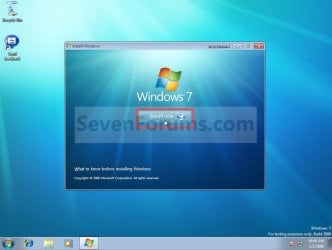
8. Click on the Install Now button to start the installation. (see screenshot below)Step1.jpg
9. If prompted, uncheck the I want to help make Windows installation better box (unless you would like to :) ), and click on the Go online to get the latest updates for installation option. (see screenshot below)Step2.jpg
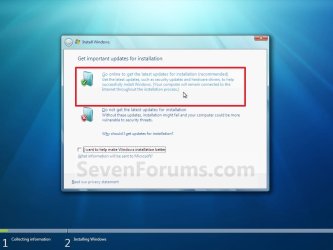
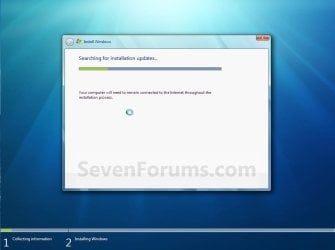
A) Windows 7 will now check online for and install any available installation updates. (see screenshots below)Step2A.jpg

Step2B.jpg

10. Check the I accept the license terms box, and click on Next. (see screenshot below)Step3.jpg
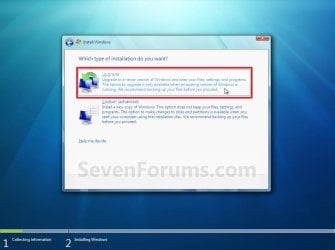
11. Click on the Upgrade option. (see screenshot below)Step4.jpg
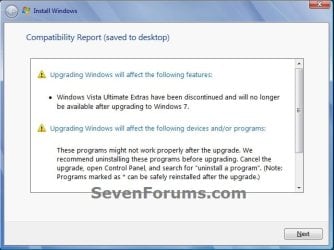
12. Windows will now check for any compatibility issues. If any are found like in the example below, click on the red X to cancel the repair install and close this "Install Windows" window, take care of any found issues (ex: uninstall any incompatible program), then restart the repair install process over again.Compatibility-Report.jpg
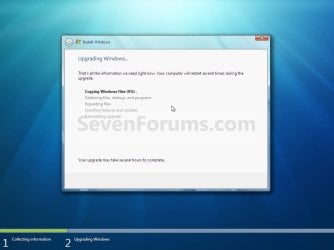
13. The installation of Windows 7 will now begin. (see screenshot below)
NOTE: During the installation process, your screen may flash and computer will restart a few times.Step5.jpg
14. After the final restart, you will see this screen for a moment. (see screenshot below)Step6.jpg
15. Type in your Windows 7 product key number. (see screenshot below step 16)

16. Uncheck the Automatically activate Windows when I'm online box unchecked, then click on the Next button. (see screenshot below)
NOTE: You can activate Windows 7 later after you make sure it is running properly. (see step 23 below)
If you chose to automatically activate Windows online when you set up your computer, automatic activation begins trying to activate your copy of Windows three days after you log on for the first time.Step7.jpg
17. Click on Use recommended settings. (see screenshot below)

:note: You will always be able to change your Windows Update settings at anytime in Windows 7.

Step8.jpg
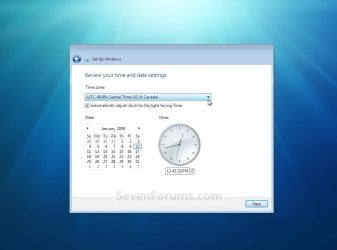
18. Select your time zone and set your time and date settings, then click on the Next button. (see screenshot below)Step9.jpg
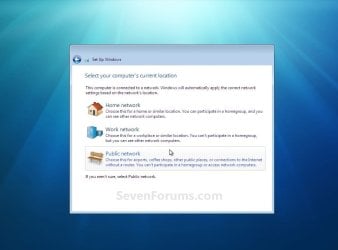
19. Click on the option for your computer's location to select the correct network location type settings to be applied for that location. (see screenshot below)
NOTE: It is best to select Public location for the best security.Step10.jpg
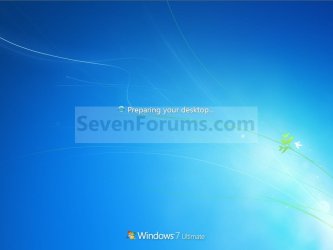
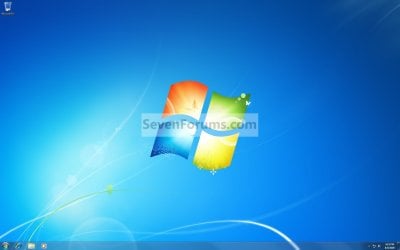
20. Windows 7 will now prepare your desktop to startup. (see screenshots below)Step11A.jpg

Desktop.jpg

21. If you used a DVD or USB to do the repair install with, then you can remove the DVD or USB when the repair install has successfully completed and you are logged in to Windows 7.

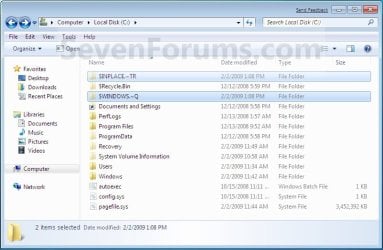
22. Check to see if you are missing any user files. If you are, then you can copy them from the C:\Windows.old or the hidden protected operating system C:\$INPLACE.~TR and C:\WINDOWS.~Q backup folders. (see screenshot below)Old_Install.jpg
23. If everything checks out in step 21, then you can run Disk Cleanup (step 5 at this link). You will need to click on the Clean up system files button first, and then could check the Files discarded by Windows upgrade, Previous Windows installations, and Windows upgrade log files boxes. (see screenshot below)
NOTE: This will delete the C:\Windows.old, C:\$INPLACE.~TR and C:\WINDOWS.~Q folders from step 21 above.Disk_Cleanup.jpg
24. Refresh your Windows Experience Index (WEI) score.

25. When finished, activate Windows 7, and make sure that your 3rd party security programs (if applicable) are enabled again.
That's it,
Shawn


Last edited:
laidbacktokyo,

You cannot use OEM installation media to do a repair install with if that is what you're using. :(
 

My Computer My Computer

At a glance

64-bit Windows 11 Pro for WorkstationsIntel i7-8700K OC'd to 5 GHz64 GB (4x16GB) G.SKILL TridentZ RGB DDR4 3600...ASUS ROG-STRIX-GTX1080TI-O11G-GAMING
Computer type
PC/Desktop
Computer Manufacturer/Model Number
Self built custom
OS
64-bit Windows 11 Pro for Workstations
CPU
Intel i7-8700K OC'd to 5 GHz
Motherboard
ASUS ROG Maximus XI Formula Z390
Memory
64 GB (4x16GB) G.SKILL TridentZ RGB DDR4 3600 MHz
Graphics Card(s)
ASUS ROG-STRIX-GTX1080TI-O11G-GAMING
Sound Card
Integrated
Monitor(s) Displays
2 x Samsung Odyssey G7 27"
Screen Resolution
2560x1440
Hard Drives
1TB Samsung 990 PRO M.2,
4TB Samsung 990 PRO PRO M.2,
TerraMaster F8 SSD Plus NAS
PSU
Seasonic Prime Titanium 850W
Case
Thermaltake Core P3
Cooling
Corsair Hydro H115i
Keyboard
Logitech wireless K800
Mouse
Logitech MX Master 4
Internet Speed
2 Gb/s Download and 100 Mb/s Upload
Antivirus
Malwarebyte Anti-Malware Premium
Browser
Google Chrome
Other Info
Logitech Z625 speaker system,
Logitech BRIO 4K Pro webcam,
HP Color LaserJet Pro MFP M477fdn,
APC SMART-UPS RT 1000 XL - SURT1000XLI,
Galaxy S23 Plus phone
laidbacktokyo their are many thing the log will indicate other than just licensed properly when the log is complete. Yours is not complete.

yep, it's surely not complete when I've pasted it here partly...
 

My Computer My Computer

At a glance

Windows 7 Ultimate x64 SP1u OEM Dell & OEM AsusIntel Core 2 T9500 2.60GHz & Core 2 Duo E7500...DDR2 - 2x4GB Hyundai SODIMM 800Mhz & 2x2GB Ge...nVIDIA Quadro FX360M & Mobo Integrated Intel4500
Computer type
Laptop
Computer Manufacturer/Model Number
Dell Laptop & Asus Desktop
OS
Windows 7 Ultimate x64 SP1u OEM Dell & OEM Asus
CPU
Intel Core 2 T9500 2.60GHz & Core 2 Duo E7500 @ 2.93GHz
Motherboard
DELL PRECISION M4300 & ASUS P5Q-EM
Memory
DDR2 - 2x4GB Hyundai SODIMM 800Mhz & 2x2GB GeIL DIMM 1066MHz
Graphics Card(s)
nVIDIA Quadro FX360M & Mobo Integrated Intel4500
Sound Card
Mobos' Integrated SigmaTel & RealTek ALC1200 8Ch HD Audio
Monitor(s) Displays
Samsung 15.4" LCD & Samsung SyncMaster 245B+ Monitor
Screen Resolution
1920x1200 both
Hard Drives
SSDs Kingston, HDDs WDC & HGST - many
PSU
DELL & Some PSU of 450W
Case
DELL & IRBIS
Cooling
Dell & Cooler Master
Keyboard
Dell & Logitech
Mouse
Logitech & Genuis
Internet Speed
100Mbps
Antivirus
N360 + MalwareBytes on both
Browser
IE11 + latest Chrome on both
laidbacktokyo,

You cannot use OEM installation media to do a repair install with if that is what you're using. :(

Shawn, it's good to hearing from you.

Yep, it's surely my genuine Dell OEM Win7 Ultimate DVD... and I've already used it a couple of times for a clean re-install of OS. Moreover, as far as I remember I've used this DVD for in-place repair a couple of times...

Also I've mentioned that this my troubled Win7 install is the Dell OEM one and DVD is Dell OEM at the very beginning of this our discussion, right?

Anyhow, I've also already tried in-place repair with the genuine M$ Win7 sp1u Ultimate MSDN DVD... with same result... I mean no result...

So what kind of any Win7 media can I use to repair my current Win7 SP1 Ultimate Dell OEM installation?

Appreciate.
 

My Computer My Computer

At a glance

Windows 7 Ultimate x64 SP1u OEM Dell & OEM AsusIntel Core 2 T9500 2.60GHz & Core 2 Duo E7500...DDR2 - 2x4GB Hyundai SODIMM 800Mhz & 2x2GB Ge...nVIDIA Quadro FX360M & Mobo Integrated Intel4500
Computer type
Laptop
Computer Manufacturer/Model Number
Dell Laptop & Asus Desktop
OS
Windows 7 Ultimate x64 SP1u OEM Dell & OEM Asus
CPU
Intel Core 2 T9500 2.60GHz & Core 2 Duo E7500 @ 2.93GHz
Motherboard
DELL PRECISION M4300 & ASUS P5Q-EM
Memory
DDR2 - 2x4GB Hyundai SODIMM 800Mhz & 2x2GB GeIL DIMM 1066MHz
Graphics Card(s)
nVIDIA Quadro FX360M & Mobo Integrated Intel4500
Sound Card
Mobos' Integrated SigmaTel & RealTek ALC1200 8Ch HD Audio
Monitor(s) Displays
Samsung 15.4" LCD & Samsung SyncMaster 245B+ Monitor
Screen Resolution
1920x1200 both
Hard Drives
SSDs Kingston, HDDs WDC & HGST - many
PSU
DELL & Some PSU of 450W
Case
DELL & IRBIS
Cooling
Dell & Cooler Master
Keyboard
Dell & Logitech
Mouse
Logitech & Genuis
Internet Speed
100Mbps
Antivirus
N360 + MalwareBytes on both
Browser
IE11 + latest Chrome on both
You would need to use a full retail version of the edition you currently have installed.
 

My Computer My Computer

At a glance

64-bit Windows 11 Pro for WorkstationsIntel i7-8700K OC'd to 5 GHz64 GB (4x16GB) G.SKILL TridentZ RGB DDR4 3600...ASUS ROG-STRIX-GTX1080TI-O11G-GAMING
Computer type
PC/Desktop
Computer Manufacturer/Model Number
Self built custom
OS
64-bit Windows 11 Pro for Workstations
CPU
Intel i7-8700K OC'd to 5 GHz
Motherboard
ASUS ROG Maximus XI Formula Z390
Memory
64 GB (4x16GB) G.SKILL TridentZ RGB DDR4 3600 MHz
Graphics Card(s)
ASUS ROG-STRIX-GTX1080TI-O11G-GAMING
Sound Card
Integrated
Monitor(s) Displays
2 x Samsung Odyssey G7 27"
Screen Resolution
2560x1440
Hard Drives
1TB Samsung 990 PRO M.2,
4TB Samsung 990 PRO PRO M.2,
TerraMaster F8 SSD Plus NAS
PSU
Seasonic Prime Titanium 850W
Case
Thermaltake Core P3
Cooling
Corsair Hydro H115i
Keyboard
Logitech wireless K800
Mouse
Logitech MX Master 4
Internet Speed
2 Gb/s Download and 100 Mb/s Upload
Antivirus
Malwarebyte Anti-Malware Premium
Browser
Google Chrome
Other Info
Logitech Z625 speaker system,
Logitech BRIO 4K Pro webcam,
HP Color LaserJet Pro MFP M477fdn,
APC SMART-UPS RT 1000 XL - SURT1000XLI,
Galaxy S23 Plus phone
You would need to use a full retail version of the edition you currently have installed.

oops... I believe that the latest M$ MSDN Win7 SP1u x64 Ultimate ISO aka
en_windows_7_ultimate_with_sp1_x64_dvd_u_677332.iso
is a full retail version. am I wrong?

btw, as mentioned I've already tried in-place repair by the above iso w/o any difference...
 

My Computer My Computer

At a glance

Windows 7 Ultimate x64 SP1u OEM Dell & OEM AsusIntel Core 2 T9500 2.60GHz & Core 2 Duo E7500...DDR2 - 2x4GB Hyundai SODIMM 800Mhz & 2x2GB Ge...nVIDIA Quadro FX360M & Mobo Integrated Intel4500
Computer type
Laptop
Computer Manufacturer/Model Number
Dell Laptop & Asus Desktop
OS
Windows 7 Ultimate x64 SP1u OEM Dell & OEM Asus
CPU
Intel Core 2 T9500 2.60GHz & Core 2 Duo E7500 @ 2.93GHz
Motherboard
DELL PRECISION M4300 & ASUS P5Q-EM
Memory
DDR2 - 2x4GB Hyundai SODIMM 800Mhz & 2x2GB GeIL DIMM 1066MHz
Graphics Card(s)
nVIDIA Quadro FX360M & Mobo Integrated Intel4500
Sound Card
Mobos' Integrated SigmaTel & RealTek ALC1200 8Ch HD Audio
Monitor(s) Displays
Samsung 15.4" LCD & Samsung SyncMaster 245B+ Monitor
Screen Resolution
1920x1200 both
Hard Drives
SSDs Kingston, HDDs WDC & HGST - many
PSU
DELL & Some PSU of 450W
Case
DELL & IRBIS
Cooling
Dell & Cooler Master
Keyboard
Dell & Logitech
Mouse
Logitech & Genuis
Internet Speed
100Mbps
Antivirus
N360 + MalwareBytes on both
Browser
IE11 + latest Chrome on both
Yeah, that would be a retail copy.

The main problem is that there's no official ISO available that will be as updated as a full updated Windows 7 installation.

This pretty much leaves a clean install. :(
 

My Computer My Computer

At a glance

64-bit Windows 11 Pro for WorkstationsIntel i7-8700K OC'd to 5 GHz64 GB (4x16GB) G.SKILL TridentZ RGB DDR4 3600...ASUS ROG-STRIX-GTX1080TI-O11G-GAMING
Computer type
PC/Desktop
Computer Manufacturer/Model Number
Self built custom
OS
64-bit Windows 11 Pro for Workstations
CPU
Intel i7-8700K OC'd to 5 GHz
Motherboard
ASUS ROG Maximus XI Formula Z390
Memory
64 GB (4x16GB) G.SKILL TridentZ RGB DDR4 3600 MHz
Graphics Card(s)
ASUS ROG-STRIX-GTX1080TI-O11G-GAMING
Sound Card
Integrated
Monitor(s) Displays
2 x Samsung Odyssey G7 27"
Screen Resolution
2560x1440
Hard Drives
1TB Samsung 990 PRO M.2,
4TB Samsung 990 PRO PRO M.2,
TerraMaster F8 SSD Plus NAS
PSU
Seasonic Prime Titanium 850W
Case
Thermaltake Core P3
Cooling
Corsair Hydro H115i
Keyboard
Logitech wireless K800
Mouse
Logitech MX Master 4
Internet Speed
2 Gb/s Download and 100 Mb/s Upload
Antivirus
Malwarebyte Anti-Malware Premium
Browser
Google Chrome
Other Info
Logitech Z625 speaker system,
Logitech BRIO 4K Pro webcam,
HP Color LaserJet Pro MFP M477fdn,
APC SMART-UPS RT 1000 XL - SURT1000XLI,
Galaxy S23 Plus phone
Yeah, that would be a retail copy.

The main problem is that there's no official ISO available that will be as updated as a full updated Windows 7 installation.

This pretty much leaves a clean install. :(

yeah... I've read your earlier discussion on a clean install as only real option due to out of date win7 sp1 iso...

maybe I need win7 sp1 iso with at least most of all recent updates slipstreamed...

or to remove sp1 first... if possible...

btw, here are some ideas to consider: https://www.winhelp.us/non-destructive-reinstall-of-windows-7.html

anyhow, as far as I remember I've used DVD for in-place repair a couple of times...
so the current fails/problems seem to be linked to this year Windows Update System upgrading and all that fuss to welcome the damn free win10. f**k m$!
 

My Computer My Computer

At a glance

Windows 7 Ultimate x64 SP1u OEM Dell & OEM AsusIntel Core 2 T9500 2.60GHz & Core 2 Duo E7500...DDR2 - 2x4GB Hyundai SODIMM 800Mhz & 2x2GB Ge...nVIDIA Quadro FX360M & Mobo Integrated Intel4500
Computer type
Laptop
Computer Manufacturer/Model Number
Dell Laptop & Asus Desktop
OS
Windows 7 Ultimate x64 SP1u OEM Dell & OEM Asus
CPU
Intel Core 2 T9500 2.60GHz & Core 2 Duo E7500 @ 2.93GHz
Motherboard
DELL PRECISION M4300 & ASUS P5Q-EM
Memory
DDR2 - 2x4GB Hyundai SODIMM 800Mhz & 2x2GB GeIL DIMM 1066MHz
Graphics Card(s)
nVIDIA Quadro FX360M & Mobo Integrated Intel4500
Sound Card
Mobos' Integrated SigmaTel & RealTek ALC1200 8Ch HD Audio
Monitor(s) Displays
Samsung 15.4" LCD & Samsung SyncMaster 245B+ Monitor
Screen Resolution
1920x1200 both
Hard Drives
SSDs Kingston, HDDs WDC & HGST - many
PSU
DELL & Some PSU of 450W
Case
DELL & IRBIS
Cooling
Dell & Cooler Master
Keyboard
Dell & Logitech
Mouse
Logitech & Genuis
Internet Speed
100Mbps
Antivirus
N360 + MalwareBytes on both
Browser
IE11 + latest Chrome on both
I wish it was that easy, but you won't be able to use slipstream installation media either. :(

That link is basically the same as this tutorial for a repair install with a different name attached to it.
 

My Computer My Computer

At a glance

64-bit Windows 11 Pro for WorkstationsIntel i7-8700K OC'd to 5 GHz64 GB (4x16GB) G.SKILL TridentZ RGB DDR4 3600...ASUS ROG-STRIX-GTX1080TI-O11G-GAMING
Computer type
PC/Desktop
Computer Manufacturer/Model Number
Self built custom
OS
64-bit Windows 11 Pro for Workstations
CPU
Intel i7-8700K OC'd to 5 GHz
Motherboard
ASUS ROG Maximus XI Formula Z390
Memory
64 GB (4x16GB) G.SKILL TridentZ RGB DDR4 3600 MHz
Graphics Card(s)
ASUS ROG-STRIX-GTX1080TI-O11G-GAMING
Sound Card
Integrated
Monitor(s) Displays
2 x Samsung Odyssey G7 27"
Screen Resolution
2560x1440
Hard Drives
1TB Samsung 990 PRO M.2,
4TB Samsung 990 PRO PRO M.2,
TerraMaster F8 SSD Plus NAS
PSU
Seasonic Prime Titanium 850W
Case
Thermaltake Core P3
Cooling
Corsair Hydro H115i
Keyboard
Logitech wireless K800
Mouse
Logitech MX Master 4
Internet Speed
2 Gb/s Download and 100 Mb/s Upload
Antivirus
Malwarebyte Anti-Malware Premium
Browser
Google Chrome
Other Info
Logitech Z625 speaker system,
Logitech BRIO 4K Pro webcam,
HP Color LaserJet Pro MFP M477fdn,
APC SMART-UPS RT 1000 XL - SURT1000XLI,
Galaxy S23 Plus phone
The worst thing that I truly hate is to do/restore all my personal settings after z clean win7 install. So I yet stay away from clean install when I'll loose all precious settings in this case..


Just my two bobs worth I always save my stuff to a stick especially downloads I have for my programs - makes a clean install just about bearable;)
 

My Computer My Computer

At a glance

Desk1 7 Home Prem / Desk2 10 Pro / Main lap A...Desk1 i5 3750K / Laptop i7 GTX 860M / Desk2 i...Desk1 8GB (1866) / Desk2 16GB (1333) / Laptop...Desk 1& 2NVidia GTX 650 & Laptops on board Intel
Computer type
PC/Desktop
Computer Manufacturer/Model Number
Own build (new) Desk1 / Asus ROG Win 7 / Desk2 1st build
OS
Desk1 7 Home Prem / Desk2 10 Pro / Main lap Asus ROG 10 Pro 2 laptop Toshiba 7 Pro Asus P2520 7 & 10
CPU
Desk1 i5 3750K / Laptop i7 GTX 860M / Desk2 i5 2500
Motherboard
Desk1 Asus P877-V / Desk2 Gigabyte H67 UD3H / Laptop ?
Memory
Desk1 8GB (1866) / Desk2 16GB (1333) / Laptop 8Gb DDR3
Graphics Card(s)
Desk 1& 2NVidia GTX 650 & Laptops on board Intel
Sound Card
Desk 1 & 2 -XONAR DG Realtek High Def audio Laptop
Monitor(s) Displays
Desk 1 Benq HD 2450 / Desk2 Philips 24" / Laptop 17.5"
Screen Resolution
1920x1080 D1 & D2 & Laptop 1
Hard Drives
Desk1 Samsung 120GB 830 SSD
Asus ROG 256GB 850 Pro SSD
Desk2 Samsung 840 256 SSD
Toshiba 120GB EVO
PSU
Desk 1 Corsair HX 1050/ Laptop ? / Desk 2 Corsair HX 650
Case
Desk 1 Cooler HAF XM ? Toshiba laptop / Desk2 Coolermaster
Cooling
Fans on all Desk1 -2 Desk2 - all Coolermasters 5 Laptop ?
Keyboard
Desk 1 MS Sidewinder X6 Desk 2 MS Sidewinder X 4
Mouse
Desk 1&2 - Gigabyte MS 900 gamer - laptop - Logitec wireless
Internet Speed
ADSL2+
Other Info
One other Desktop (tester) and spare Toshba laptop both with SSD's
Running Kaspersky 2016 ISS on all machines config'd identically
Logitec audio stereo systems on each machine (x3)
Canon MG5250MFC
Router/modem TP-Link running WPA2SK
Looking at this tutorial it sounds like maybe I am violating one of the specifics for the version needed, but I don't fully understand that or know if my version is the wrong one. I have a W7 64 bit desktop. I was losing the HD so I cloned it to a new one which will boot fine. This OS has never had anything done to tune it up and since it may have had some errors with the drive going bad I feel this is a good time to freshen it up before I do some program and personalization stuff. I wanted to do an in place upgrade install. I have a USB I made bootable that has all W7 versions. I got the link for the download I used from sevensforum a couple months ago, possibly from a fairly recent tutorial or post from a regular member. File is named Windows_7_AIO_SP1_x64_x86.ISO. I used eicfg to remove the single version restriction and rufus to make a bootable USB. When I look at the ei.cfg file is has no specific version listed. (I have used this to reinstall W7 in a laptop (Home Premium version) just fine.)

I start up W7 then put in the USB and click setup. All goes great until it checks compatibility. It says I can’t upgrade 64 to 32. And the next line says I can’t upgrade 32 to 64! Along with some other info on some network drivers that may not work. Of course it won’t let me move beyond that screen. Right on my pc properties it says Ultimate 64 bit and I am selecting Ultimate 64 bit on the install select screen. If I change compatibility to vista I believe it has the same errors. I tried W7 for compatibility and that tells me I need W7 with SP1. Right on my properties screen it says SP1. I look through the list of updates in two different ways and it is not there, which is surprising since this pc was built for his family by a pc tech in 2011. I tried downloading and installing SP1 and it says it is already there. Getting weird. I cannot seem to get any way to make this work even trying uninstalling SP1 so I can reinstall it. I had wondered if the builder had some kind of W7 install that already had SP1 in it so it doesn’t show as an update. Since this USB install is wanting me to already have SP1, maybe that means that this version does not have SP1 already, even though the file name seems to imply that. Should I just can this version and get a different download to re do this? I really like the idea of having a universal install USB ready to go, but this one may not be that.

Any idea how to make this work or should I just do a do over? Thanks for any help.
 

My Computer My Computer

At a glance

W7 Pro 64Ryzen 1500XG Skill 2400 - 8GBHD 6450
Computer type
PC/Desktop
Computer Manufacturer/Model Number
Custom
OS
W7 Pro 64
CPU
Ryzen 1500X
Motherboard
Gigabyte AX370 - Gaming
Memory
G Skill 2400 - 8GB
Graphics Card(s)
HD 6450
Sound Card
Realtek onboard
Monitor(s) Displays
Dell 19 square, Dell 17 square, Dell 15 square, Element 24
Hard Drives
Samsung 970 nvme 120 GB, WD 1TB 7200
Keyboard
MS ERGO 4000 mostly
Mouse
Dell standard optical
Internet Speed
15 Mbps
Antivirus
AVG, MS firewall
Browser
firefox mostly
Hello helpful55,

I'm afraid that the USB will need to be the exact same as what you currently have installed. A universal AIO USB will not work for a repair install like it will for a clean install. :(
 

My Computer My Computer

At a glance

64-bit Windows 11 Pro for WorkstationsIntel i7-8700K OC'd to 5 GHz64 GB (4x16GB) G.SKILL TridentZ RGB DDR4 3600...ASUS ROG-STRIX-GTX1080TI-O11G-GAMING
Computer type
PC/Desktop
Computer Manufacturer/Model Number
Self built custom
OS
64-bit Windows 11 Pro for Workstations
CPU
Intel i7-8700K OC'd to 5 GHz
Motherboard
ASUS ROG Maximus XI Formula Z390
Memory
64 GB (4x16GB) G.SKILL TridentZ RGB DDR4 3600 MHz
Graphics Card(s)
ASUS ROG-STRIX-GTX1080TI-O11G-GAMING
Sound Card
Integrated
Monitor(s) Displays
2 x Samsung Odyssey G7 27"
Screen Resolution
2560x1440
Hard Drives
1TB Samsung 990 PRO M.2,
4TB Samsung 990 PRO PRO M.2,
TerraMaster F8 SSD Plus NAS
PSU
Seasonic Prime Titanium 850W
Case
Thermaltake Core P3
Cooling
Corsair Hydro H115i
Keyboard
Logitech wireless K800
Mouse
Logitech MX Master 4
Internet Speed
2 Gb/s Download and 100 Mb/s Upload
Antivirus
Malwarebyte Anti-Malware Premium
Browser
Google Chrome
Other Info
Logitech Z625 speaker system,
Logitech BRIO 4K Pro webcam,
HP Color LaserJet Pro MFP M477fdn,
APC SMART-UPS RT 1000 XL - SURT1000XLI,
Galaxy S23 Plus phone
Hello helpful55,

I'm afraid that the USB will need to be the exact same as what you currently have installed. A universal AIO USB will not work for a repair install like it will for a clean install. :(

All right thank you. It’s not the end of the world, I will just make sure to do a good OS/program backup of my pc’s after I get it all to or near 100%. I wasn’t aware that was the case, but a repair is certainly a somewhat different animal so that makes sense. Although they didn’t expand at all like you did MS also said I need to use a matching OS file. I will get a same version file and use it. When I looked at the link MS gave for the download I noticed mention of the volume licensing version. I really think that is what this has since the builder of this pc was some kind of pc tech worker so he may have used volume licensing from work. I compared some of the slmgr info on CMD prompt and it says – Windows ® 7, OEM_SLP channel, which matches my main W7 pc which I know has a volume license version. Would that make any difference for this or do I just need a W7 Ultimate 64 bit file? I don’t want to end up with activation problems although I suppose MS would help me with that.

Also I am not any pc expert, but I have always felt that an OS can end up with errors or problems especially with hard drive damage and I don’t know if scannow can fix everything where a repair install should. I’d rather not do the full clean install unless necessary. Am I right that this is something I should be using like this or is it a waste? I have the time (as long as it doesn’t become a hassle like sometimes they do). Thanks for all your help Brink.
 

My Computer My Computer

At a glance

W7 Pro 64Ryzen 1500XG Skill 2400 - 8GBHD 6450
Computer type
PC/Desktop
Computer Manufacturer/Model Number
Custom
OS
W7 Pro 64
CPU
Ryzen 1500X
Motherboard
Gigabyte AX370 - Gaming
Memory
G Skill 2400 - 8GB
Graphics Card(s)
HD 6450
Sound Card
Realtek onboard
Monitor(s) Displays
Dell 19 square, Dell 17 square, Dell 15 square, Element 24
Hard Drives
Samsung 970 nvme 120 GB, WD 1TB 7200
Keyboard
MS ERGO 4000 mostly
Mouse
Dell standard optical
Internet Speed
15 Mbps
Antivirus
AVG, MS firewall
Browser
firefox mostly
You shouldn't have any activation issues with a repair install. :)
 

My Computer My Computer

At a glance

64-bit Windows 11 Pro for WorkstationsIntel i7-8700K OC'd to 5 GHz64 GB (4x16GB) G.SKILL TridentZ RGB DDR4 3600...ASUS ROG-STRIX-GTX1080TI-O11G-GAMING
Computer type
PC/Desktop
Computer Manufacturer/Model Number
Self built custom
OS
64-bit Windows 11 Pro for Workstations
CPU
Intel i7-8700K OC'd to 5 GHz
Motherboard
ASUS ROG Maximus XI Formula Z390
Memory
64 GB (4x16GB) G.SKILL TridentZ RGB DDR4 3600 MHz
Graphics Card(s)
ASUS ROG-STRIX-GTX1080TI-O11G-GAMING
Sound Card
Integrated
Monitor(s) Displays
2 x Samsung Odyssey G7 27"
Screen Resolution
2560x1440
Hard Drives
1TB Samsung 990 PRO M.2,
4TB Samsung 990 PRO PRO M.2,
TerraMaster F8 SSD Plus NAS
PSU
Seasonic Prime Titanium 850W
Case
Thermaltake Core P3
Cooling
Corsair Hydro H115i
Keyboard
Logitech wireless K800
Mouse
Logitech MX Master 4
Internet Speed
2 Gb/s Download and 100 Mb/s Upload
Antivirus
Malwarebyte Anti-Malware Premium
Browser
Google Chrome
Other Info
Logitech Z625 speaker system,
Logitech BRIO 4K Pro webcam,
HP Color LaserJet Pro MFP M477fdn,
APC SMART-UPS RT 1000 XL - SURT1000XLI,
Galaxy S23 Plus phone
...This OS has never had anything done to tune it up and since it may have had some errors with the drive going bad I feel this is a good time to freshen it up before I do some program and personalization stuff...
IMO your premise may be flawed i.e. if it's working well then just leave it alone. In all the years I have been working with many Windows PCs I have only done a Repair Install once, and if I ever did a computer reinstall from scratch to fix a problem I don't recall it. You may be much better off to focus on any issues you may have with the PC and do specific repairs/tweaks rather than a general Repair Install.

BTW also IMO just because your drive may have had problems does not automatically mean any of those problems were transferred to the new drive. The copy process would likely do error-correction (unless you got specific messages that EC did not work?).
 

My Computer My Computer

At a glance

Windows 7 Professional 64bitIntel Core i7 4600M @ 2.90GHz16.0GB Dual-Channel DDR3 @ 797MHz (11-11-11-28)Intel HD Graphics 4600 (Dell) 2048MB ATI AMD ...
Computer type
Laptop
Computer Manufacturer/Model Number
Dell Latitude E6540 Laptop
OS
Windows 7 Professional 64bit
CPU
Intel Core i7 4600M @ 2.90GHz
Motherboard
Dell Inc. 0CYT5F (SOCKET 0)
Memory
16.0GB Dual-Channel DDR3 @ 797MHz (11-11-11-28)
Graphics Card(s)
Intel HD Graphics 4600 (Dell) 2048MB ATI AMD Radeon HD 8790M
Sound Card
Realtek High Definition Audio
Monitor(s) Displays
HP ZR30w (2560x1600@60Hz)
Hard Drives
256GB LITEONIT LMT-256M6M-41 mm SATA (SSD)
1TB Samsung SSD 860 EVO mSATA SATA (SSD)
2TB USB 3.0 USB Device
115GB SanDisk Ultra Fit USB
Other Info
Multiple Dell E-Port Plus II Port Replicator/Docking Stations 0Y72NH USB 3.0 + 130W AC Adapters
Can I use a HomePremium disk to do a OEM Professional repair?

Hi,

I have an OEM installation of Win 7 Professional SP1 X64 on my Toshiba laptop. I have the OEM product key for it, but not a installation disk.

I have a copy of a WIN 7 Home Premium SP1 X64 installation disk, also with a product key.

Can I use the Home Premium disk to do a Repair Install on my Win 7 Pro system? Can I follow the instructions on Page 1 of this thread? Are there any special problems I should be aware of before I start?

Thank you in advance.

Judy
 

My Computer My Computer

At a glance

Win 7 Pro SP1 X64, OEM installation2.4 GH Intel Core i7-4700MQ16296 MB in two modulesNVIDIA GeForec GT 740M
Computer type
Laptop
Computer Manufacturer/Model Number
Toshiba Satellite S50-A
OS
Win 7 Pro SP1 X64, OEM installation
CPU
2.4 GH Intel Core i7-4700MQ
Motherboard
Toshiba VG10S
Memory
16296 MB in two modules
Graphics Card(s)
NVIDIA GeForec GT 740M
Hard Drives
1 TB SSHD (Hybrid)
Antivirus
MalwareBytes and Security Essentials
Browser
Chrome and IE10
Hello Judy, and welcome to Seven Forums.

I'm afraid not. The installation media will need to be for the same edition as what you currently have installed. :(
 

My Computer My Computer

At a glance

64-bit Windows 11 Pro for WorkstationsIntel i7-8700K OC'd to 5 GHz64 GB (4x16GB) G.SKILL TridentZ RGB DDR4 3600...ASUS ROG-STRIX-GTX1080TI-O11G-GAMING
Computer type
PC/Desktop
Computer Manufacturer/Model Number
Self built custom
OS
64-bit Windows 11 Pro for Workstations
CPU
Intel i7-8700K OC'd to 5 GHz
Motherboard
ASUS ROG Maximus XI Formula Z390
Memory
64 GB (4x16GB) G.SKILL TridentZ RGB DDR4 3600 MHz
Graphics Card(s)
ASUS ROG-STRIX-GTX1080TI-O11G-GAMING
Sound Card
Integrated
Monitor(s) Displays
2 x Samsung Odyssey G7 27"
Screen Resolution
2560x1440
Hard Drives
1TB Samsung 990 PRO M.2,
4TB Samsung 990 PRO PRO M.2,
TerraMaster F8 SSD Plus NAS
PSU
Seasonic Prime Titanium 850W
Case
Thermaltake Core P3
Cooling
Corsair Hydro H115i
Keyboard
Logitech wireless K800
Mouse
Logitech MX Master 4
Internet Speed
2 Gb/s Download and 100 Mb/s Upload
Antivirus
Malwarebyte Anti-Malware Premium
Browser
Google Chrome
Other Info
Logitech Z625 speaker system,
Logitech BRIO 4K Pro webcam,
HP Color LaserJet Pro MFP M477fdn,
APC SMART-UPS RT 1000 XL - SURT1000XLI,
Galaxy S23 Plus phone
Hello Judy, and welcome to Seven Forums.

I'm afraid not. The installation media will need to be for the same edition as what you currently have installed. :(

Hi Brink,

Thanks for the quick comment and reply. :)

Here's the history behind my questions, and a work-around that I came up with.

My Toshiba came with an pre-installed WIN7 Pro SP1 x64 on hard-drive, it did not come with a a WIN7 OS disk. My product key is an OEM product key.

When I tried to download an .iso from Microsoft ( https://www.microsoft.com/en-us/software-download/windows7 ) the webpage wouldn't let me download an iso, because it requires a retail product key.

What to do? Here's the workaround I came up with: I also have a copy of Win7 Home, with a retail product key. I used that product key to down load an iso from Microsoft.

Then I removed the ei.cfg file from the .iso. Based on what I've read, this makes the iso universal. To accomplish this, I used an "ei.cfg Removal Utility" from winisoutils - Windows ISO Disc Image Utilities ). I ran Malwarebyes and Security Essentials scans to detect any malware or virus during and after the download. So far it seems the software was clean.

I burned the universal (I hope!) WIN7 X64 SP1 .iso to disk.

I've done a complete image backup of my hard-drive's data and system partitions using Macrium Reflect.

Am I ready to follow the procedures on page 1 of this thread?
Any advice or comments before I start the repair installation process?

Thanks in advance.

Judy
 

My Computer My Computer

At a glance

Win 7 Pro SP1 X64, OEM installation2.4 GH Intel Core i7-4700MQ16296 MB in two modulesNVIDIA GeForec GT 740M
Computer type
Laptop
Computer Manufacturer/Model Number
Toshiba Satellite S50-A
OS
Win 7 Pro SP1 X64, OEM installation
CPU
2.4 GH Intel Core i7-4700MQ
Motherboard
Toshiba VG10S
Memory
16296 MB in two modules
Graphics Card(s)
NVIDIA GeForec GT 740M
Hard Drives
1 TB SSHD (Hybrid)
Antivirus
MalwareBytes and Security Essentials
Browser
Chrome and IE10
Judy,

It's certainly worth giving a try. If it doesn't like the ISO, the repair install will just fail and revert back to where you are now.
 

My Computer My Computer

At a glance

64-bit Windows 11 Pro for WorkstationsIntel i7-8700K OC'd to 5 GHz64 GB (4x16GB) G.SKILL TridentZ RGB DDR4 3600...ASUS ROG-STRIX-GTX1080TI-O11G-GAMING
Computer type
PC/Desktop
Computer Manufacturer/Model Number
Self built custom
OS
64-bit Windows 11 Pro for Workstations
CPU
Intel i7-8700K OC'd to 5 GHz
Motherboard
ASUS ROG Maximus XI Formula Z390
Memory
64 GB (4x16GB) G.SKILL TridentZ RGB DDR4 3600 MHz
Graphics Card(s)
ASUS ROG-STRIX-GTX1080TI-O11G-GAMING
Sound Card
Integrated
Monitor(s) Displays
2 x Samsung Odyssey G7 27"
Screen Resolution
2560x1440
Hard Drives
1TB Samsung 990 PRO M.2,
4TB Samsung 990 PRO PRO M.2,
TerraMaster F8 SSD Plus NAS
PSU
Seasonic Prime Titanium 850W
Case
Thermaltake Core P3
Cooling
Corsair Hydro H115i
Keyboard
Logitech wireless K800
Mouse
Logitech MX Master 4
Internet Speed
2 Gb/s Download and 100 Mb/s Upload
Antivirus
Malwarebyte Anti-Malware Premium
Browser
Google Chrome
Other Info
Logitech Z625 speaker system,
Logitech BRIO 4K Pro webcam,
HP Color LaserJet Pro MFP M477fdn,
APC SMART-UPS RT 1000 XL - SURT1000XLI,
Galaxy S23 Plus phone
Sounds like you did the right thing, Judy.

It is possible there will be some updates in your current installation that may prevent a repair install.

The only way to find out is to try.

It is worth creating some space on your Windows partition , move any personal files to a different partition, if possible. You need 20gb free space as a minimum.

Also disable your antivirus and any startup programs, just in case they interfere.

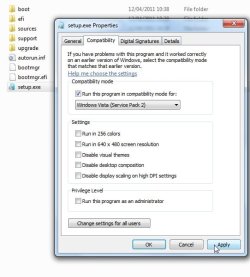
If necessary, you can run setup in compatibility mode. Rt click setup.exe, select properties and select Vista sp2.Apply, OK.

setup-comaptibility.jpg
 

My Computers My Computers

  • At a glance

    7 X64i5 84002x8gb 3200mhz
    Computer type
    PC/Desktop
    OS
    7 X64
    CPU
    i5 8400
    Motherboard
    gigabyte b365m ds3h
    Memory
    2x8gb 3200mhz
    Hard Drives
    various
    PSU
    pure power 11 400w cm
    Case
    Coolermaster
    Cooling
    cryorig m9i
  • At a glance

    7x64g54008gb ddr4 2400
    Computer type
    PC/Desktop
    OS
    7x64
    CPU
    g5400
    Motherboard
    ga b365m ds3h
    Memory
    8gb ddr4 2400
    PSU
    xfx pro 450w
Slogging slowly along...

I started the repair installation at 11 am,

Phase 1: Compatibility checks
.... and ran into some compatibility issues. There were 3 Kindle Fire USB drivers that were reported as incompatible by the installation. The installation told me to uninstall them and restart the installation. Then the installation program closed itself.

I searched in Control Panel > Device Manager but couldn't find anything that matched the descriptions given by the installation: kindle adb driver, plus two others (I forget their descriptions now)

I googled WIN7 upgrade and found a handful of references to difficulties removing drivers for Kindle Fire devices. But no solutions. So I went looking for a utility that would list device drives... and found USBDeview.exe

I downloaded USBDeview.exe from View any installed/connected USB device on your system . this utility constructs a list of all the devices on the machine and the detailed properties of each device (I used Malwarebytes and Secruity Essentials to check for malware and it reported clean.)

I used the search function in USBDeview and was able to find the device drivers and delete them. The information in the "properties" of the device driver matched the information provided by Win7 install.

I restarted the computer and restarted Installation. But the program found the same incompatible devices and shut itself down.

So I did a "shutdown", followed by a "cold" start, rather than a "restart." When I restarted the installation program, it was able to complete the compatibility check successfully.

The time was 11:40 am. It had taken me 40 minutes to track down the incompatible device drivers.

Phase 2: Expanding Windows Files". Elapsed time approx. 3.5 hours.
At about 12:45 it started "Expanding Windows files". At 12:54 it got "stuck" at 18%. Nothing appeared to be happening. Finally at 1:03 pm it said it needed to restart the computer before expanding more files.

It was still "stuck" at 18% when it restarted at 1:05.
It was cycleing between the following two meassages:
"Gathering additional information before expanding files"
and
"18% complete"

At 2:24 it was still stuck at 18%. This stage finally completed successfully after about 3.5-4 hours,

Phase 3: "Installing features and updates"
No problems and it went so quickly that it was done before I checked on it.

Phase 4: Transferring files, setting and programs. - Elapsed time for this stage was approx. 5.5 hours.
It was stuck at 32% for the first 1.5 hours, and then jumped to 62%, where it was "stuck" for several hours.

Total time for the repair to be processed: 11 hours.

I'll let you know how well (or not) it's running tomorrow.

Judy
 

My Computer My Computer

At a glance

Win 7 Pro SP1 X64, OEM installation2.4 GH Intel Core i7-4700MQ16296 MB in two modulesNVIDIA GeForec GT 740M
Computer type
Laptop
Computer Manufacturer/Model Number
Toshiba Satellite S50-A
OS
Win 7 Pro SP1 X64, OEM installation
CPU
2.4 GH Intel Core i7-4700MQ
Motherboard
Toshiba VG10S
Memory
16296 MB in two modules
Graphics Card(s)
NVIDIA GeForec GT 740M
Hard Drives
1 TB SSHD (Hybrid)
Antivirus
MalwareBytes and Security Essentials
Browser
Chrome and IE10
Back
Top