Enabling Custom Themes - Windows 7

How to Enable Custom Themes without Modifying System Files


   Information
This will show you how to enable and use custom themes without modifying system files. This method (in the form of a runnable service) was created and maintained by Rafael Rivera at Within Windows
   Note
This method can be used on Windows XP Service Pack 2-3, Windows Vista (All Service Packs), and Windows 7
   Warning
The UxStyle installer checks to see if typical patched files (like uxtheme.dll) have been patched. If they have, the installer will fail and you must replace these patched files with the original Windows' copies. Check the Frequently Asked Questions part of the tutorial for help with resolving this issue


Here's How:
1. Disable User Account Control (this is only temporary, Windows Vista and 7 only)

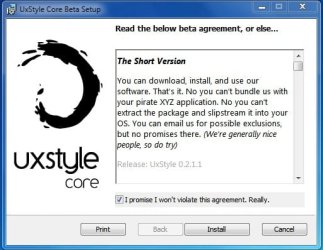
2. Download UxStyle Core Beta here and save the file to a meaningful location (such as the desktop)
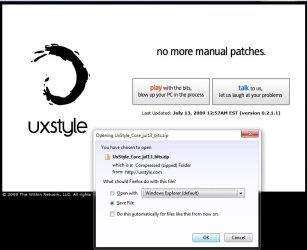
UxStyle.jpg
3. Extract the files and run the installer that matches your architecture: x86 or x64 (In this example I will be running the x64 installer)
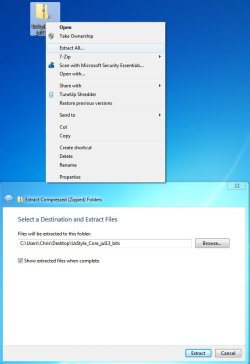
UxStyle2.jpg
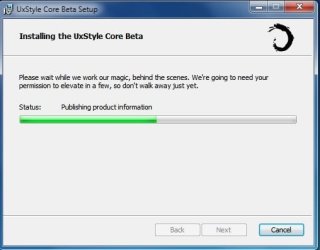
4. Follow the onscreen instructions
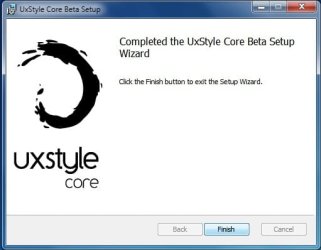
UxStyle3.jpg

UxStyle4.jpg

UxStyle5.jpg
5. Reboot the computer

6. Enable User Account Control again (Only Windows Vista and 7 users)

Frequently Asked Questions


Q: Exactly how is this different from using utilities like the universal patcher?

A: This program installs a service called UnsignedThemesSvc that takes less than a MB of RAM (520K for me on x64 in the screen shot below). The process will *trick* Windows into thinking all themes are signed thus allowing any installed custom theme to run. The patch modifies system files that could potentially end up being corrupted in the process, resulting in a repair install or a format
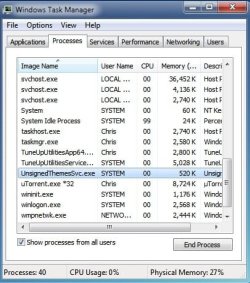

UxStyle6.jpg


Q: I installed the program but I can't see the process nor can I use a theme...help!
A: This normally is the result of not turning off UAC completely before installing the program. Uninstall UxStyle Core Beta from Programs and Features, restart the computer, turn off UAC, restart the computer, install UxStyle Core Beta, restart the computer. Your theme should work then.

Q: I tried running the installer but it keeps telling me that my subsystem has been tampered with...help!
A: This occurs when you have attempted to apply a patch to system files such as uxtheme.dll. To remedy this (in 95% of all scenarios) you must open a command prompt (run as Administrator) and execute the following command: sfc /scannow. After it finishes you should be able to run the installer for the program with no issue. See Run as Adminstrator and SFC /SCANNON Command - System File Checker in Related Links at the top for more info

Q: Okay, I got UxStyle Core running...now what?
A: The fun part...install some themes! Manually installing themes is easy...extract the theme to C:\Windows\Resources\Themes and choose it under the Installed Themes segment in Personalization (See tutorials above in Related Links to get more info on this)!

Q: Where can I find custom themes?
A: Some places to look would be in the Customization area of SevenForums and using the search terms "Windows 7 themes" on deviantART. You may also wish to contact members who hold the GFX Team badge as some of them are currently making themes or have released them


Hope it helps,
Chris


Attachments

Last edited by a moderator:
The UxStyle process won't show up on my task manager, and my new theme won't work. At first I installed it without turning off the UAC, which was the problem, but then I followed all the steps to fix it and it still won't work. I uninstalled, rebooted, turned off UAC, rebooted, installed, and rebooted, but it still doesn't show up. Anything I'm doing wrong?

Take a look in Control Panel. Is UxStyle Core Beta listed there?

Under the uninstall/change program list? It is, yes.

Good. Then it is installed. It won't show up in task manager's Application's Tab when it's running, as it is not a running application in the classic sense.

Since UxStyle is installed, that means the problem is either a.) a faulty theme, or b.) an incorrectly installed theme. Have you installed many themes before Windows 7?
 

My Computer

Computer Manufacturer/Model Number
me / #1
OS
windows 7 x64 Home Premium
CPU
intel q6600
Motherboard
gigbyte ga ep45 ud3l
Memory
g.skill 8gb ddr2 1066 (pc2 8500)
Graphics Card(s)
evga geforce 9800 gtx 512 mb
Screen Resolution
1680 x 1050
Hard Drives
wd caviar black 500 gb
wd caviar black 1tb
wd elements 1tb external hd x2
PSU
raidmax 500w
Case
smilodon (yes, t'was the pretty blue lites that got me!)
Take a look in Control Panel. Is UxStyle Core Beta listed there?

Under the uninstall/change program list? It is, yes.

Good. Then it is installed. It won't show up in task manager's Application's Tab when it's running, as it is not a running application in the classic sense.

Since UxStyle is installed, that means the problem is either a.) a faulty theme, or b.) an incorrectly installed theme. Have you installed many themes before Windows 7?

Haha, I haven't installed any, so that could definitely be it. The theme is showing up on the list of installed themes under Personalize, but when I click on it it says "Please Wait" and changes things to what looks like a weird combination of XP and Windows 95. Not what the theme is supposed to look like at all. I put the theme folder under C:\Windows\Resources\Themes.

Also, does the UxStyle process only show up under the Processes tab in the Task Manager when there's a custom theme running? Because that's what I was referring to when I said it wasn't showing up...

Thanks so much for your help!
 

My Computer

OS
Windows 7 Home Premium 32bit
Heh. Yeah, the first few unsigned custom themes usually go wrong for everyone. I'll try to help you get one of them in there.

I'm gonna log out of Windows 8 and log in to Windows 7... then I can help you better. Be right back...
 

My Computer

Computer Manufacturer/Model Number
me / #1
OS
windows 7 x64 Home Premium
CPU
intel q6600
Motherboard
gigbyte ga ep45 ud3l
Memory
g.skill 8gb ddr2 1066 (pc2 8500)
Graphics Card(s)
evga geforce 9800 gtx 512 mb
Screen Resolution
1680 x 1050
Hard Drives
wd caviar black 500 gb
wd caviar black 1tb
wd elements 1tb external hd x2
PSU
raidmax 500w
Case
smilodon (yes, t'was the pretty blue lites that got me!)
Heh. Yeah, the first few unsigned custom themes usually go wrong for everyone. I'll try to help you get one of them in there.

I'm gonna log out of Windows 8 and log in to Windows 7... then I can help you better. Be right back...

Thanks a bunch, you're awesome :)

As an update, I was messing around to try and get the theme to work, and I replaced explorerframe.dll with the one included with the download (keeping and renaming the old one as a backup)...and everything exploded. I restarted, and explorer refused to start when I tried to log back in. I ran system restore and things are fine now, but I am obviously doing something very wrong :P
 

My Computer

OS
Windows 7 Home Premium 32bit
I'm back. The first thing to do is start a new thread for this over in the Customization sub-forum. Themes and Styles - Windows 7 Forums

This thread here is for UxStyle Core installation, and since you've got it installed OK, we'll make a new thread more specific to your problem... OK? So go start a new thread over there and describe your issues, and I'll meet you there. And more folks will see it over there as well... and that's always a good thing too.
 

My Computer

Computer Manufacturer/Model Number
me / #1
OS
windows 7 x64 Home Premium
CPU
intel q6600
Motherboard
gigbyte ga ep45 ud3l
Memory
g.skill 8gb ddr2 1066 (pc2 8500)
Graphics Card(s)
evga geforce 9800 gtx 512 mb
Screen Resolution
1680 x 1050
Hard Drives
wd caviar black 500 gb
wd caviar black 1tb
wd elements 1tb external hd x2
PSU
raidmax 500w
Case
smilodon (yes, t'was the pretty blue lites that got me!)
Thanks for the clear guide and suggestion for using an alternative to a patcher. I used Universal Theme Patcher previously but had problems.
 

My Computer

OS
Windows 7 Home Premium 64 bit
CPU
Intel i7 930 1366LGA 2.8 @ 3.4 MHz
Motherboard
Asus P6X58D-E
Memory
Mushkin DDR3 2gb x 3 1333MHz MHz 9, 9, 9, 24
Graphics Card(s)
HIS HD5870 1GB TurboV
Sound Card
Realtek High Definition Audio
Monitor(s) Displays
Samsung SyncMaster P2070 20" Widescreen LCD Monitor 2ms
Hard Drives
Western Digital 640gb Sata III 64mg 6gb
PSU
Be Quiet 700W
Case
Thermaltake Armor A60 black
Cooling
Asetek cpu watercooling radiator, Ezcool case fan, +3 case
Hi, I'm new here. I just signed up in order to fix the problem I have right now concerning the UxStyles program. Hope you'll stay with me 'till I fix that damn thing. xD

Anyway, back to topic. Like Zidane said, I followed the instructions given, and what turned at the end was but a failure. The weird Windows 95 task bar pops out EVERY TIME I tried to use a 3rd Party Theme. If you need the specific name, it's called the Sword Art Online v2 Theme. That's what it's called by the file name, though.

So all in all, I need to find a way to make this work. I had the same problem as sanddobby in where the program couldn't run. I tried running it through the Service thing, but all it gave was an error 2, same content as sanddobby.

EDIT
Ah, no worries. I seem to have found the solution. I've been installing with x86 instead of x64.
 
Last edited:

My Computer

Computer type
Laptop
OS
Windows 7 Ultimate x32
In Answer of 1st question you wrote that :

"The patch modifies system files that could potentially end up being corrupted in the process, resulting in a repair install or a format"

Means if I use UxStyle Core, it will patch modifies system files and because of that I may need to repair or install or format my system ?
 

My Computer

Computer type
PC/Desktop
OS
Microsoft Windows 7 Ultimate 32-bit 7601 Multiprocessor Free Service Pack 1
CPU
Intel(R) Pentium(R) Dual CPU E2160 @ 1.80GHz
Motherboard
Intel DL-G41MX3-LT
Memory
2.00 GB
Graphics Card(s)
Intel(R) G41 Express Chipset
Sound Card
Realtek High Definition Audio
Screen Resolution
1024 x 768 x 32 bits (4294967296 colors) @ 75 Hz
Hard Drives
ST500DM002-1BD142 ATA Device
In Answer of 1st question you wrote that :

"The patch modifies system files that could potentially end up being corrupted in the process, resulting in a repair install or a format"

Means if I use UxStyle Core, it will patch modifies system files and because of that I may need to repair or install or format my system ?

No it just installs a service, it does not modify system files like the universal theme patcher does.
 

My Computer

Computer type
PC/Desktop
Computer Manufacturer/Model Number
Self Built
OS
Win 10 Pro x64
CPU
Intel I5-2500K @3.3GHz
Motherboard
Asrock P67 Extreme4
Memory
16GB G.Skill Ripjaws X (4x4GB)
Graphics Card(s)
EVGA GeForce 750 Ti SC 2GB
Sound Card
ASUS Xonar DG 5.1 Channels 24-bit 96KHz PCI Interface Sound
Monitor(s) Displays
auria eq2367
Screen Resolution
1920 x 1080
Hard Drives
250GB Samsung 850 EVO SSD
1TB WD Blue
1TB Hitachi
PSU
SeaSonic X 650W 80 Plus Gold
Case
Corsair Obsidian 750D
Cooling
Corsair H60, Three 140mm case fans
Keyboard
Logitech Wireless Keyboard K520
Mouse
Logitech Wireless Mouse M310
Internet Speed
Wave Broadband ~ 100 dn 5 up
Antivirus
Windows Defender, Malwarebytes Premium
Browser
Edge, IE11, Chrome
Other Info
Laptop specs: HP g7-1365dx /
CPU: AMD A6-3420M APU with Radeon(tm) HD Graphics /
RAM: Crucial 8Gb (2x4Gb) /
SSD: Crucial M4-CT128M4SSD2 ATA Device/ FW 000F /
GFX: AMD Radeon HD 6520G /
OS: Windows 10 Pro x64
Q: Okay, I got UxStyle Core running...now what?

In this answer you have "extract the theme to C:\Windows\Resources\Themes. How do you extract the theme so it is of the type ".Windows Theme File"? Thanks for this Information.
 

My Computer

Computer type
PC/Desktop
Computer Manufacturer/Model Number
Dell
OS
Windows 7 32 bit
CPU
1100
Motherboard
Dell Dimension
Memory
2g
Graphics Card(s)
Matrox Millennium
Hard Drives
450 GB
Antivirus
Microsoft Security Essentials
Browser
Windows 7 Home Premium
In this answer you have "extract the theme to C:\Windows\Resources\Themes. How do you extract the theme so it is of the type ".Windows Theme File"? Thanks for this Information.

Welcome to the Seven Forums

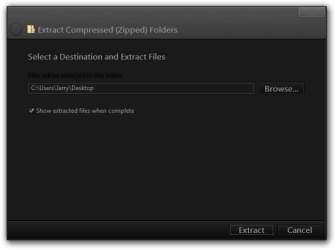
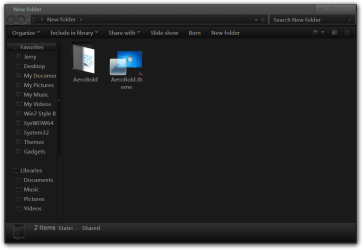
I would extract it to your desktop then move/copy both the theme folder and the theme .theme file to C:\Windows\Resources\Themes.

Jerry
Extract Compressed (Zipped) Folders.png

New folder.png
 

My Computer

Computer type
Laptop
Computer Manufacturer/Model Number
Sager NP9170
OS
Win 7 Pro x64 / Win 10 Pro
CPU
Intel(R) Core(TM) i7-3630QM CPU @ 2.40GHz
Motherboard
CLEVO P170EM
Memory
12 GB
Graphics Card(s)
(1) Intel(R) HD Graphics 4000 (2) NVIDIA GeForce GTX 675M
Sound Card
(1) Realtek High Definition Audio (2) Intel(R) Display Aud
Monitor(s) Displays
17.3
Screen Resolution
1920x1080
Hard Drives
(1) Samsung 860 EVO 500GB(OS) (1) Samsung 860 EVO 500GB(Data)
Keyboard
Backlite
Antivirus
MSE, Malwarebytes Pro
Browser
Firefox
Other Info
DESKTOP: Custom-built.
OS: Win 10 Pro x64.
CASE: Rosewill R5.
CPU: Intel I5 4670K CPU @ 3.40GHz.
CPU COOLER: Cool Master Hyper 212 EVO.
MOTHERBOARD: Asus Z87-A.
MEMORY: Kingston HyperX 2x4 GB.
GPU: Nvidia Geforce 650 TI.
PSU: Corsair TX750.
DRIVES: (1) Samsung 840 120 GB SSD (2) Western Digital blue 500 GB 7200 RPM.
I found this on UxStyle website when I went to download

"UxStyle is a bit of software that relaxes Windows theme signature requirements to enable third-party customization. Specifically, UxStyle consists of a tiny system service and a kernel driver that are loaded into memory where they hang out until reboot. No file system changes are made."
So should I uninstall and install after every reboot? sorry I didn't understand it!
 

My Computer

Computer type
Laptop
Computer Manufacturer/Model Number
Acer 5733Z
OS
Windows 7 Professional 32bit
CPU
P6200 @ 2.13GHz
Memory
2043 MB
Graphics Card(s)
Intel HD graphics
Hard Drives
C: Total - 49899 MB; D: Total - 149999; E: Total - 149999 MB; F: Total - 123107 MB;
Antivirus
Microsoft Security Essentials, ESET NOD 32
Browser
Mozilla
I found this on UxStyle website when I went to download

"UxStyle is a bit of software that relaxes Windows theme signature requirements to enable third-party customization. Specifically, UxStyle consists of a tiny system service and a kernel driver that are loaded into memory where they hang out until reboot. No file system changes are made."
So should I uninstall and install after every reboot? sorry I didn't understand it!
No.

Jerry
 

My Computer

Computer type
Laptop
Computer Manufacturer/Model Number
Sager NP9170
OS
Win 7 Pro x64 / Win 10 Pro
CPU
Intel(R) Core(TM) i7-3630QM CPU @ 2.40GHz
Motherboard
CLEVO P170EM
Memory
12 GB
Graphics Card(s)
(1) Intel(R) HD Graphics 4000 (2) NVIDIA GeForce GTX 675M
Sound Card
(1) Realtek High Definition Audio (2) Intel(R) Display Aud
Monitor(s) Displays
17.3
Screen Resolution
1920x1080
Hard Drives
(1) Samsung 860 EVO 500GB(OS) (1) Samsung 860 EVO 500GB(Data)
Keyboard
Backlite
Antivirus
MSE, Malwarebytes Pro
Browser
Firefox
Other Info
DESKTOP: Custom-built.
OS: Win 10 Pro x64.
CASE: Rosewill R5.
CPU: Intel I5 4670K CPU @ 3.40GHz.
CPU COOLER: Cool Master Hyper 212 EVO.
MOTHERBOARD: Asus Z87-A.
MEMORY: Kingston HyperX 2x4 GB.
GPU: Nvidia Geforce 650 TI.
PSU: Corsair TX750.
DRIVES: (1) Samsung 840 120 GB SSD (2) Western Digital blue 500 GB 7200 RPM.

My Computer

Computer type
Laptop
Computer Manufacturer/Model Number
Acer 5733Z
OS
Windows 7 Professional 32bit
CPU
P6200 @ 2.13GHz
Memory
2043 MB
Graphics Card(s)
Intel HD graphics
Hard Drives
C: Total - 49899 MB; D: Total - 149999; E: Total - 149999 MB; F: Total - 123107 MB;
Antivirus
Microsoft Security Essentials, ESET NOD 32
Browser
Mozilla
I followed this guide on two Win 7 SP1 systems, and neither of them show the process UnsignedThemesSvc. I did disable UAC (dropped to lowest setting and restarted) prior to installing UxStyle. Both computers show UxStyle in Programs.

Should the process be running after a restart following the install? Or is it only supposed to show up after installing a theme (have not done so yet)?

I have also run sfc /scannow on both systems and neither has an integrity violation.
If I go to Services, I can see that Unsigned Themes is Started and set to Automatic startup on both systems. But it doesn't show in running processes in Task Mgr.

Update: Issue resolved on both computers - same issue on both. The process was running, I just had to enable "Show processes from all users" in the Processes tab of Task Mgr. Got Dark7 Ultimate theme going - love it!
 
Last edited:

My Computer

Computer type
PC/Desktop
Computer Manufacturer/Model Number
Dell XPS 8700
OS
Windows 7 Pro 64-bit
CPU
Intel core i7-4770 cpu @ 3.40 GHz
Motherboard
Dell OEM
Memory
32GB
Graphics Card(s)
AMD Radeon R9 270
Sound Card
integrated
Monitor(s) Displays
multiple
Screen Resolution
1920x1080
Back
Top