How to Enable Custom Themes without Modifying System Files
Information
This will show you how to enable and use custom themes without modifying system files. This method (in the form of a runnable service) was created and maintained by Rafael Rivera at Within Windows
Note
This method can be used on Windows XP Service Pack 2-3, Windows Vista (All Service Packs), and Windows 7
Warning
The UxStyle installer checks to see if typical patched files (like uxtheme.dll) have been patched. If they have, the installer will fail and you must replace these patched files with the original Windows' copies. Check the Frequently Asked Questions part of the tutorial for help with resolving this issue
Here's How:
1. Disable User Account Control (this is only temporary, Windows Vista and 7 only)
2. Download UxStyle Core Beta here and save the file to a meaningful location (such as the desktop)
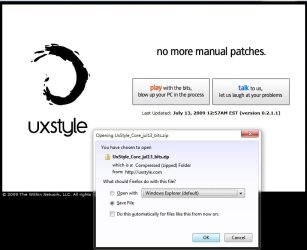
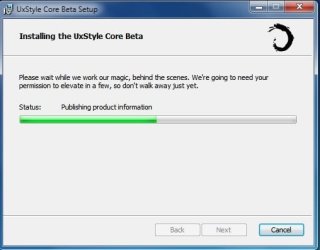
3. Extract the files and run the installer that matches your architecture: x86 or x64 (In this example I will be running the x64 installer)
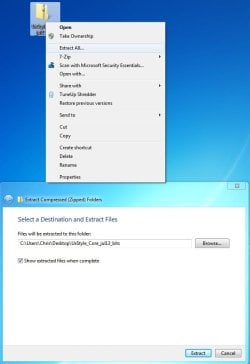
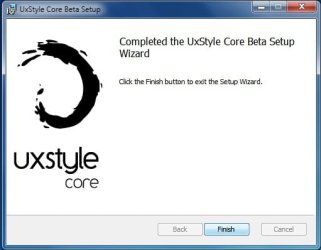
4. Follow the onscreen instructions
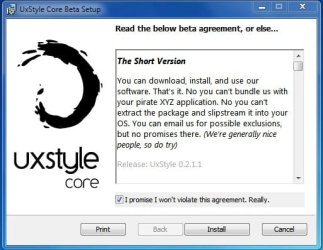
5. Reboot the computer
6. Enable User Account Control again (Only Windows Vista and 7 users)
Frequently Asked Questions
Q: Exactly how is this different from using utilities like the universal patcher?
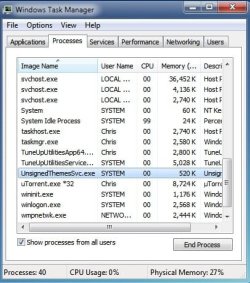
A: This program installs a service called UnsignedThemesSvc that takes less than a MB of RAM (520K for me on x64 in the screen shot below). The process will *trick* Windows into thinking all themes are signed thus allowing any installed custom theme to run. The patch modifies system files that could potentially end up being corrupted in the process, resulting in a repair install or a format
Q: I installed the program but I can't see the process nor can I use a theme...help!
A: This normally is the result of not turning off UAC completely before installing the program. Uninstall UxStyle Core Beta from Programs and Features, restart the computer, turn off UAC, restart the computer, install UxStyle Core Beta, restart the computer. Your theme should work then.
Q: I tried running the installer but it keeps telling me that my subsystem has been tampered with...help!
A: This occurs when you have attempted to apply a patch to system files such as uxtheme.dll. To remedy this (in 95% of all scenarios) you must open a command prompt (run as Administrator) and execute the following command: sfc /scannow. After it finishes you should be able to run the installer for the program with no issue. See Run as Adminstrator and SFC /SCANNON Command - System File Checker in Related Links at the top for more info
Q: Okay, I got UxStyle Core running...now what?
A: The fun part...install some themes! Manually installing themes is easy...extract the theme to C:\Windows\Resources\Themes and choose it under the Installed Themes segment in Personalization (See tutorials above in Related Links to get more info on this)!
Q: Where can I find custom themes?
A: Some places to look would be in the Customization area of SevenForums and using the search terms "Windows 7 themes" on deviantART. You may also wish to contact members who hold the GFX Team badge as some of them are currently making themes or have released them
Hope it helps,
Chris
Related Tutorials
- How to Customize a Custom Theme from deviantArt
- http://www.sevenforums.com/tutorials/28377-theme-how-apply-custom-themes.html
- http://www.sevenforums.com/tutorials/11841-run-administrator.html
- http://www.sevenforums.com/tutorials/1538-sfc-scannow-command-system-file-checker.html
- http://www.sevenforums.com/tutorials/280-theme-change-save.html
- http://www.sevenforums.com/tutorials/2026-theme-pack-create-save-install-delete.html
- http://www.sevenforums.com/tutorials/921-desktop-icons-allow-prevent-themes-change.html
- http://www.sevenforums.com/tutorials/2425-mouse-pointers-allow-prevent-themes-change.html
- http://www.sevenforums.com/tutorials/299-user-account-control-uac-change-notification-settings.html
- Change Windows 7 to Look and Function like Windows XP again
Attachments
Last edited by a moderator: