|
Welcome to Windows 7 Forums. Our forum is dedicated to helping you find solutions with any problems, errors or issues you are experiencing with Windows 7. The Windows 7 forum also covers news and updates and has an extensive Windows 7 tutorial section that covers a wide range of tips and tricks.
Windows 7 - Windows Movie Maker 6.0 - Install on Windows 7 |
11-03-2009
|
#109 | | Windows 7 x64 Ultimate RTM |
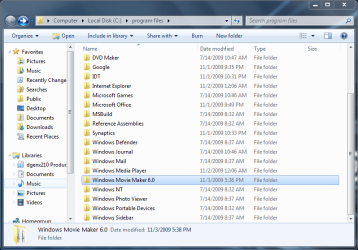
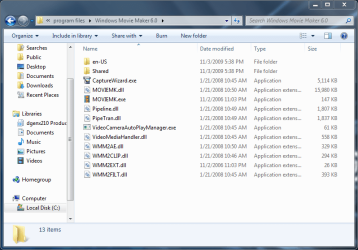
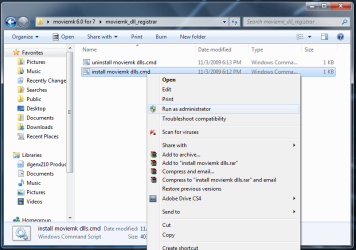
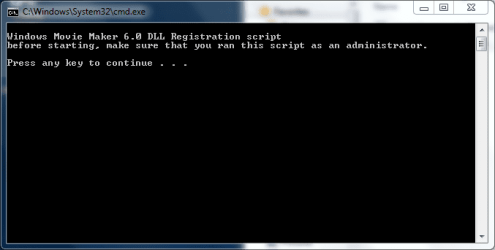
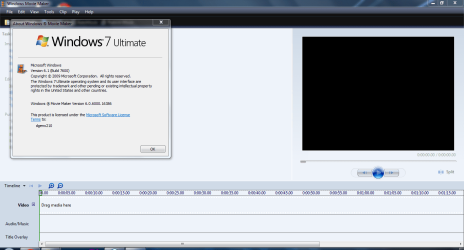
Windows Movie Maker 6.0 - Install on Windows 7 How to Install Windows Movie Maker 6.0 on Windows 7
Last edited by Brink; 10-31-2011 at 03:46 PM..
| My System Specs | | System Manufacturer/Model Number HP Pavilion dv6-1210ee Artist Edition 2 Notebook OS Windows 7 x64 Ultimate RTM CPU AMD Turion X2 Ultra Dual-Core Mobile ZM-85 @ 2.30 GHz Memory DDR2 800MHz 2GBx2 Graphics Card ATI Mobility Radeon 4650 1GB GDDR3 Screen Resolution 1366 x 768 Internet Speed 1Mbit ADSL |
11-15-2011
|
#110 | | Windows 7 Home Professional 32bit |
No sound on video clips! I have followed the instructions in this thread and successfully installed Windows Movie Maker 6.0.
However, when I import an .mpg file, there is no sound, though there is a visible waveform in the timeline.
Please help! | My System Specs | | OS Windows 7 Home Professional 32bit |
02-13-2012
|
#111 | | Win 7 Home Premium 64bit Ver 6.1.7600 Build 7601 - SP1 |
Could another member take a look at this thread? how to change background colour in video slides
I tried to answer the best I could, but I wanted to help t-4-2 with more opinions. | My System Specs | | System Manufacturer/Model Number Gateway DX4831e OS Win 7 Home Premium 64bit Ver 6.1.7600 Build 7601 - SP1 CPU Intel i3 530 2.93GHz, 2933MHz 2 Cores 4 Logical Processors Motherboard Gateway H57M01 133 megahertz Memory 6GB of 1,333MHz DDR3 SDRAM Graphics Card 32MB Intel Graphics Media Accelerator HD IGChip Sound Card Realtek High Definition Audio Monitor(s) Displays Gateway HX2000 20inch TFT active matrix TN Screen Resolution 1600 x 900 x 59 hertz Keyboard MS 'Natural' Standard PS/2 Enhanced 101-102 Key Mouse Gateway USB wired optical PSU Knowing Gateway it is probably just a 300watter. Case Mid-Tower Desktop Hard Drives WDC WD10EADS-00M2B0 [HDD] (1000.20 GB) -- drive 0,
HL-DT-ST DVDRAM GH41N [CD-ROM dr]
HP Photosmart Plus B210a e_series AIO Printer
Four card readers, and Four USB 2.0 Internet Speed Verizon FIOS 24.57Mbps Down - 5.68Mbps up Other Info BIOS: American Megatrends Inc. P01-A0 11/17/2009
Browsers: IE8.0.7601.17514, FireFox 11.0, System Specs by Belarc.
Join Date March 27th 2010 at 10:44:15 AM. |
02-22-2012
|
#112 | | |
i wish that this can run in window 7 ? 
so helpful
thankyou! | My System Specs | | |
03-28-2012
|
#113 | | Windows 8 Consumer Preview 64 bit |
the wmm 6.0 .exe installation works fine but when i try to import files or open a project it doesnt work. | My System Specs | | OS Windows 8 Consumer Preview 64 bit |
03-28-2012
|
#114 | | Windows 8 Consumer Preview 64 bit |
Can anybody get the original wmm folder from vista 64bit plz cause the wmm 6.0 program gives me errors when trying to import media. | My System Specs | | OS Windows 8 Consumer Preview 64 bit |
03-30-2012
|
#115 | | Win 7 Home Premium 64bit Ver 6.1.7600 Build 7601 - SP1 |
Hi wolfy1339, welcome to 7F!
See if this helps: How to Install Windows Movie Maker 6.0 on Windows 7
Pay particular attention to SIW2, and whs's posts. SIW2 starts at post #11, and whs at post #13
SIW2 can get the 32bit version to run on x64 machines follow his instructions. Install it in Program Files(x86), register the .dlls
whs has a link to the files at post #13, and SWI2 has some .zip files at post #28.
Read the whole Tutorial. | My System Specs | | System Manufacturer/Model Number Gateway DX4831e OS Win 7 Home Premium 64bit Ver 6.1.7600 Build 7601 - SP1 CPU Intel i3 530 2.93GHz, 2933MHz 2 Cores 4 Logical Processors Motherboard Gateway H57M01 133 megahertz Memory 6GB of 1,333MHz DDR3 SDRAM Graphics Card 32MB Intel Graphics Media Accelerator HD IGChip Sound Card Realtek High Definition Audio Monitor(s) Displays Gateway HX2000 20inch TFT active matrix TN Screen Resolution 1600 x 900 x 59 hertz Keyboard MS 'Natural' Standard PS/2 Enhanced 101-102 Key Mouse Gateway USB wired optical PSU Knowing Gateway it is probably just a 300watter. Case Mid-Tower Desktop Hard Drives WDC WD10EADS-00M2B0 [HDD] (1000.20 GB) -- drive 0,
HL-DT-ST DVDRAM GH41N [CD-ROM dr]
HP Photosmart Plus B210a e_series AIO Printer
Four card readers, and Four USB 2.0 Internet Speed Verizon FIOS 24.57Mbps Down - 5.68Mbps up Other Info BIOS: American Megatrends Inc. P01-A0 11/17/2009
Browsers: IE8.0.7601.17514, FireFox 11.0, System Specs by Belarc.
Join Date March 27th 2010 at 10:44:15 AM. |
4 Weeks Ago
|
#116 | | |
Same thing for Windows Photo Gallery??? Is there something similar I can do to get the old version of Windoes Photo Gallery to run on my Windows 7? I have the old files from vista but I have no clue how to make them work on my new computer's windows 7.
Please help!! | My System Specs | | |
4 Weeks Ago
|
#117 | | Win 7 Home Premium 64bit Ver 6.1.7600 Build 7601 - SP1 |
Hi burdok33, welcome to 7F!
An interesting concept, you would of course have to use the pertinent files for Windows Photo Gallery (WPG).
Try following this tutorial: Windows Movie Maker 6.0 - Install on Windows 7, only substitute the WPG from the Vista disk, the one problem?
You need a Photo Gallery_dll_registrar.zip download file instead of the moviemk_dll_registrar.zip listed there.
See if the instructions here help: Windows photo gallery Install
I believe this is similar, but clearer to the instructions in the above link: Where is Windows Photo Gallery in Windows 7? | My System Specs | | System Manufacturer/Model Number Gateway DX4831e OS Win 7 Home Premium 64bit Ver 6.1.7600 Build 7601 - SP1 CPU Intel i3 530 2.93GHz, 2933MHz 2 Cores 4 Logical Processors Motherboard Gateway H57M01 133 megahertz Memory 6GB of 1,333MHz DDR3 SDRAM Graphics Card 32MB Intel Graphics Media Accelerator HD IGChip Sound Card Realtek High Definition Audio Monitor(s) Displays Gateway HX2000 20inch TFT active matrix TN Screen Resolution 1600 x 900 x 59 hertz Keyboard MS 'Natural' Standard PS/2 Enhanced 101-102 Key Mouse Gateway USB wired optical PSU Knowing Gateway it is probably just a 300watter. Case Mid-Tower Desktop Hard Drives WDC WD10EADS-00M2B0 [HDD] (1000.20 GB) -- drive 0,
HL-DT-ST DVDRAM GH41N [CD-ROM dr]
HP Photosmart Plus B210a e_series AIO Printer
Four card readers, and Four USB 2.0 Internet Speed Verizon FIOS 24.57Mbps Down - 5.68Mbps up Other Info BIOS: American Megatrends Inc. P01-A0 11/17/2009
Browsers: IE8.0.7601.17514, FireFox 11.0, System Specs by Belarc.
Join Date March 27th 2010 at 10:44:15 AM. |
2 Weeks Ago
|
#118 | | |
Hi guys, there's a few threads, i hope this is useful in this one:
I just used this installer: Videoconferencing and Video Capture Tools
I use w7x64, it installed here: "C:\Program Files\Movie Maker".
According to "Worthytips.com" it works for x64 and 32bit. Fresh Install Windows Movie Maker 6.0 in Windows 7 with Windows Movie Maker Installer Quote: Note: Both Windows Live Movie Maker and Windows Movie Maker 6.0 may be installed side-by-side if needed. This installer supports both 32-bit and 64-bit platforms. Seems to work fine, but i haven't used it extensively as yet.
I ran MalwareBytes and MSE on the installer, then on the whole system: no issues detected. I always worry about such things. | My System Specs | | OS Windows 7 64Bit CPU AMD Phenom II 965 Motherboard Gigabyte GA-790XT-USB3 (rev. 1.0) Memory 4gb Kingston(?) Graphics Card ASUS ATI Radeon 5850 Sound Card Realtek (onboard) Monitor(s) Displays Samsung 940b & Samsung S23A750D PSU Seasonic 650w Case Antec Cooling stock Hard Drives Seagate 250gb
Western Digital "Green" 1tb Windows Movie Maker 6.0 - Install on Windows 7 problems? All times are GMT -5. The time now is 02:33 AM. |  |